Roles and permissions
System roles, custom roles, and the permission model.
Managed on the web app and, when signed in to a cloud organization, in the desktop app’s Settings tab.
Infrawrench uses a permission-based authorization model. Every API call and UI action is gated by one or more permission strings. Roles bundle permissions together, and members are assigned a role.
Permission strings
Permissions are colon-separated identifiers. Granted permissions can use * as a wildcard at any segment, or a bare * to grant everything.
accounts:read              # list and view cloud accounts
resources:execute          # SSH, SQL, KV console, exec
resources:postgres:execute # narrow execute to a specific plugin
resources:*:read           # read any resource type
*                          # full access
The Settings → Roles page lists the full catalogue grouped by category (Accounts, Resources, Team, Billing, etc.). The same permission strings are accepted as API key scopes — a key with resources:read can hit every read-only resource endpoint.
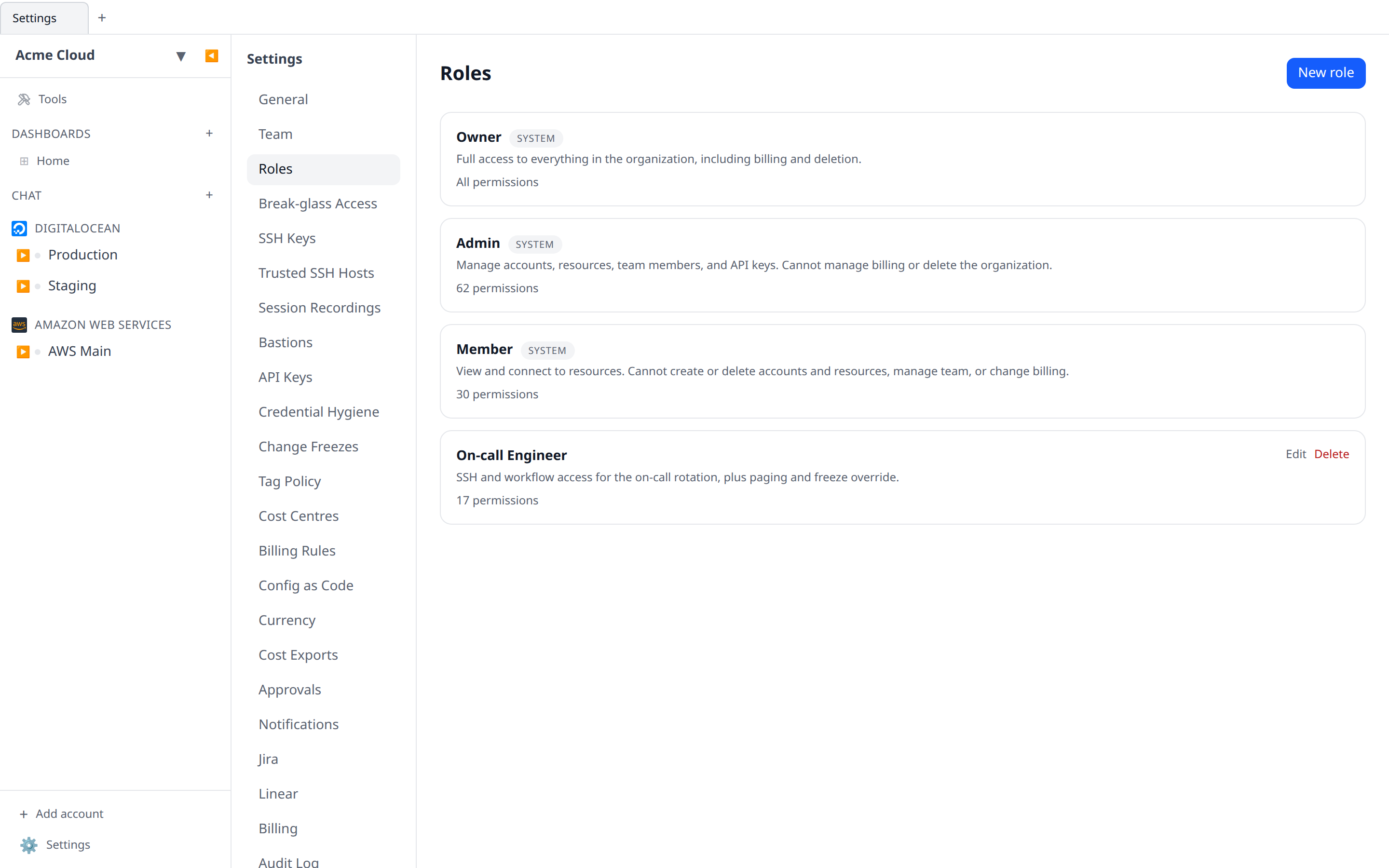
System roles
Every organization has three pre-seeded system roles. They cannot be edited or deleted.
| Role | Permissions |
|---|---|
| Owner | * — everything, including billing and deleting the organization. |
| Admin | Everything except billing:write and org:settings:write. |
| Member | Read everything; connect to resources (SSH/SQL/exec); use AI chat (chat:read, chat:write); manage own dashboards; write, run, and approve workflows (workflows:read, workflows:write, workflows:approve); view cost graphs and budgets (costs:read, budgets:read — creating budgets needs budgets:write, held by Admin+). |
System role permissions are computed in code, so upgrades extend them automatically when new permissions are added.
Two permissions are deliberately not in any system role, because they let unattended code write into the org:
costs:write— push cost rows from your own systems.pages:write— raise an on-call page from your own systems.
Grant them with a scoped API key, or add them to a custom role. Admin and Owner hold them through their wildcards.
If someone needs a permission only occasionally, consider break-glass access rather than widening their role: they ask for exactly that permission, for as long as they need it, and it lapses on its own.
Custom roles
Owners and anyone with team:role:write can define their own roles in Settings → Roles → New role. Pick permissions from the categorised list, or paste wildcard patterns (e.g. resources:postgres:*) into the advanced field.
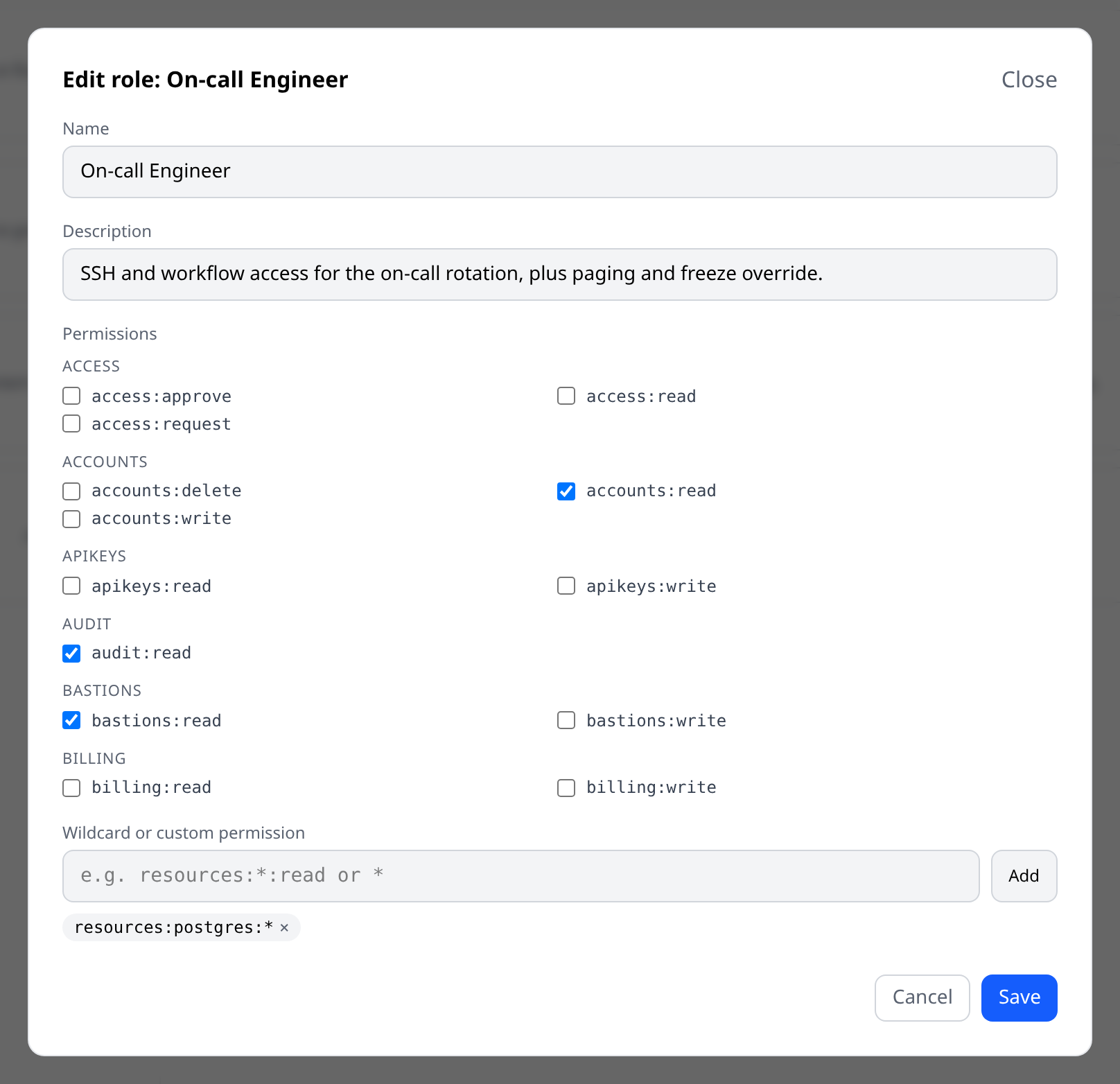
A custom role cannot be deleted while any member or pending invitation still references it. Reassign or revoke first.
Assigning a role
Use Settings → Team → (member) → Role picker to change a member’s role. The owner role cannot be reassigned through this picker — use the existing owner to promote someone first.
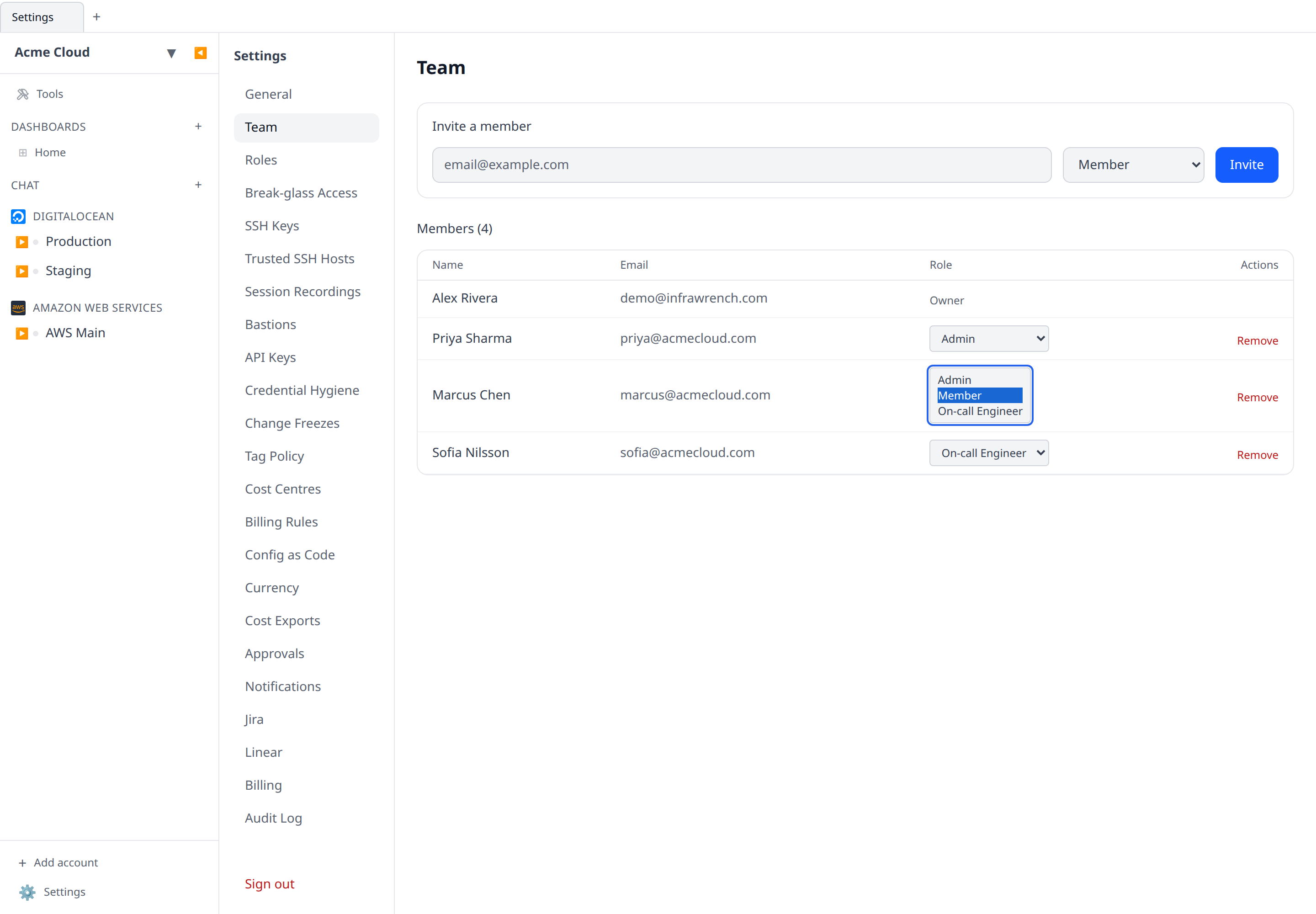
You cannot hand out more authority than you hold. Two rules enforce that:
- A role you assign must be a subset of your own effective permissions, so an admin (who has no
billing:write) cannot move someone onto a custom role that grants it. - Only an owner can grant the owner role, or change an owner’s role.
Both apply when you invite someone, not just when you change an existing member’s role — otherwise the invite form would be a way around the picker.
API key scopes
API keys store the same permission strings as roles. When you create a key, pick the exact scopes it should carry; the server enforces them with the same matcher used for session permissions, including wildcards. Older keys created with the deprecated sync:read/sync:write scopes are renamed automatically the next time they authenticate. Keys that were still active when workflows got permissions of their own had the matching workflow scopes added once, during that upgrade, so a dashboards:write key kept the workflow access it had — you can see the added scopes on the key. Revoked keys were skipped. Nothing is added at authentication time: a key carries the scopes it is listed as carrying.
A key never carries more authority than its owner. Its effective permissions are the intersection of its scopes and the current role of the user who created it, recomputed on every call — so demoting someone narrows their keys immediately, and a broadly-scoped key cannot outrun a role change.
Removing someone from the organization revokes the keys they created in it, and any key whose owner is no longer a member stops authenticating.
Where permissions are enforced
The same permission set gates every surface, not just the web UI:
-
HTTP API — checked per route (see
x-required-permissionin the API reference). -
AI chat and MCP — reaching chat at all needs
chat:read/chat:write, and each tool then declares the permission it needs, checked before the tool runs. A member who cannot delete a resource over HTTP cannot delete one by asking the assistant either, and destructive tools are re-checked at approval time rather than only when queued. -
WebSocket sessions (SSH terminals, SQL console, Kubernetes exec and port-forward) — require
resources:execute, whether the connection authenticates with a browser session or an API key. -
Workflows —
workflows:writestarts a run; it does not decide what the run may do. Every operation the sandbox performs is checked against the permissions of the user the run acts for, using the same strings as the HTTP API:infra.…create()needsresources:write,.delete()needsresources:delete,.ssh()and.query()needresources:execute, SFTP writes needstorage:write. A member who cannot delete a resource in the UI cannot delete one from a workflow either.Manual runs act for whoever started them. Scheduled, git-triggered and budget-triggered runs act for the workflow’s author, so putting a workflow on a schedule cannot give it authority its author lacks — and a workflow whose author has left the organization stops being able to do anything privileged. If a run fails with a permission error, the message names the exact permission to ask for. See What a run is allowed to do.
-
Deploys split across three permissions, because previewing and shipping are different risks:
deployments:read— deploy history and a repository’s declared environments. Inert. Members hold it.deployments:plan— runs the repository’splan(), which executes its code against your accounts but builds and ships nothing. Members hold it; a custom role can withhold it without also taking away the history.deployments:write— builds, deploys and rolls back. Admin and Owner only.
The deploy WebSocket enforces the same split its HTTP routes do, so a
planOnlyrun needsdeployments:planand a real deploy needsdeployments:write. -
Workflows split across three permissions:
workflows:read— list workflows, read their source, run history and metrics, and see pending approval requests. Members hold it.workflows:write— create, edit, delete, and run. Running sits here rather than in a permission of its own, because anyone who can edit a workflow can give it a cron or git trigger anyway. The workflow debug WebSocket enforces it too, so the editor’s live-debug run is gated exactly likePOST /workflows/{id}/run.workflows:approve— decide a request raised byinfra.waitForApproval(...). Deliberately separate: the point of an approval step is that a second person signs off, so a custom role can grant authorship without sign-off, or sign-off without authorship. All three are in the Member role, matching what members could already do — the split is there for custom roles to use.
-
Config as code has its own pair, because the document is the unit of trust — one
config:readcall hands over every workflow’s source, and oneconfig:writerewrites nine surfaces at once:config:read— export the organization’s configuration, and preview what applying a document would change.config:write— apply one.
Neither is a substitute for the per-section permissions: both routes additionally require the read (or write) permission of every section involved, so
config:writecannot be used to reach past a role that deliberately withholdsworkflows:write. Export refuses rather than silently omitting a section you cannot read — a partial document looks complete, and applying it with--prunewould delete everything the exporter was not allowed to see. Admin and Owner hold both through their wildcards; Member holds neither. -
IaC reconciliation has its own pair rather than riding on
resources:*, because the two verbs are different in kind:iac:read— see which resources Terraform manages, which have drifted, and which somebody made by hand, and generate theimportblocks to adopt them. Members hold it, for the same reason they can read the change timeline: “is this thing managed?” is a question you have to be able to answer before you touch anything, and reconciliation nobody can read is reconciliation nobody acts on.iac:write— upload and delete Terraform state documents. Not a mutation of any cloud resource, which is why it is notresources:write; it is the organization declaring what its estate looks like, so it stays with Admin and Owner.
Workflows used to be gated on
dashboards:read/dashboards:write. Custom roles and API keys that granted those had the matching workflow permissions added to them once, during the upgrade that introduced them, so nobody lost access — the added permissions show up in the role editor, ticked, and you can untick them. Every grant since means exactly what it says: a custom role grantingworkflows:writewhile withholdingworkflows:approvewithholds it. Custom graphs, which really are dashboard content, stayed on the dashboard permissions. -
Managed accounts & invoices are a family of their own rather than more
costs:*, and split three ways. Every other cost surface is the organization looking at its own spend; a managed account holds a customer’s contact details and the price you quoted them.invoices:read— customers, invoices, line items and the CSV export.invoices:write— add a customer, raise a draft invoice, edit its period, delete a draft. Entirely revisable, and none of it visible outside the organization.invoices:issue— approve, send, void. The irreversible half: approving freezes the figures a customer will be sent, sending emails the invoice to them, voiding withdraws a document already in their hands.
The last split is the one worth using: a billing clerk holding
readandwritecan prepare a month’s invoices while only the finance lead holdsissue. Members hold none of the three; Admin and Owner hold all three through their wildcards. -
Break-glass access splits three ways, because the three verbs are held by genuinely different people:
access:read— see the queue, live elevations and history. Members hold it: an elevation regime nobody can see is not a control.access:request— raise and withdraw your own requests. Members hold it; they are exactly who this is for.access:approve— approve, deny, or revoke anyone’s elevation. Deliberately not implied byteam:role:write: granting a role is a considered change with a paper trail, approving an elevation happens mid-incident, and an organization should be able to say who may do the second without also saying who may do the first.
A live grant is unioned into the holder’s permissions at resolution time, so it reaches every surface at once — and is excluded from API keys and custom graphs, which are not people.
-
Session recordings have their own pair, separate from SSH keys and from the audit log:
session-recordings:read— list, watch and download recorded SSH sessions.session-recordings:write— change the organization’s recording policy and delete recordings.
Neither is in the Member role. Recording exists to watch operators, so granting every operator the ability to watch defeats it. A custom role can grant read without write, which is the usual shape for a compliance reviewer who should be able to watch a tape but not change the policy or destroy evidence. Watching a recording is itself audit-logged.
Audit trail
Every permission-sensitive action is recorded in the audit log, including role creates/edits/deletes and member-role changes.