Infrafile
One file at your repo root that describes how your project is built and deployed — the environments it supports, an interactive plan, a Dockerfile, and a deploy script.
An Infrafile is a single TypeScript file at the root of your repository that describes how that project gets built and shipped. It declares the environments you can deploy to, asks you anything it needs to know, renders a Dockerfile, and then deploys — all in one run you can watch.
It is not a workflow. It has no trigger, it is never stored in Infrawrench, and it is read fresh from your repository every single time it runs. The CLI reads it from disk; the web app pulls it from git.
defineInfra({
  envs: ["staging", "production"],

  async plan({ env, git, select }) {
    return {
      tag: `${env}-${git.sha.slice(0, 7)}`,
      replicas: env === "production" ? 3 : 1,
    };
  },

  dockerfile({ env, plan }) {
    return `FROM node:22-slim
WORKDIR /app
COPY . .
RUN npm ci ${env === "production" ? "--omit=dev" : ""}
CMD ["node", "server.js"]`;
  },

  async deploy({ env, plan, image, push, notes }) {
    await push(image);
    const cluster = infra.accounts.kubernetes.getByName("prod");
    await cluster.importYaml(manifestFor(env, image, plan.replicas));
    await notes(`deployed ${image} — ${plan.replicas} replicas`);
  },
});
The three stages
plan(ctx) runs first. It has the full infra surface — every account,
resource and output a workflow can reach — plus select and
git. Whatever it returns is handed to the later stages as plan.
dockerfile(ctx) is pure: no await, no infra. It takes the environment
and the plan and returns Dockerfile text. Splitting by environment is just an
if.
deploy(ctx) runs after the image is built, with the full infra surface
again. Applying a Kubernetes manifest, writing a DNS record, SSHing to a box —
all ordinary calls.
There is also an optional fourth stage, destroy(ctx), which is not part of
a deploy at all — it tears one down. See Tearing down.
Asking questions with select
const host = await select("build-host", "Build on", await droplets.list());The first argument is a key, and it is what makes a deploy scriptable. Pass
--set build-host=web-01 and the choice resolves with no prompt, so the same
Infrafile runs unattended in CI. Without an answer in a non-interactive run the
deploy fails and tells you which key it needed.
select returns the item you picked, not a label — so selecting a resource
gives you back a usable resource.
Asking for anything else
select covers “pick one of these”. ask covers everything else — a version
string, a replica count, a date, a yes/no:
async plan({ ask }) {
  const tag      = await ask("tag", "Image tag", { pattern: "^v[0-9]" });
  const replicas = await ask("replicas", "Replicas", { kind: "number", min: 1, max: 20, default: 2 });
  const when     = await ask("cutover", "Cut over on", { kind: "date" });
  const drain    = await ask("drain", "Drain connections first?", { kind: "boolean" });
  return { tag, replicas, when, drain };
}
Kinds are text (the default), password, number, date and boolean.
Answers come back already typed — a number is a number, a date is an ISO
YYYY-MM-DD string — so there is nothing to parse and no NaN to guard against.
Same keyed contract as select: --set replicas=4 answers it with no prompt,
and a trigger’s stored answers do the same for a deploy nobody is watching.
Validation runs server-side rather than in the input box, which matters because
--set never sees an input box. --set replicas=lots fails naming the key,
instead of quietly becoming NaN and deploying nothing:
ask("replicas"): "lots" is not a number.min/max bound numbers and dates, pattern constrains text, and required: false allows an empty answer. A default fills in a blank one.
Two reserved keys
Everything plan() returns is yours except two keys the host reads:
buildOn— where to build. An SSH-reachable resource, or the string"local"to use the Docker daemon on the machine running the deploy.registry—{ host, username, password }, used fordocker loginbefore a push. It is never written to the run log.
tag and buildArgs are honoured when present.
When the image is a build environment, not the artifact
Plenty of targets aren’t containers. A Cloudflare Worker, a static site, a Lambda bundle — none of them want your image deployed. They want a reproducible environment to be published from.
So build a toolchain and run inside it. run(command) executes in the image
that was just built, with your project mounted at /workspace, and resolves
with the command’s stdout:
defineInfra({
  envs: ["production"],

  async plan({ env }) {
    return { tag: env };
  },

  // The image is never pushed anywhere. It exists to hold wrangler.
  dockerfile() {
    return `FROM node:22-slim
WORKDIR /workspace
RUN npm install -g wrangler`;
  },

  async deploy({ run, notes }) {
    const token = await infra.accounts.cloudflare
      .getByName("main")
      .workers.get("my-worker")
      .resolveOutput("apiToken");

    const out = await run("wrangler deploy", {
      env: { CLOUDFLARE_API_TOKEN: token },
    });
    await notes(out.trim());
  },
});
run takes any command, so pre-deploy steps are just earlier calls:
async deploy({ run, image, push, notes }) {
  const url = await infra.accounts.neon.getByName("main")
    .databases.get("app").resolveOutput("connectionString");

  await run("npm run db:migrate", { env: { DATABASE_URL: url } });
  await push(image);
  await notes("migrated and shipped");
}
They run in order, and because a failure stops the deploy, a broken migration means nothing gets shipped.
A non-zero exit fails the deploy and surfaces the tail of stderr — a failed
wrangler deploy should stop the run, not scroll past. Pass
{ allowFailure: true } to handle it yourself, and you get
{ exitCode, stdout, stderr } back instead of stdout.
Anything in env is passed to the container out of band and never appears in
the run log or in the machine’s process list, so credentials are safe to put
there. Do not interpolate them into the command string.
On a web deploy, run() executes on a Cloud Build worker with your project
mounted at /workspace, exactly as it does locally — the image is staged so the
worker can pull it. Each call is its own step, so combine work with && when
round-trips matter.
Commands run through sh by default, so &&, pipes and npm run scripts all
behave. That entrypoint is set explicitly rather than inherited from the image —
a container’s arguments are appended to whatever ENTRYPOINT the Dockerfile
declared, so an image that sets one would otherwise mangle every command. Pass
entrypoint to use a different binary, or "" to clear it.
Other options: workdir (defaults to /workspace), mountSource: false for an
image that already carries everything, and image to run something other than
the one just built.
Deploying from the CLI
infrawrench deploy                      # one env declared? just go
infrawrench deploy --env production
infrawrench deploy --plan               # dry run: planned changes, plan and Dockerfile — nothing is touched
infrawrench deploy --env staging --set build-host=local --json
infrawrench deploy destroy -e staging   # run the destroy() stage — tear the env down
The CLI reads ./Infrafile (walking up to your repo root), builds with your
local Docker daemon so you get your warm layer cache and need no VM, and
prompts in the terminal for anything select asks about.
infra.accounts merges your local workspace’s accounts with your
organization’s cloud accounts. The scope is settled before the run starts:
at a terminal the CLI asks once (“local + org, or local only?”); --org <id|name> or --local answers it up front, and non-interactive runs default
to local + your default org. Cloud accounts support listing, outputs, create
and delete; surfaces that need a live connection from your machine (SSH,
storage, SQL) still want a local account.
--plan is the safe first move, and it is a true dry run: resource creates,
updates and deletes made through infra.accounts are intercepted, and nothing
touches your providers. Each intercepted call is reported as a planned change —
+, ~ and - lines with an “N to create, M to update, K to delete” summary —
alongside the plan itself and the Dockerfile it rendered.
An intercepted create returns a synthetic resource whose id starts with
planned:, and any output resolved on it comes back as the string
(known after apply) — so a plan that threads a connection string from a
just-created database into later decisions still runs to completion. The one
thing that can’t work on a synthetic resource is waiting for it: plan() now
receives a dryRun: boolean flag on its context, so a readiness wait — polling
a provider until a branch or an endpoint really appears — should be skipped
when ctx.dryRun is true.
--plan also prints a diff of the new plan against the plan recorded by this
environment’s last successful deploy: top-level keys, marked +, - or ~,
with secret-looking values redacted. The diff is best-effort — with no previous
successful deploy there is nothing to compare against.
Because the build is local, the CLI can deploy a working tree with uncommitted changes — it will tell you when it spots them.
Deploying from the desktop app
Open Deploy in the sidebar. What it shows follows the org switcher:
- With an organization selected it is the web app’s Deploy screen — the same repository and environment pickers, plan-then-deploy flow, live build output, deploy-on-push triggers and rollbacks, driven by the same hosted builds.
- In local mode it is the history of what
infrawrench deploydid on this machine: when each run happened, which environment and project directory, the commit (flagged when the tree was dirty), the image it produced, how far a failed run got, and how long it took. Expanding a run shows its notes and the error that stopped it.
Local deploys are still driven from the terminal, because a local deploy needs the two things the terminal already has: your working tree on disk and your own Docker daemon. The app is where you go afterwards to see what happened.
A run recorded on this machine is kept locally whether or not it was also
reported to an organization, so a --local deploy — which never talks to an org
at all — still leaves a trace you can read. The same list is available as
infrawrench deploy log --local.
<insert [The desktop app’s Deploy tab in local mode, showing a table of past infrawrench deploy runs with one failed run expanded to reveal its error] here>
Deploying from the web app
Who can deploy
Three permissions, because previewing and shipping are different risks:
| Permission | Grants | Default for |
|---|---|---|
deployments:read | Deploy history, and a repo’s declared envs | Members |
deployments:plan | Running plan() — code execution, ships nothing | Members |
deployments:write | Building, deploying, rolling back | Admins, owners |
plan is separate from read because running plan() evaluates the
repository’s Infrafile against your organization’s accounts — inert as far as
your infrastructure goes, but still code execution. Members get it so they can
see what a deploy would do; a custom role can withhold it without also taking
away the history.
Plans
The Deploy page in the web app needs a paid plan (or complimentary access).
On the free tier the page shows what the feature includes and an upgrade link
instead. infrawrench deploy from the CLI builds on your own machine and is not
gated — you can plan and deploy from there on any tier.
If a subscription lapses the message says so and points at Settings → Billing. A
payment that is merely retrying (past_due) does not block deploys — losing
the ability to ship should follow a cancellation, not a bounced card.
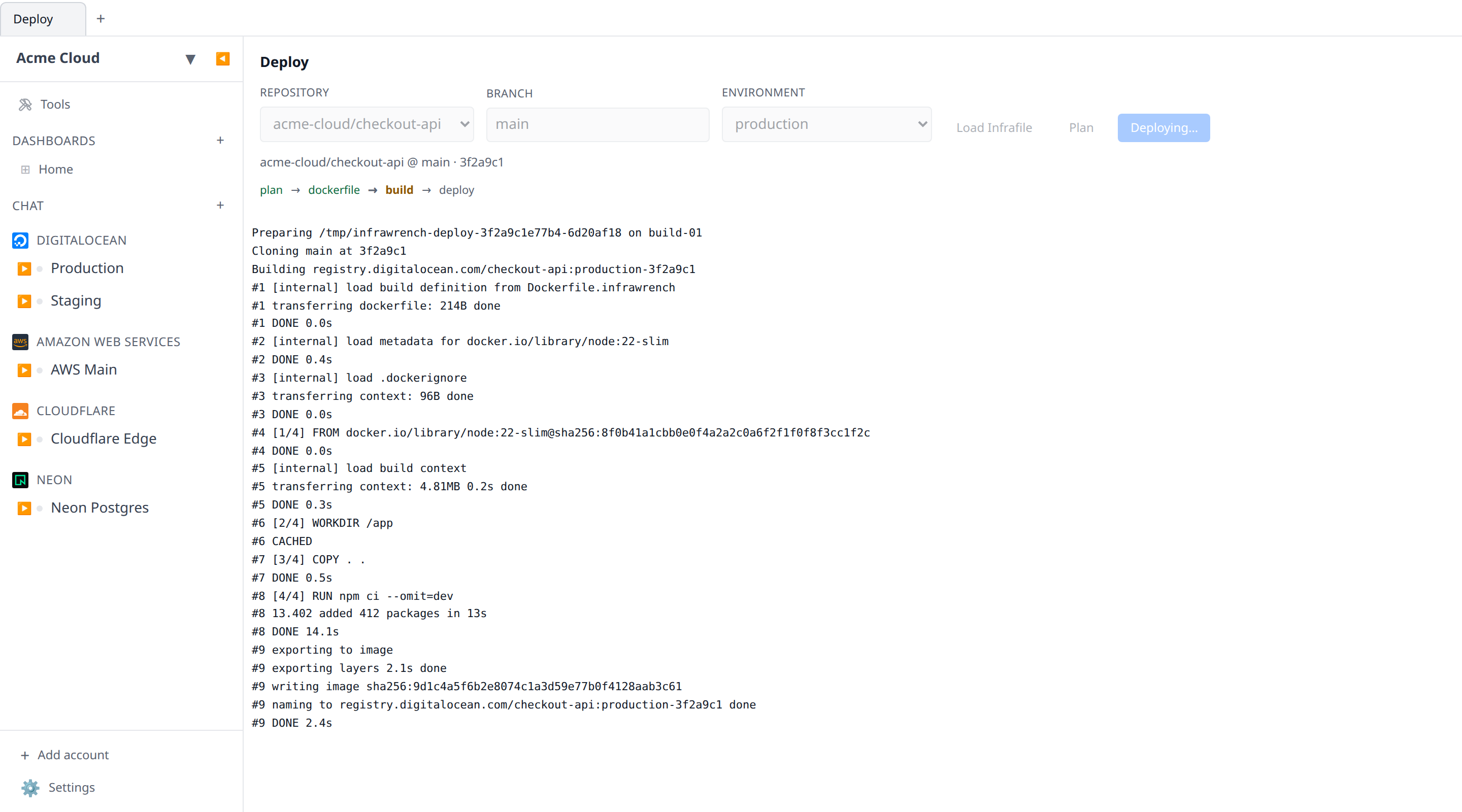
Open Deploy in the sidebar. Pick the repository and branch, load the Infrafile to populate the environment list, then Plan and Deploy. The same three stages run server-side.
Builds are hosted. You don’t need a build machine — your paid plan includes
the build. Infrawrench sends your repository at the chosen commit, plus the
Dockerfile your Infrafile rendered, to an isolated build worker, and pushes the
result to the registry your plan() returned. That’s why it goes to your
registry: your cluster can then pull it with credentials it already has.
Builds are capped at 20 minutes and metered, so a runaway RUN stops on its own.
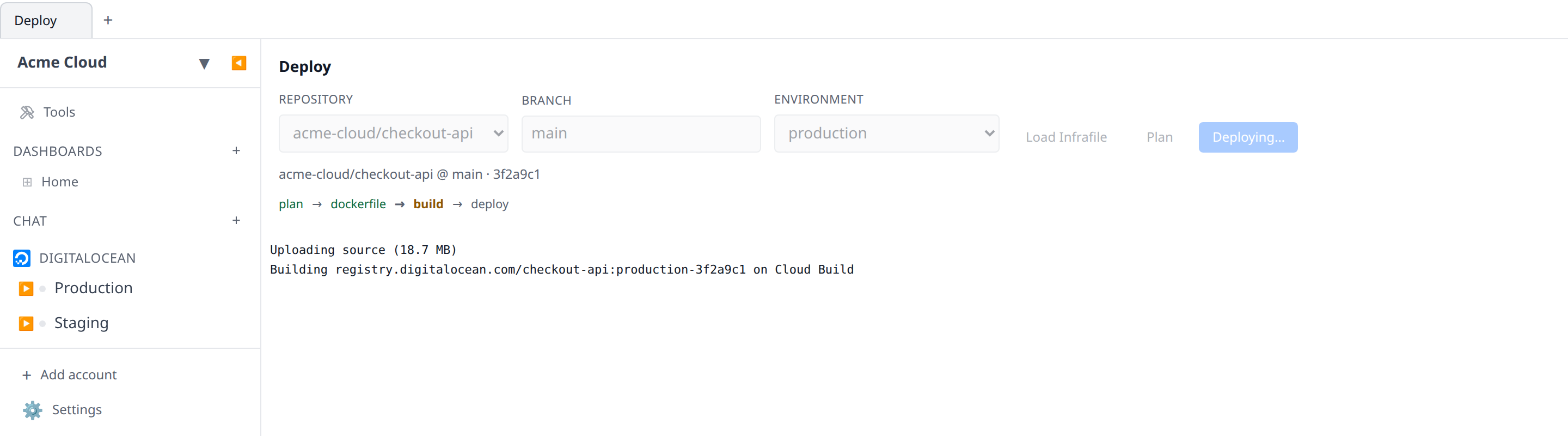
A hosted build is quiet while it runs. The log gets Uploading source (12.4 MB),
then Building <image> on Cloud Build, and then nothing until the build finishes
and Built <image> in 84s appears — the worker’s per-layer output goes to storage
rather than back down the wire, so there is no Step 3/9 to watch. A failure names
the build id so you can read the full log in Google Cloud Build. Hosted run()
steps do get their output, but in one burst once the step ends rather than as it
happens.
Set buildOn to a resource if you’d rather build somewhere specific — a machine
with a warm layer cache, or one inside a private network. It’s an override, not
a requirement, and it is also the way to watch a build happen: that path streams
every line of docker build and docker push into the log as it is printed.
Deploy on push
In the Deploy screen, add a trigger: when owner/repo main moves, deploy
production. The watcher notices within 30 seconds and deploys the commit that
moved it.
Two things worth knowing:
- Adding a trigger does not deploy right now. It records where the branch is and fires on the next push. Arming a trigger shouldn’t ship whatever happened to be at HEAD when you clicked save.
- A triggered deploy has nobody to ask. Any
select(...)in your Infrafile must be pre-answered on the trigger, the same way--setanswers it in CI. A key without an answer fails the run and names it.
The environment is checked against your Infrafile when you create the trigger, so a typo is caught then rather than silently never firing.
Deploy links
https://app.infrawrench.com/deploy/github.com/owner/name opens the deploy
screen with that repository already selected — handy in a README, a runbook, or
a chat message.
The link tolerates what people actually paste: a full https:// URL, a bare
owner/name, a .git suffix, a trailing slash. If you belong to one
organization it goes straight there; if you belong to several it asks which one,
carrying the repository through either way.
If that organization’s GitHub App cannot see the repository, the screen says so rather than presenting a repo no deploy could read.
Editor support
Infrafile has no extension on purpose — it is a well-known filename like
Dockerfile or Makefile. To get types and autocomplete, tell your editor it
is TypeScript and drop the generated declarations next to it:
infrawrench deploy typings > Infrafile.d.tsIn VS Code:
{ "files.associations": { "Infrafile": "typescript" } }The declarations are generated from your connected accounts, exactly like the
ones a workflow gets, so infra.accounts. autocompletes with real account
names.
Keep the file extensionless. If you name it Infrafile.ts, TypeScript treats
Infrafile.d.ts as that file’s declaration output and silently excludes it
from the program — you get “Cannot find name ‘defineInfra’” and no obvious
reason why.
Rolling back
A rollback ships a previous deploy’s exact image again. It does not rebuild:
infrawrench deploy rollback --env production
infrawrench deploy rollback --to-run <runId>
or the Roll back button on any successful row in the web app’s history.
With no --to-run, the CLI picks the last successful deploy before the one
currently live — which is what “roll back” usually means. Naming a run is how
you go further back.
What actually happens: the Infrafile is re-read at the commit that run deployed
— not at the branch head, so you get the deploy logic that shipped alongside
those bytes — and its deploy() runs with the plan and image the run recorded.
plan(), dockerfile() and the build are all skipped. The point of rolling
back is to get the bytes that were known good, not to reconstruct something that
ought to resemble them.
Two consequences worth knowing:
planarrives as the recorded JSON, so anything in it that was a resource is now plain data rather than a live handle. Adeploy()that needs handles should take them frominfra.*, which works normally.- Only a successful run that produced an image can be rolled back to. A CLI run from a directory with no git remote has no repository recorded, so the web app cannot re-read its Infrafile.
run(...) still works during a rollback and targets the recorded image, so a
npm run db:rollback step reaches the same toolchain the deploy originally used.
Undoing what a deploy created
Every run keeps a ledger of the resources it created through
infra.accounts.*.create(...) — a self-provisioning Infrafile that spun up a
database or a cluster records exactly what it spun up. A plain rollback never
touches those resources: it re-ships the image and nothing else.
To also undo the provisioning, pass --delete-created:
infrawrench deploy rollback -e production --to-run <runId> --delete-createdOnce the known-good image is confirmed live, every resource that runs after
the target created is deleted — newest run first, children before their parents.
The target run’s own resources survive; so does anything the rollback’s own
deploy() just created. Deletions are best-effort and reported in the run’s
notes: a resource somebody already removed by hand is noted, not fatal.
This is opt-in for a reason: a database created by the bad deploy is still a
database, and it may hold data written since. Reach for --delete-created when
the deploy’s provisioning was the mistake — not as a routine part of rolling
back.
Tearing down
An Infrafile can declare a destroy(ctx) stage — the inverse of deploy():
async destroy({ env, git, notes }) {
  const namespace = git.pullRequest ? `app-pr-${git.pullRequest.number}` : `app-${env}`;
  // delete the namespace, the DNS record, the preview database…
  await notes(`tore down ${namespace}`);
}
Run it from the CLI:
infrawrench deploy destroy -e stagingAt a terminal the CLI asks once before proceeding; non-interactive runs (CI tearing down a preview when its pull request closes) proceed without asking — that is the use case.
destroy gets no image and never prompts: by the time a preview closes its
image is usually gone and nobody is at a terminal. What it does get is plan —
the env’s last successful deploy’s recorded plan, when one exists — so a
choice env and git cannot settle (which account, which region) should be
written into the plan by the deploy that created it and read back here:
async destroy({ env, plan, notes }) {
  const account = infra.accounts.neon
    .list()
    .find((a) => a.displayName === plan?.neonAccount);
  // …
}
Treat plan as possibly absent — a teardown can outlive its deploy history —
and fall back to naming by env/git. It arrives as recorded JSON (plain
data, not live handles; take handles from infra.* as usual). destroy has
the full infra surface, so deleting resources, applying manifests and SSHing
all work normally, and the run is recorded in the deploy history with stage
destroy.
An Infrafile with a "preview" environment should always declare destroy —
without it a closed pull request leaves its environment running forever, and
the only symptom is a bill.
Tearing down from the ledger
destroy() reconstructs what to delete from env and git. The other route
is to delete exactly what the record says was created:
infrawrench deploy destroy --created -e stagingInstead of running the destroy() stage, this reads the environment’s recorded
runs and deletes every resource they created — newest run first, children
before their parents, the same order rollback --delete-created uses.
Deletions are best-effort, reported with a ✓ or ! line per resource, so
something already removed by hand is noted rather than fatal. --created
requires an explicit -e: a ledger-driven teardown is too sweeping to aim at a
defaulted environment.
An Infrafile with no destroy() stage no longer leaves a plain
deploy destroy with nowhere to go — the message now points at --created,
which needs no stage at all.
Outputs
notes() records prose for humans. infra.output(...) is its structured
counterpart — call it from deploy() with whatever a script will want later,
and the value is persisted on the run:
async deploy({ env, plan, image, push, notes }) {
  await push(image);
  const ip = await applyManifestAndWait(env, plan, image);
  await notes(`deployed ${image} behind ${ip}`);
  await infra.output({ url: `http://${ip}`, image });
}
infra.output already existed in workflows; calling it from
a deploy works the same way, and the value lands on the deploy’s record. Read
it back with:
infrawrench deploy outputs -e staging
infrawrench deploy outputs -e staging --json
which prints the latest successful deploy’s output as JSON — the service
URL, the load-balancer IP, whatever deploy() recorded. --json is the mode
for scripting; a jq '.url' away from a smoke test. When prose is what you
want — “migrated and shipped” — that is still notes(); infra.output is for
values another program reads.
Drift
Every run records the resources it created (the same ledger
--delete-created and destroy --created read). deploy status checks that
record against reality:
infrawrench deploy status -e staging
infrawrench deploy status -e staging --json
Each resource past runs created is reported as ok (still exists), missing (deleted out-of-band — somebody removed it at the provider), or unknown (the check could not be completed), followed by a summary. From the CLI the ledger consulted is this machine’s deploy history, so the report covers what this machine deployed.
What a deploy records
The Infrafile itself is never stored — not on your machine’s behalf, not in your organization. It is read from your repository on every run and discarded.
What is stored is the record of a run: env, commit, image, logs, the plan as
JSON, the rendered Dockerfile, notes, the structured output recorded with
infra.output(...) — and the created-resource ledger that --delete-created
reads (see above).
The web app streams a run’s logs live and shows the plan and rendered Dockerfile before anything is built.
Stopping a run
Stop sits next to Deploy while a run is in flight, in the web app and in the
desktop app’s Deploy tab. It is a request rather than a kill switch: the run
unwinds at its next checkpoint, and a select(...) still waiting on an answer is
resolved so the isolate can exit instead of sitting there until the execution
budget expires. Clicking it before the connection is up is fine — the request is
held and sent the moment the run is reachable — and the button reads “Stopping…”
until the run ends.
A stopped run is recorded like any other unsuccessful one: it appears in the
history as failed, at the stage it reached, with the reason attached. Anything it
had already provisioned stays provisioned, and stays in that run’s
created-resource ledger, so destroy --created can clean it up.
What a deploy cost
Every successful run carries a Cost impact button in the history: what the deploy did to your run rate, broken down over the resources it provisioned, from the provider’s own collected billing either side of it. The created-resource ledger above is what makes that attribution possible — a run that only re-shipped an image links to no resources and says so, rather than blaming whatever else drifted in the same hour.
See Cost per change & cost per deploy for how the comparison works, what “unknown” means (it is never “$0”), and why the figure keeps moving as provider billing arrives.
Asking an AI client about a deploy
The AI chat and the MCP server share a small set of
deployment tools: list_deployments and get_deployment for the history and one
run in full (logs, plan, rendered Dockerfile, error), list_deployable_repos for
what your GitHub App can see, plan_deployment to run a repo’s plan() and
render its Dockerfile without building anything, and rollback_deployment.
There is deliberately no tool that deploys. Building and shipping a release
is slow, expensive, and lands bytes on real infrastructure that nothing can take
back, so a human starts it — from the Deploy tab or infrawrench deploy.
What a model gets is everything needed to reason about a deploy (“why did last
night’s staging deploy fail?”, “what would deploying this branch do?”) plus
rollback, which is the one deploy-shaped action that makes things safer.
plan_deployment is a destructive tool in chat despite building nothing: it
executes your repository’s plan() against your organization’s infra surface,
which is arbitrary code that can create or delete resources on its way to
returning a plan. It waits for your approval, as does rollback_deployment.
Both are audit-logged. They need deployments:plan and deployments:write
permissions respectively; the
read tools need deployments:read.
plan_deployment cannot answer a select(...) prompt — pass the choices up
front as answers, keyed by the same key the Infrafile used.
See also
- Workflows — the same
infrasurface, on a trigger - CLI — the rest of the terminal tool
- AI chat — asking about deploys, and rolling one back
- Cost per change & cost per deploy — what a run did to the bill