Domains & dangling DNS
Every DNS zone and record across every provider in one view, with potential subdomain-takeover risks — a record pointing at a provider name nothing in the connected workspace claims — flagged automatically.
DNS is the one thing you own that is spread across the most consoles. A zone in Cloudflare, a hosted zone in Route 53 from the migration that never finished, a DigitalOcean domain someone set up for a side project, a Netlify zone that came with a site. Domains puts all of it in one table — every zone and every record, across every connected provider — and, more usefully, flags records whose targets nothing in the connected workspace claims.
That last part is the subdomain-takeover problem. You delete the S3 bucket, tear down the Vercel project, rename the Netlify site — and the CNAME in your zone stays behind, still pointing at a name the provider has now released. Whoever registers that name next can serve their content on your hostname; depending on how TLS and cookies are configured for that deployment, that can also put their content behind your certificate and inside your cookie scope.
Like the posture checks, orphan finder and expiry radar, this costs nothing to have on. It is computed entirely from state your accounts already sync — no extra provider API calls, and no DNS resolution: a record’s target is judged against what you actually have, not against what a resolver answers right now.
The view
Open Domains from the sidebar on web or desktop, or run infrawrench dns.
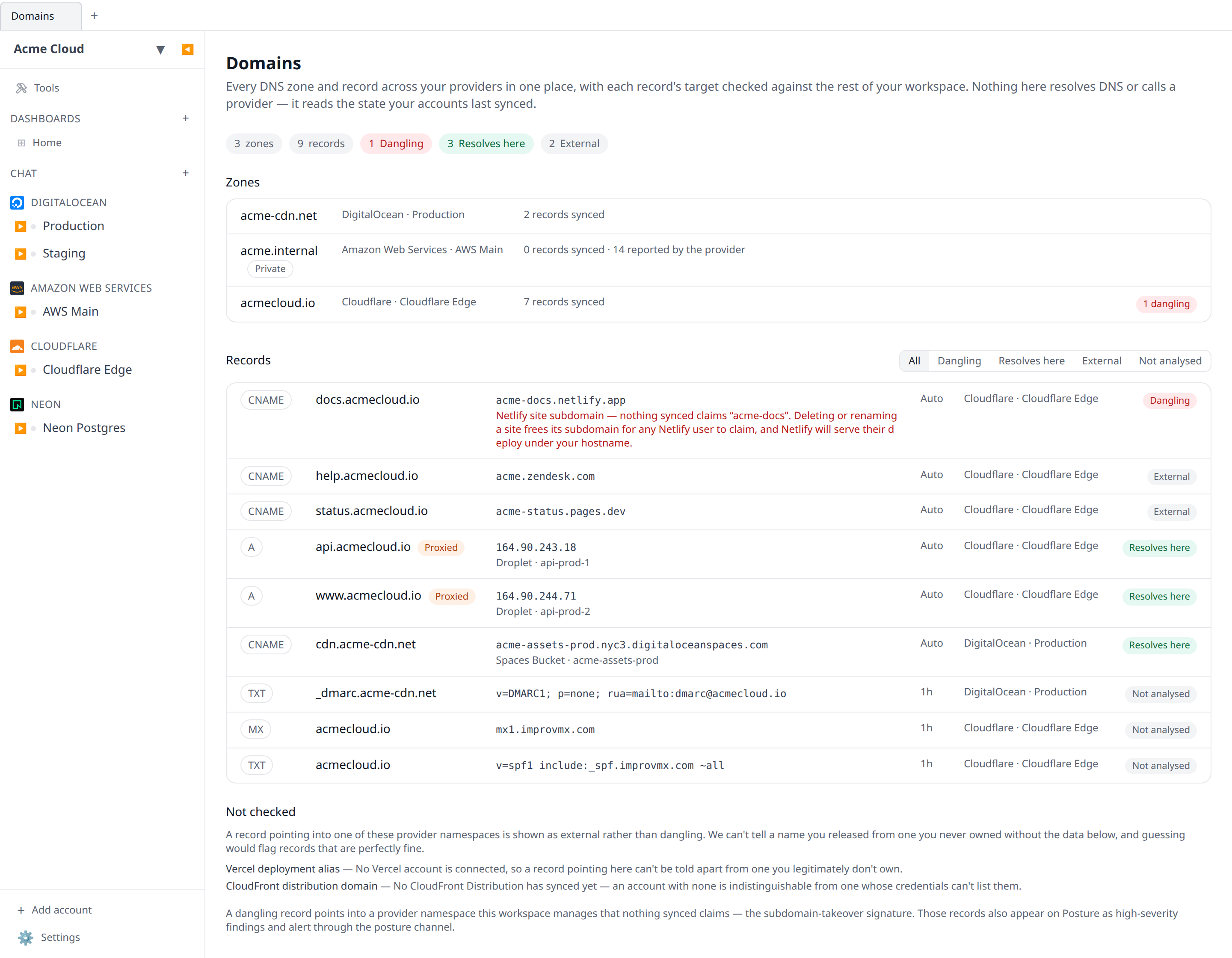
Zones lists every managed zone: the apex domain, which provider and account it lives in, how many records we synced, and how many of them are dangling. Where the provider reports its own record count and it differs from what synced, both numbers show — several providers list zones without listing their records, and it is better to say so than to imply a zone is empty.
Records lists every record, worst first, with each target’s status:
| Status | What it means |
|---|---|
| Dangling | The target points into a provider namespace you manage, and nothing you’ve synced claims it. This is the takeover signature. |
| Resolves here | The target is a resource in your workspace — a droplet’s IP, a bucket, a project. Clicking through takes you to it. |
| External | The target points somewhere we have no declaration for: a third-party SaaS, someone else’s nameserver, an IP you never synced. Not a finding. |
| Not analysed | The record type carries no host target we reason about (TXT, MX, SOA, CAA, SRV). Listed, never judged. |
The zone domain and the record name are buttons: activating one opens the underlying resource, which is where the edit or delete actually happens. They are ordinary tab stops, so the table is navigable from the keyboard alone.
Which providers
Zones and records come from every plugin that declares them:
| Provider | Zones | Records |
|---|---|---|
| Cloudflare | Zones | DNS records |
| AWS | Route 53 hosted zones | Route 53 record sets |
| Google Cloud | Cloud DNS zones | Cloud DNS record sets |
| DigitalOcean | Domains | DNS records |
| Netlify | Managed DNS zones | DNS records |
| Azure | DNS zones, Private DNS zones | — |
| Vercel | Domains | — |
Azure and Vercel list domains but not their records through the APIs we sync, so their zones appear with the provider’s own record count and no rows beneath them.
Private and split-horizon zones (Route 53 private hosted zones, Cloud DNS private zones, Azure Private DNS) are listed and clearly marked, but never analysed for takeover — an internal name resolving to nothing is a broken deploy, not an exposure.
How dangling is decided
A record is dangling when its target matches a provider namespace one of your plugins declares and nothing in your workspace claims that name. The namespaces are the ones where names are globally unique and released on delete — which is exactly what makes them takeable:
- S3 bucket endpoints and CloudFront distribution domains
- Cloud Storage bucket endpoints
- Azure Storage account and App Service default hostnames
- DigitalOcean Spaces endpoints
- Netlify site subdomains, Vercel deployment aliases, Fly.io app hostnames
workers.devWorker subdomains
So a CNAME to assets.s3.amazonaws.com is fine while that bucket is in one of your connected accounts, and becomes a finding after the next sync reflects that the bucket is gone.
Why it stays quiet
The tempting version of this check flags every record whose target isn’t in your workspace. That would flag most of your DNS, because most targets are things you legitimately don’t manage here — and a check that cries wolf gets muted.
So a namespace is only evaluated when two things are true:
- You have an account connected for that provider. Without one we cannot tell your bucket from a stranger’s.
- At least one resource of the claiming type has synced. An account with zero buckets looks identical to one whose credentials can’t list them.
When either is missing, records pointing there are shown as External and the namespace is listed under Not checked with the reason. “We found nothing” and “we didn’t look” are different answers, so they don’t render the same.
One honest false positive remains, and the finding says so: a bucket or app living in an account you have not connected here is indistinguishable from one that was deleted. Connecting that account clears it.
What it can’t tell you
An A record pointing at an IP address you no longer hold — a released Elastic IP, a destroyed droplet — shows as External, not dangling. Addresses carry no provider namespace to check against, so from stored state alone there is no way to distinguish “an IP I released last week” from “an IP I never owned”. Rather than guess, the view says what it knows: the address matches nothing you’ve synced.
Alerts
Dangling records also appear on the Posture screen as high-severity dns-dangling-target findings, which means they page through the posture channel you already configured — push, Slack, Teams — with no separate setting to turn on. Turning posture alerts off turns these off too.
From the CLI
infrawrench dns              # zones, records and dangling targets for your org
infrawrench dns --json       # the same as JSON
infrawrench dns --local      # scan this machine's local workspace, signed out
--local runs the identical computation against the desktop app’s local workspace: no credentials, no network, nothing resolved.
From the API and MCP
GET /api/org/{orgId}/dns returns the whole inventory (permission resources:read); see the OpenAPI spec. The list_dns_records MCP tool exposes the same data with status and domain filters, so you can ask an assistant “what points at this domain?” or “find any takeover risks” directly.
Related
- DNS records — creating and editing records, and pointing them at a resource with live tracking
- Posture checks — where dangling records show up as findings
- Dependency graph — the same identity matching, drawn as topology