Config as code
Export your organization's dashboards, workflows, budgets, graphs, alert rules and policies as one JSON document, keep it in git, and apply it back.
Everything you configure in Infrawrench that isn’t a provider account or a live resource can be exported as a single JSON document, committed to git, reviewed like any other change, and applied back — to the same organization for disaster recovery, or to a different one to seed a staging environment, a demo, or a new client’s workspace.
What’s in the document
| Section | What it carries |
|---|---|
budgets | Monthly spend budgets, their filters and alert thresholds |
customGraphs | Each custom graph’s name, description and source |
workflows | Each workflow’s source, trigger, declared metrics, enabled |
dashboards | Every dashboard, its name, and its cards in grid order |
metricAlerts | Metric alert rules — selector, condition, cooldown |
probes | Synthetic probes — URL, interval, failure threshold |
costCentres | Cost centres and their allocation rules |
tagPolicy | The org’s required tags and whether they’re enforced at create time |
alertSettings | Cost anomaly tuning, drift/expiry/posture alerting, the weekly digest schedule |
What’s deliberately not
- Accounts and credentials. An export must never be a way to walk off with an organization’s provider keys. Connect accounts in the target organization first.
- Resources. They belong to the provider, not to Infrawrench. A dashboard’s resource pins are carried by provider, type, external id and account name — if the target organization has synced the same resource, the pin lands; if not, that one card is skipped and reported.
- Workflow webhook signing secrets. Write-only by design: the API never returns one, so no document can leak or set one. After importing a git-triggered workflow, set its secret again.
- History and throttle state. Firing history, run logs, cooldown claims, change freezes. Restoring a cooldown claim from a config file would re-open a quiet period and page people twice.
Keys, not ids
Every entity in the document is addressed by a key — a slug derived from its name, like monthly-cloud-spend — never by a database id. That’s what lets one document apply to any organization, and it’s what an import matches on:
- A key the target doesn’t have is created.
- A key it has is updated — including when the name changed. Renaming an entity while keeping its key is a rename, not a delete-and-recreate.
- A key the document doesn’t mention is left alone, unless you ask for replace mode.
Cross-references work the same way. A budget card on a dashboard names the budget’s key; a workflow with a budget trigger names the budget’s key. Both are resolved against the document (and the target organization) at import time.
Export
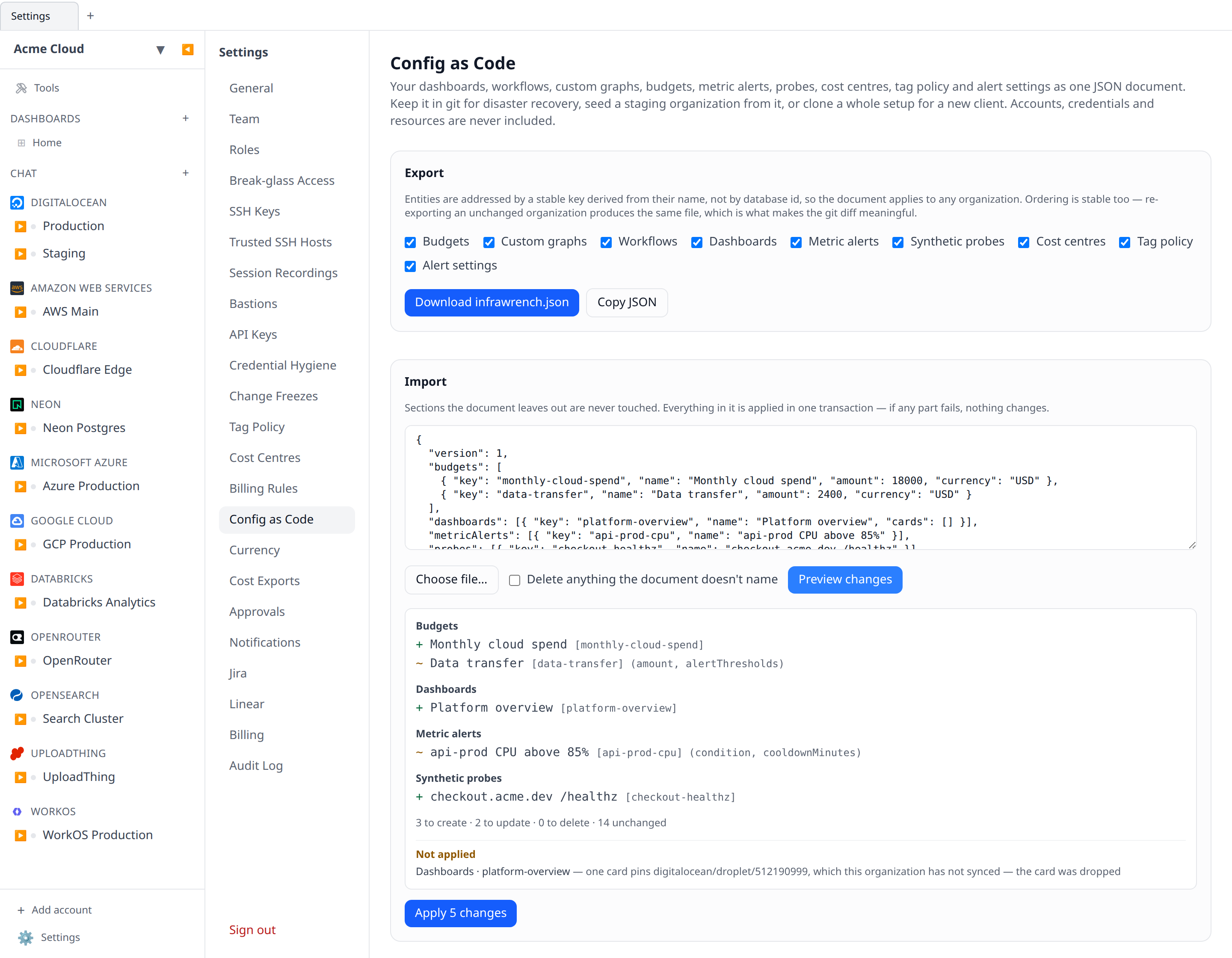
In the app: Settings → Config as Code → Download infrawrench.json. Tick the sections you want.
From the CLI:
infrawrench config export --out infrawrench.json
infrawrench config export --sections budgets,workflows --out spend.json
infrawrench config export | jq .            # no --out: straight to stdout
Ordering is stable and the same organization exports byte-identically until something actually changes — so git diff on the committed file is a real diff of your configuration, not churn.
Import
Importing is always two steps: plan, then apply. The plan validates the document, resolves its references against the target organization, and lists exactly what would be created, updated and deleted, without writing anything.
infrawrench config plan  -f infrawrench.json      # dry run — safe on any org
infrawrench config apply -f infrawrench.json      # shows the plan, then asks
In the app, Settings → Config as Code → Import does the same: paste or choose a file, hit Preview changes, and the apply button only appears once you’ve seen the list.
The whole document is applied in one database transaction. If any part fails, nothing changes — an organization is never left halfway between two configurations.
Merge vs replace
By default an import merges: it creates and updates what the document names and leaves everything else alone. Safe to run against a live organization.
--prune (the Delete anything the document doesn’t name checkbox) switches to replace: entities the document doesn’t name are deleted too — but only within the sections the document actually carries. A document with only a budgets section can never touch your workflows, whichever mode you use. The default dashboard is never deleted.
# Make staging an exact copy of production's dashboards and budgets
infrawrench config export --sections dashboards,budgets --out prod.json --org production
infrawrench config apply -f prod.json --prune --org staging
In CI
config plan writes nothing and only needs read access, so it’s the natural pull-request check:
- run: infrawrench config plan -f infrawrench.jsonconfig apply refuses to run without confirmation on a non-interactive terminal. Pass -y once the plan has been reviewed:
- run: infrawrench config apply -f infrawrench.json -yThings a document can’t do, and what it says instead
A restore is never held hostage by one dangling reference. Anything the target organization can’t satisfy is reported under Not applied (or in the plan’s unresolved list) and skipped, while the rest of the document still applies:
- A resource pin for a resource nobody has synced yet — sync the account and apply again.
- An account name the target organization hasn’t connected (on a resource pin, an allocation rule, or the drift alert scope).
- A workflow whose budget trigger names a budget the document doesn’t define — the workflow is imported with a manual trigger rather than one that would silently never fire.
Two things are refused outright rather than reported, because guessing would be worse than failing: a drift alert scope that resolves to no accounts at all (an empty scope means every account, so dropping unknown names would widen alerting), and a probe or widget whose settings the normal editor would also have rejected.
Or manage objects one at a time, with Terraform
A document moves a whole organization at once, which is what makes it right for cloning, seeding a staging org, or a restore. It is the wrong shape for “this one budget lives in the platform team’s git repo and changes go through review”: the document addresses entities by name rather than by id, applies in one transaction, and in --prune mode deletes anything it doesn’t name.
For that, use the Terraform provider instead. It manages individual Infrawrench objects — budgets, cost centres, allocation rules, tag policy, saved filters, reports, cost alerts, scenario models, billing rules and exports — as Terraform resources, with per-object plans, drift detection and terraform import. It also reaches objects this document has no section for.
The two coexist: seed an organization with a document, then adopt the pieces you want under continuous review into Terraform.
Permissions
Exporting needs config:read; importing needs config:write. Owners and admins have both.
Both also require the per-section permission for every section involved — so config:write can’t be used to reach past a role that deliberately withholds workflows:write. Export refuses rather than quietly omitting a section you can’t read: a partial document looks complete, and applying it with --prune would delete everything the exporter wasn’t allowed to see.
Every export and apply is recorded in the audit log.