Managed accounts & invoices
Bill customers for the infrastructure you run on their behalf — customers scoped to cost centres, invoices that freeze when you approve them, and a derivation you can hand to accounts payable.
If you run infrastructure for other people, you eventually have to bill them for it. The pieces were already here — cost centres decide whose spend is whose, billing rules add the markup, showback totals it up — but there was no customer and no document. That is what this page is.
A managed account is a customer. An invoice is what you send them.
A customer references cost centres — it does not match spend itself
This is the most important thing to understand about the feature, and it is deliberately a limitation.
A managed account names cost centres. It has no tag match, no priority, no rule of its own. Which spend lands in which cost centre is already decided by your allocation rules, and a second way of claiming spend would eventually disagree with the first. The day it disagreed, an invoice would stop matching the showback report you had been showing the customer all quarter.
So: an invoice line for a cost centre is the same number the showback report gives for that centre and that period. If you can explain the showback report, you can explain the invoice.
Two consequences worth stating outright:
- A parent bills its whole subtree. Naming Engineering bills Engineering → Platform → Search too. Naming both a parent and its child bills the child once, not twice — the broader selection wins.
- A cost centre belongs to exactly one customer. So does a cloud account. Trying to give the same centre to a second customer is refused with an error naming the first one. Billing the same money to two people is not a state worth being able to represent.
If a customer has their own dedicated cloud account, you can name the account instead. An account in scope claims that account’s spend only where no cost centre already claimed it, which is what keeps every cost row resolving exactly once.
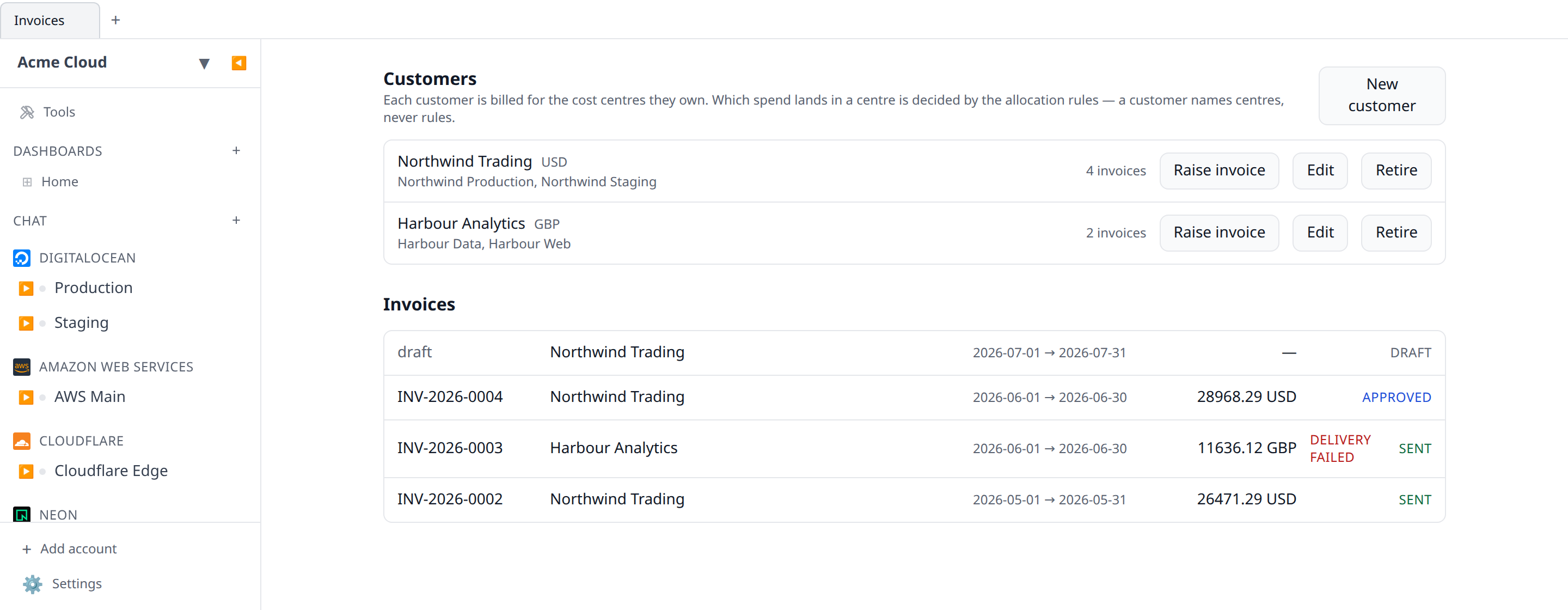
Setting up a customer
- Open Invoices in the sidebar.
- New customer.
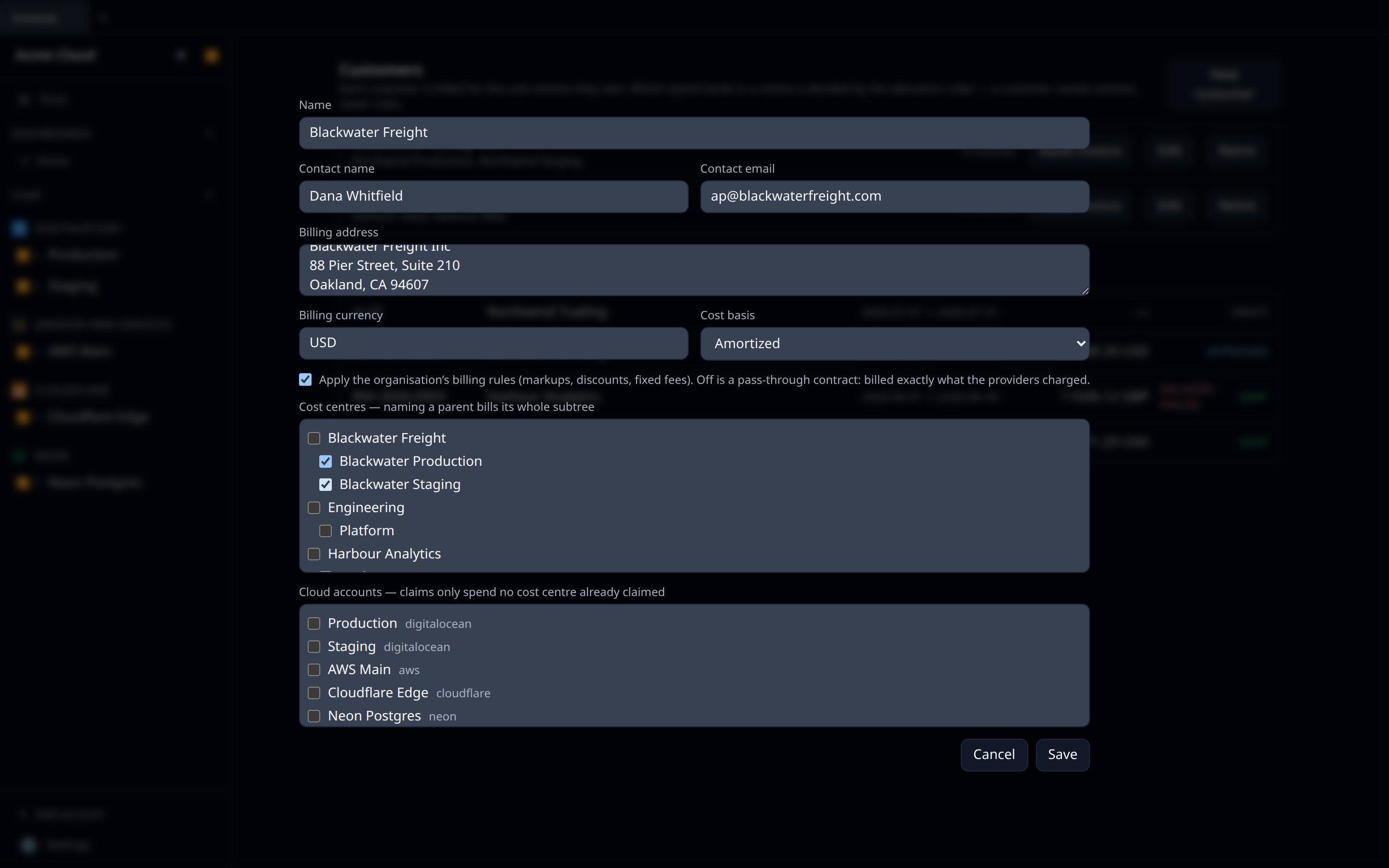
- Give it a name, contact details, and a billing currency.
- Tick the cost centres — and any cloud accounts — whose spend is theirs.
- Choose the cost basis and whether your billing rules apply.
Cost basis
Defaults to amortized, and that is the defensible choice for a managed service: charging a customer the whole cash value of a three-year reservation in the month you signed it is not a bill anyone can budget against. Cash basis is there if your contract genuinely says so.
Billing rules on or off
On by default — a service provider’s markup is the whole reason billing rules exist. Turn it off for a pass-through contract, where the customer is billed exactly what the providers charged and nothing else.
Fixed-amount rules become their own invoice lines rather than being folded into a cost centre’s spend. A management fee is something the customer agreed to pay, not something a provider charged, and burying it inside “Compute” is how an invoice becomes an argument.
Raising an invoice
Raise invoice on a customer, pick the period (it defaults to last calendar month), and you get a draft.
A draft is a working document. Its figures are recomputed from live spend every time you open it, which is exactly what you want while you are still deciding what to bill: cost data restates for days after a month ends, and a draft showing a stale number would be worse than useless.
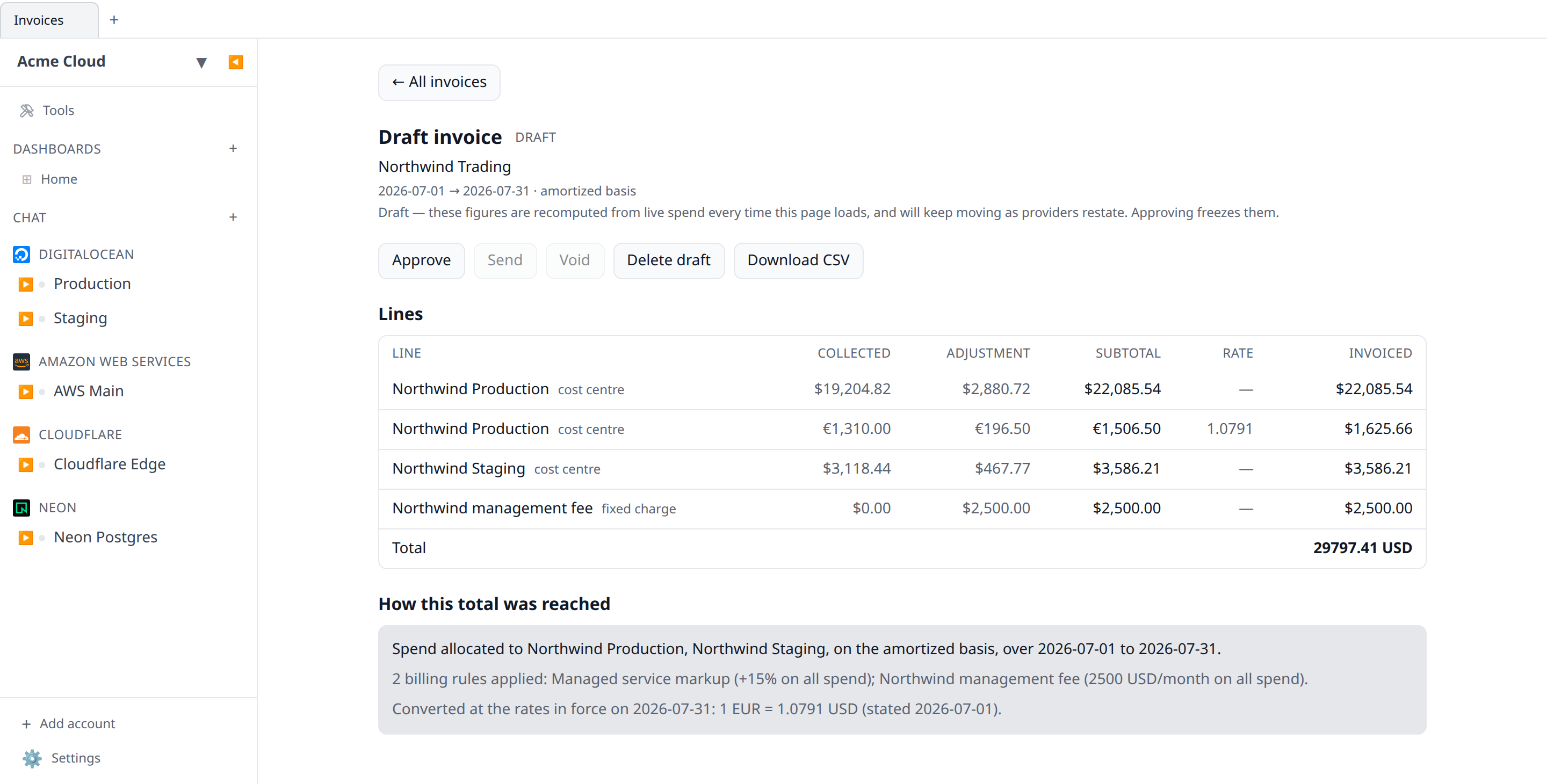
Approving freezes the numbers
This is the point of the feature. When you approve an invoice, Infrawrench computes the figures one last time and writes them onto the invoice: the lines, the totals, the exchange rates and the day those rates were read, the billing rules that were in force, and the names everything in scope had at that moment.
From then on, nothing recomputes. A provider revising January’s bill in March, an exchange rate being restated, a billing rule being edited, a cost centre being renamed or moved to another customer — none of them can change a number that has already been sent to somebody.
| Status | Figures | What you can do |
|---|---|---|
| Draft | Recomputed on every read | Edit the period, delete it, approve |
| Approved | Frozen | Send, void |
| Sent | Frozen | Send again, void |
| Void | Frozen, and kept as a record | Nothing — raise a correction |
Approval, sending and voiding are each separate acts with separate audit entries naming who did them. Approving is not generating, and sending is not approving.
Approval is refused if the invoice holds spend in a currency you have not stated an exchange rate for. An approved invoice has to be quotable as one number in the customer’s currency, and freezing a total that is partly in some other currency would be exactly the figure nobody can explain. Add the rate under Settings → Currency and approve again.
It is also refused — with nothing approved — if the draft or its customer changed while the figures were being computed: a different period, a different scope, a different billing currency, cost basis or billing-rules setting. Computing the numbers takes a moment, and in that moment somebody else can edit the draft. Rather than freeze figures that describe a different question, Infrawrench refuses and asks you to look again. Re-open the draft, check what it now says, and approve.
Void, never delete
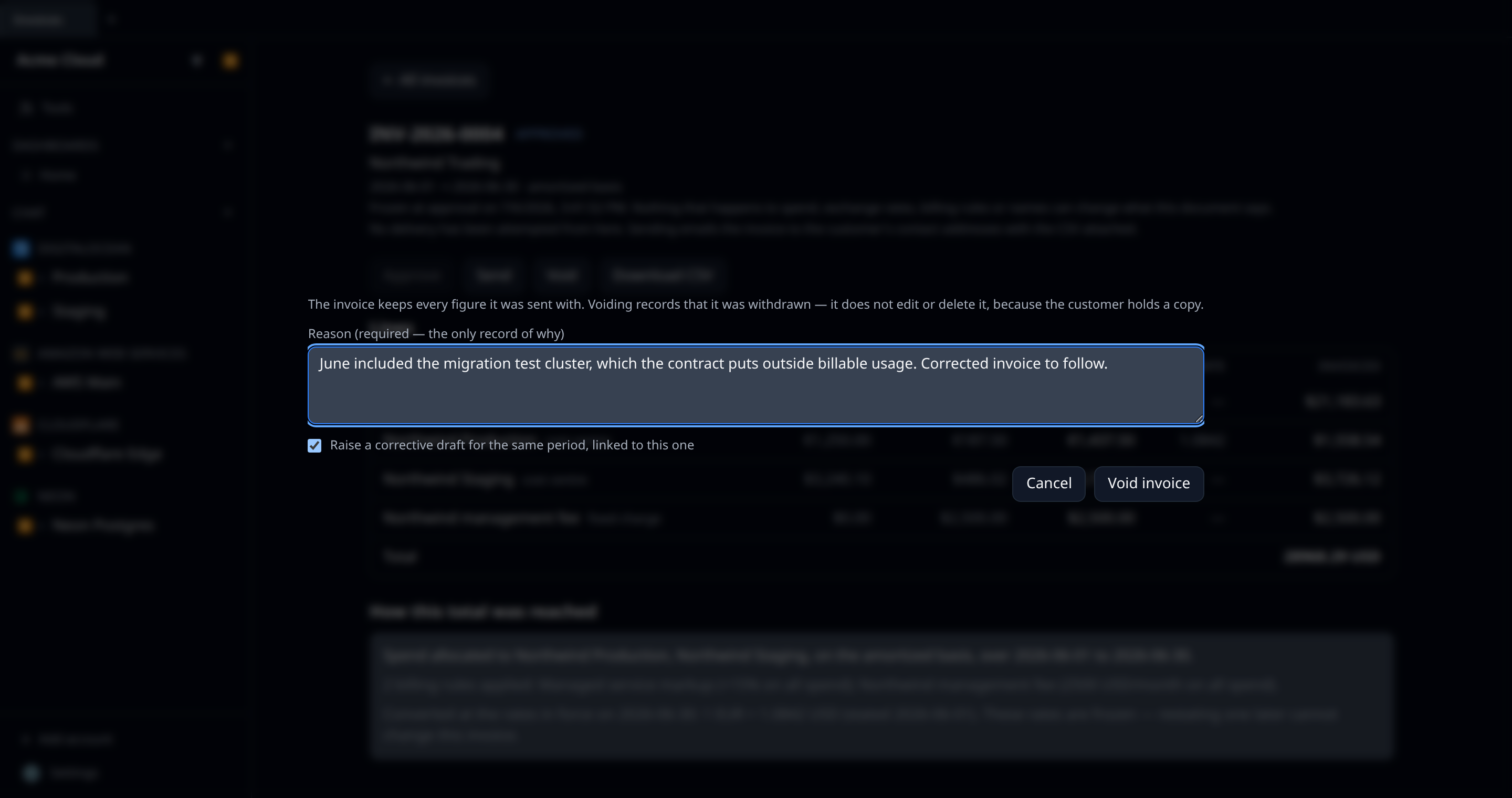
An issued invoice is never edited and never deleted. If it turns out wrong, you void it with a reason and raise a corrective invoice; both survive, linked to each other.
That is not a UI convention — the server refuses an edit or a delete on an issued invoice regardless of how the request arrives. “We billed you this, it was wrong, here is the corrected one” is a story a customer can follow. “We changed the invoice” is not.
Ticking Raise a corrective draft when you void does both in one step, and the two are written together or not at all — the void, the corrective draft, and the link between them in both directions. Void is irreversible and a void invoice refuses every action that could produce a correction, so an invoice left void with no draft would strand you. If anything goes wrong mid-way, nothing is applied and the invoice is still issued.
One void gets one correction. If a corrective invoice already exists, raising a second is refused: two corrections for one void would leave the link pointing at only one of them, and the customer holding two bills for the same period.
Every invoice shows its derivation
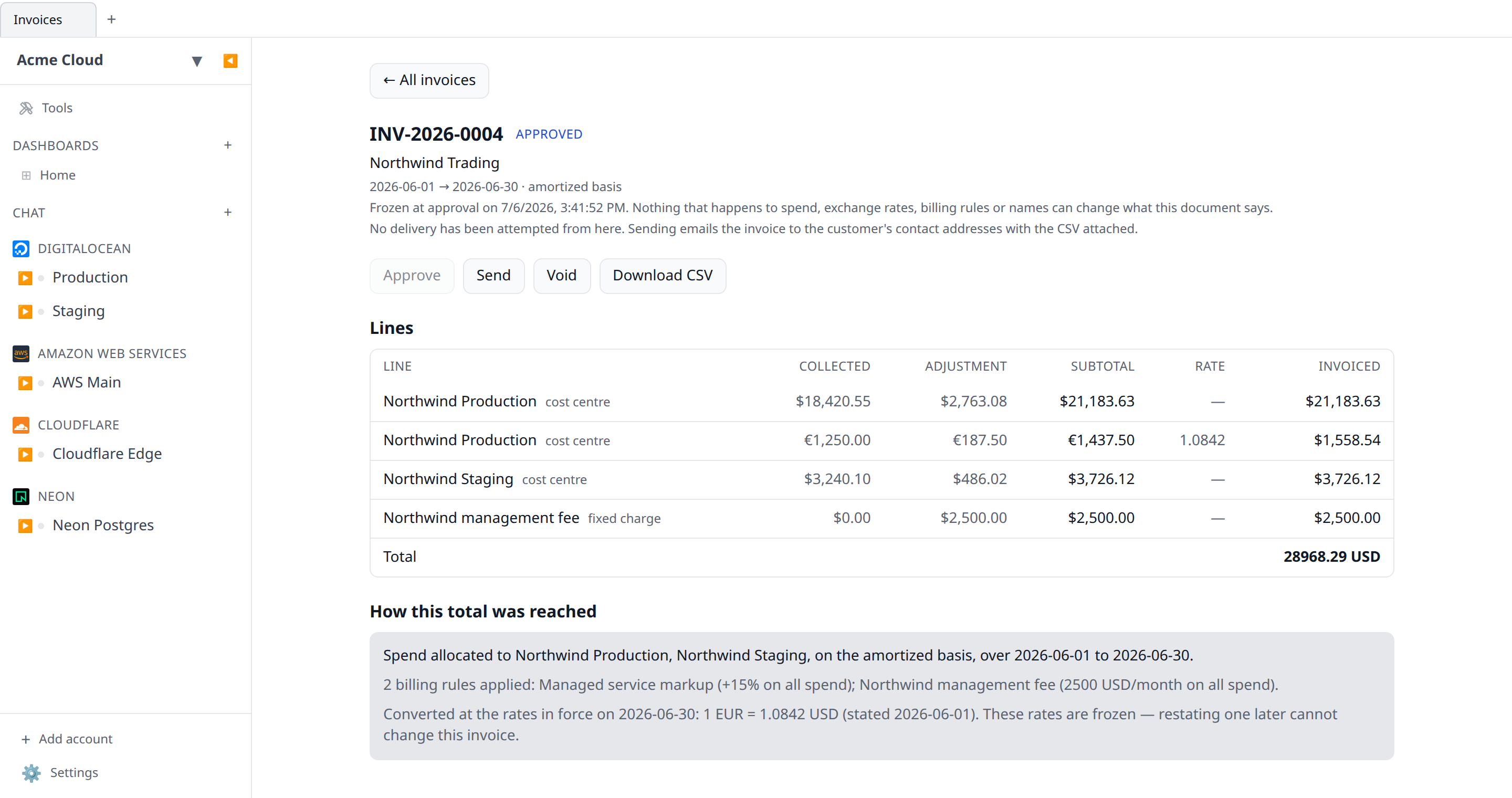
An invoice a customer cannot reconcile is an invoice a customer does not pay, so every line carries the whole chain:
| Column | What it is |
|---|---|
| Collected | What the providers charged, before any rule of yours |
| Adjustment | What your billing rules added or removed |
| Subtotal | Collected + adjustment |
| Rate | The exchange rate applied, and — when none was needed |
| Invoiced | The subtotal in the customer’s currency |
collected + adjustment = subtotal holds on every line and in every total. Underneath, the invoice spells out which cost centres were in scope, which billing rules applied and what each one does, the exchange rates used, and the date those rates were read — always the last day of the period, so “January, at the 31 January rate” is a sentence you can reproduce.
Downloading it
Download CSV gives you the derivation as a file — every column above, plus the totals in the same file so nobody has to sum it themselves. It uses the same RFC 4180 quoting as scheduled cost exports, so a customer who already ingests those needs no second parser.
The download button is web-only. The desktop app talks to the cloud with a bearer token that a plain download link cannot carry.
Sending it to the customer
Send on an approved invoice does two things, and they are recorded separately because they are different facts:
- it records the release — this document may go to the customer, and this person said so;
- it emails the invoice to the customer’s contact addresses, with the CSV attached.
The CSV is attached to the message rather than linked. An invoice has to still open when somebody queries it eleven months later, and a link is a thing that stops resolving.
The contact email on the customer may hold several addresses, separated by commas or semicolons — an AP mailbox and a named contact, say. Each gets its own copy, so nobody sees anybody else’s address.
Sending needs a mail provider configured on the deployment (MAILGUN_API_KEY, MAILGUN_DOMAIN, EMAIL_FROM). Without one, sending still records the release and shows a failed delivery saying exactly that, rather than quietly doing nothing.
When delivery fails
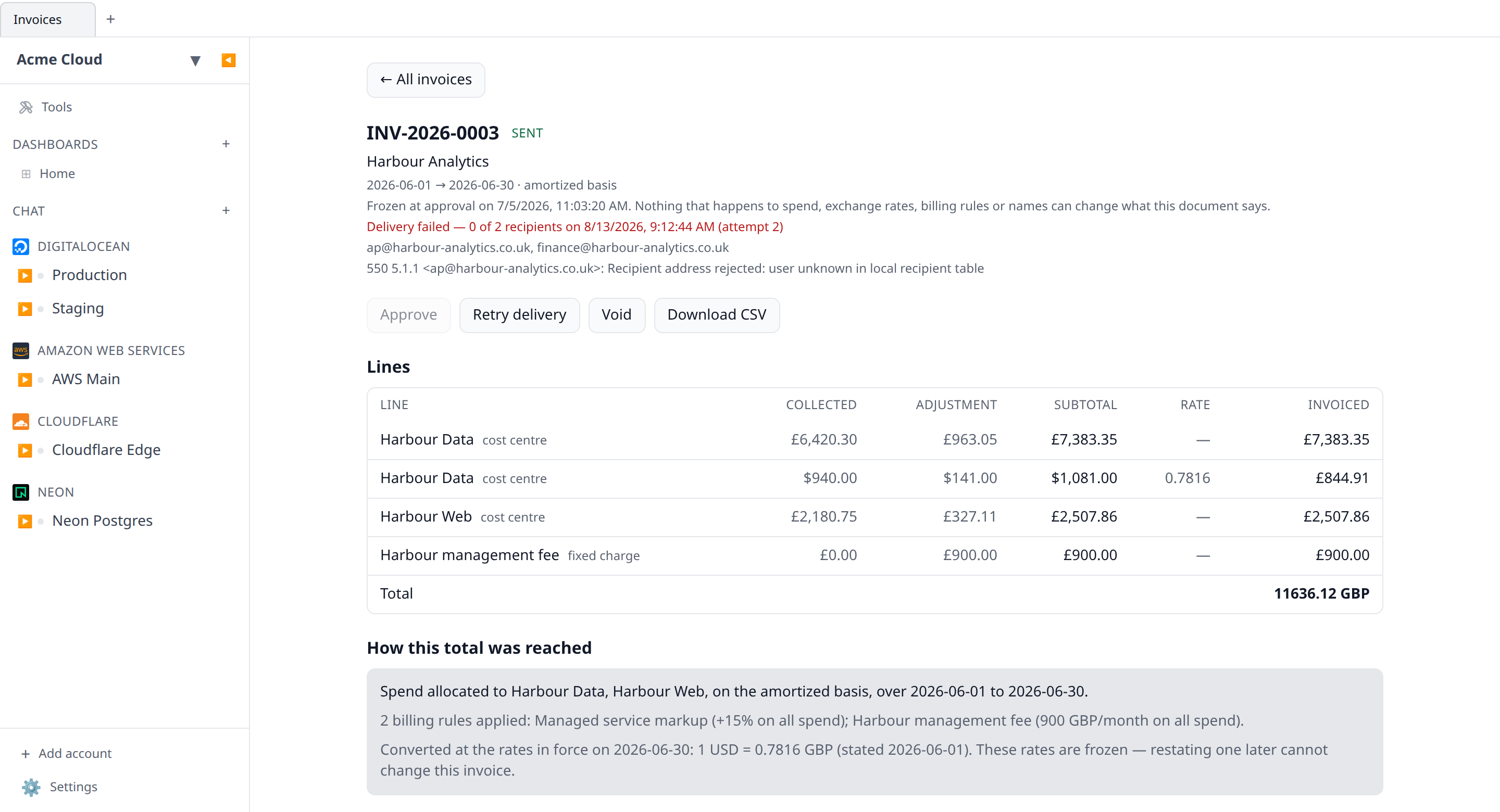
The invoice’s delivery is shown next to its status: which addresses were tried, how many the mail provider took, and the error when it did not. A failed send is visible and re-sendable — it does not silently sit there reading “Sent”.
The rule for sending again is drawn on whether anything landed:
| Last attempt | Sending again is… |
|---|---|
| Reached nobody (failed, no recipients) | a retry — one click, no confirmation |
| Reached somebody (delivered, or partly) | Send again — a confirmation first |
| Interrupted, outcome unknown | Send again — a confirmation first |
A partial delivery is never retried automatically, and that is deliberate: the mail provider cannot collapse a duplicate, so a retry would put a second copy of the same bill in the inboxes that already have it. Fix the failing address and use Send again if the customer needs another copy.
Sending again never rewrites who released the invoice, and never touches a figure. The document was frozen at approval; delivery only records where it went.
Permissions
Invoices have their own permission family rather than riding costs:*. Every other cost surface is your organization looking at its own spend; this one holds a customer’s contact details and the price you quoted them.
| Permission | Covers |
|---|---|
invoices:read | Customers, invoices, line items, the CSV |
invoices:write | Add a customer, raise a draft, edit a period, delete a draft |
invoices:issue | Approve, send, void |
The split between the last two is the one worth using. invoices:write is entirely revisable; invoices:issue is not — approving freezes what a customer will be sent, and sending puts it in their mailbox, which no API call takes back. A billing clerk can hold read and write and prepare the month while only the finance lead holds issue.
Members get none of the three by default. Admins and owners get all three; grant a custom role the first two if you want somebody preparing invoices without being able to issue them. See Roles & permissions.
From the terminal
infrawrench invoices                      # every invoice, newest period first
infrawrench invoices customers            # the managed accounts themselves
infrawrench invoices INV-2026-0004        # one invoice, with its full derivation
infrawrench invoices northwind --json     # by customer name, as JSON
Read-only. Approving and sending carry an audit entry naming a person — and sending now actually emails a customer — which is not something to make one flag away in a shell. infrawrench invoices INV-2026-0004 does print the delivery outcome, so a reconciliation script can tell “we released it” from “it arrived”. What the terminal is good for is the other half — printing an invoice’s derivation next to infrawrench showback for the same period, in a reconciliation script.
Note that the list does not compute a draft’s total (it shows not computed, never 0.00): a draft’s figures are recomputed on read, and the list does not recompute. Ask for the invoice by name or number to get them.
See the CLI reference.
From the model
The MCP server and AI chat expose list_managed_accounts, get_managed_account, list_invoices and get_invoice — all read-only, all on invoices:read. Approving an invoice is not an act a model takes because it inferred from a conversation that it was time.
get_invoice returns the whole derivation, so “why is this customer being billed this” is a question the model can actually answer.
API
GET /managed-accounts,GET /managed-accounts/{id}(invoices:read)POST /managed-accounts,PUT /managed-accounts/{id},DELETE /managed-accounts/{id}(invoices:write)GET /invoices,GET /invoices/{id},GET /invoices/{id}/export(invoices:read)POST /invoices,PUT /invoices/{id},DELETE /invoices/{id}(invoices:write)POST /invoices/{id}/approve,POST /invoices/{id}/send,POST /invoices/{id}/void(invoices:issue)
POST /invoices/{id}/send answers 200 even when the email failed — the release happened either way, and the delivery object in the response says what became of the transport. Pass {"resend": true} to send a second copy of an invoice that already reached somebody; a retry after a delivery that reached nobody needs no flag.
See the OpenAPI reference.