Secret export to Kubernetes
Drag a cloud resource onto a cluster to create a K8s secret with its credentials.
This is the flagship cross-plugin flow. You have an RDS database, or an S3 bucket, or a Redis cluster, and you want those credentials available inside a Kubernetes pod. Instead of copying them into a YAML file, you point the two resources at each other and infrawrench creates the Secret for you.
On the web
You start from the target — the cluster or account that will hold the secret — and pick the source:
- Open the Kubernetes resource you want the secret to live in.
- Click Connect resource in the action bar.
- Search for the source resource (e.g. an RDS instance) and press Enter.
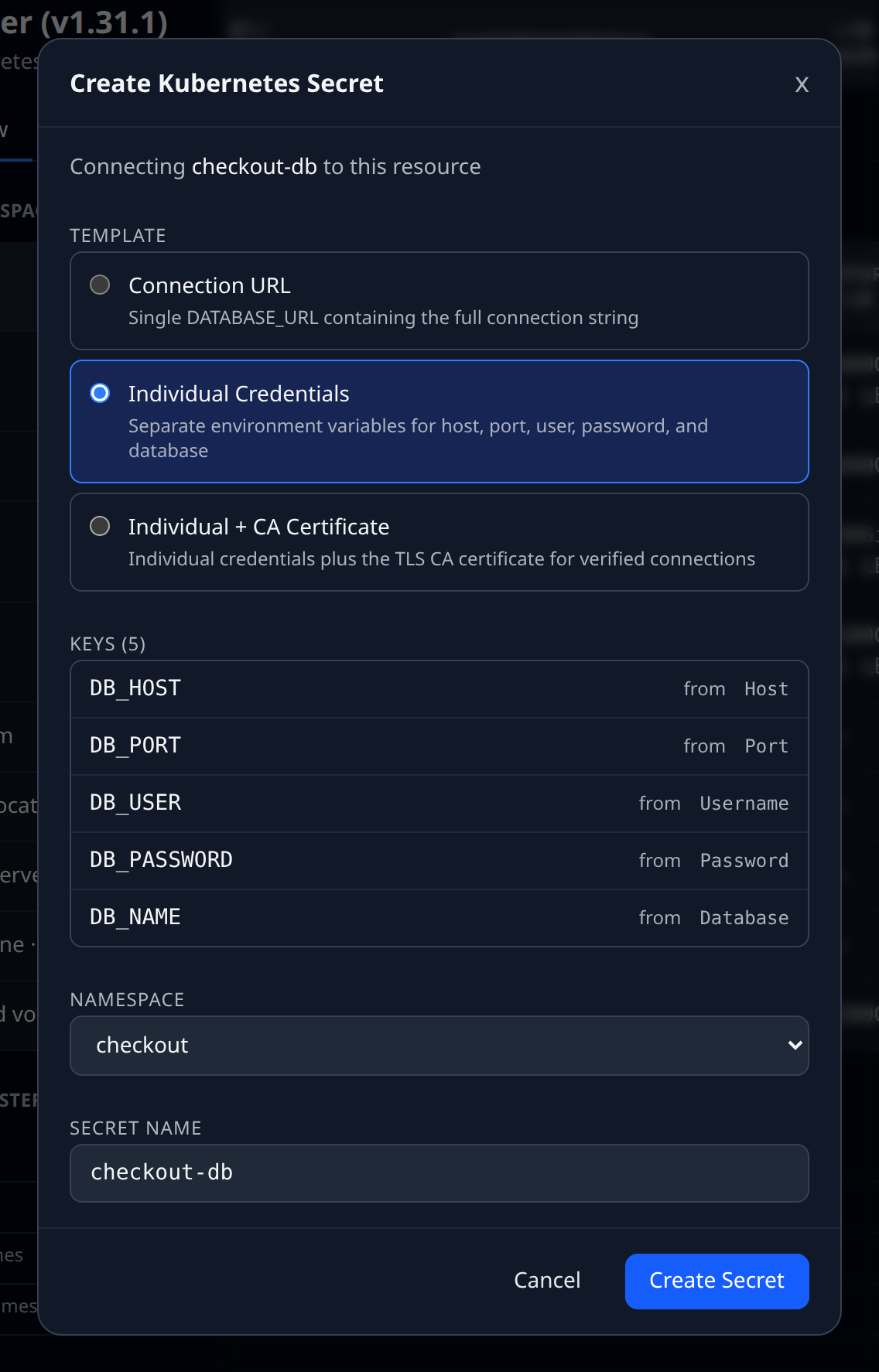
- The Create Kubernetes Secret dialog opens showing the template, the keys and where each one comes from.
- Pick a namespace, rename keys if you want, set the secret name.
- Click Create Secret.
On the desktop
The desktop app has the same Connect resource button, and additionally lets you do it by dragging: pick up the source resource in the sidebar (or off an account’s detail page) and drop it on a Kubernetes account or a cluster resource. Namespaces are not drop targets — choose the namespace in the dialog that opens. The dialog is the same one, titled Create Kubernetes Secret.
If the target is a VM instead
Where the target has no Kubernetes behind it but does have an SSH host, the same Connect resource button writes the credentials to a file on that host instead — the dialog switches to Deploy Credentials via SSH, asking for the SSH key and username, a .env or shell export format, and a file path. When a target supports both, a K8s Secret / SSH Env Deploy switcher appears at the top.
Which resources support it
Resources that declare a secret export template. Current list:
- AWS — RDS, Aurora, Redshift, ElastiCache, S3, Lambda, SQS, SNS, DynamoDB, ECS, EKS
- GCP — Cloud SQL, GCS
- Azure — SQL Database, Storage accounts
- DigitalOcean — managed databases, Spaces
- Neon, PlanetScale, Turso — databases and branches
- Redis, Memcached (via output reference)
- Cloudflare — R2 buckets, Workers KV
Each plugin controls its template — what keys are exported, what shape the values take.
What it writes
A standard Opaque Secret in the namespace you picked. Keys are base64-encoded as K8s requires. No labels or annotations beyond the defaults; edit the manifest afterwards if you want to add them.
Updating a secret
Re-drag the same resource onto the same cluster. Infrawrench detects the existing secret and offers to update it in place. This is the usual flow after a reroll or a credential rotation.
Delete
The secret is not auto-managed. If you remove the source resource, the K8s secret stays. Delete it manually from the Kubernetes plugin.