Tag policy, untagged spend & showback
Require tags like owner and env on every resource, score compliance per account, find the spend that carries no tags, and map spend to cost centres.
A tag policy is an org-level rule of the form “every resource carries owner and env”. Infrawrench scores each account’s compliance with it, reports the spend that doesn’t carry the required tags, and — when you switch enforcement on — rejects resource creation that would violate it. Allocation rules then map spend onto named cost centres for a showback report.
Cloud only. The policy, compliance scores, and both reports are org-level cloud state. The desktop app shows the same tag governance section on its Costs panel when signed into a cloud org, and the mobile app shows the showback tree read-only; policy, cost centre and rule editing lives in the web app’s org settings.
Defining the policy
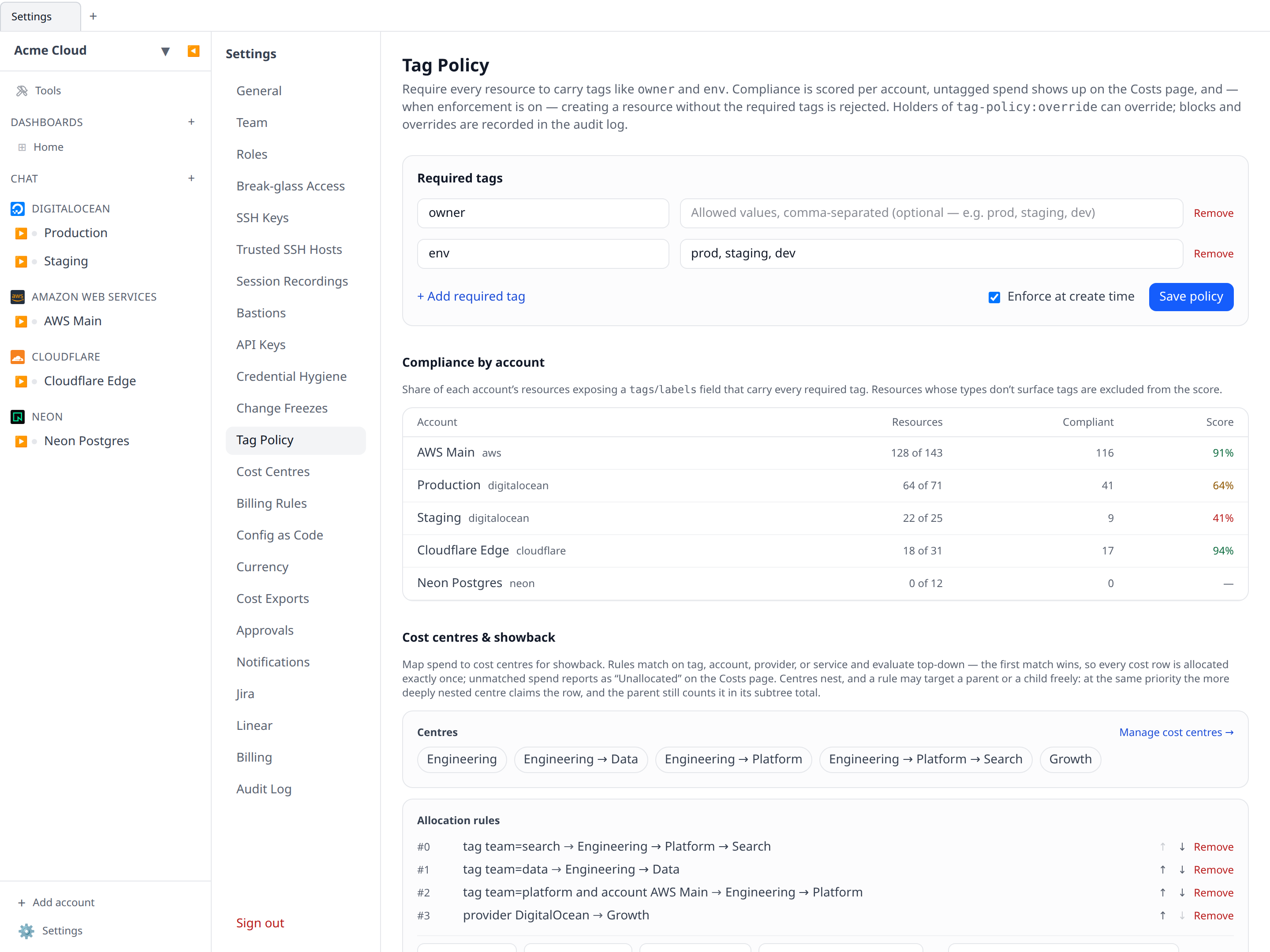
The policy lives in Settings → Tag Policy. Anyone with org:settings:write (Owner by default) can edit it:
- Required tag keys — e.g.
owner,env,team. Keys are matched case-insensitively, soOwneron an AWS resource satisfies a requiredowner. - Allowed values (optional, per key) — e.g.
envmust be one ofprod,staging,dev. Values are compared exactly. - Enforce at create time — off by default; see enforcement.
How a resource “carries” a tag
Infrawrench’s host is provider-agnostic, so tag detection follows one generic convention: a resource’s stored record (its fields or cached outputs) exposes a field named tags or labels, in any of the shapes providers actually use — a string map, a JSON-encoded map, a list of key=value entries, or a list of {key, value} objects. Resources whose types expose such a field are evaluated; resource types with no tag concept are left out of the score rather than dragging it down.
Compliance scores
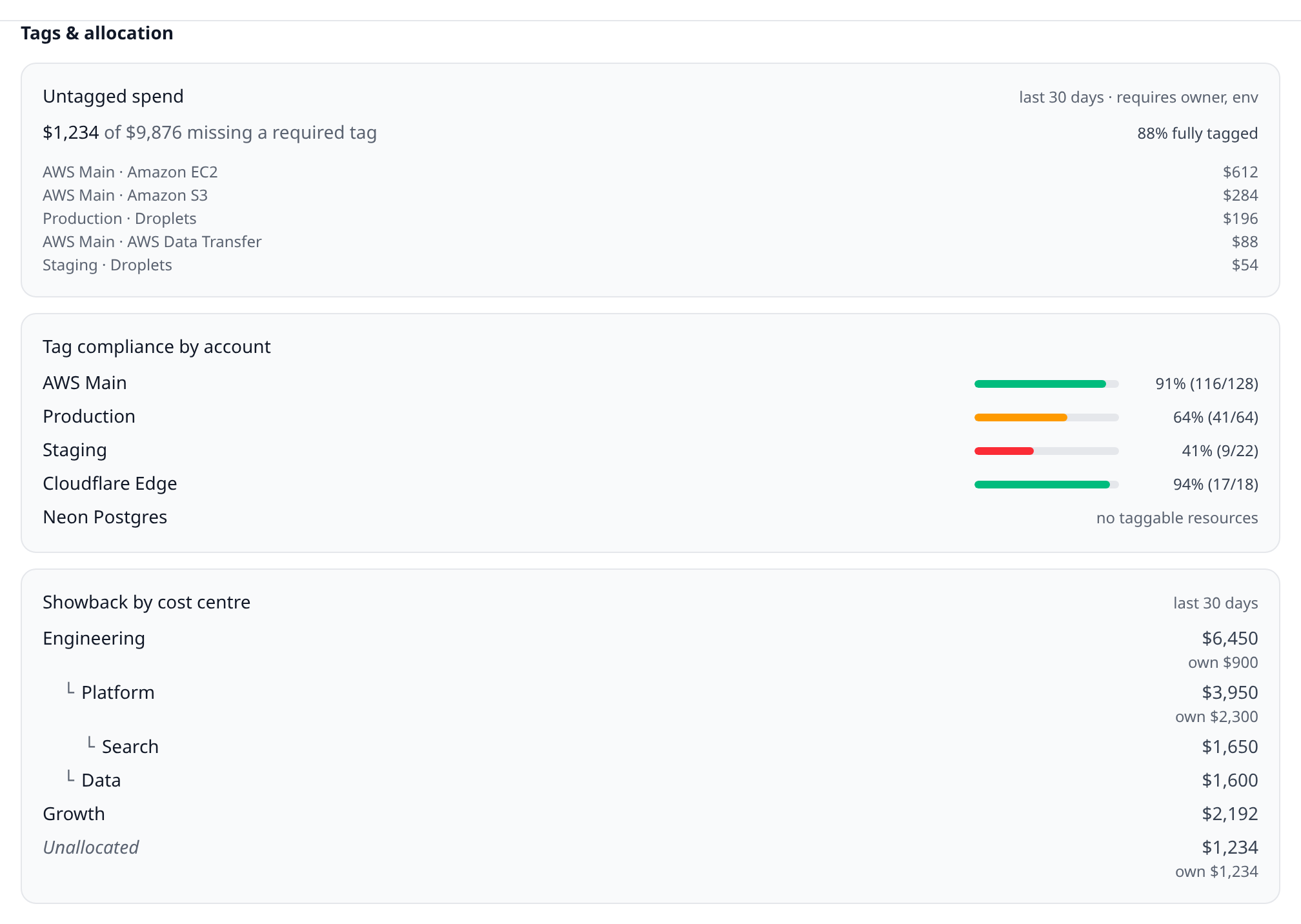
Each account gets a score: the percentage of its evaluated resources that carry every required tag (with an allowed value, where the policy restricts one). The table in Settings → Tag Policy shows the score alongside how many resources were evaluated versus how many the account holds in total, so a high score over a small evaluated set doesn’t overstate coverage. The same per-account list appears in the Tags & allocation section of the Costs panel on web and desktop, and on the mobile app’s Costs tab.
Enforcement at create time
With Enforce at create time on, creating a resource through Infrawrench (web, desktop, SDKs, API) is checked against the policy:
- The create form pre-fills the required keys into the type’s tag field and shows what the policy demands.
- Server-side, a create whose tags are missing a required key (or carry a disallowed value) is rejected with
422 Unprocessable Entityand the codetag_policy_unmet— the same pattern as the change freeze’s423, listing each violation in the body. - Resource types whose create form has no
tags/labelsfield are exempt: a policy cannot demand what a provider cannot store.
Callers holding tag-policy:override (Admin and Owner by default) can create anyway by sending the header:
x-tag-policy-override: trueEvery block and every override is recorded in the audit log as tag_policy.block / tag_policy.override.
Untagged spend
The payoff for the policy is on the money side: the Tags & allocation section of the Costs panel reports how much of the org’s spend (from provider billing data) sits on rows missing at least one required tag key — overall, per key, and as a top list of the (account, service) buckets responsible. That’s the spend nobody can allocate; the top list is the shortest path to fixing it.
Cost centres & showback
Cost centres are org-defined buckets (“Platform”, “Data”, “Growth”) that spend is allocated to for showback. Allocation rules map spend onto them, matching on any combination of:
- a tag key (or key = value),
- an account,
- a provider,
- a service.
Rules evaluate top-down by priority and the first match wins, so put specific rules (this one account’s team=data spend → Data) above broad ones (everything on GCP → Platform). Spend no rule claims reports as Unallocated — it never disappears. Rules are edited in Settings → Tag Policy; the report renders on the Costs panel and answers “what did each team’s infrastructure cost this month” without touching a spreadsheet.
Nesting: a tree, not a flat list
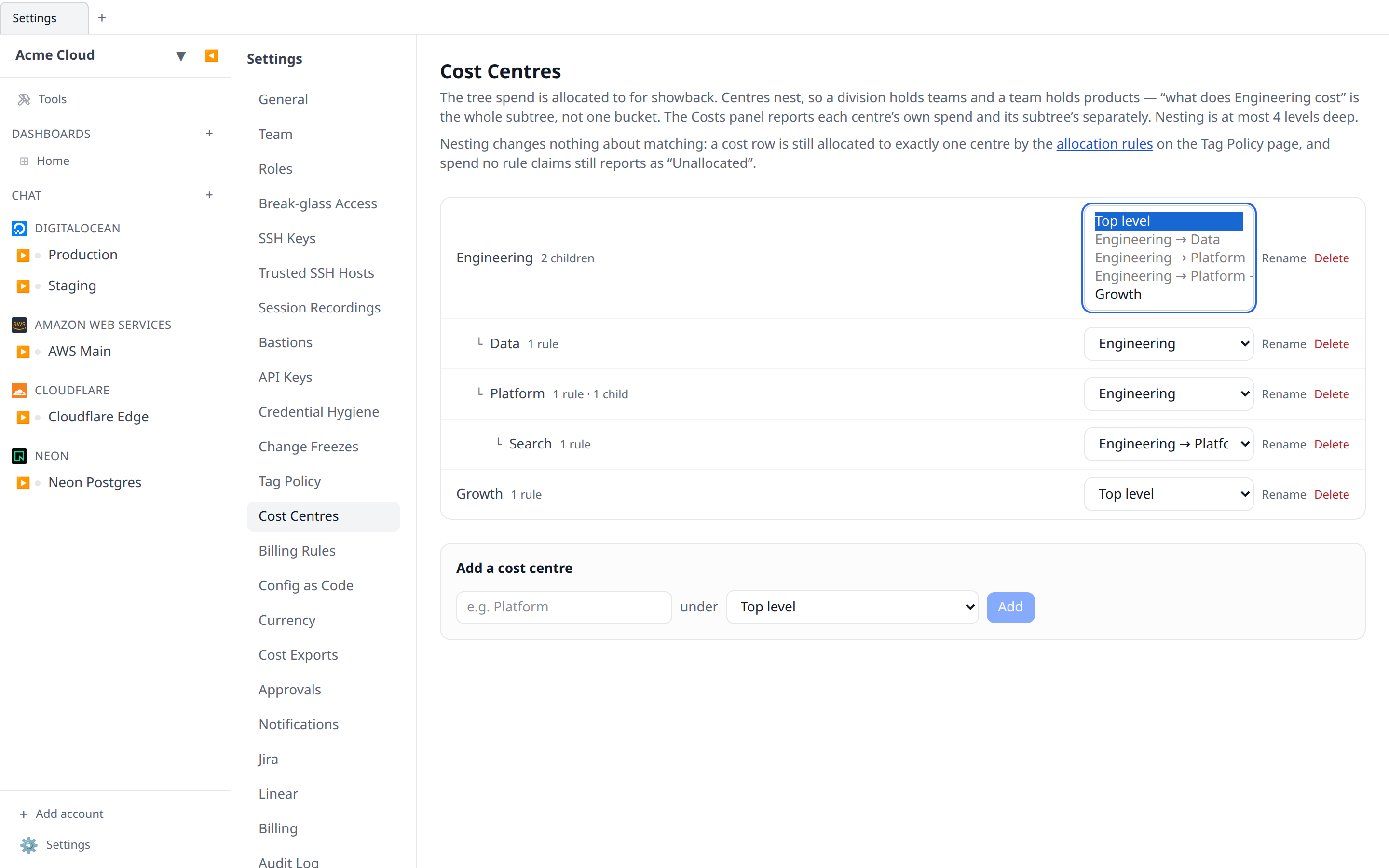
Cost centres nest. A division holds teams, a team holds products, and “what does Engineering cost” is answered by the whole subtree rather than by one bucket. The tree is built in Settings → Cost Centres (create, rename, move, delete) and is at most four levels deep.
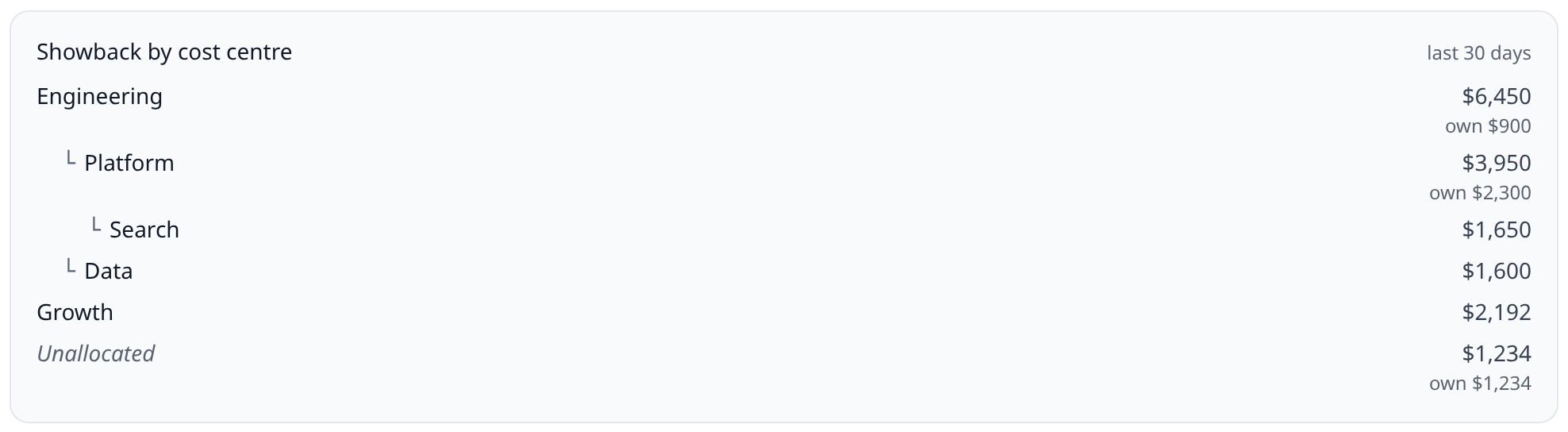
Every centre reports two numbers on the Costs panel and in the API:
| Field | Means |
|---|---|
totals | Spend allocated directly to this centre |
subtreeTotals | This centre plus every descendant — the rollup |
Both matter, because “Engineering $40k, of which Platform $12k” is the shape a budget conversation actually takes. A leaf’s two numbers are equal, as are every centre’s in an org that doesn’t nest.
If you already had flat cost centres, nothing changes: they are all roots, subtreeTotals equals totals everywhere, and every existing report reads exactly as it did. Nesting is opt-in, one centre at a time.
Parent and child rules
Nesting is a reporting structure — it changes nothing about matching. A cost row is still allocated to exactly one centre, so no amount is ever counted twice:
- Rules are one ordered list regardless of where their centres sit in the tree. Lower priority number fires first, first match wins — the rule that has always applied.
- Where a rule targets a parent and another targets its child at the same priority, the more deeply nested centre wins. A parent-level catch-all (“everything on GCP → Engineering”) therefore doesn’t quietly swallow spend a child rule (“tag
team=search→ Search”) was written for. The parent still gets that spend back through its subtree total.
Unallocated stays a first-class row at the bottom of the tree; it is never folded into a parent.
Deleting a centre
Deleting a centre never deletes its children and never touches spend history:
- Child centres are re-parented onto the deleted centre’s own parent — delete “Platform” out of Engineering → Platform → Search and Search stays under Engineering. (Deleting a top-level centre leaves its children at the top level.) Promoting everything to the root instead would silently move spend out of an ancestor’s subtree total, which is the last thing a chargeback number should do when someone tidies up a middle row.
- The centre’s own allocation rules are deleted with it, so the spend they claimed falls through to the next matching rule — often “Unallocated”.
The confirmation dialog spells out both, along with how many children and rules are affected.
CLI
The infrawrench CLI has both reports, with --json for scripting:
infrawrench tags                  # policy, per-account compliance, untagged spend
infrawrench tags --last 90d --json
infrawrench showback              # spend by cost centre, last 30 days
infrawrench showback --from 2026-07-01 --to 2026-07-31
showback prints the centre tree indented. A parent’s bar is its subtree total with its own directly-allocated spend noted beside it, so the bars deliberately don’t sum to the org total — the leaves do. --json returns the wire report, totals and subtreeTotals and all.
MCP & AI chat
Three read-only tools expose the same data to MCP clients and the AI assistant: get_tag_compliance, query_untagged_spend, and query_showback — so “which team’s spend grew last month” and “how much of our spend is untagged” are answerable in chat. query_showback returns the same tree as the panel: quote subtreeTotals for a division, totals for what that division spends itself, and never add subtreeTotals up across entries.
Permissions
| Permission | Grants | Default roles |
|---|---|---|
resources:read | See the policy and compliance scores | all roles |
org:settings:write | Edit the policy and enforcement | Owner |
costs:read | Untagged spend & showback reports | all roles |
costs:write | Manage the cost centre tree and allocation rules | Admin, Owner |
tag-policy:override | Create a resource past the policy, per request | Admin, Owner |