Fan-out SSH
Run one command across many hosts at once, with identical output collapsed and the odd one out diffed.
The SSH terminal gives you one shell on one box. Fan-out SSH answers the other question: which of these thirty boxes is the wrong one?
Pick a set of SSH-capable hosts, type one command, and Infrawrench runs it on all of them at once. Hosts that produced identical output are collapsed into a single block, and anything that differs is diffed against what the majority said — so “which machine is still on the old kernel” is a glance, not a spreadsheet.
Open it from Fan-out in the sidebar, on web and on desktop.
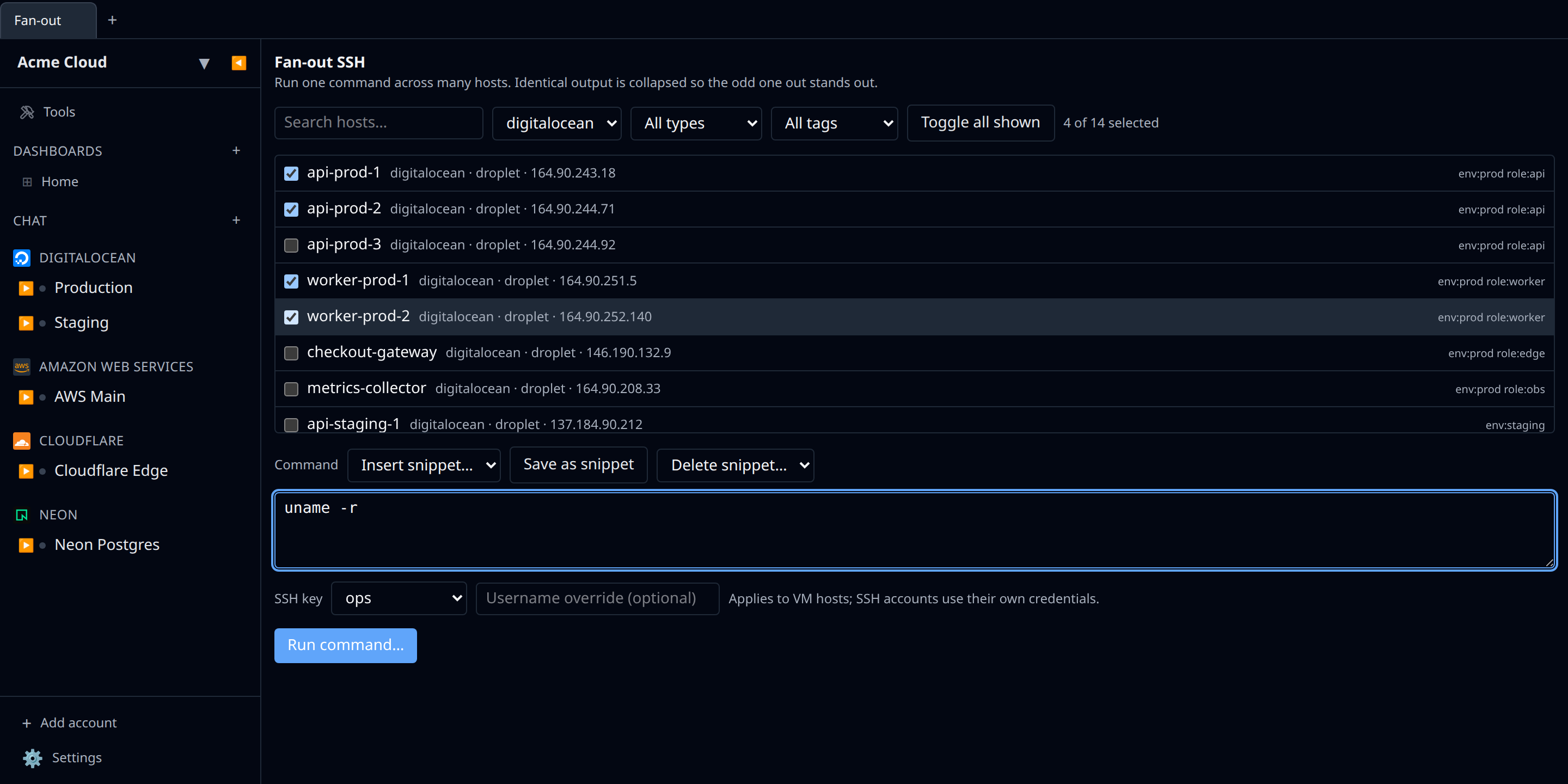
Picking hosts
The host list contains everything Infrawrench can already SSH into:
- SSH accounts — hosts added through the SSH plugin. These carry their own credentials, so nothing else is needed.
- VMs — any resource whose type exposes an SSH endpoint (EC2 instances, Droplets, Hetzner and Scaleway servers, GCP instances, and so on), exactly the resources that show an SSH button on their detail page.
Narrow the list by search text, provider, resource type, or tag, then use Toggle all shown to select everything that matches. Stopped VMs are listed but cannot be selected — a host that is not running has nothing to answer with.
VM hosts need one of your organization’s SSH keys, picked once for the whole run, plus an optional username override. SSH accounts ignore both and use their own credentials.
Running
Fan-out always confirms before it executes, and the confirmation names the number of hosts — “Run on 14 hosts?” — along with the command and the first few host names. There is no way to fire a fleet-wide command with one click.
Runs are capped at 100 hosts, with at most 8 connections open at once (configurable up to 16). Each host gets up to two minutes; output is captured up to 256 KiB per stream.
A run is a mutating operation, so it respects change freezes the same way resource deletion does: while a freeze is in effect the run is blocked, and members holding the freeze-override permission get an Override freeze and run button instead. Every run — and every block or override — is written to the audit log as ssh.fanout.run, with the command’s first 200 characters, the host count, and how many hosts failed.
Reading the results
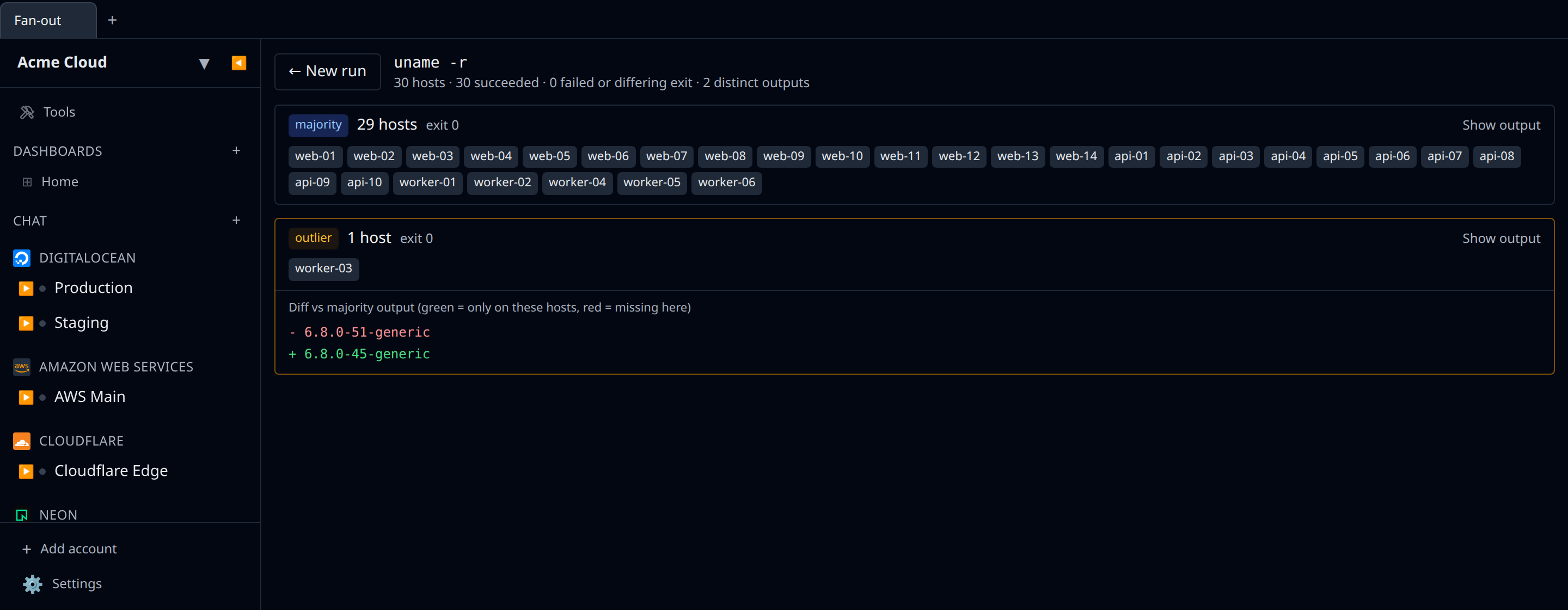
Results are grouped by output, not listed per host:
- The largest successful group is labelled majority — the answer most of your fleet gave.
- Every other group is an outlier, shown as a diff against the majority: green lines are what only these hosts said, red lines are what the majority said and these did not. Long runs of identical lines are collapsed.
- Groups where the command could not run at all are labelled failed and carry the reason — connection refused, an untrusted host key, a stopped host, an address the server refuses to dial.
Exit codes are part of the grouping, so hosts that printed the same text but exited non-zero form their own group rather than hiding inside the majority. Each host chip shows its exit code when it is not zero, and Show output expands any group’s full text.
Saved snippets
Commands you run often can be saved with a name. Snippets are stored per organization, so the whole team sees the same list — save uname -r once and everyone gets it from the Insert snippet… dropdown, on web, on desktop, and in the CLI.
From the CLI
The CLI has the same feature, with the same confirmation and the same grouped, diffed output:
# what can I fan out to?
infrawrench ssh-fanout --list --plugin hetzner

# run a command; you'll be asked "Run on 14 hosts?" first
infrawrench ssh-fanout "uname -r" --tag env:prod --key ops

# a saved snippet, unattended, as JSON
infrawrench ssh-fanout --snippet kernel --hosts web- --key ops --yes --json

# the organization's saved commands
infrawrench ssh-fanout snippets
Useful flags: --hosts <text> matches a host name, address, or tag; --plugin and --tag narrow further; --key <id|name> supplies the org SSH key VM hosts need; --user overrides the username; --concurrency <n> changes how many connections run at once; -y/--yes skips the confirmation for scripts; --json prints the raw per-host results.
The CLI’s fan-out is cloud-only — the freeze gate, the key store, and the audit trail live server-side. Use the desktop app’s Fan-out screen for local-only SSH accounts, which executes through your own machine’s SSH stack instead.
Security notes
- Host-key pinning applies exactly as it does for a single terminal — a host whose key is unknown or has changed fails that host with a trust error rather than connecting. See Security notes.
- The SSH key must be one you own; you cannot fan out with a teammate’s private key.
- The server refuses to dial hosts that resolve to internal address space, so a resource whose recorded address points inward is reported as blocked rather than connected to.
- One bad host never fails the run — unreachable machines come back as their own failure group alongside everyone else’s results.