Ephemeral environments
Capture the environment you already have as a reusable template, stamp out a fresh copy on demand with a required time-to-live, and let it delete itself when the clock runs out.
The environment diff tells you that staging and production have drifted apart. Ephemeral environments are the next step: take the environment you already have, turn it into a template, and stamp out a fresh copy whenever you need one — for a pull request, a load test, a demo, a migration rehearsal — with an expiry attached so it cannot quietly become permanent.
Everything about a template is built from the plugin’s own create form. Infrawrench has no per-provider recipe book; if a plugin can create a resource type, that type can be captured, and if it can’t, the capture says so instead of pretending.
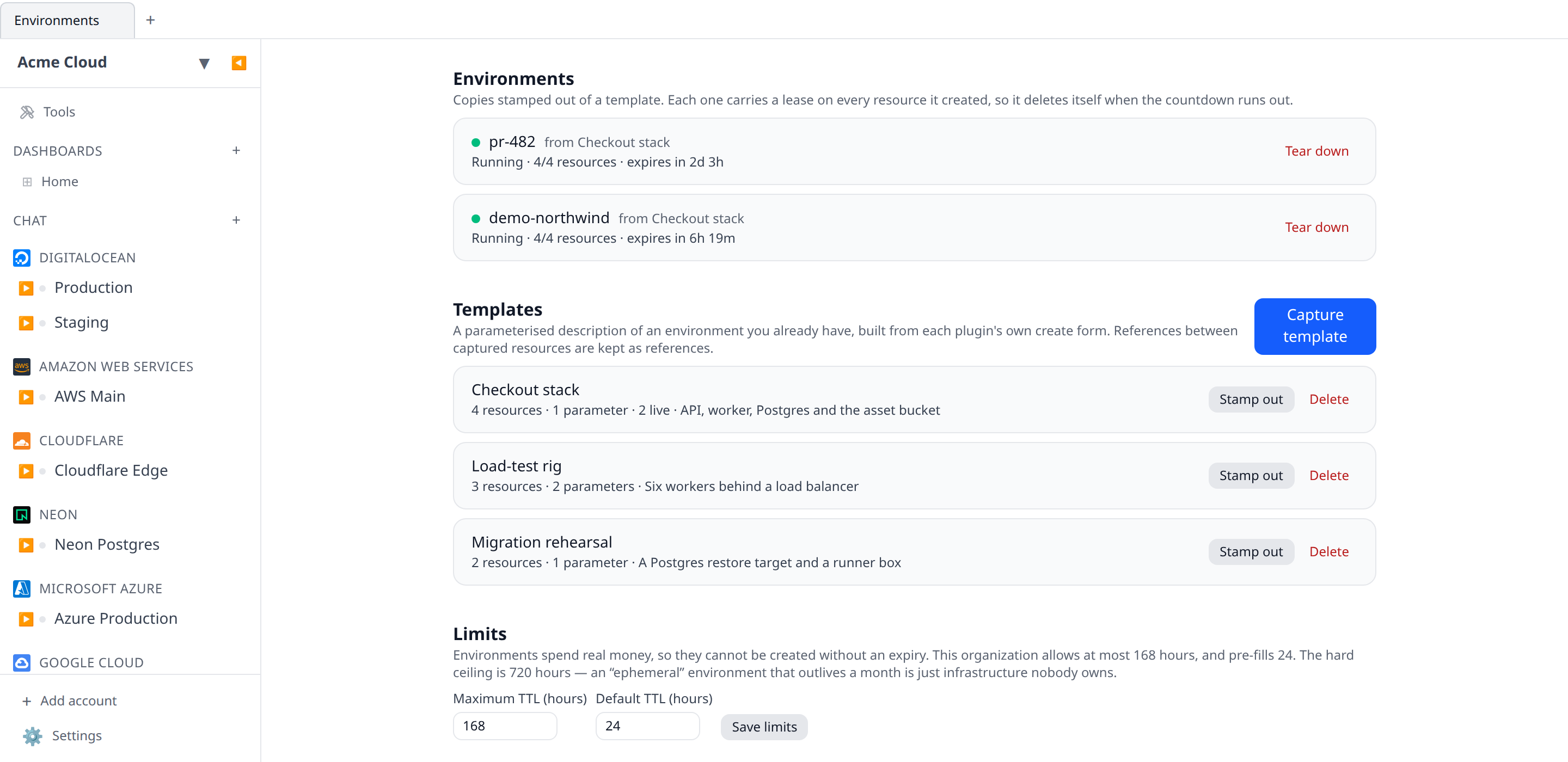
Capture a template
Open Environments from the sidebar and choose Capture template. Pick the account holding the environment you want to copy, and optionally narrow it with a tag (for example env = staging).
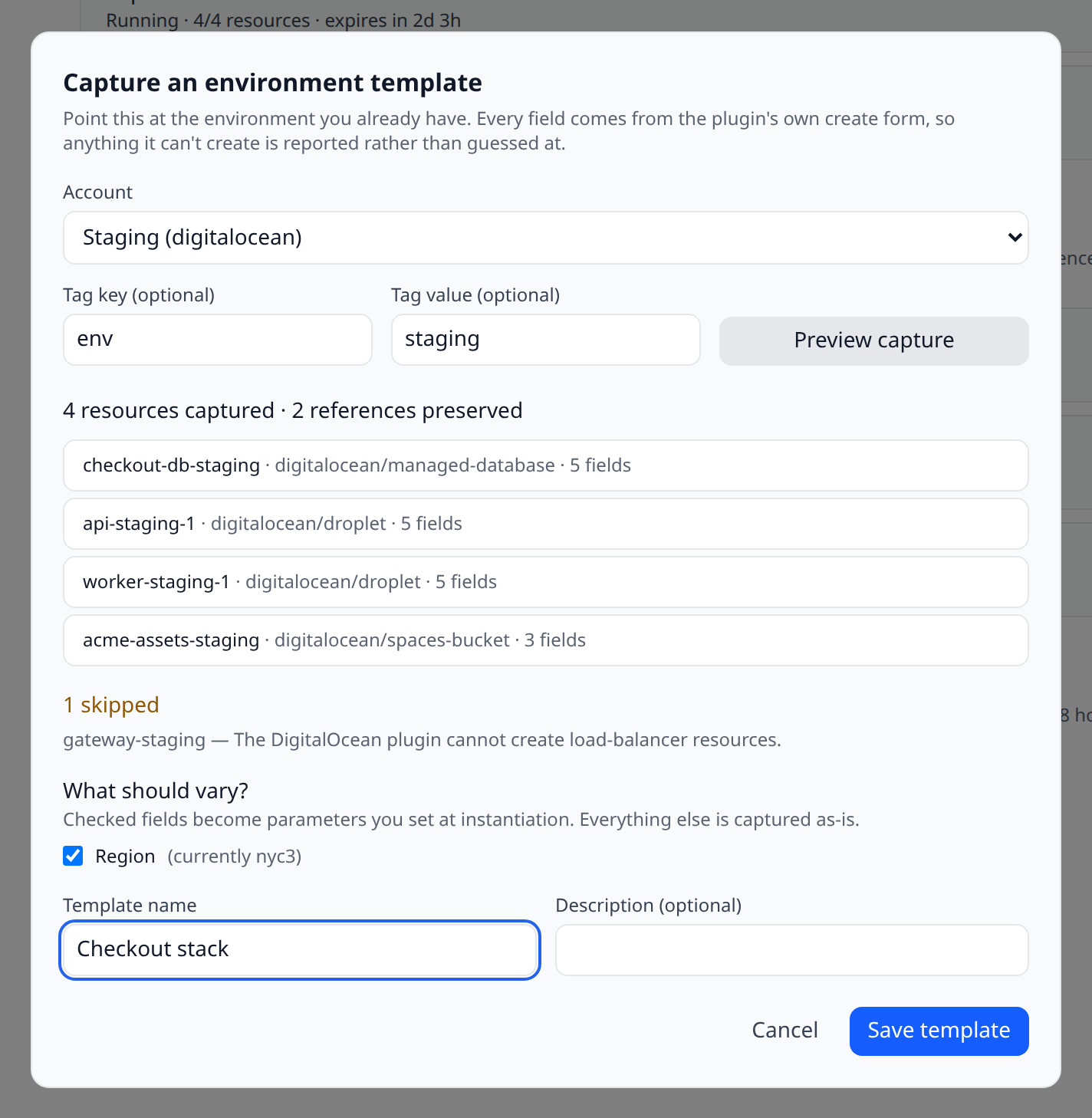
Infrawrench reads the selected resources and shows you a draft:
- What was captured. Each resource, its type, and how many of its fields are reproducible. A field only appears if the plugin’s create form has a matching input — anything the provider derives (ids, timestamps, computed endpoints) is dropped, because feeding it back would fail.
- What was skipped, and why. A resource whose plugin cannot create that type is listed with a reason. It is never silently omitted; a template that quietly lost your database is worse than one that tells you it couldn’t take it.
- References that were preserved. If your app resource points at your database — through an output reference you wired up, or simply by carrying the database’s id in one of its fields — that link is captured as a reference, not as a copied string. This is the part that makes a template more than a list: when you stamp out a copy, the new app gets the new database’s connection string.
- What should vary. Fields the plugins describe as knobs — region pickers, size pickers, disk sliders — are offered as parameters you can set at instantiation. Everything you leave unchecked is captured exactly as it is today.
Give the template a name and save it. Capture writes nothing until you do.
Stamp one out
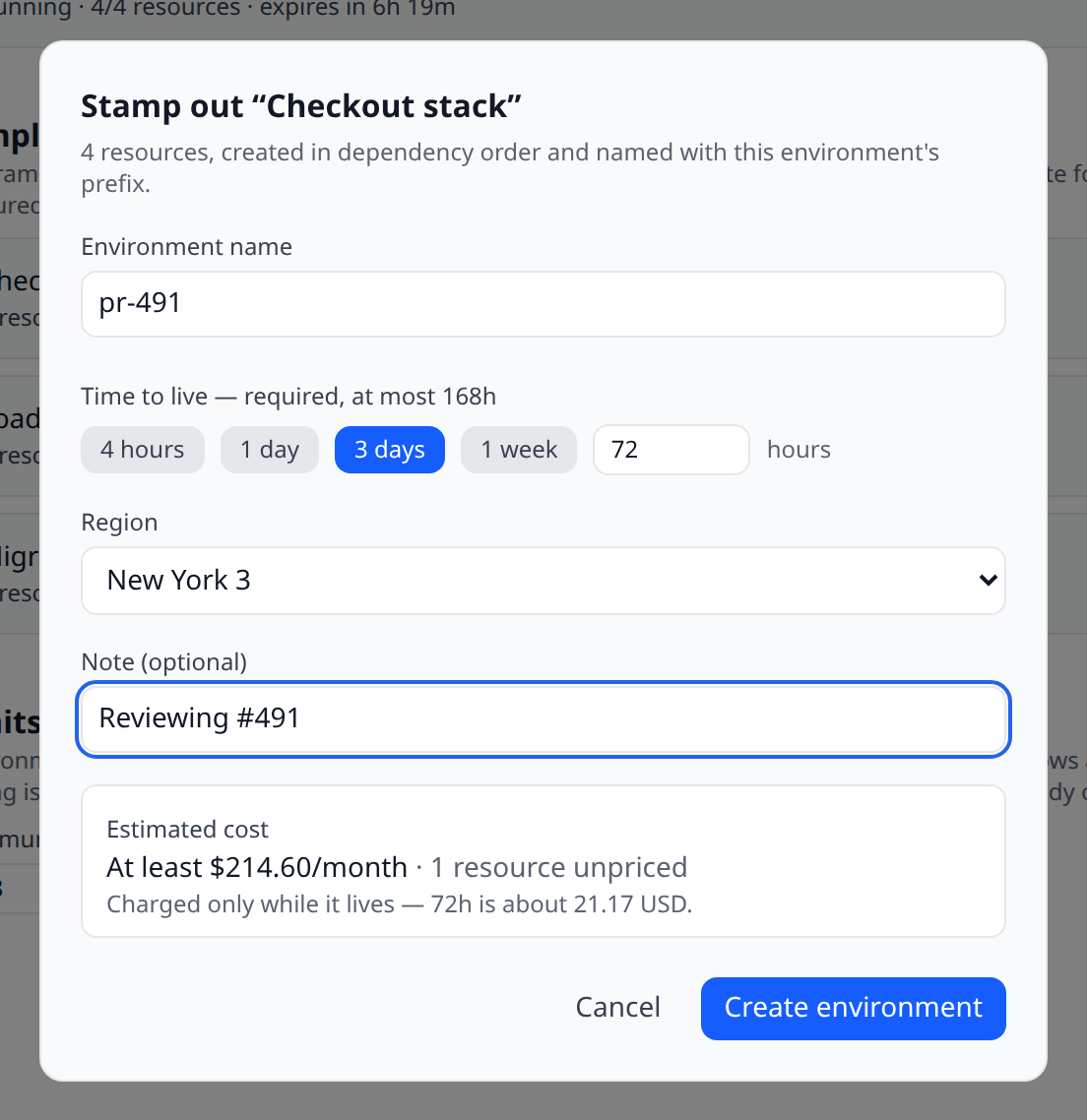
Press Stamp out on a template and fill in three things:
- A name. It becomes the prefix on every resource the environment creates, so
pr-482gives youpr-482-api,pr-482-db, and so on. Two copies of one template never collide. - A time to live. This is required — there is no “forever” option. Pick a preset or type a number of hours, up to the ceiling your organization sets (see below).
- Any parameters the template declares.
Before you commit, the form shows a cost estimate for the whole environment, drawn from the same forward-looking estimates the create form uses, plus what the chosen TTL works out to. A resource the provider cannot price is reported as unpriced rather than counted as free — “at least $X/month” is an honest answer, $0 is not.
Infrawrench then creates the resources in dependency order: anything referenced by something else is created first, and the reference is filled in with the freshly created resource’s real id or output. Each resource is created through exactly the same path the create form uses, so plugins, permissions, tag policies and audit logging all behave identically.
If something fails half-way
A partially created environment is recorded, not abandoned. Every member is written down before the first resource is created, and each one is marked as created the moment the provider returns. If the fourth of six creates fails, you get an environment marked partially created, listing the three resources that exist and the error on the fourth — and you can tear it down with one button.
This is deliberate: the one failure that would genuinely cost you money is a cloud resource that exists with nothing in Infrawrench pointing at it. That cannot happen here.
Expiry and teardown
Each resource an environment creates gets a lease set to the environment’s deadline, with auto-delete switched on. That means expiry is handled by the machinery you already have:
- You are warned twice before anything is deleted, through the same expiry radar and alert routing as every other lease.
- Deletion defers during a change freeze rather than being skipped — the environment is still going away, just not during the freeze.
- A failed delete is retried and then reported, never dropped silently.
What actually enforces the deadline. Every resource an environment creates gets its own lease, and those leases are executed by Infrawrench’s background poller — not by anything on this page. A background pass also checks, on every tick, for any resource that ended up without a lease (a rare consequence of a failure part-way through creation) and gives it one. Nothing here depends on you having the Environments page open, and closing your laptop does not extend an environment’s life.
If that repair itself keeps failing, it retries indefinitely — backing off to about once an hour — and the reason is recorded against the affected resource rather than only written to a log. In the one case Infrawrench cannot resolve on its own (a resource whose identity was lost mid-creation), it tells you which resource to look at instead of guessing; see below.
You can also tear an environment down at any time with Tear down. Resources are deleted newest-first, and the operation is safe to repeat: a resource that is already gone, or one the provider answers “not found” for, counts as done. Once an environment is torn down you can Forget it to remove the record; Infrawrench refuses to forget one that still owns resources.
When Infrawrench won’t delete for you
Very occasionally a resource is created but the record of its id is lost — a database write failing at exactly the wrong moment, or the process being killed mid-run. Teardown looks for it by the name it would have been given, and if something matches it tells you rather than deleting it:
A resource carries the name this member would have had (
i-0abc123), but nothing proves this environment created it. It has been left running — delete it yourself if it is not wanted, then tear this environment down again to close it out.
This is deliberate. A matching name is not proof of ownership, and Infrawrench has no signal that reliably distinguishes “the resource we just created” from “a resource of yours that happens to share the name”. Deleting on a guess could destroy infrastructure you manage yourself, so it doesn’t. An orphaned resource costs money, which you can recover; a wrongly deleted one costs data, which you cannot.
Everything Infrawrench created and recorded normally — which is essentially always — is deleted for you without any of this.
Guardrails
Environments spend real money, so the page is fenced:
| Guardrail | What it does |
|---|---|
| Time to live is mandatory | An environment cannot be created without a deadline. |
| Organization TTL ceiling | Set the maximum and the pre-filled default under Limits on the Environments page. The hard ceiling is 720 hours — an “ephemeral” environment that outlives a month is just infrastructure nobody owns. |
| Permissions | Viewing needs resources:read; editing templates needs resources:write. Stamping one out needs both resources:write and resources:delete, because the auto-delete lease it carries is a standing instruction to delete. Tearing down needs resources:delete. Changing the TTL ceiling needs org:settings:write. |
| Change freezes | Both stamping out and tearing down are blocked while an org change freeze is in effect. |
| Cost estimate first | The projected monthly cost is shown before the button does anything. |
| Live environment cap | An organization may hold 50 live environments at once, and a template may hold 50 resources. |
What it doesn’t do yet
- Pull-request environments. The API is shaped so an automation can drive it — one call to stamp out, one idempotent call to tear down — but Infrawrench does not yet watch your pull requests or post URLs back to them.
- Editing a saved template in the UI. Templates can be captured, listed and deleted from the page; changing one in place is an API call today (
PUT /environments/templates/{id}). Re-capturing is the usual route. - Local desktop mode. An environment is created against organization accounts and torn down by the cloud, so the desktop app shows it in cloud mode only. It is not on mobile at all — stamping out infrastructure is a desk task.
See also
- Environment diff — why staging and production disagree in the first place
- Resource leases — the TTL mechanism environments are built on
- Cost estimates — where the projected cost comes from
- Output references — the links a capture preserves