Change timeline
A cross-provider drift feed — see every resource that appeared, changed, or disappeared between polls, org-wide or per resource, with optional batched drift alerts.
The change timeline is a drift feed for your whole inventory. Every time the cloud poller re-fetches an account, it compares what the provider returned against the last stored snapshot and records anything that differs:
- Appeared — a resource exists upstream that Infrawrench hadn’t seen (or that had previously disappeared).
- Changed — a stored field, resolved output, or the display name differs from the previous sync, with a per-field before → after diff.
- Disappeared — a resource Infrawrench knew about is no longer returned by the provider.
It works for every provider automatically: the diff runs on the generic resource record Infrawrench already stores, not on provider-specific shapes, so a new plugin gets a change feed the moment its resources sync.
Cloud only. Change events are recorded by Infrawrench Cloud’s background poller as it syncs your accounts. Manual per-resource refreshes record events too. The desktop app in local-only mode does not collect them, so the Changes tile only appears there once you’re signed in to an organization.
The org-wide feed
Click Changes in the sidebar (next to Costs) to open the feed for the whole organization, newest first. It is the same page on the web app and in the desktop app when signed in. Each row shows when the change was seen, what kind it was, the resource (click through to its detail page), its type, and the account it came from. Updates carry a one-line summary of the changed fields — expand Show diff to see the before → after values.
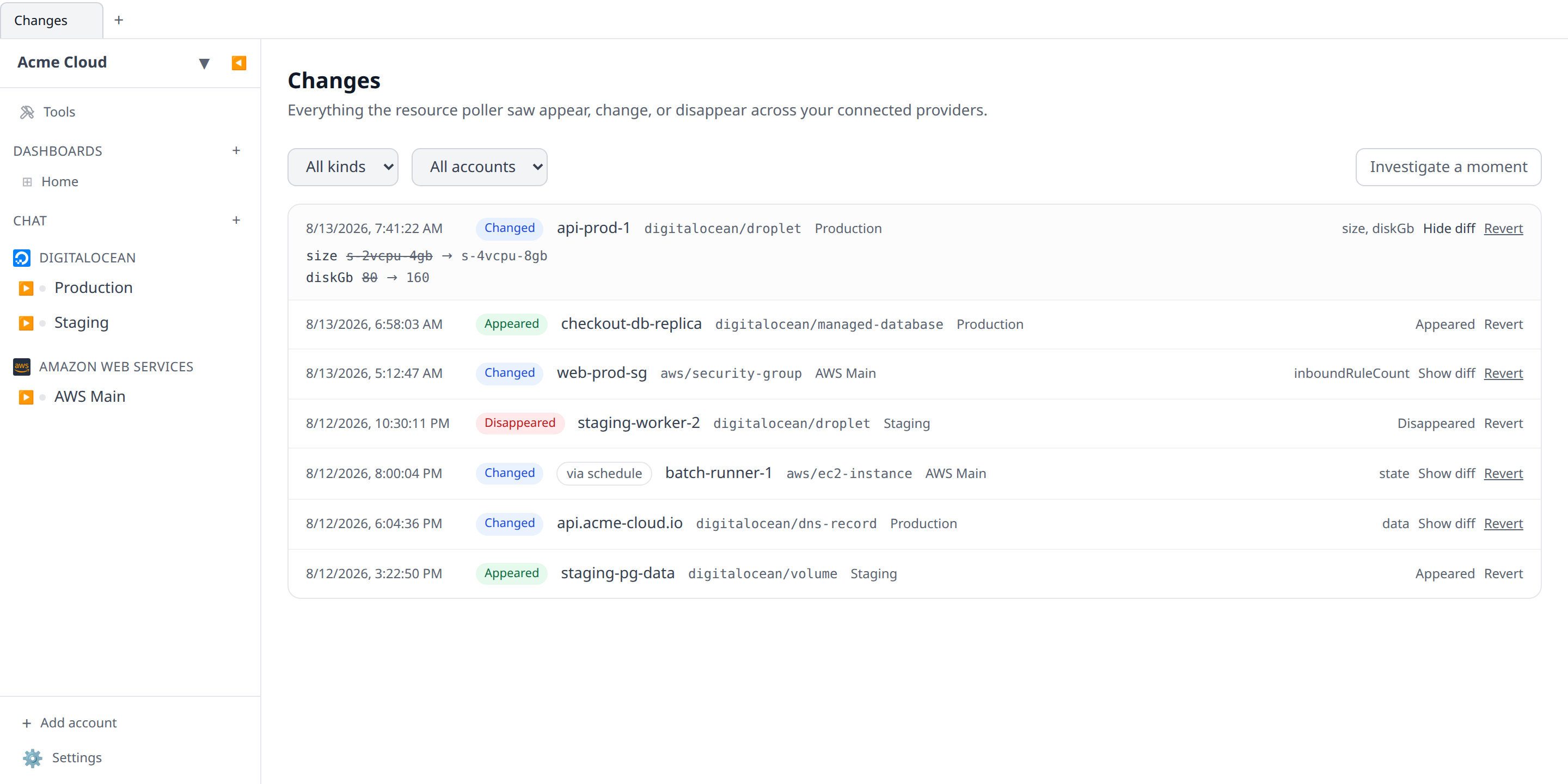
Filter the feed by change kind or by account; results are paginated.
Rows also carry a cost impact — what the change did to that resource’s per-day spend, measured from collected provider billing either side of it. See Cost per change & cost per deploy for how it is measured, when it says “unknown” rather than “$0”, and why it is a correlation rather than a verdict.
On your phone
The mobile app has the same feed: open Changes at the top of the Resources tab. Filters are chips rather than dropdowns — change kind, account, and a time window (Any time, 24h, 7d, 30d) — and Load more pages through the rest.
Tap any event to open it: the full per-field before → after list, the resource’s id, a button through to the resource itself, and — on Changed events — the same Revert flow the web app has, with the plan rendered in place rather than in a dialog. Tapping a drift notification opens the moment view centred on the window that alert covered — the digest’s changes merged with everything else that happened around them.
Per-resource changes
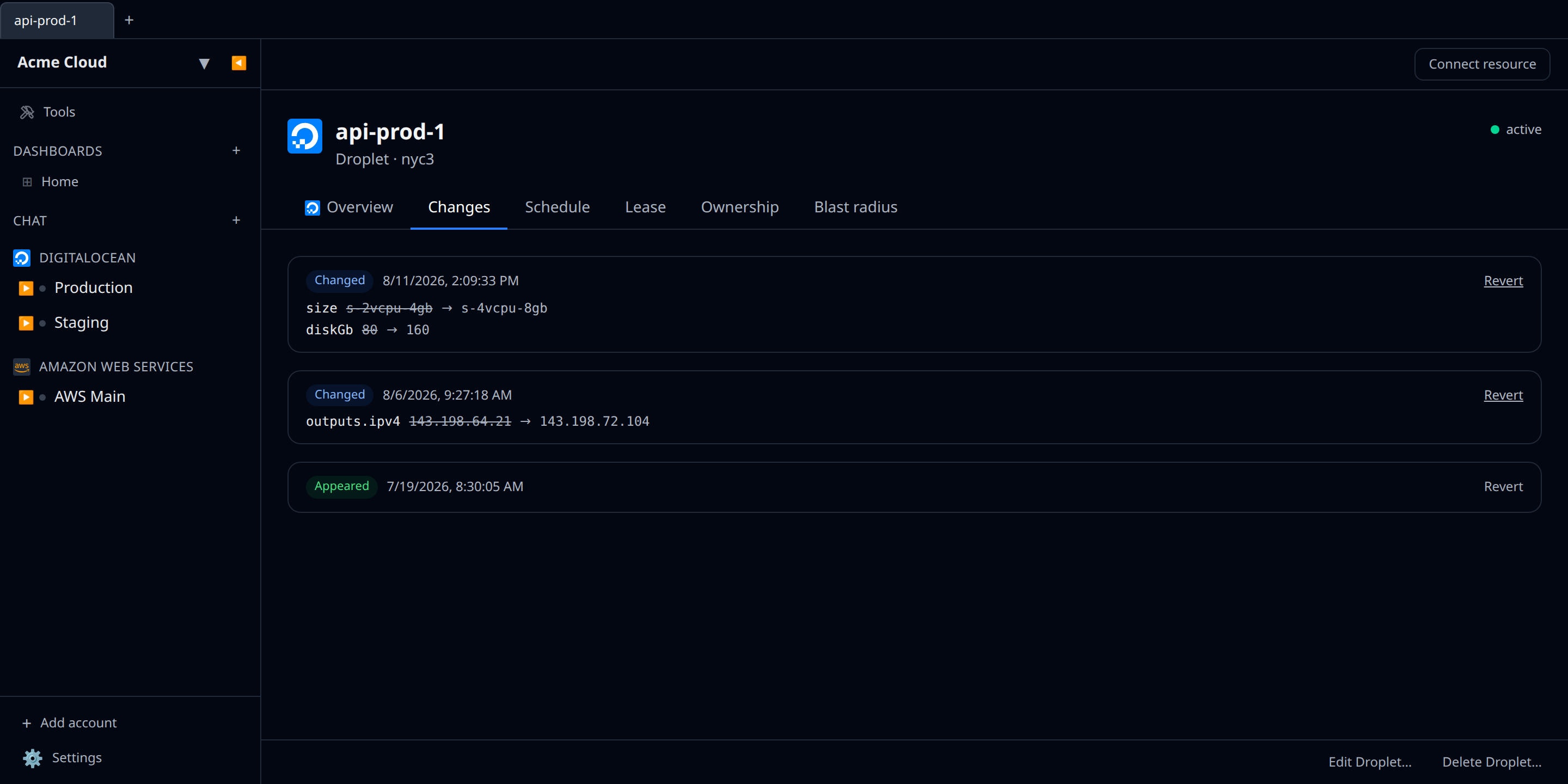
Every resource detail page has a Changes tab showing that resource’s own slice of the timeline — handy for answering “when did this instance’s IP change?” or “when did this DNS record show up?”. On mobile it is a Changes section on the resource’s page rather than a tab; tapping a change there expands the same diff.
From the CLI
The desktop CLI prints the same feed:
infrawrench changes                        # the last 50 events, newest first
infrawrench changes --last 7d              # only the past week
infrawrench changes --kind deleted         # only disappearances
infrawrench changes -a "Production GCP"    # one account (id, name, or unique prefix)
infrawrench changes --resource <id>        # one resource, with full before → after diffs
infrawrench changes --limit 200 --json     # stable JSON for scripting
Text mode prints one line per event — when it was seen, a +/~/- glyph for appeared / changed / disappeared, the resource, its type, its account, and a summary of the changed fields. Narrowing to a single resource with --resource also prints each update’s per-field before → after values, which would be thousands of lines for a whole organization’s feed. --json carries the full entries, including every diff, plus the total matching your filter.
<insert [Terminal showing infrawrench changes output: the event table with colored +/~/- glyphs, resource names, plugin/type column, account column, and a changed-fields summary] here>
The command is cloud-only for the same reason the page is — local-only mode has no poller, so it says so and exits rather than printing an empty table.
What counts as a change
The differ compares the top-level fields of the stored record: the display name, the non-secret fields the plugin’s lister returns, and cached resolved outputs (shown with an outputs. prefix). Values are compared structurally, so reordered JSON keys are not a change.
Two things deliberately do not produce events:
- Fields the lister stopped returning. Synced state merges over stored state, so a user-supplied value the provider never echoes back (for example a root password set at create time) survives — and is not reported as removed on every cycle.
- Absences during provider errors. If a resource type’s list call fails, its resources are left untouched and nothing is reported as disappeared. Only a successful list that omits a known resource counts.
Reverting a change
A Revert button sits on every row of the feed and on every event in a resource’s Changes tab. It puts the changed fields back to what they were — the same edit you would have made by hand, made for you.
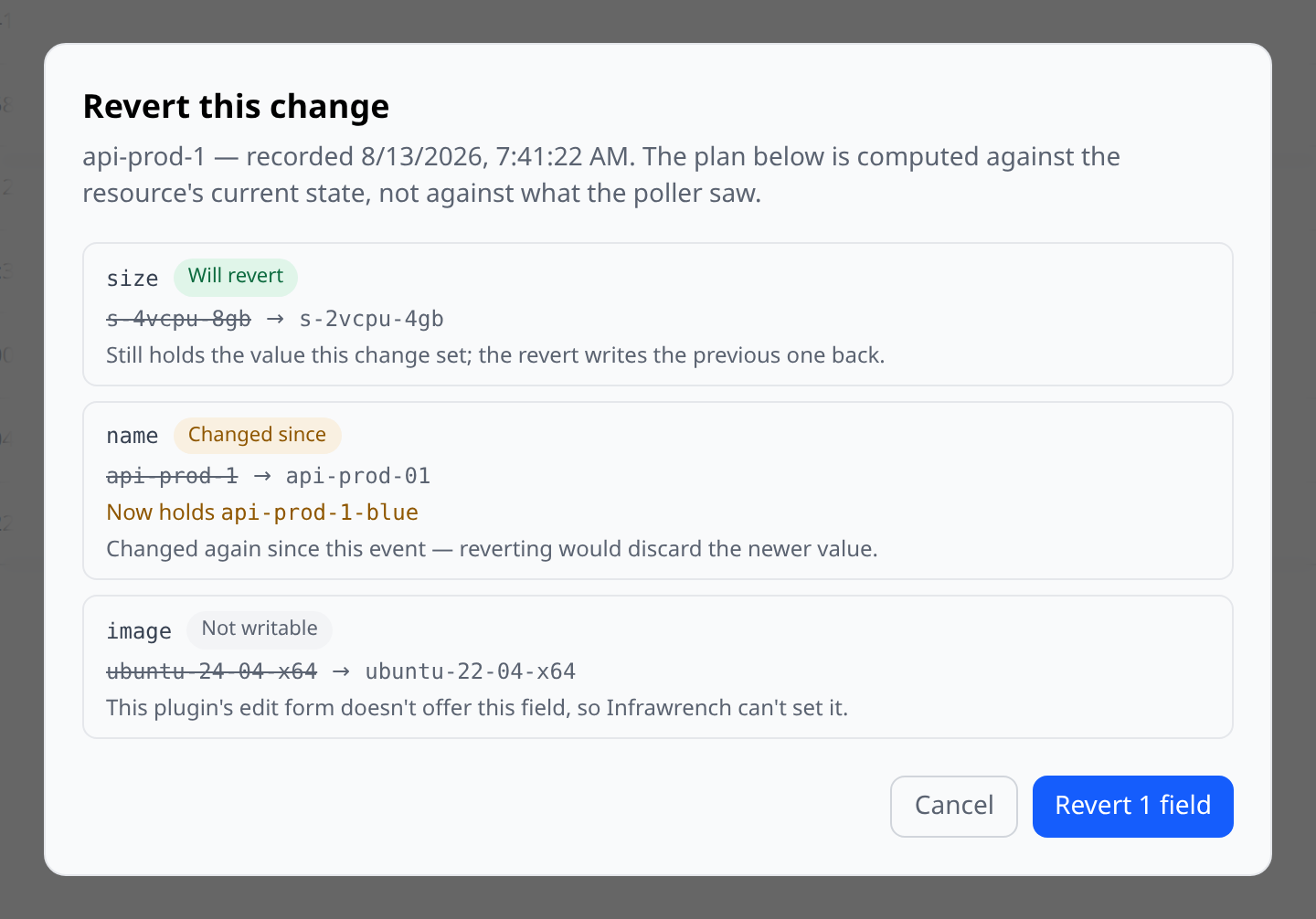
Reverting is not a replay of history: it is a write against the resource as it is now. So the button opens a dry run first, and the dialog tells you, field by field, what would actually happen:
| Verdict | What it means |
|---|---|
| Will revert | The field still holds the value this change set, and the previous value can be written back. These are the fields the revert touches |
| No change needed | The field is already back at its old value — someone (or something) beat you to it. Nothing is written |
| Changed since | The field moved again after this event. Reverting would silently discard that newer value, so the field is left alone and both values are shown |
| Not writable | The field is outside what the provider lets Infrawrench edit, or its previous value isn’t something an edit form can submit |
| Provider-derived | An outputs. entry. Outputs are computed by the provider from other state — there is nothing to write |
Whether a field can be written at all is decided by the plugin, not by Infrawrench: the revert can only set fields the resource’s Edit form offers. A field the provider treats as read-only, an identity field it won’t let you rename, and a secret all fall outside that set, and the dialog says so rather than attempting a provider call that doesn’t exist.
The one race it can’t win
The plan is rebuilt against a fresh read of the resource immediately before the write, so pressing Revert on a stale dialog is safe: anything that moved in the meantime comes back as Changed since and is left alone.
What that check cannot do is hold the field still while the write happens. If someone edits the same field in the provider’s own console — or a Terraform run does — in the fraction of a second between Infrawrench reading the field and writing it, their value is overwritten with no warning. Infrawrench can’t prevent this, because setting a field goes through one generic update call that has no way to say “only if it still equals this”; providers that support conditional writes have no route to express one here.
In practice the window is one API round-trip wide, and reverting a change nobody else is touching is not a risky operation. But it is a real window, and it is worth knowing about before you revert something during an incident that several people are working on at once.
What can’t be reverted
- Appearances and disappearances. Undoing a resource showing up means deleting it, and undoing one vanishing means recreating it. Neither is a field write, so neither is a revert — the button is present but disabled and says which action to take instead.
- Events with no field diff. There is nothing to invert.
- Events already reverted. Reverting is a one-shot: once an event has been reverted the row is labelled reverted and the button is disabled. If two people press Revert at the same moment, exactly one write happens and the other is told so.
An event only counts as reverted once the provider has accepted the write. If a revert is interrupted part-way — a deploy, a restart, a dropped connection — the event is held for five minutes and then becomes revertible again, so an undo that never landed is never left looking like one that did.
Very occasionally a provider is slow enough that a revert outlives that five-minute hold and someone else’s retry picks the event up first. When that happens the slow request tells you so explicitly, listing the fields it did write, rather than quietly reporting success — both attempts are putting back the same recorded values, so the resource ends up correct either way, but the message is worth reading before you retry again.
If the revert reaches the provider but Infrawrench then fails to record it, you get an explicit error saying the resource has been put back and the timeline hasn’t caught up. Retry it: the retry sees the fields are already back, records the revert without touching the provider again, and the event picks up its reverted label. That reconciliation only happens when Infrawrench actually issued a write for that event — it keeps a note before calling the provider — so a resource you put back by hand is never claimed as somebody’s revert.
Guardrails
- Reverting needs the Resources: write permission — the same one editing a resource needs.
- It is blocked by an active change freeze, like any other provider mutation, and can be overridden by an admin the same way.
- Every revert that reaches the provider is written to the audit log as
resource.change_revert, naming who did it, the change event, and the fields written — including the rare superseded case below, which is recorded asoutcome: supersededso it doesn’t read as a second, separate revert. A revert that wrote nothing writes no audit entry either. Attribution is best-effort rather than guaranteed: a cloud provider’s API and Infrawrench’s database can’t be written to together as one transaction, so in the rare case the audit entry itself fails the API says so explicitly and the details go to the server log instead of being dropped quietly. - The revert shows up in the timeline itself. Nothing special-cases it: the next poll sees the resource differ from its stored snapshot and records the undo as an ordinary Changed event.
Drift alerts
The feed is a place you go and look. If you’d rather be told, turn the Drift trigger on for a Slack channel, a Microsoft Teams channel, or your phone.
It is the only alert trigger that arrives off, and the only one that is batched rather than sent per event — both for the same reason. A budget crossing or a cost anomaly is exceptional by construction; drift is continuous, and a single sync pass on a busy organization can record hundreds of changes. One message per change would be unreadable within a day and muted within two.
So drift alerting works like a digest:
- One message per organization per cooldown window. Not one per change, not one per account, not one per sync pass. The default window is 60 minutes, so the worst case is 24 messages a day no matter how much moves.
- Each message covers everything since the last one. A window with nothing worth saying isn’t a window you miss out on — its changes roll into the next message.
- Each message is bounded. It leads with the counts, then names the first dozen changes — appearances and disappearances first — and links to the feed for the rest. A window with more changes than it can read reports “500+” rather than pretending to an exact number.
Choosing what counts
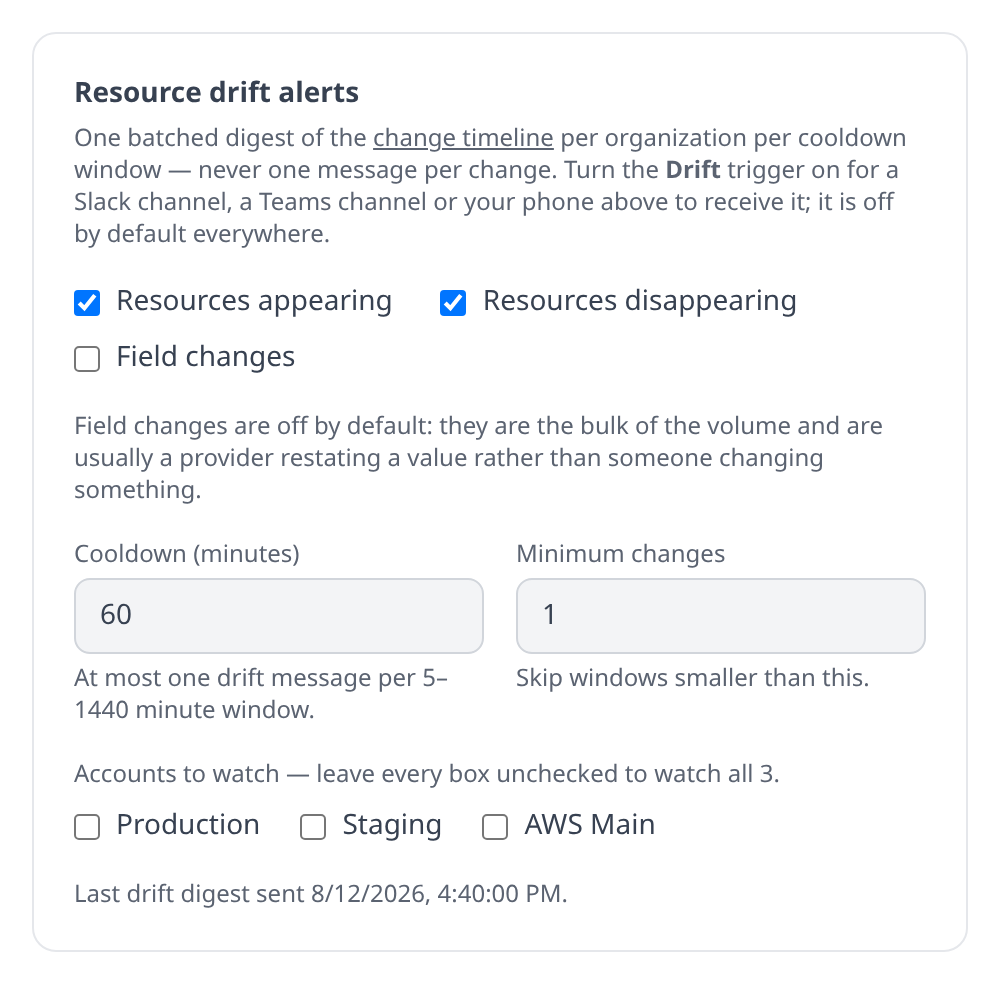
Settings → Notifications → Resource drift alerts configures this once for the whole organization. It needs the Organization settings permission, and it is separate from the per-channel toggles above: those decide who hears, this decides what and how often.
| Setting | Default | What it does |
|---|---|---|
| Resources appearing | on | Alert when a resource shows up that Infrawrench hadn’t seen |
| Resources disappearing | on | Alert when a known resource stops being returned |
| Field changes | off | Alert on per-field updates. These are the bulk of the volume and are usually a provider restating a value, so they start silent |
| Cooldown | 60 minutes | The least time between drift messages. Floored at 5 minutes — below the poller’s own cycle the message rate would just follow the sync rate again |
| Minimum changes | 1 | Skip windows smaller than this |
| Accounts to watch | all | Leave every box unchecked to watch everything, or tick the accounts worth being woken up for |
Only the background poller raises drift alerts. A manual refresh from the UI still records events in the feed but never notifies — the same rule sync-failure incidents follow, and for the same reason: you are already looking at the result.
Drift alerts do not send SMS. Twilio is reserved for things that should interrupt a human — sync incidents, budget crossings, pages, approval requests, and (opt-in) cost anomalies — and a drift digest is a thing to read, not a thing to be woken by.
On the mobile app, Settings → Notifications carries your personal Resource drift push toggle, so you can mute or unmute the feed from the phone it arrives on. The organization-wide filters in the table above are set on the web app: they decide what everyone in the org hears, and retuning a shared threshold is not a thing to do one-handed.
How far back it goes
Change events are kept for 90 days, then deleted. The cloud poller trims the feed once an hour, so the oldest rows you can reach are always within about an hour of that window — scrolling (or asking the API for a from date) past 90 days returns nothing, even for a resource that has existed for years.
The window is the same for every organization and is not configurable. Nothing else depends on it: the weekly digest counts resource churn from the inventory itself, not from this feed, so a pruned change never changes a digest.
If you need a permanent record of a change, export it while it is still in the window — GET /api/org/{orgId}/changes takes from, to, and paging parameters and returns the same rows the UI shows.
Requirements
- The feed needs the
resources:readpermission; reverting needsresources:write; the drift alert settings needorg:settings:write. - Events accumulate from the first poll after your org picks up this feature; there is no retroactive history.
- History is capped at the 90-day retention window described above.
The feed is also available over the HTTP API: GET /api/org/{orgId}/changes for the paginated org feed and GET /api/org/{orgId}/changes/resource for a single resource. Reverting is the same path under two verbs — GET /api/org/{orgId}/changes/{changeId}/revert returns the plan without writing anything, and POST to the same path applies it.
The same comparison, pointed at a different pair of snapshots, is what environment diff runs: instead of one account against its own past, two accounts against each other.