Jumpbox routing
Route SSH connections through one or more SSH jump hosts (ProxyJump), set up from the app.
When a target host is on a private network, SSH normally requires a jump host (a “bastion”) sitting on the network edge. Infrawrench supports this natively: any SSH plugin account can route through another SSH account, the chain is resolved at connect time, and the entire pipeline — every hop, host-key verification, agent forwarding on the final hop — works the same on desktop, the desktop cloud proxy, and the web app.
The mental model
A jumpbox in Infrawrench is just an SSH plugin account. Marking one as a jumpbox is as simple as setting another SSH account’s Connect through field to it. The chain is implicit:
- Account A has
Connect through = ∅— direct. - Account B has
Connect through = A— dials A first, then tunnels to B’s host:port through A. - Account C has
Connect through = B— dials A, tunnels to B, tunnels to C.
The chain has a hard cap of 8 hops and cycles are detected and rejected, so misconfiguration fails loudly rather than hanging.
Two ways to create a routed target
From the SSH account form
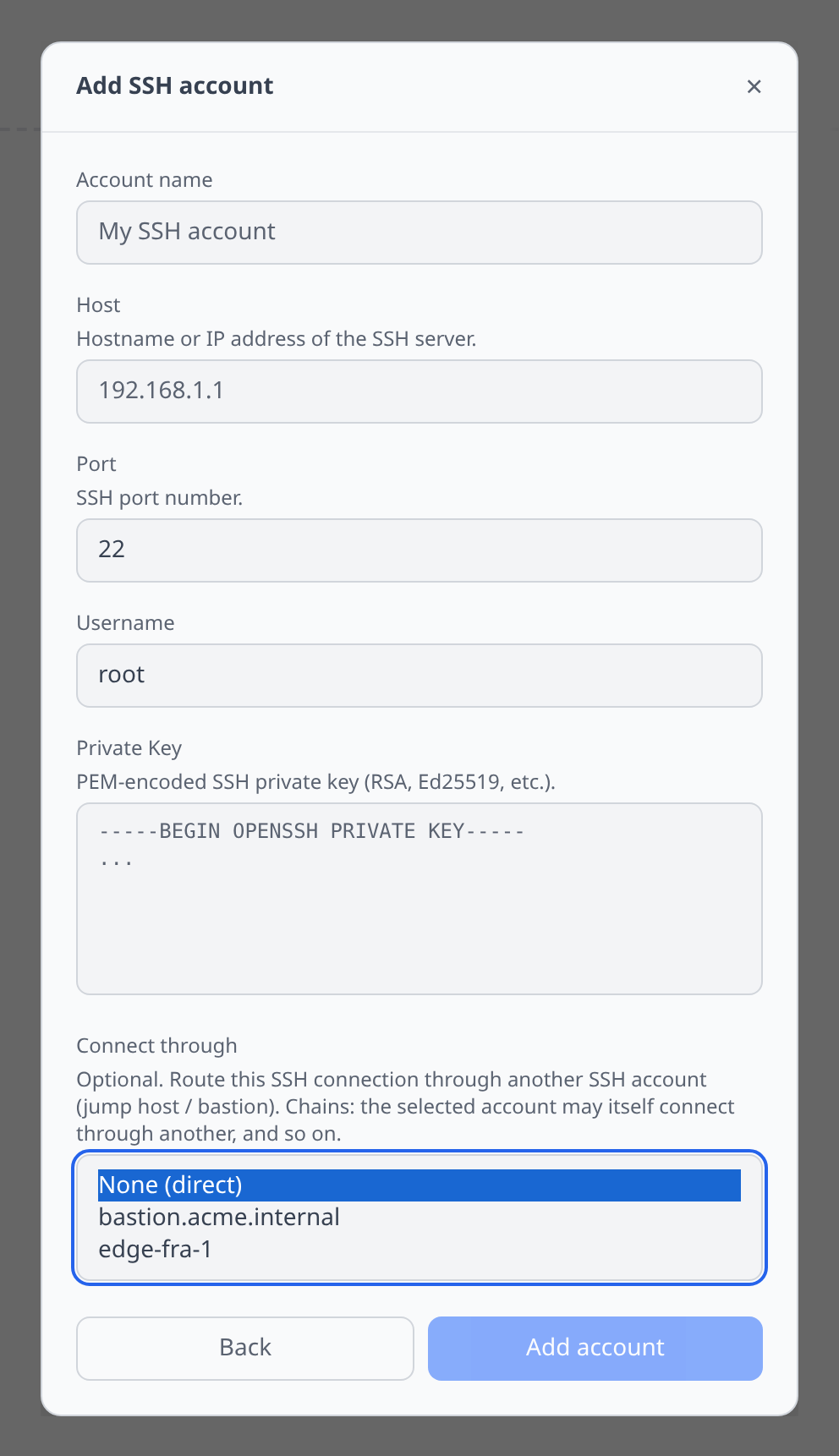
When adding a new SSH account (sidebar → Add account → SSH), the credential form includes a Connect through dropdown listing your other SSH accounts. Pick one and save — the new account will now dial through it on every terminal/SFTP open.
From a cloud VM’s detail page
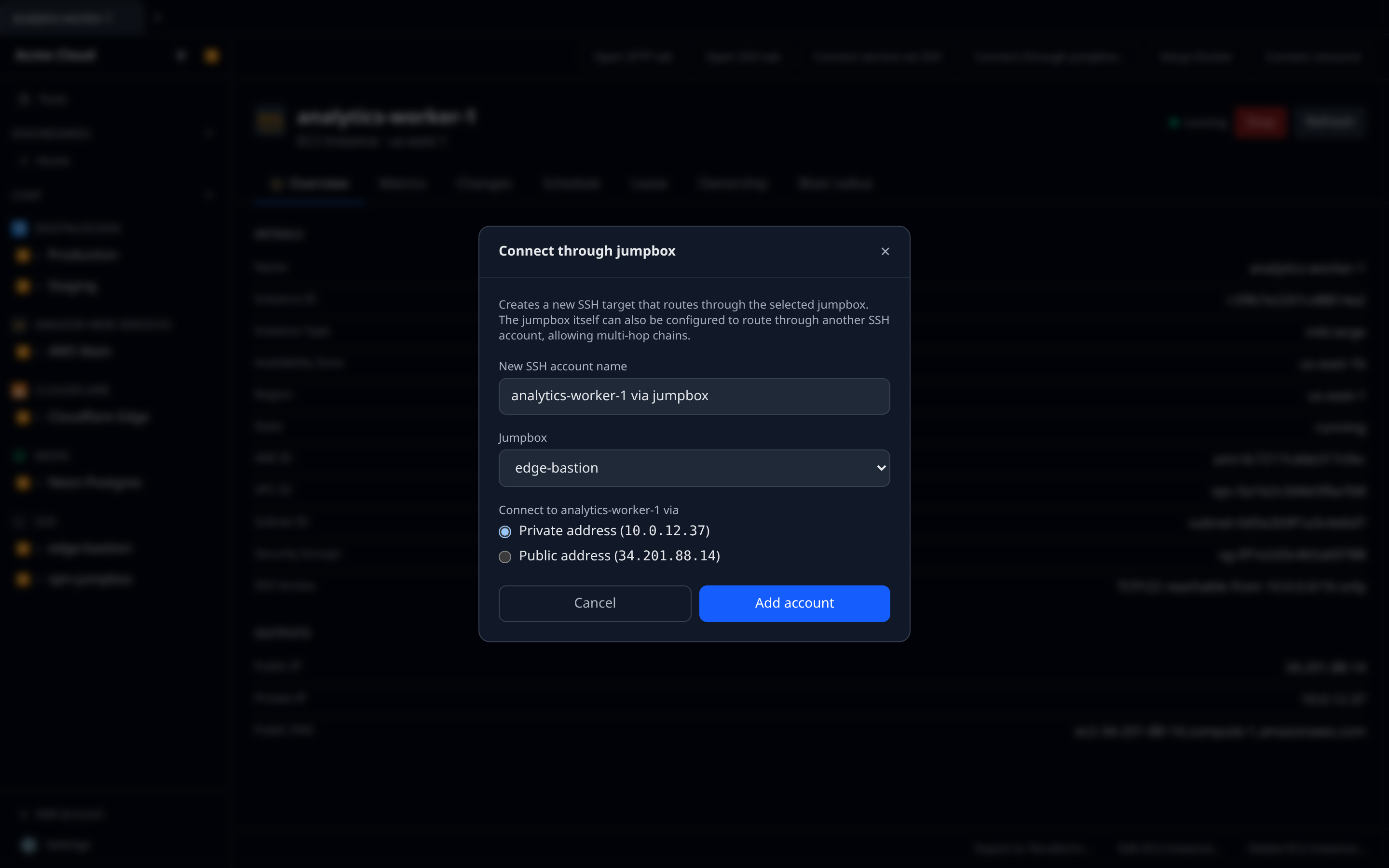
Any cloud VM with an SSH endpoint (EC2 instance, GCE instance, Droplet, Hetzner server, Scaleway instance, OVH instance, Azure VM) gets a Connect through jumpbox… button alongside its SSH/SFTP actions. Clicking it opens a small dialog with:
- a dropdown of SSH plugin accounts to use as the jumpbox,
- a radio choice between the VM’s public address (default for VMs without a private network) and private address (default when one is declared), and
- a name for the new SSH-target resource it will create.
On confirm, it opens the standard SSH-plugin Add account form pre-filled with host (the chosen IP), port, username, and the selected jumpbox. Add the private key, save, and a new SSH-target resource appears in the sidebar — already wired to dial through the chosen jumpbox.
Public vs private address
For cloud VMs that expose both a public and a private IP, the dialog defaults to the private one — most of the time, the jump host is on the same VPC/private network as the target and reaching it on the internal interface is both faster and more secure. Switch to the public address only when the jump host doesn’t share a network with the target.
The same option only appears for resource types whose plugin declares a privateHostOutputKey on its sshEndpoint. If only the public address is available, the dialog skips the radio selector.
Multi-hop chains
To extend an existing routed target with another hop in front of it, edit the jump host account (not the final target) and set its Connect through to a third account. The resolver walks the pointer chain top-down at connect time, so:
edge → jump → targetis set up by configuring target.connectThrough = jump and jump.connectThrough = edge. The chain is followed in order, with each hop’s host key verified independently against the same TOFU cache the SSH terminal uses.
What gets audited
Each routed session writes an extra audit log entry per chain open, recording the hop count and the ordered list of intermediate host:port:username triples. Per-hop agent-forwarding sign requests still emit the existing ssh.agent.session_opened entry; the new ssh.session.chain_opened entry covers the chain itself for organisations that need to attribute jump-host usage.
Limitations
- Routing SSH through a bastion agent is not the same feature: bastion agents tunnel cloud-API HTTP egress, not SSH. Jumpbox routing is plain ssh2
forwardOutchaining and does not require the bastion agent. - Agent forwarding is applied to the final hop only — intermediate hops never see the user’s agent socket.
- All hops must be reachable from the host running the SSH session (the desktop process, or the web server on the cloud side). The first hop is always dialled directly.