IaC reconciliation
Upload the Terraform state you already have and Infrawrench classifies every synced resource as managed, drifted, or unmanaged — then writes the import blocks to adopt the unmanaged ones.
Terraform tells you what it manages. It cannot tell you what it doesn’t — the security group somebody widened at 2 a.m., the RDS instance created “just for a test” eighteen months ago, the load balancer that nobody remembers asking for. Those are the resources that break a terraform apply, survive an environment teardown, and appear on the bill forever.
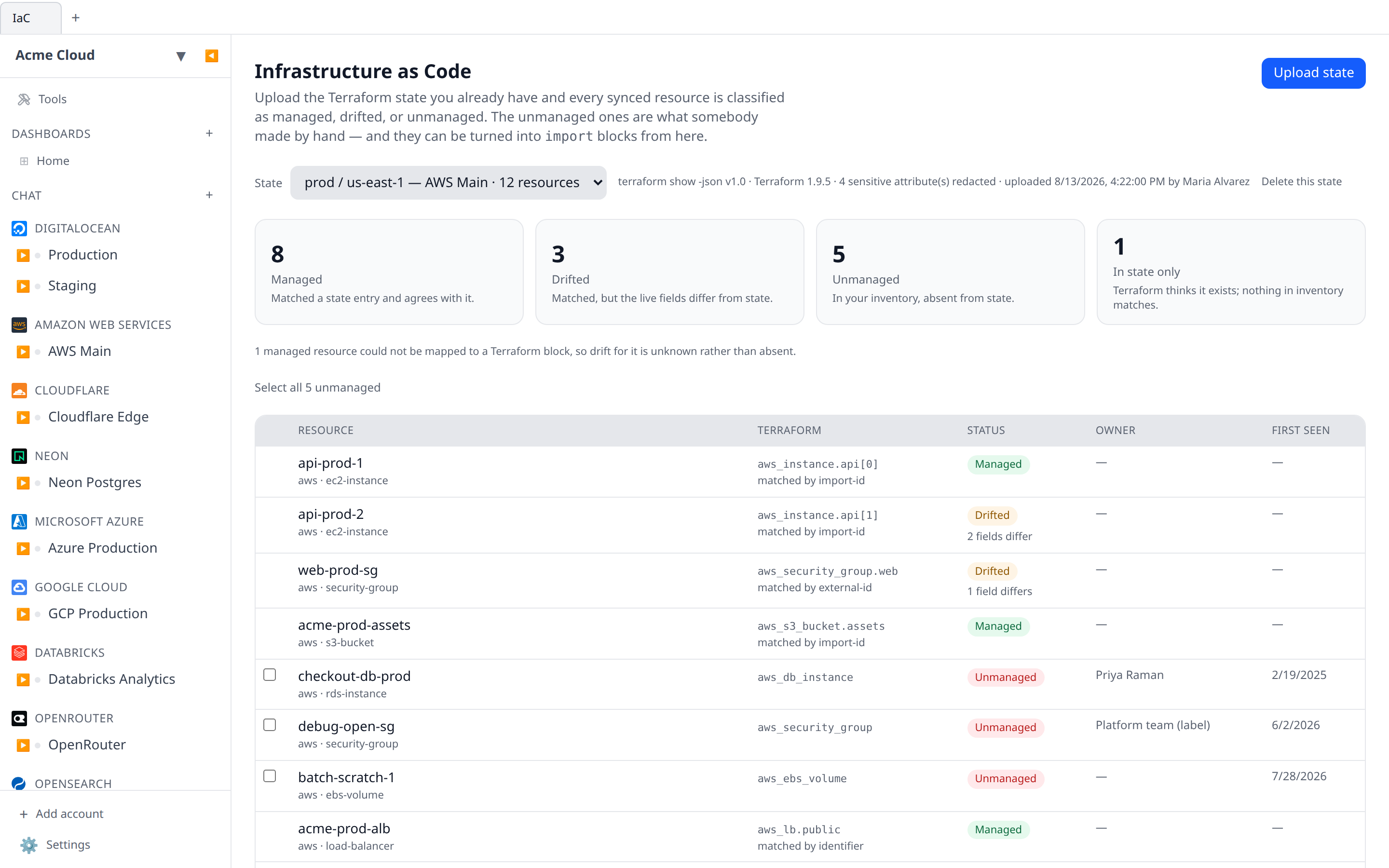
IaC reconciliation answers the question directly. Upload the Terraform state your organization already has, and every resource Infrawrench has synced is put in one of three buckets:
| Status | Meaning |
|---|---|
| Managed | Matched an entry in your state, and the live fields agree with it |
| Drifted | Matched an entry in your state, but the live fields have moved away from it |
| Unmanaged | In your inventory, absent from your state — somebody made it by hand |
A fourth category sits beside them: resources that are in state but not in inventory. Terraform believes they exist; Infrawrench has never seen them.
Four things called “Terraform”
Infrawrench has four features that mention Terraform, and it is worth being precise about which is which:
| Feature | Direction | Unit |
|---|---|---|
| IaC reconciliation (this page) | Terraform state → in | Your cloud resources |
| Eject to Terraform | HCL → out | Your cloud resources |
| Config as code | JSON → both ways | Your Infrawrench organization |
| Terraform provider | Terraform → Infrawrench | Your Infrawrench organization |
This one is the only feature that reads state in. Eject-to-Terraform writes HCL describing your cloud resources; config as code moves your whole Infrawrench organization as one JSON document; the Terraform provider lets Terraform manage Infrawrench’s own configuration. They do not overlap.
Uploading a state document
Open IaC in the sidebar and choose Upload state. Two document shapes are accepted:
terraform show -jsonoutput — run it in your workspace and upload the result. This is the recommended form; it is the format HashiCorp documents as stable.- A raw
.tfstate— state file format version 4 (Terraform 0.12 and later).
terraform show -json > state.jsonGive the upload a label (“prod / us-east-1”) and, optionally, a scope: an account, or the whole organization. Scoping to an account means only that account’s resources are classified against it, which is what you want when each Terraform workspace covers one account.
The format version is checked, not assumed. A state file at version 3 or a terraform show document at a format version this parser does not read is refused with an explanation, rather than half-read — a partially-read state would report genuinely managed resources as ClickOps, which is exactly the wrong answer.
Re-upload after each apply. Infrawrench keeps the twenty most recent documents per organization and prunes superseded ones after 90 days; the newest for each scope is always kept, so a workspace nobody has re-applied in months does not quietly lose its answer.
What happens to secrets in your state
A Terraform state file is one of the most secret-dense artefacts an organization has. Three things are true of every upload:
- The document itself is never stored. It is parsed once, on upload, and discarded. Only the parsed projection is written to the database.
- Attributes the state marks sensitive are dropped before anything is written. Both formats carry that marking —
sensitive_attributesin a.tfstate,sensitive_valuesinterraform show -json— and both are honoured. If a nested value inside an attribute is sensitive, the whole top-level attribute is redacted; half-redacted structures invite mistakes. - Redacted attributes are never compared. A field whose value was dropped cannot produce a drift row, so nothing about a secret’s value leaks through the diff. The page reports how many attributes were redacted so you can see the redaction happened.
Documents nesting more than 64 levels deep inside a single attribute are rejected outright — real Terraform state does not nest anywhere near that far, so crossing it means the file is not what it claims to be. Attribute values are also truncated at 4 000 characters, and structures larger than that are dropped whole — a value that big cannot be a useful diff, and the bound keeps an untrusted upload from becoming a storage problem. Clamped values are excluded from drift comparison exactly like sensitive ones: a value Infrawrench did not store faithfully must never be compared, or its own storage limit would show up as drift. Uploads are limited to 8 MiB and 250 attributes per resource.
How resources are matched
A Terraform address like aws_instance.web has to be tied to a resource Infrawrench synced. That mapping is derived from the plugin’s own export mappers, not from a second hand-written table: each plugin already declares how its resources become Terraform blocks for eject to Terraform, and reconciliation reads that same declaration backwards. A plugin that gains export support gains reconciliation with it, and the two directions cannot fall out of step.
Matching runs on identity, in order:
- the import ID the plugin’s mapper produces for the live resource;
- the resource’s external ID (the provider’s own ID);
- failing both, the
id/arn/self_linkin the state entry — but only when it resolves to exactly one state entry. An ambiguous identifier is a coincidence, and reporting a coincidence as “managed” is worse than reporting a managed resource as unmanaged.
Every row says how it was matched, so you can argue with it.
Where a plugin resource type’s Terraform type cannot be derived at all, the page says so under Coverage gaps rather than guessing. That only affects the “in state only” list — a resource Infrawrench actually holds still matches, because there the real mapper runs against the real resource.
Drift
A drifted resource shows the fields where your state and the live resource disagree, rendered exactly the way the change timeline renders drift — same comparison, same before → after layout. The left value is what Terraform state carries; the right is what is actually running.
Only the attributes the plugin’s export mapper knows about are compared. Everything else in a state entry is provider bookkeeping Infrawrench has no opinion about, and comparing it would produce noise, not drift.
A resource that matched but that no plugin can express as a Terraform block is reported as managed with a note — its drift is unknown, not absent. Infrawrench will not tell you a resource is clean when it has no way to check.
Adopting unmanaged resources
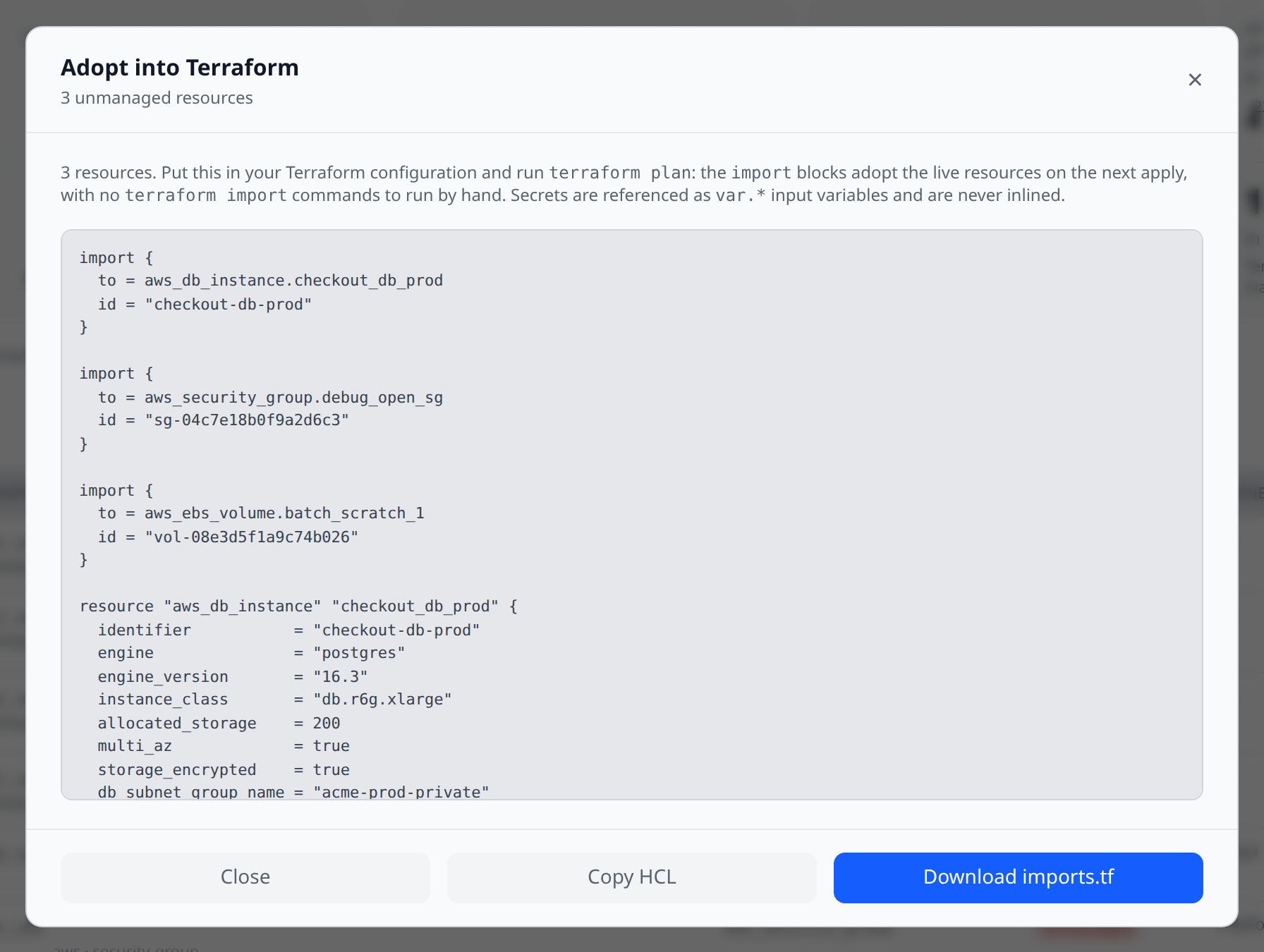
This is the point of the feature. Select unmanaged resources — or Select all — and choose Generate import blocks. You get one document containing Terraform 1.5+ import blocks followed by the matching resource stanzas:
import {
  to = aws_instance.web
  id = "i-0abc123def456"
}

resource "aws_instance" "web" {
  ami           = "ami-0abc123"
  instance_type = "t3.medium"
  subnet_id     = "subnet-0123456"
  tags = {
    Name = "web"
  }
}
Put it in your configuration and run terraform plan. The import blocks adopt the live resources on the next apply — no terraform import commands to run by hand, and the whole set comes under management in one reviewed change.
The HCL is generated by the same mappers and serializer that back eject to Terraform, plus the adoption blocks. Secrets are referenced as var.* input variables and are never inlined.
Every resource in the document is imported, not created. A resource block with no matching import block is a create — running it would fail with already-exists, or build a second copy of something you already have. So if a provider gives no import ID for a resource, that resource is left out of the document entirely rather than declared without an import, and is listed with the reason instead. The same goes for resources no plugin can express. Nothing is dropped silently, and nothing in the document is unsafe to plan.
Who made this, and when
For every unmanaged resource the page shows two extra columns:
- Owner — from resource ownership, if anybody recorded one.
- First seen — the date the change timeline first recorded the resource appearing.
Together those turn “you have 34 unmanaged resources” into a list you can act on: a name to ask, and a date to ask about.
Permissions
| Permission | Grants |
|---|---|
iac:read | View the classification, drift, and generate import blocks |
iac:write | Upload and delete state documents |
Members get iac:read by default, for the same reason they can read the change timeline: “is this thing managed?” is a question you have to answer before you touch anything. Uploading a state document is an organization declaring what its estate looks like, so it stays with admins and owners.
Where it runs
Cloud only, on web, desktop and the CLI-less surfaces alike — the inventory being classified is the organization’s synced resources, which local-only desktop mode does not have. The desktop panel says so rather than fetching.
Related
- Eject to Terraform — generate HCL for resources you already have
- Change timeline — the drift feed this page’s field diffs come from
- Resource ownership — who owns what
- Config as code — your Infrawrench organization as one JSON document
- Terraform provider — manage Infrawrench with Terraform