OpenSearch
Connect to an OpenSearch (or Elasticsearch-compatible) cluster — browse indices, run searches, manage snapshots.
The OpenSearch plugin gives you a single account per cluster. It speaks the OpenSearch REST API, so it also works against Elasticsearch (7.x+) and forks like Aiven for OpenSearch.
For provider-managed OpenSearch (DigitalOcean, AWS, OVH), you don’t normally add an account here directly — the cluster shows up as an OpenSearch tab inside the managed-database resource detail page, and connection details flow through automatically.
What you can manage
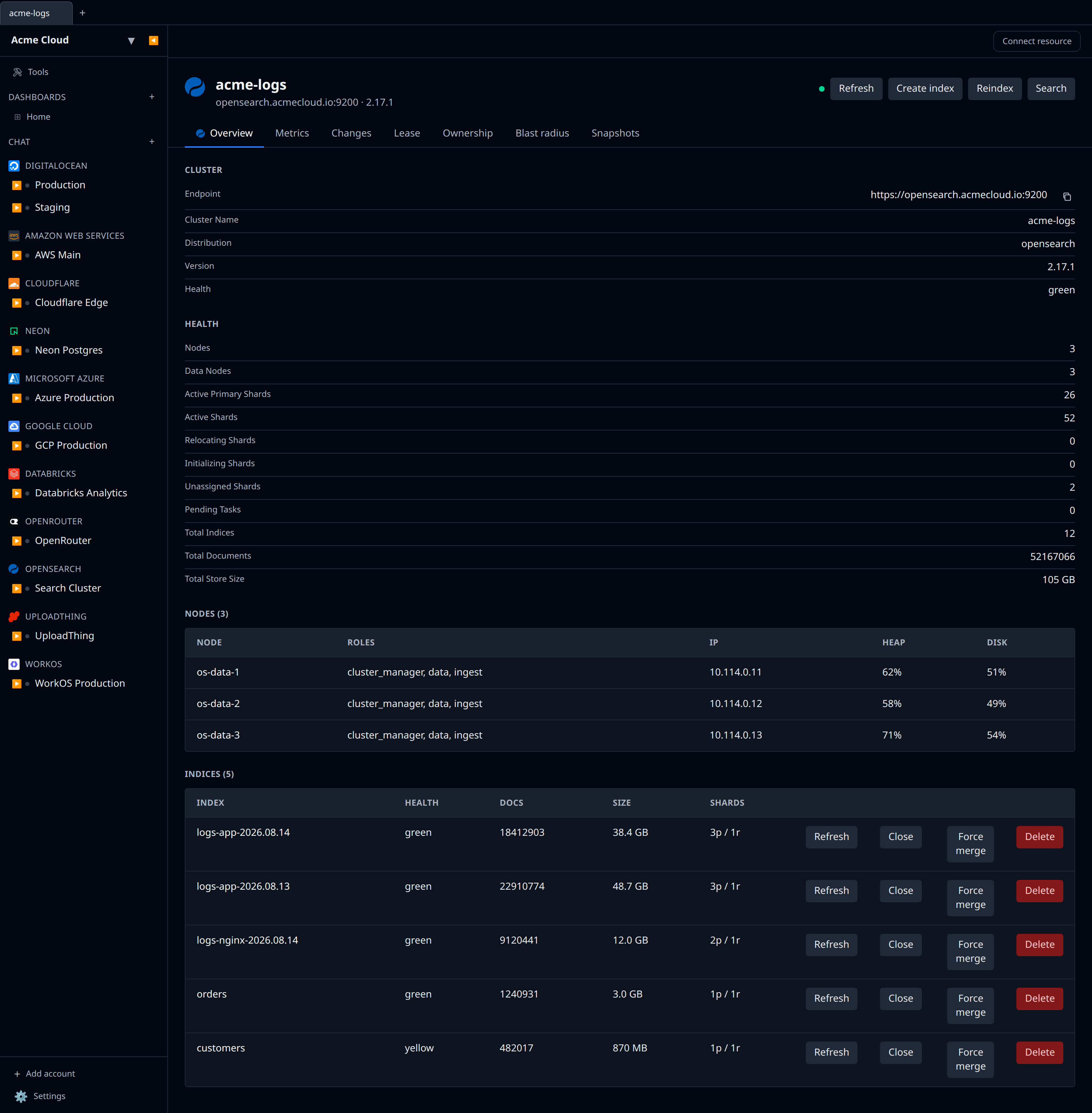
- Cluster health — green/yellow/red status, shard counts, pending tasks
- Nodes — per-node roles, IP, JVM heap usage, disk usage
- Indices — health, doc count, store size, primary/replica shard counts
- Per-index actions — refresh, force-merge, clear cache, delete
- Create index — name, shards, replicas, and an optional inline mapping
- Reindex — copy documents from one index to another (same cluster)
- Search — paste a Query DSL JSON and get the top hits back
- Snapshot repositories — register an S3 repository, take snapshots on demand, restore, delete
- Dashboard stats + metrics — cluster status, total nodes/indices/docs, store size, JVM heap %, disk used %
Credentials
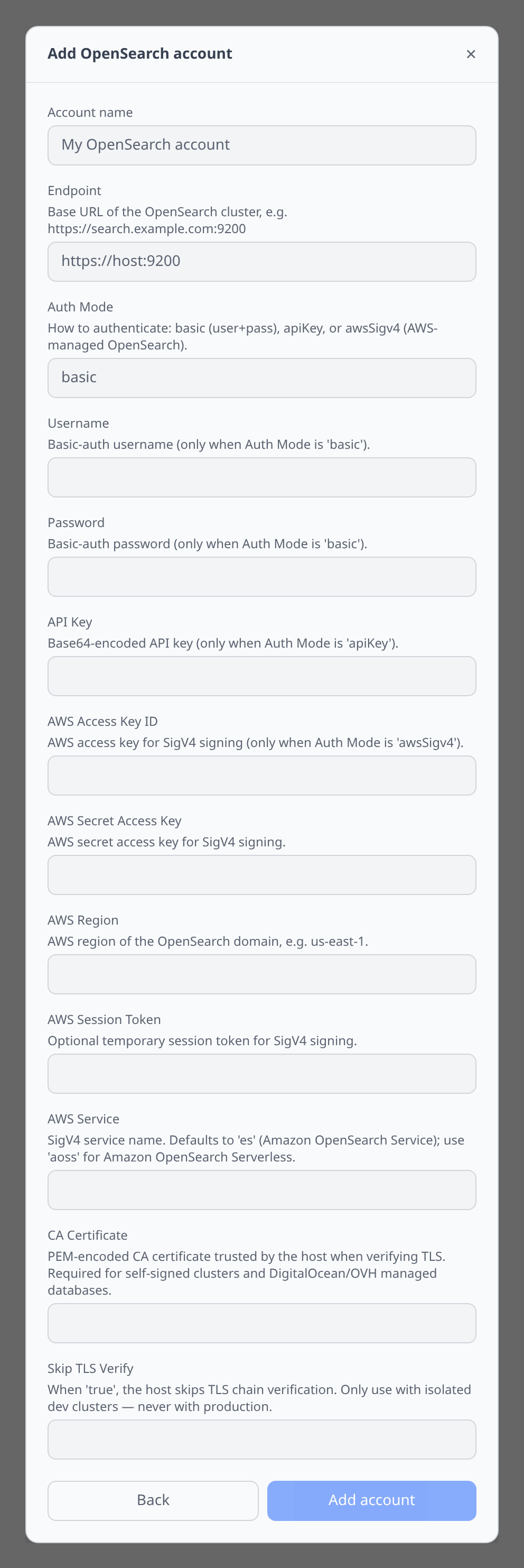
The plugin supports three auth modes. Auth Mode is a plain text field, not a dropdown — type one of basic, apiKey or awsSigv4 into it (matching is case-insensitive). Leave it empty and the plugin infers the mode: AWS access key and secret present means SigV4, otherwise an API key means apiKey, otherwise basic auth.
The add-account form shows every credential field at once — nothing appears or disappears as you change the mode, and the field descriptions are what tell you which ones a given mode reads. The form also treats them all as required, so fill the ones your mode ignores with a placeholder such as - to enable the submit button.
Basic auth (most clusters, including DigitalOcean / OVH managed)
Set:
- Endpoint —
https://host:9200(or:25060for DigitalOcean) - Username — typically
doadmin,admin, or a user you created - Password
- CA Certificate (optional) — paste the cluster’s PEM-encoded CA when it uses a private CA. DigitalOcean managed OpenSearch uses DO’s internal CA — Infrawrench auto-fills this from the managed-database tab.
If the endpoint URL embeds credentials (e.g. https://doadmin:pw@host:25060), the plugin will pull them out automatically — you don’t have to split them by hand.
API key (modern clusters)
Set Auth Mode to apiKey and paste the base64-encoded key (the same value Elasticsearch’s GET _security/api_key endpoint returns under encoded). The plugin sends it as Authorization: ApiKey <key>.
AWS SigV4 (Amazon OpenSearch Service)
For IAM-controlled Amazon OpenSearch domains, set:
- Auth Mode —
awsSigv4 - AWS Access Key ID / AWS Secret Access Key (and optionally AWS Session Token)
- AWS Region — e.g.
us-east-1 - AWS Service — defaults to
es; set toaossfor OpenSearch Serverless collections
The plugin signs every request with SigV4 using the same @smithy/signature-v4 signer the AWS SDK uses, so any IAM policy attached to the user/role flows through unchanged.
Notable flows
- DigitalOcean → OpenSearch — Open a DO managed OpenSearch cluster; the OpenSearch tab appears automatically with the endpoint and CA cert pre-filled. No manual account needed.
- OVH → OpenSearch — Same pattern. OVH never returns user passwords from its API, so the OpenSearch tab works for users whose password Infrawrench captured at create time. For pre-existing users you’ll have to rotate the password from the OVH side and paste it in.
- AWS → OpenSearch — The OpenSearch tab shows on AWS OpenSearch domain detail pages with the endpoint pre-filled, but auth (basic vs SigV4) still needs the credentials filled in on the standalone account.
Tips & limits
- Snapshot repositories — registering an S3 repository needs the
repository-s3plugin installed cluster-side. DigitalOcean, OVH, and Amazon OpenSearch Service all ship it by default. Bring-your-own clusters may need to install and configure IAM/access for the bucket. - Force-merge is destructive on writeable indices — only run it on read-only indices that are no longer being written to. The action prompts for confirmation before sending.
- Search results are capped at 10 hits in the prompt UI. For deeper exploration use OpenSearch Dashboards (Kibana) directly — the plugin doesn’t try to replace it.
- SigV4 + non-AWS endpoints don’t mix — if you set Auth Mode to
awsSigv4against a non-AWS cluster, the cluster will reject signed requests it can’t verify. UsebasicorapiKeyinstead.