Docker controls
Start, stop, and restart containers on a local or remote Docker host.
The Docker plugin lists containers on any Docker host you point it at — local Unix socket (desktop only) or a remote TCP endpoint.
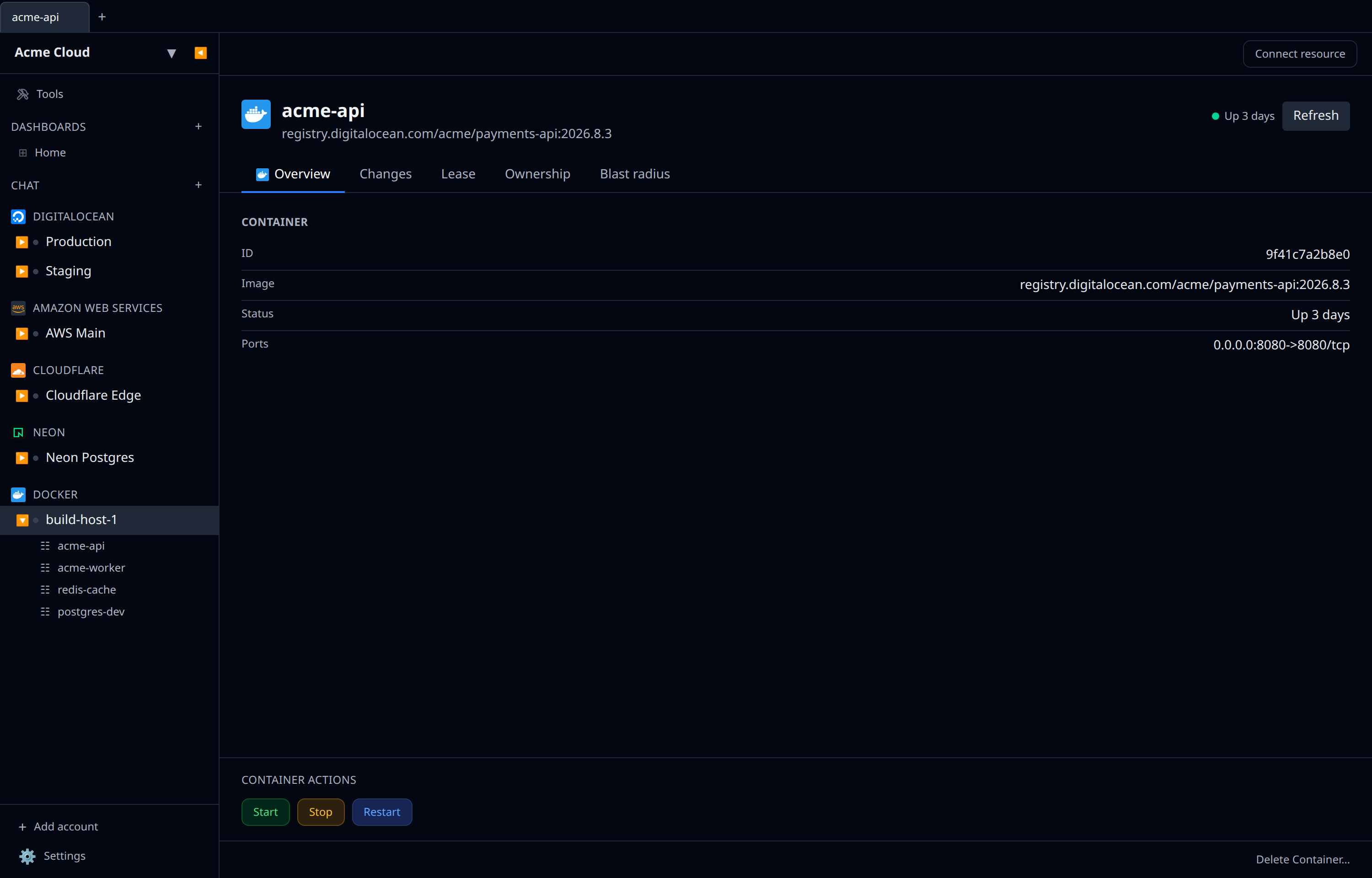
What you see
For each container: name, image, status, ports, networks, and volumes. Click one to open its detail page with logs and inspect data.
Actions
The container list has no per-row buttons — open a container first. Its detail page carries a Container Actions panel with three buttons:
- Start
- Stop
- Restart
All three fire immediately against the host, report Start succeeded (or the error) underneath, and are disabled while one is in flight. Status in the list updates on the next refresh tick.
Removing a container is the ordinary resource delete rather than an action here, and it is always forced — a running container will not stop you.
Connecting to a host
- Desktop — the default is the local Unix socket. Change to a remote TCP endpoint in the account form.
- Web — only remote TCP. Make sure the endpoint is reachable and secured (TLS + client certs recommended; plaintext 2375 is not).
Not a replacement for…
This is a control surface, not a full Docker UI. For image builds, compose stacks, and buildx, keep using the CLI. Use infrawrench when you want to see container state across hosts at a glance.