Live cost estimates
A running "$X/month" as you fill in a create form, the same figure on the resource afterwards, what an edit does to the bill before you save it, and the run-rate your week's changes leave behind.
Cloud costs tells you what your providers have already billed. Cost estimates answer the other half: what a machine you are about to create — or one you are about to resize — will cost you per month, before you commit to it.
The figure updates live. Change the size, the region, the disk, or the node count and it moves with you, because it is computed from the provider’s own published rates for exactly the configuration on screen rather than from a table of round numbers.
Where you see it
In the create form. A green Estimated cost badge sits in the header of every create dialog whose provider can price the type. Click it to see what the total is made of.
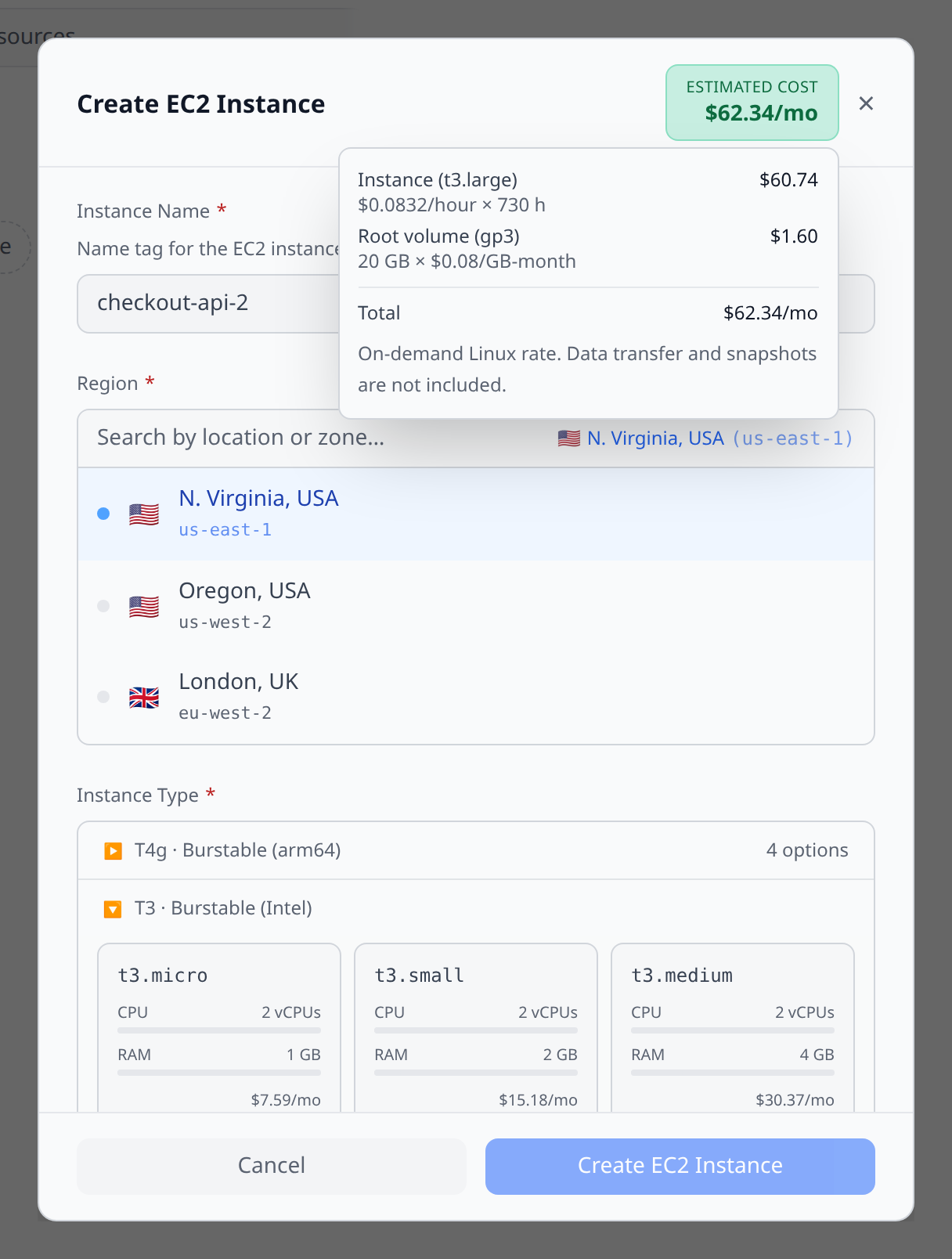
On the resource afterwards. The same badge appears in the header of the resource’s detail page, so the number you were quoted at create time is the number you can check later. On the mobile app it is a card lower down the resource screen, with the line items already open.
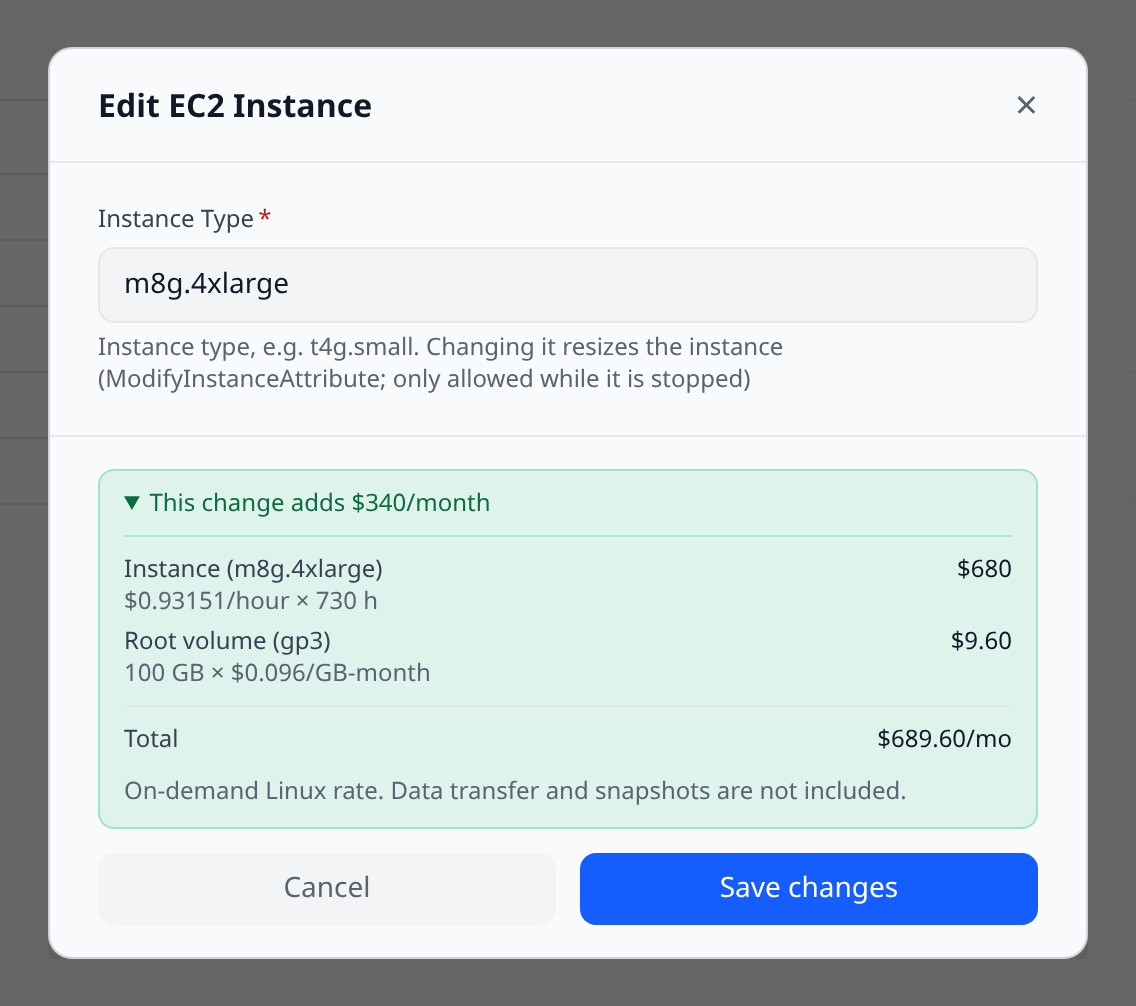
Before you save an edit. Change a machine’s size in the Edit dialog and a line appears above the buttons: This change adds $340/month. Expand it for the new breakdown. Nothing is charged until you save — this is the preview.
In the weekly digest. The weekly digest carries a Projected spend line: what last week’s creates and deletes do to your monthly run-rate, separate from what was actually billed during the week. A cluster spun up last Sunday barely registers in last week’s spend and is most of next month’s — this is the line that says so.
From the CLI.
infrawrench estimate <resource-id>
infrawrench estimate <resource-id> --json
Prints the monthly total and its line items. Cloud only.
What the numbers mean
Estimates are list-price projections, not bills. Specifically:
- They are on-demand, pay-as-you-go rates. Reserved instances, savings plans, committed-use discounts, sustained-use discounts and your negotiated pricing are not applied, so a discounted account will see a figure above what it is actually charged.
- They assume the resource runs for a whole month (730 hours). Something you stop, put on a sleep schedule, or delete mid-month costs less.
- They price the resource’s own standing components. Metered usage — data transfer, requests, IOPS, snapshots — is not included.
For what you were actually charged, use Cloud costs.
When you see nothing
There is no badge at all in two situations, and they mean different things from an estimate of $0:
- The provider plugin doesn’t publish rates for this type. Most resource types have no standing price to quote (a VPC, a security group, a DNS record), and for the ones that do, not every provider exposes a pricing API. No badge is the honest answer.
- A rate couldn’t be resolved. An unrecognised SKU, or a missing permission on the provider’s pricing API. Infrawrench quotes nothing rather than a plausible-looking wrong number.
When only part of a resource can be priced, the estimate says so: the badge reads at least $X/mo and the breakdown lists only the components with known rates. An EKS cluster, for example, prices its worker nodes and their volumes but not the control-plane charge, and the note under the breakdown tells you which piece is missing.
Provider support
| Provider | Priced types |
|---|---|
| AWS | EC2 instances, EBS volumes, RDS instances, EKS node groups |
| Azure | VMs, AKS clusters, managed disks, Container Instances, Redis caches, App Service and Function App plans, SQL databases |
| Google Cloud | Compute Engine instances and disks, GKE node pools |
| DigitalOcean | Managed databases (per node) |
AWS reads the Price List Query API, which needs the pricing:GetProducts permission on the account’s credentials — without it, AWS resources quote nothing. Azure uses the keyless Retail Prices API and Google Cloud the Cloud Billing catalog, neither of which needs extra permissions.
Every figure is region-specific: the same instance type quotes a different number in Tokyo than in Virginia, and switching the region picker moves it.