Work in progressThese docs are still being written and are currently mostly AI-generated. Some details may be inaccurate or incomplete.
Bucket policy editor
Interactive editor for S3-style bucket policies — statement builder, presets, lint, and plain-English summaries.
The Bucket Policy tab is shown on AWS S3, DigitalOcean Spaces, and Scaleway Object Storage buckets. It edits the same AWS-flavoured policy JSON underneath, but gives you a structured view instead of dropping you into raw JSON.
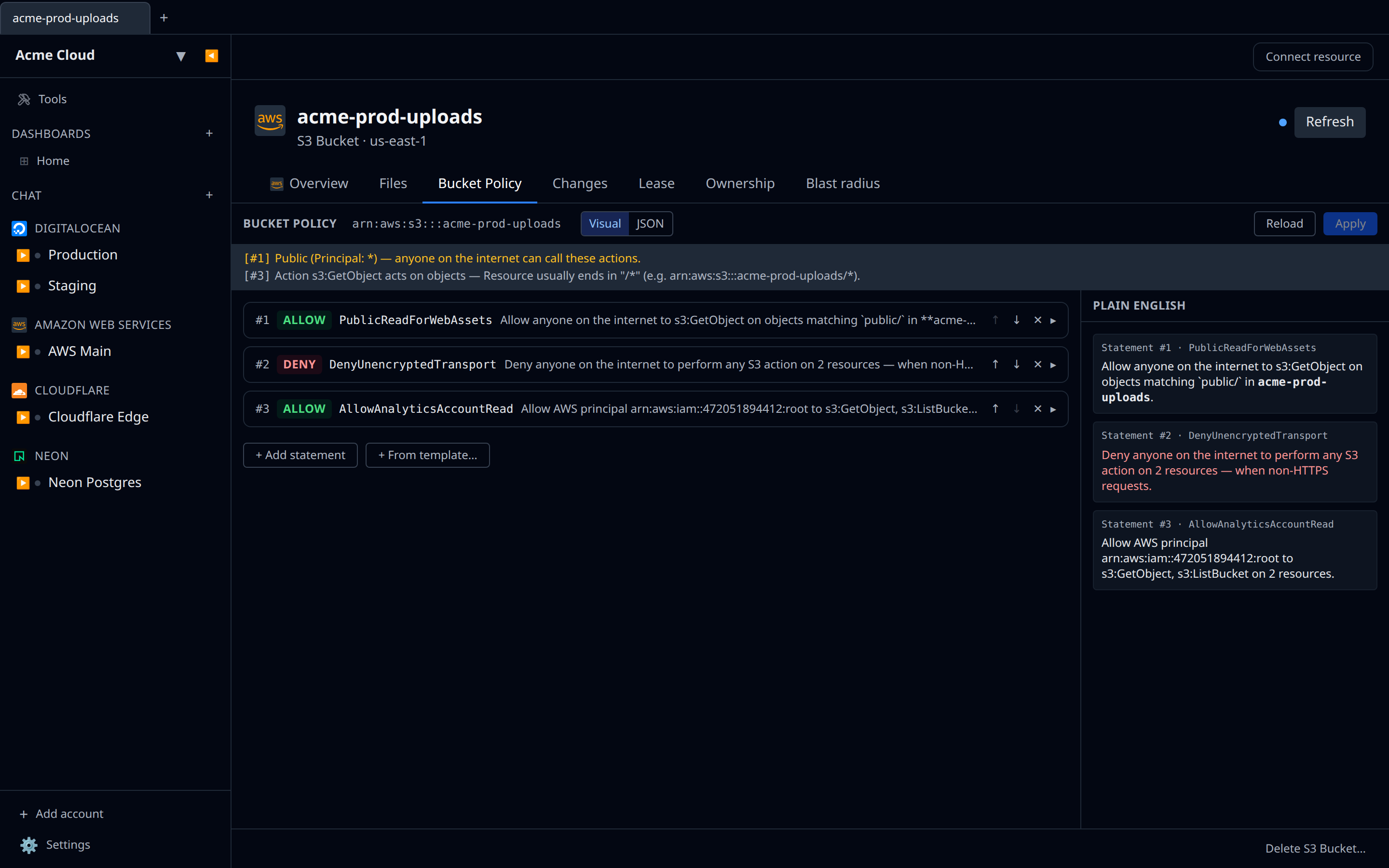
Layout
- Toolbar — Visual / JSON toggle, Reload, Apply. Apply is disabled while the lint banner has errors.
- Lint banner (when applicable) — red errors block save, yellow warnings call out risky patterns (public principal, overly broad action, ARN mismatch), grey info hints nudge object vs bucket scoping.
- Statement list (Visual mode) — each statement shown as a collapsible card. Click to expand and edit Sid, Effect, Principal, Action, Resource, Condition. Use ↑ / ↓ to reorder.
- Plain English side panel — read-only translation of every statement (e.g. *“Allow anyone on the internet to perform s3:GetObject on every object in my-bucket*”).
- JSON mode — Monaco editor for power users. Switches sync the doc both ways; if the JSON has a parse error, switching to Visual is blocked until you fix it.
Templates
The + From template… button drops a known-good statement onto the policy. Templates that need values (account ID, OAI ID, VPC endpoint, CIDR) prompt before insertion. Available templates:
- Public read of all objects — Allow
s3:GetObjecttoPrincipal: *onbucket/*. - Deny non-HTTPS requests — Deny everything when
aws:SecureTransport=false. Pair with a more specific Allow. - Cross-account read/write (AWS S3 only) — Allow another account ID list/get/put/delete.
- CloudFront OAI read-only (AWS S3 only) — restrict object reads to a specific CloudFront Origin Access Identity.
- Allow only from a VPC endpoint (AWS S3 only) — Deny anything not coming through
aws:SourceVpce. - Restrict to IP allowlist — Deny anything from outside a CIDR.
Save semantics
- An empty policy (no statements) saves as an empty body, which the underlying API treats as DeleteBucketPolicy — the bucket reverts to no policy. This is intentional; it means the natural way to remove a policy is “delete all statements, hit Apply.”
- The editor surfaces vendor errors verbatim in the toolbar — common ones are malformed JSON, invalid principal ARN, or resource ARN does not match this bucket.
- Loaded policies are pretty-printed before showing in JSON view, but the original whitespace doesn’t round-trip.
What the lint catches
The lint runs locally — it doesn’t ship the policy to the provider for evaluation. It’s heuristic, not a substitute for the provider’s own access-analyzer. What it does flag:
- Errors — missing Effect, missing both Action/NotAction or Resource/NotResource.
- Warnings —
Principal: *without a Condition (public access),Action: s3:*+Principal: *(total wildcard), Resource ARN that doesn’t match this bucket, Resource*. - Info — object-level actions (
s3:GetObject,s3:PutObject, …) whose Resource doesn’t end in/*, or bucket-level actions (s3:ListBucket,s3:GetBucketAcl, …) whose Resource is object-scoped.