Agents
Provision coding VMs from VM-capable cloud accounts and reconcile their branches locally.
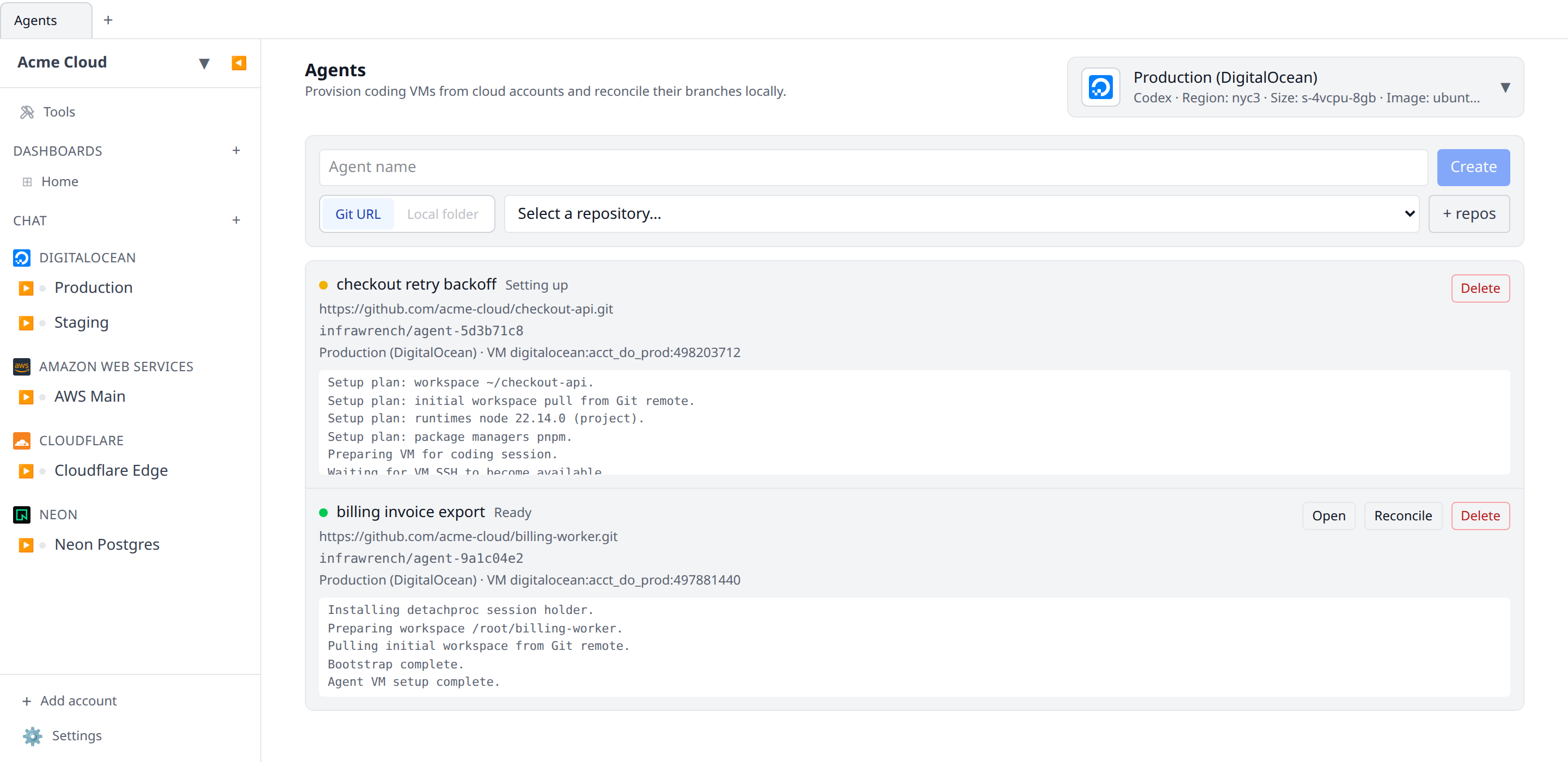
Agents create coding VM records from accounts whose provider plugins declare VM support. Open Agents from the sidebar, use the configuration menu in the header to choose a VM-capable account and save defaults for the VM shape and tool, then create a named session from a repository — picked from your connected GitHub repos on the cloud, or given as a Git URL or local path.
Local and organization sessions
On the desktop app, Agents follows the org switcher, the same way Workflows and Deploy do:
- Local-only mode — sessions are stored on this machine, VMs are provisioned and bootstrapped from here, and the account list is the accounts you added to the desktop app. This is the mode that can use a local folder as the session’s repository.
- With an organization selected — you get the organization’s sessions, the same ones the web app shows. They are provisioned from the organization’s accounts, and the cloud runs the provisioning and VM bootstrap, so a session keeps setting itself up whether or not your laptop is awake. The GitHub repository picker is available here; local folders are not, because the cloud pipeline has no way to reach a folder on your machine.
The two sets are separate and nothing is copied between them. If an account only exists in the organization — a GCP project added on the web, say — select that organization to use it as an agent target; it will not appear in local-only mode.
Defaults
Infrawrench lists accounts that can create VMs through provider plugin capabilities. The header configuration menu stores VM settings such as size, image, region, and selected coding tool. Those controls come from the provider plugin’s create form metadata, so the Agents defaults match the normal create flow for the provider.
Agents can target either Codex or Claude Code. The selected tool is stored on the session so setup installs and launches the right coding environment on the VM. A second control, Interface, chooses how you talk to that tool: Terminal (SSH) attaches its CLI in a terminal tab, and T3 Code installs the T3 Code server to drive it instead — there the session’s button becomes Authorize server, and you use the machine from T3 Code’s own app afterwards. The two are independent — T3 Code is a control surface, not an agent, so it still installs and signs in to the tool you picked. Local-only desktop sessions copy the selected tool’s local credential and settings files into the VM (organization sessions are bootstrapped by the cloud, which has no access to your machine’s config). Codex sessions copy selected files from ~/.codex, such as auth.json, config.toml, and skills. Claude Code sessions copy selected settings and plugins from ~/.claude plus ~/.claude.json when those paths exist. Local sessions, logs, caches, temp files, downloads, and package stores are skipped.
Local-only desktop sessions also copy your ~/.gitconfig so commits from the VM carry your identity. Settings that only work on your own machine are stripped on the way: GPG signing (the keys aren’t there, and commit.gpgsign=true would fail every commit), credential helpers like osxkeychain, and url.*.insteadOf rewrites that point at SSH. That last one matters if you rewrite https://github.com/ to SSH locally — the VM has no key registered with GitHub, so the rewrite would turn every HTTPS clone into a failing SSH one, including clones of public repositories. Rewrites to a non-SSH target (an internal HTTPS mirror) are kept.
Agent VMs use a dedicated Infrawrench-managed SSH key named infrawrench-agent. Organization sessions create or reuse that key inside the organization, whichever surface you drive them from — so a desktop terminal opened against an org session connects with the org’s key, whose private half stays server-side, rather than anything in your local key store. Local-only desktop sessions create or reuse the key in the local app key store. The key is injected into the provider’s VM create field declared by the plugin, so providers such as DigitalOcean attach it during VM creation instead of falling back to password access.
Choosing a repository
On the cloud, the session form shows a repository picker fed by the same GitHub App integration that powers workflow git triggers. Once GitHub is connected, pick any repository the installation can access — private repos are marked in the list — or choose Custom Git URL… to type a clone URL for a repository hosted anywhere else. + repos (or Connect GitHub when nothing is connected yet) opens the GitHub App install flow to add repositories.
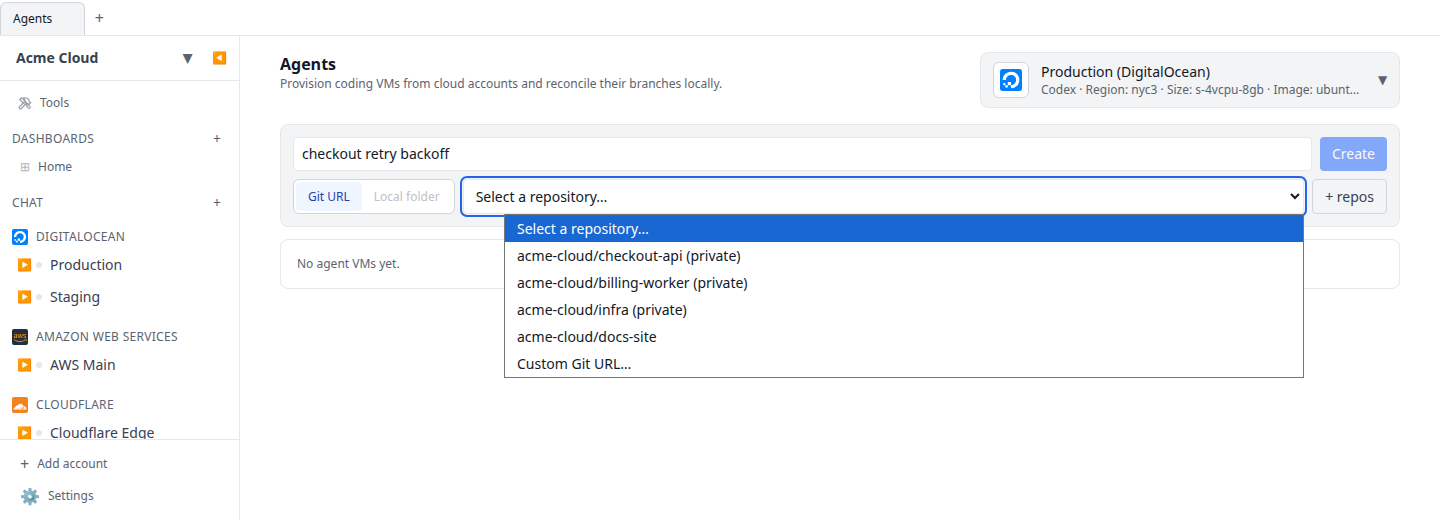
Private GitHub repositories picked this way clone cleanly on the VM: setup mints a short-lived GitHub App installation token for the clone and resets the workspace’s origin remote to the plain repository URL afterwards, so no credential persists on the VM. To push the agent branch from the VM you still authenticate as usual (the setup token is not left behind).
The desktop app shows the same picker when an organization is selected — it reads that organization’s GitHub App installations. In local-only mode there is no organization to read them from, so the form keeps the free-text Git URL input and the Local folder picker.
Sessions
Creating a session records the repo, session name, workspace folder name, generated branch name, selected account, and tool, then asks the selected provider plugin to create the VM with the saved defaults. The session name is the label shown in the Agents list; the workspace folder name comes from the repo basename, so /Users/alex/infrawrench opens as ~/infrawrench even if the session is named differently. When the provider accepts the request, Infrawrench stores the created resource id on the session and shows it in the agent row.
Desktop local-folder sessions are inspected before provider provisioning starts. The selected folder must exist and be a Git work tree, otherwise session creation fails before a VM is created. Infrawrench reads the folder’s origin remote when one is present and uses that clone URL for the VM’s initial workspace pull. It detects Node, PHP, Ruby, and Go from project files such as package.json, .nvmrc, composer.json, .php-version, Gemfile, .ruby-version, go.mod, and .tool-versions. Exact project versions are used directly; when a runtime is detected but the project only provides a range or no version, Infrawrench resolves the current release from the runtime’s public release feed before creating the VM. It also detects package managers from packageManager, lockfiles, and language manifests, including pnpm, yarn, bun, Composer, Bundler, npm, and Go. The setup log records the workspace folder, planned runtimes, package managers, initial Git pull plan, and whether the selected tool’s local config was found.
The session list refreshes automatically while the page is open, so setup state moves to ready without a manual reload once the VM is running and the bootstrap finishes. The bootstrap uses the infrawrench-agent key to connect over SSH, waits until the VM accepts SSH commands, installs the detachproc session holder, installs the planned runtimes through mise, installs detected package managers, installs the selected coding tool, prepares ~/<workspace name>, pulls from the Git remote when possible, and checks out the generated branch when the repo can be cloned. For desktop local-folder sessions, Open refreshes the VM workspace before launching by uploading one compressed archive and extracting it on the VM. The archive uses Git’s ignored-file rules (git ls-files --cached --others --exclude-standard) for worktree files and includes normal .git metadata so the VM workspace remains a Git repository.
Open starts an SSH workspace tab for the agent VM, automatically selects the infrawrench-agent SSH key, and attaches to one named detachproc session for that agent. If the session does not exist, Infrawrench starts codex --yolo or claude --dangerously-skip-permissions inside ~/<workspace name> first; if it already exists, Open resumes it. Opening the same agent again closes other SSH tabs for that VM before attaching, and attaching steals the session from any other connected client.
The setup policy is conservative: sessions stay in a setup state until the VM bootstrap flow can finish clearly. Provider errors leave a failed session row with the error in the log so you can see what the create API rejected.
Reconciliation
Use Reconcile to bring the agent branch back to the local repository as an infrawrench/agent-* branch. Infrawrench does not apply the diff to the current working tree automatically; review, merge, cherry-pick, or discard it with normal Git tools.
This applies to local-only desktop sessions, which have a checkout on your machine to fetch into. An organization session clones from a Git URL on the VM and there is no local checkout on the server, so Reconcile there tells you to push the branch from the VM to your Git remote instead — open the agent terminal and push from inside the workspace.
Deleting an agent
Use Delete on a session row to remove the agent. After a confirmation, Infrawrench destroys the agent’s VM at the provider (stopping its billing), removes the session, and closes any open SSH tabs for that VM. Any work on the VM that hasn’t been reconciled is lost, so reconcile first if you want to keep the agent’s branch. If the provider refuses to delete the VM, the session is kept and the error is shown so nothing is silently orphaned.
Repository configuration (.infrawrench/)
A repository can optionally shape its agent sessions with two files:
.infrawrench/agent.json
{
  "env": { "APP_ENV": "agent" },
  "resources": [
    {
      "pluginId": "neon",
      "resourceTypeId": "branch",
      "name": "agent-db",
      "fields": { "parentBranchId": "main" },
      "env": { "DATABASE_URL": "{{outputs.connectionString}}" }
    }
  ]
}env— static environment variables delivered to the VM. They are written to~/.infrawrench-agent/agent.envand sourced before the coding tool starts, so the agent and everything it runs sees them.resources— resources Infrawrench creates once per session from your existing accounts (for example a database branch). Each entry is matched to an account bypluginId(setaccountto an account display name when you have several). The created resource’s outputs and fields can be templated into env vars with{{outputs.<key>}}and{{fields.<key>}}. Created resources are destroyed again when you delete the agent.
Session resources and env from agent.json are currently read for desktop local-folder sessions; git-URL sessions get the setup script only.
.infrawrench/agent-setup.sh
An optional bash script that runs on the VM after the runtimes, package managers, and coding tool are installed and the workspace is in place — but before you connect. It runs inside the workspace with the session env sourced, so it is the right place for pnpm install, database migrations, or seeding. A non-zero exit fails the session setup (with Retry available), so keep it idempotent.