File browsers
Browse, upload, and download objects in cloud object storage and over SFTP.
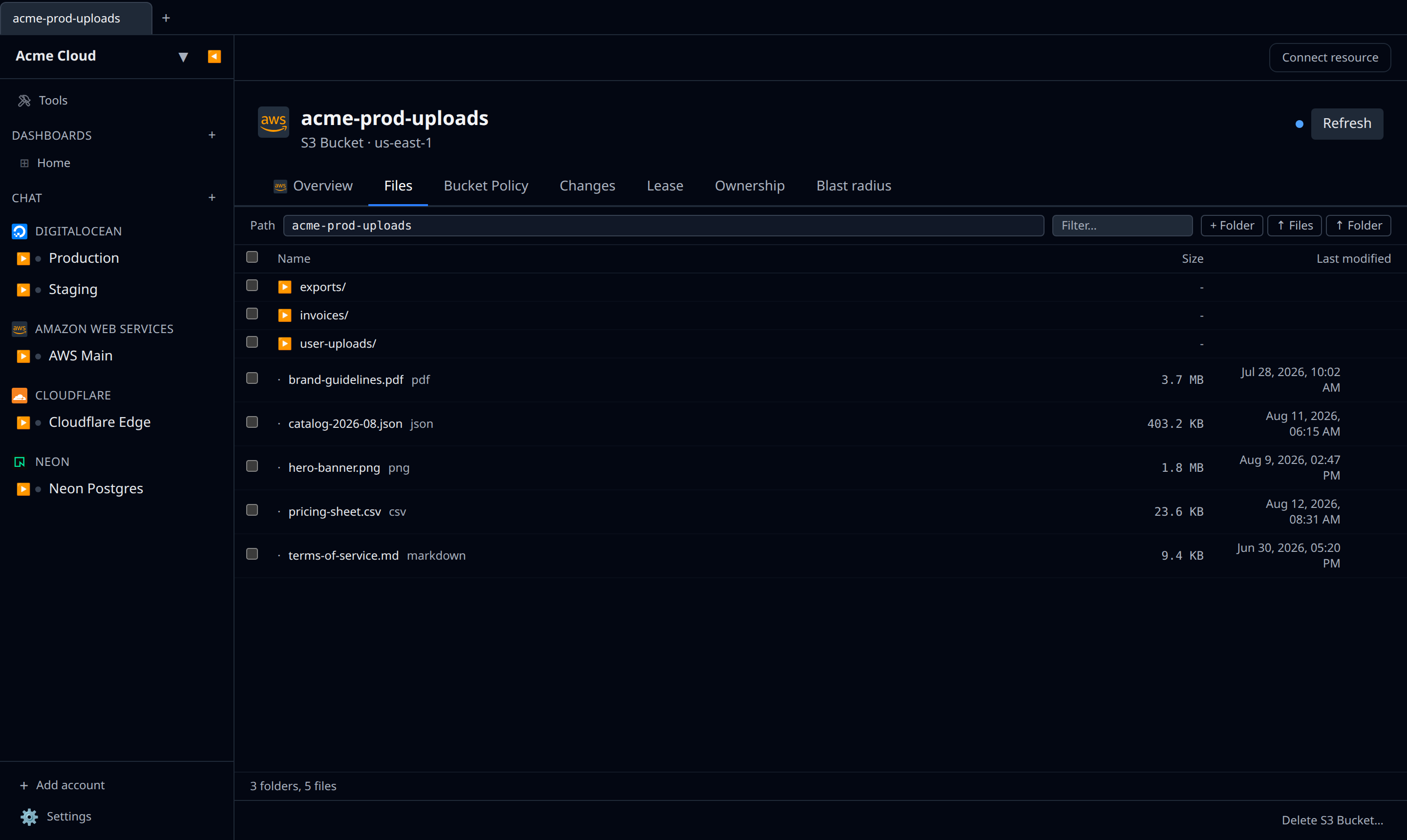
Several plugins expose a file-browser panel on any resource that holds files. It appears as a Files tab on bucket and storage-account resources, alongside Overview and any provider-specific editors (e.g. Bucket Policy on S3-compatible buckets).
Supported backends
- Amazon S3 buckets
- Google Cloud Storage buckets
- Cloudflare R2 buckets
- Azure Blob Storage containers
- DigitalOcean Spaces (S3-compatible)
- Scaleway Object Storage (S3-compatible)
- SFTP over SSH — on desktop natively, and on web proxied through the cloud
What you see
One listing, not a tree beside a grid. Across the top is a Path box you can type into (Enter to go, Escape to revert) and a Filter… box; below it a single table with Name, Size and Last modified columns. Folders are rows in that table, marked ▶ and shown before the files, with a .. row to go up. The footer counts what you are looking at.
What you can do
- Navigate by clicking a folder row, or by typing a path.
- Upload with ↑ Files, or ↑ Folder where the backend supports it. There is no drag-and-drop target.
- + Folder creates one (for object stores, a zero-byte marker).
- Download with the
↓on a row. Tick several rows and the toolbar offers ↓ Download, which streams them as a zip — on web that opens one download per batch, so allow pop-ups. - Delete — the
✕on a row, or the toolbar’s Delete for a selection. Both ask to confirm inline.
Shift-click selects a range. Sorting is fixed: folders first, then files.
Large uploads
- S3, R2, GCS, Azure Blob: multipart uploads are used automatically for files over 8 MB. Pausing a tab cancels the upload; there is no resume.
- Desktop is generally faster — it talks direct to the provider. The web app proxies through infrawrench’s server, which adds a round-trip.
Permissions gotchas
The browser only shows what your account’s credential can see. If you can list a bucket but not a particular prefix, the prefix shows up but opens empty. Check your IAM policies if something is missing.