Incident mode
Declare an incident once and it opens the change freeze, pins the moment, tells your org, and posts the public update — then assembles the timeline and pre-fills the postmortem.
At 03:14, declaring an incident is six errands. Somebody freezes deploys. Somebody posts in the channel. Somebody remembers to update the status page. Somebody starts a doc. Somebody notes the time. Then, three days later, somebody reconstructs the timeline from scrollback.
Incident mode is one object that does all six, composed from primitives Infrawrench already ships — the change freeze, the Moment view, the alert routing rules and the status page are the same ones you already configured, not incident-mode copies of them.
Two different things are called “incidents”. This page is about incidents your organization declares. The other kind — a provider’s outage scraped from their status page and correlated against your resources — is provider status correlation, and it appears here only as evidence on your timeline. Everywhere the two could be confused, this one is spelled out: the CLI command is
infrawrench declared-incidents, becauseinfrawrench incidentswas already the providers’.
Declaring
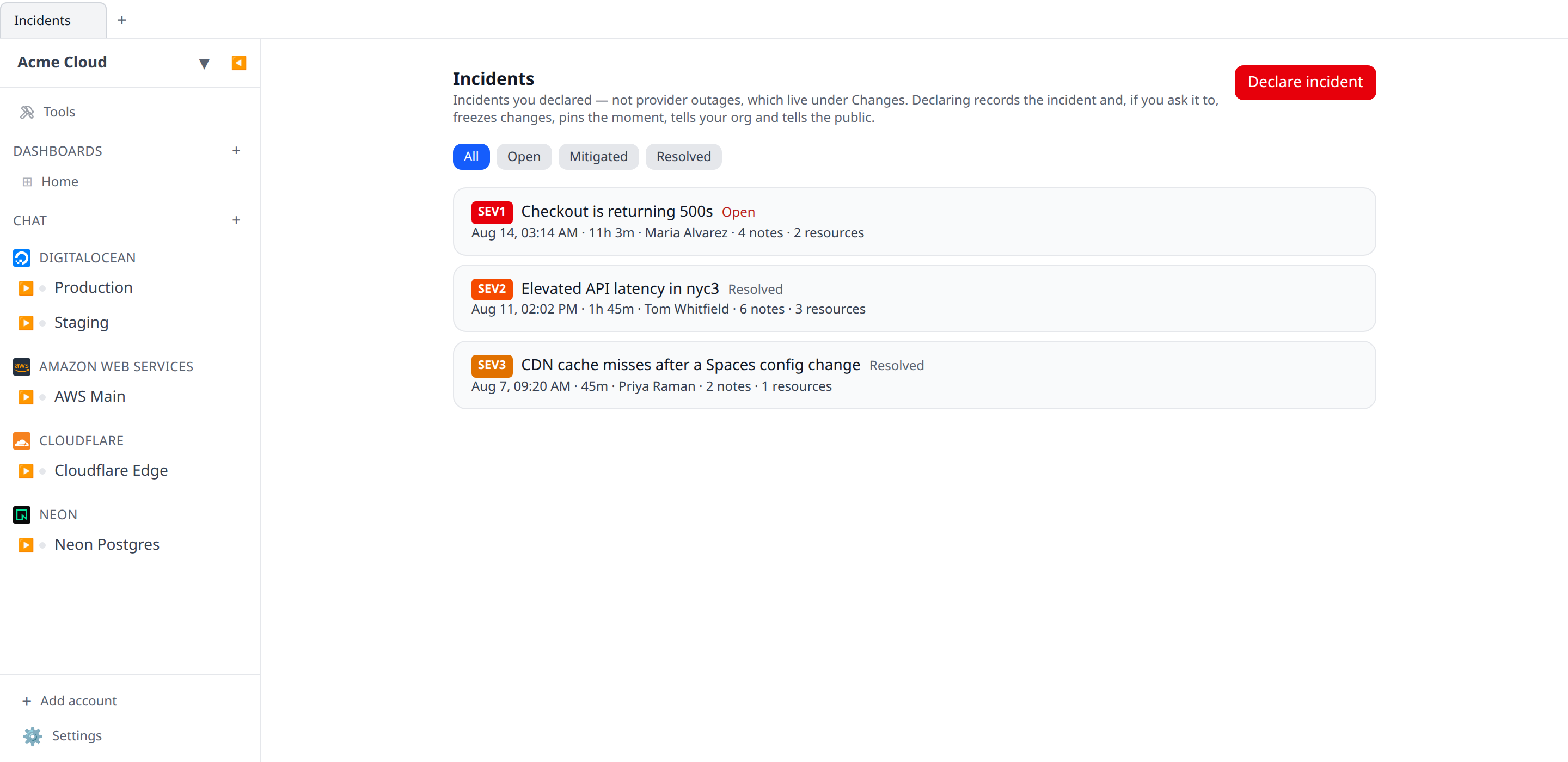
Open Incidents from the sidebar and hit Declare incident, or start where you actually noticed: a down probe on the Probes tab and a firing rule on the Alerts tab both carry a Declare incident button that opens the same form with the title, the summary, the affected resource and the start time already filled in.
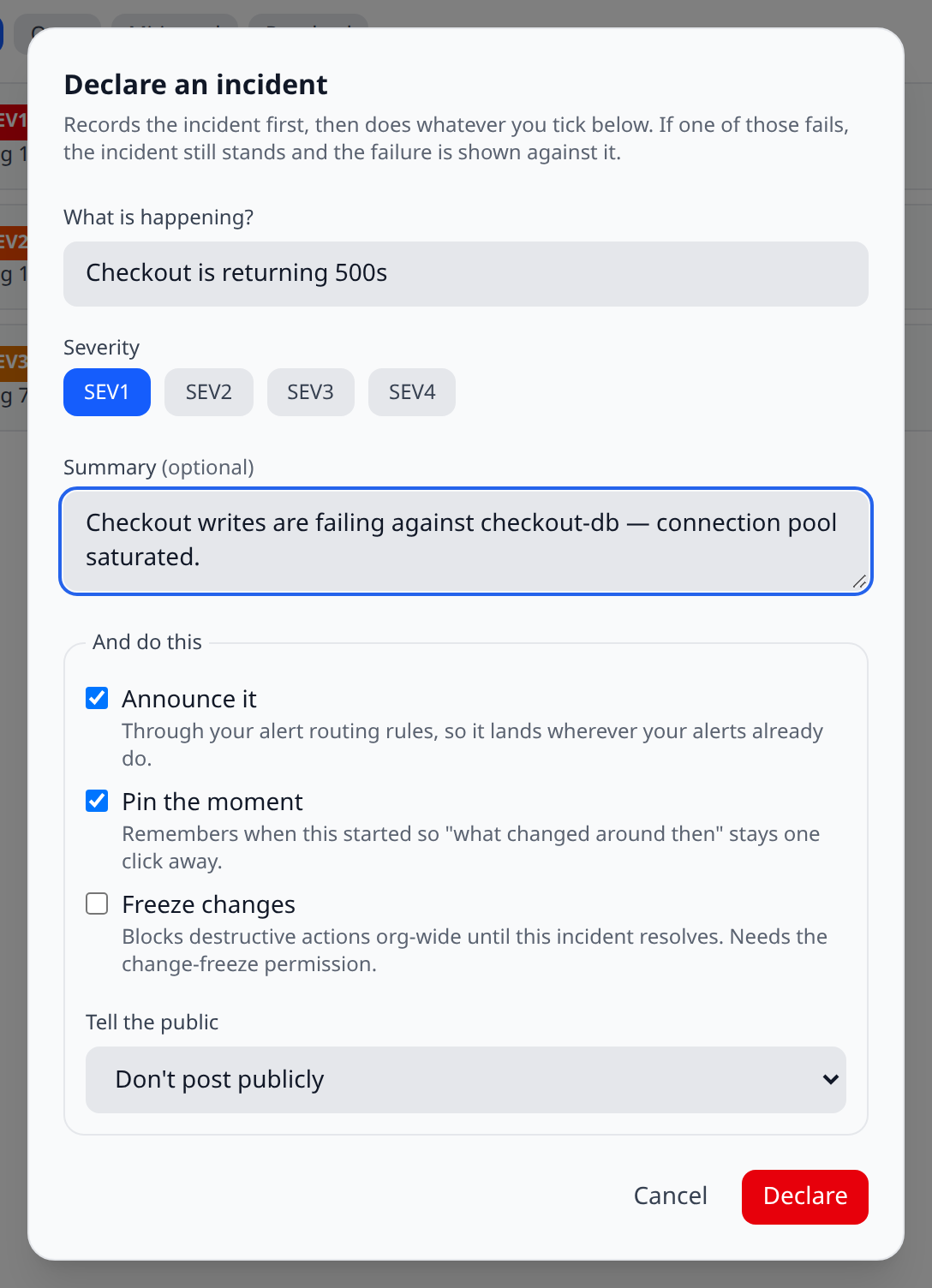
The form asks for a title, a severity (SEV1–SEV4, defaulting to SEV2) and an optional summary, then offers four things to do under And do this — three checkboxes and, last, a Tell the public dropdown rather than a tick:
| Action | Default | What it does |
|---|---|---|
| Announce it | on | Sends through your existing alert routing rules under a new Incidents trigger — so it lands in whichever Slack channels, Teams webhooks and phones your rules already name, honouring quiet hours and escalation. |
| Pin the moment | on | Records when this started, so “what changed around then” stays one click away for the whole investigation. |
| Freeze changes | off | Opens an org change freeze for the duration, blocking destructive actions. Lifted automatically when the incident resolves. |
| Tell the public | off | A dropdown of your status pages, defaulting to Don’t post publicly. Pick one and it posts an update there, with toggles for which components are affected. Closed automatically on resolve. It is hidden entirely if you have no status pages. |
The two that are off by default are the two with blast radius beyond the incident. The two that are on only help.
If something fails, you still have the incident
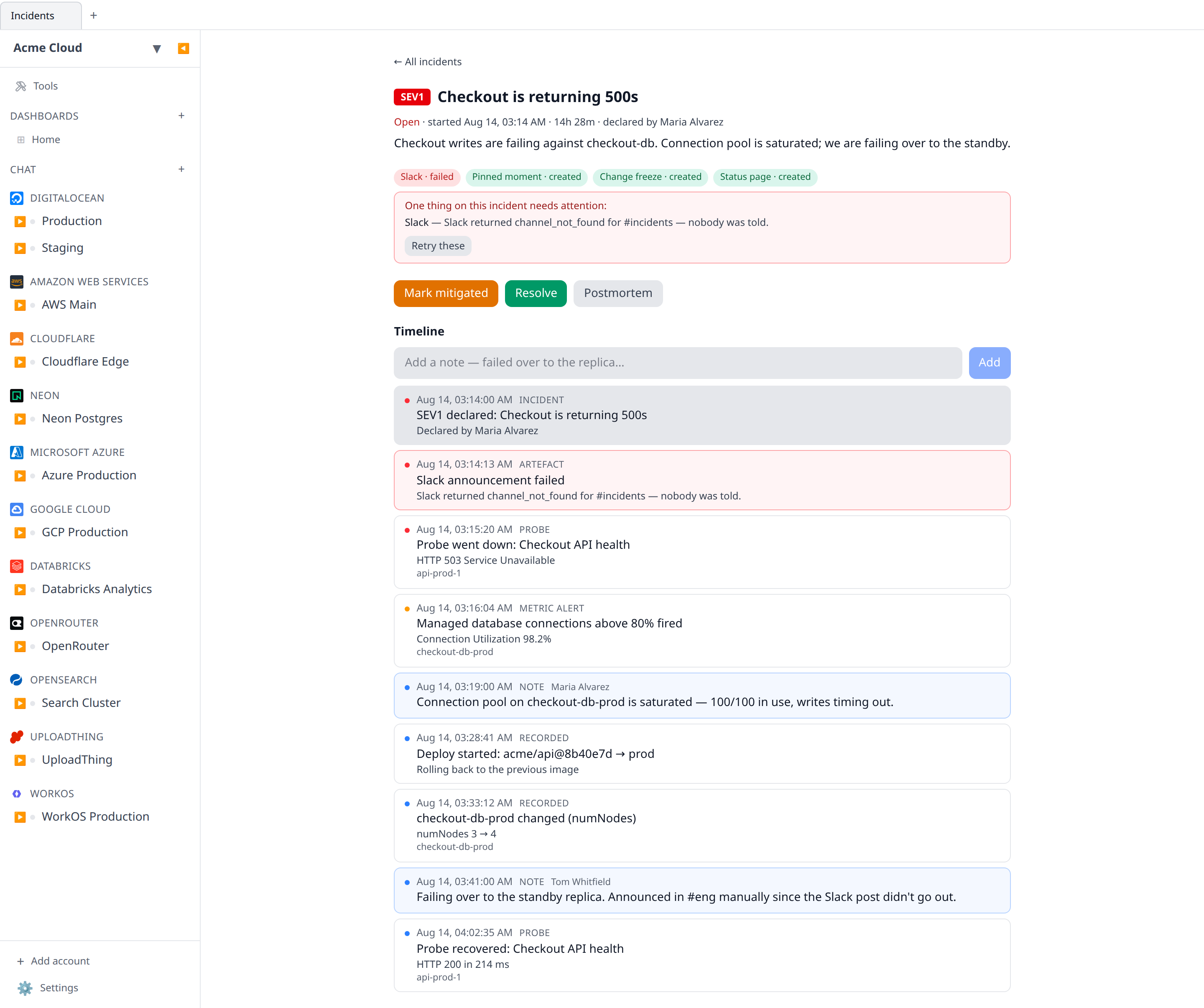
The incident row is written first, and alone. Every action is attempted afterwards, and each records its own outcome against the incident. A Slack outage costs you the announcement and never the declaration.
Failures are shown, not swallowed. The incident detail page carries a red box naming each thing that did not happen and why — “No alert routing rule matches the Incidents trigger, so nobody was told”, “Opening a change freeze needs the freezes:write permission” — with a Retry these button that re-runs only the failures.
Resolving can fail the same way, and it is tracked separately because the fix is the opposite one. If lifting the freeze or closing the public update fails, the artefact reads still open rather than “failed”: the freeze really is still in force and the status page really is still reporting an outage, so Retry these runs the closing step again. Re-running the creating step would open a second freeze or post a duplicate notice, which is worse than the failure it was meant to fix.
Retrying a status-page update republishes it against the components you originally picked, not the whole page.
The timeline
The timeline is assembled when you read it, by joining what the platform already recorded between the incident’s start and its resolution. Nothing is copied into the incident, so a correction made upstream shows up here on the next refresh.
It merges:
- resource change events from the change timeline
- deployments, and workflow runs
- cost anomalies
- provider status incidents overlapping the window
- audit entries and change-freeze edges
- synthetic probe state transitions
- metric alert firings and recoveries
- the incident’s own life events and its artefacts, including the failed ones
- operator notes you write as you go
Notes carry their own timestamp separate from when they were typed, so a note written at 04:00 about something that happened at 03:14 lands in the right place.
If one of the underlying feeds is unavailable — or you lack permission to read it — the timeline says so in a small chip and shows everything else. A missing feed never blanks the page.
Resolving, and the postmortem
Marking an incident mitigated stops the paging without closing the incident; that middle state is what makes “time to mitigate” a measurement rather than a guess. Resolve finishes it and undoes exactly what this incident created — the freeze whose id is on its own artefact (not whatever freeze happens to be in effect) and the status-page update it posted.
Then hit Postmortem for a markdown document with the facts already in it: the window, the duration, the time to mitigate, the affected resources, the whole timeline as a table, and every note. The analysis headings — impact, root cause, what went well, action items — are deliberately left blank. Copy it into your tracker and finish it there.
Permissions
incidents:read— see incidents and their timelines. Held by members.incidents:write— declare, annotate, transition and resolve. Also held by members, on purpose: the people who notice an outage at 03:14 are rarely admins, and a product where declaring needs an admin is a product where nobody declares.
What a declaration can do keeps its own gates. Requesting a change freeze still needs
freezes:write; a declaration by someone without it records the freeze as a failed artefact
naming the permission, and the incident stands.
On the phone and in the terminal
The mobile app gets the three things you do away from a laptop: declare, read the timeline, and add a note. The phone’s declare sheet asks only for a title and a severity and takes the safe defaults — deciding whether to freeze your whole organization is not a lock-screen decision. Editing, retrying failed artefacts and the postmortem export stay on web and desktop.
The CLI reads:
infrawrench declared-incidents              # the list
infrawrench declared-incidents "checkout"   # one incident's assembled timeline
infrawrench declared-incidents --json
Status page updates
Status pages used to be purely derived — every word on them came from probe state. An incident that publishes adds the thing visitors actually turn up for: a sentence from a human, in the usual investigating → identified → monitoring → resolved vocabulary, above the component list. Resolving the incident closes it.
The public payload carries the notice’s title, body, state, timestamps and which components on that page it names. It does not carry the incident’s id, who declared it, or anything about your organization — the same rule the rest of the public page follows.