T3 Code servers
Run the T3 Code harness on an agent VM, provisioned and authorized from Infrawrench.
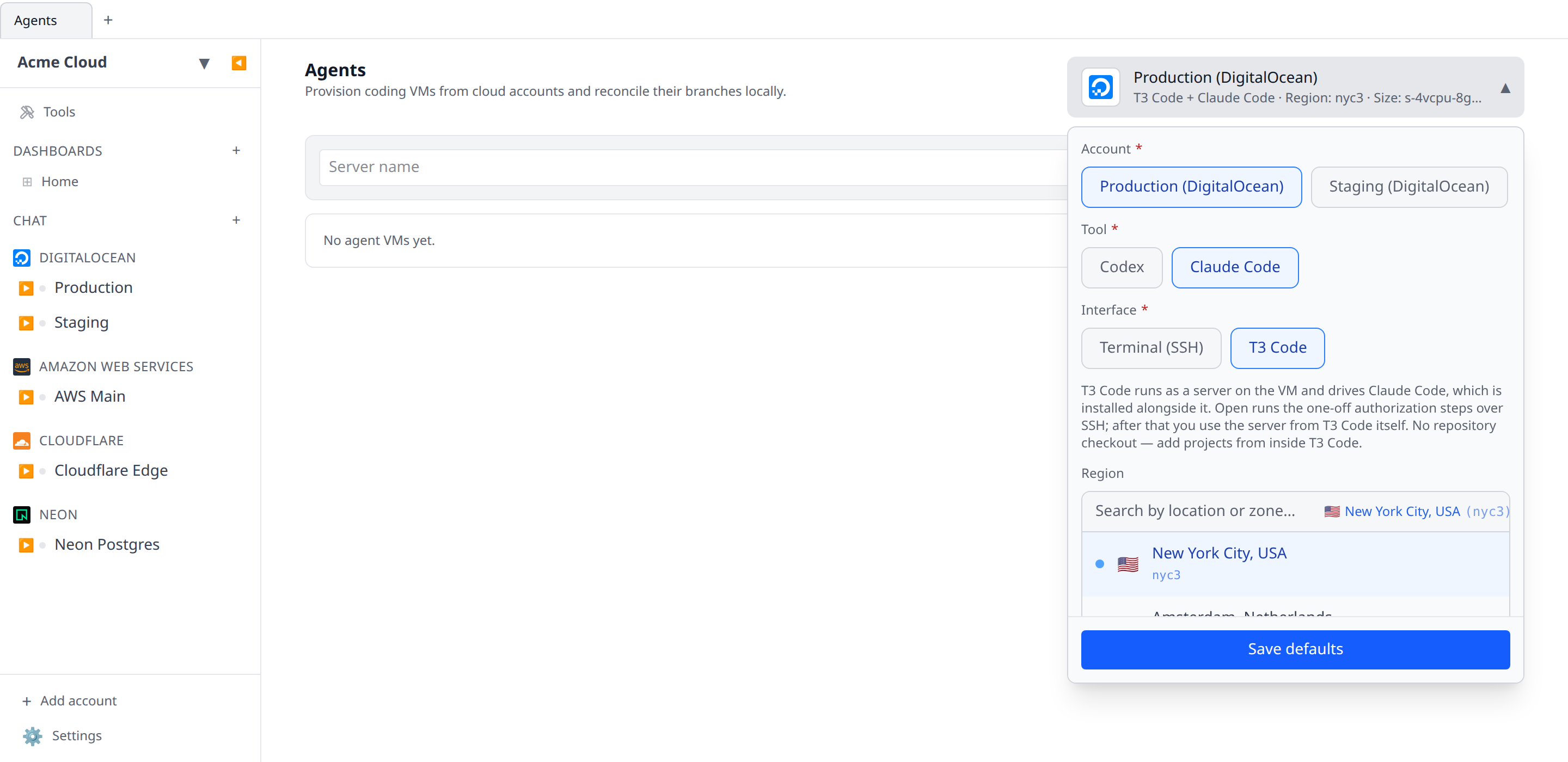
T3 Code is a GUI for running coding agents on a machine you control. Infrawrench can provision that machine for you: pick T3 Code as the Interface on an agent session and the VM comes up running the T3 Code server, linked to your T3 Connect account and ready to use from T3 Code’s own app.
Infrawrench’s job here ends at a working, linked server. It does not embed or proxy T3 Code — you drive the server from T3 Code’s desktop, web, or mobile app, the same as any other machine you have linked.
T3 Code is not an agent
This is the thing to get right before anything else. T3 Code ships no model access of its own — it drives provider CLIs installed next to it. So a T3 Code session still has a Tool, and that tool matters:
| You pick | The VM gets | You sign in with |
|---|---|---|
| Claude Code | claude + t3 | claude auth login |
| Codex | codex + t3 | codex login --device-auth |
A server with only t3 on it can add projects and browse files but can never start a session.
Creating a server
Choose a VM-capable account and VM shape exactly as you would for a terminal agent, set Interface to T3 Code, name the server, and select Create.
There is no repository field. T3 Code manages its own projects — you add them from inside it with the Command Palette (Cmd/Ctrl + K) → Add Project — so Infrawrench provisions a bare server and never clones a repo or checks out a branch for it. The bootstrap creates an empty ~/projects directory as a convenient clone destination and nothing more. For the same reason these sessions have no Reconcile action.
Setup installs, in order:
- the system packages, then Node (T3 Code’s server requires
^22.16 || ^23.11 || >=24.10, so Infrawrench installs Node 24 and verifies the result rather than letting a stale version manager fail later), - the
t3CLI and both agent CLIs — Codex and Claude Code. T3 Code reaches for a provider other than the one you’re chatting with for its own work (generating a thread title runscodexeven in a Claude thread), so installing only the session’s tool leaves it failing with an opaque runtime error. The session’s tool is the one setup signs in; sign the other in withcodex login --device-authorclaude auth loginif you want those extras. Thet3package pulls innode-pty, a native addon that is compiled on the VM, so this step waits for the compiler toolchain (make,g++,python3) to finish installing first — which is why a T3 Code VM takes a little longer to come up than a terminal one, gitand the GitHub CLI, which back T3 Code’s clone, publish, and pull-request features,- T3 Code’s background service, so the server starts on boot and outlives the SSH session that set it up. This needs systemd; on a VM without it the setup warns and you start the server yourself with
t3 serve.
Setup also writes a systemd drop-in giving the T3 Code service a PATH that includes ~/.local/bin and the mise shims. T3 Code’s own unit sets no PATH, so without this the server runs with systemd’s minimal default and cannot see the CLIs setup installed — gh (and the git credential helper it registers), or your agent CLI. The confusing part is that an SSH shell sees them fine, so the setup terminal reports everything signed in while source control fails on the server with a generic “The source control operation could not be completed”. Re-running Authorize server rewrites the drop-in, so an older server is repaired in place.
A second drop-in gives the server process itself the highest CPU priority the scheduler offers (Nice=-20) and stops that priority at the server: everything expensive on the VM — your agent CLI, its builds, its test runs — is a child of the service, and nice values are normally inherited, so raising the service alone would raise them too and change nothing. CPUSchedulingResetOnFork=yes makes the kernel drop the boost in anything the server forks, so the part that holds the relay connection and streams your session keeps the CPU it needs while a busy agent runs at the normal priority. Re-running Authorize server applies it to an existing VM. It needs a service running as root, which is how Infrawrench provisions these VMs; on a VM set up under an unprivileged user the priority is left at the default, since a negative nice value cannot be granted there.
Setup also installs a no-op xdg-open on the VM. T3 Code’s open in browser runs on the machine hosting the server, which here is a headless droplet — upstream hard-codes xdg-open on Linux with no setting to disable it, so without this the action fails with a command-not-found error you can’t act on. With the shim it is simply a no-op, and links you want to follow you open on your own machine. A real xdg-open already on the VM is left alone.
Authorizing the server
Two steps in the flow are browser sign-ins and cannot be scripted, so they happen once, interactively. Select Authorize server on the session row — the button in the place a terminal agent’s Open would be, because running these steps is the only thing Infrawrench opens for a T3 Code server. It opens an SSH terminal on the VM that walks through:
-
t3 connect link— links the server to T3 Connect. Over SSH the CLI detects it has no local browser and switches to its out-of-band flow automatically: it prints an authorization URL and waits for a pasted code, so nothing needs port forwarding. -
The agent sign-in —
claude auth login, orcodex login --device-authfor Codex (its default flow wants a loopback callback an SSH client can’t reach). Skipped when the CLI is already signed in, which it often is on desktop: desktop sessions sync your local tool config to the VM, so the credential may already be there. -
gh auth login— optional, a device flow. Without it T3 Code works but can’t open pull requests.This step also makes git agree with whichever protocol
ghis set to. T3 Code picks clone URLs itself and asks git for the SSH one whenever your clone protocol is SSH — which fails on a fresh VM, because it has no key registered with GitHub. Whenghis on HTTPS, setup rewrites SSH-style GitHub URLs back to HTTPS so those clones authenticate through theghcredential helper instead. Whenghis on SSH it tells you so rather than overriding your choice, and shows both ways forward:gh config set git_protocol https, or registering a key for the machine withgh ssh-key add. -
Restarting the server, which is what actually provisions the relay link and launches the managed tunnel.
t3 connect linkonly records the intent to expose the environment; the link is reconciled when the server next starts, and the server has been running since before you linked. The step restarts the systemd user unit (systemctl --user restart t3code.service) — note thatt3 service installandt3 service updatecannot do this, because both return early once the service is installed and current.
The last step then polls until the link reports provisioned, so the terminal tells you when the server is actually reachable instead of leaving you to check. If it stays pending, read the server log. The unit redirects stdout and stderr to a file, so journalctl shows only systemd’s start/stop lines, not the server’s own errors:
t3 service status                                 # shows the log path
tail -n 200 ~/.t3/userdata/logs/boot-service.log
Each step can be skipped with Ctrl-C and rerun later; the terminal drops you at a shell when it finishes.
Using the server
Once the link reports provisioned, the machine shows up in T3 Code under your account. Open it from T3 Code’s own app or its desktop build and add projects there with the Command Palette (Cmd/Ctrl + K) → Add Project.
Authorize server stays available afterwards and is safe to re-run: every step detects work already done and skips it, so it doubles as the way to re-link a server, sign a provider back in, or just get a shell on the box.
Deleting a server
Delete runs t3 connect logout on the VM first, then destroys it at the provider, removes the session, and closes any SSH tabs for it. The logout matters: the relay’s environment record can only be revoked by the machine itself, so once the VM is gone the environment lingers in your T3 account with no way to remove it. It’s best effort — a VM that’s already unreachable won’t block the delete, it just leaves the environment behind. T3 Code’s own state lives on the VM, so anything in its projects that hasn’t been pushed goes with it — push from inside T3 Code first.
If you tear the VM down by hand instead, run t3 connect logout on it yourself first. Signing out of T3 Connect is separate from the background service: it leaves the service running, and t3 service uninstall stops T3 Code starting on boot without touching the VM. Deleting the session from Infrawrench removes the machine all of it was running on.