SSH session recording
Record every SSH session opened through the cloud and replay it later — who connected, to what, and exactly what crossed the terminal. Recordings are standard asciinema casts.
When you open an SSH terminal in the web app — or in the desktop app while signed into Infrawrench Cloud — the session is proxied by our servers. That means the bytes are already passing through us, and recording the session is a matter of writing them down rather than installing an agent on your host. Turn it on for the organization and every cloud SSH session becomes a replayable recording: who connected, which host they reached, how they got there, and precisely what the terminal showed them.
This is the artifact an auditor asks for and almost nobody has.
What is and is not recorded
Recorded: any SSH session opened through Infrawrench Cloud. That includes the web terminal, the desktop app’s SSH tabs while in cloud mode, and sessions that jump through a bastion or jumpbox — the hop count is stored with the recording.
Not recorded: sessions the desktop app opens directly against a host in local-only mode. Those never touch our servers, so there is nothing for us to tee. The Session Recordings page says so rather than letting you assume coverage you do not have.
Shared sessions
A session that was shared with colleagues records exactly as a solo one does, and the recording knows who was on it. Every participant is named in the recording’s metadata with the highest role they held, and the cast itself carries asciinema marker events on the timeline — who joined, when the keyboard moved and to whom, when the share was revoked. Markers are part of the asciicast format, so the file still plays anywhere a plain cast does.
Once a session can be shared, userId alone stops answering “whose hands were on this box”. This is what answers it.
Turning it on
Settings → Session Recordings, on both web and desktop. Recording is off until you turn it on — a terminal capture is a wiretap on your own staff, and that is a decision an organization makes deliberately rather than one we make for you.
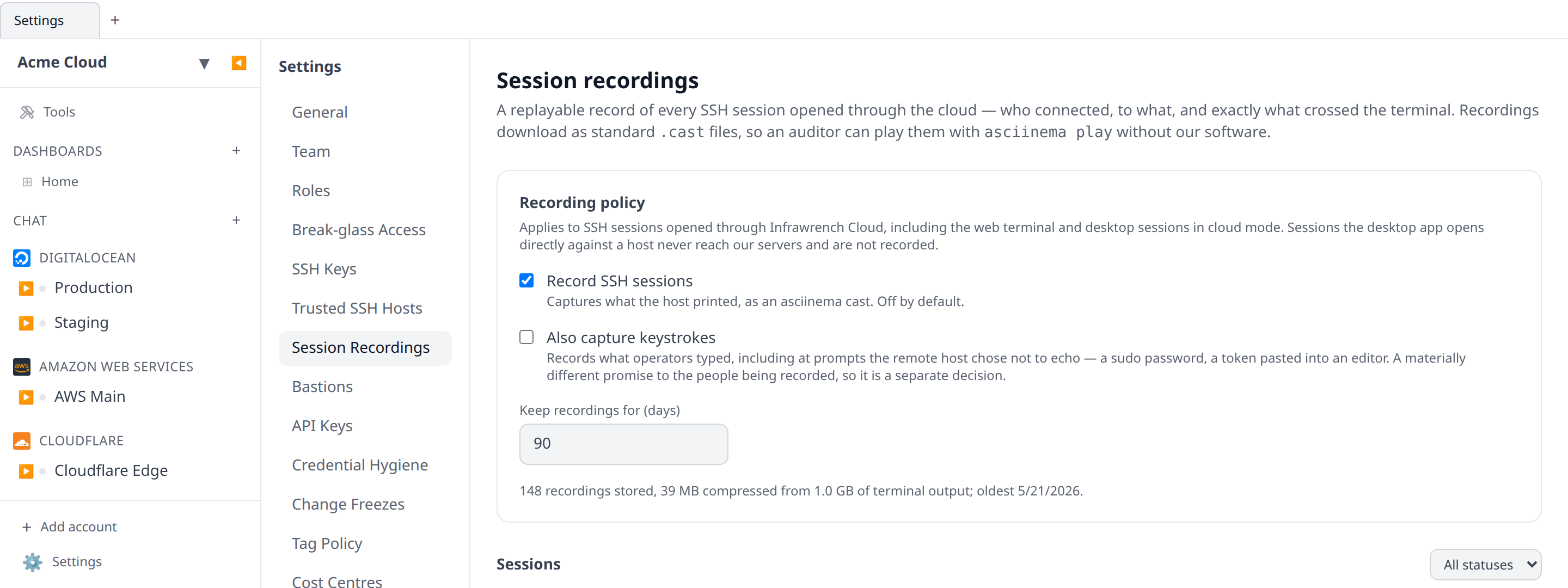
Three settings:
- Record SSH sessions — captures what the host printed. This is the compliance artifact: what happened on the box.
- Also capture keystrokes — off by default and a separate decision on purpose. Output capture answers “what happened on this host”. Keystroke capture also records anything typed at a prompt the remote host chose not to echo: a
sudopassword, a token pasted into an editor. That is a materially different promise to the people being recorded, so it is its own switch. - Keep recordings for — the retention window, in days. Expired recordings are deleted by a background pass that runs hourly. Turning recording off does not shorten the window on tapes you already have.
The card also shows what the organization currently stores: how many recordings, their compressed size, how much raw terminal output that came from, and the date of the oldest one. Terminal output compresses extremely well — a redraw-heavy TUI session routinely stores at a small fraction of its captured size.
Watching a session back
The Sessions list shows every recording newest first, with who opened it, the target, when, how long it ran, and its size. Press Watch to replay it inline.
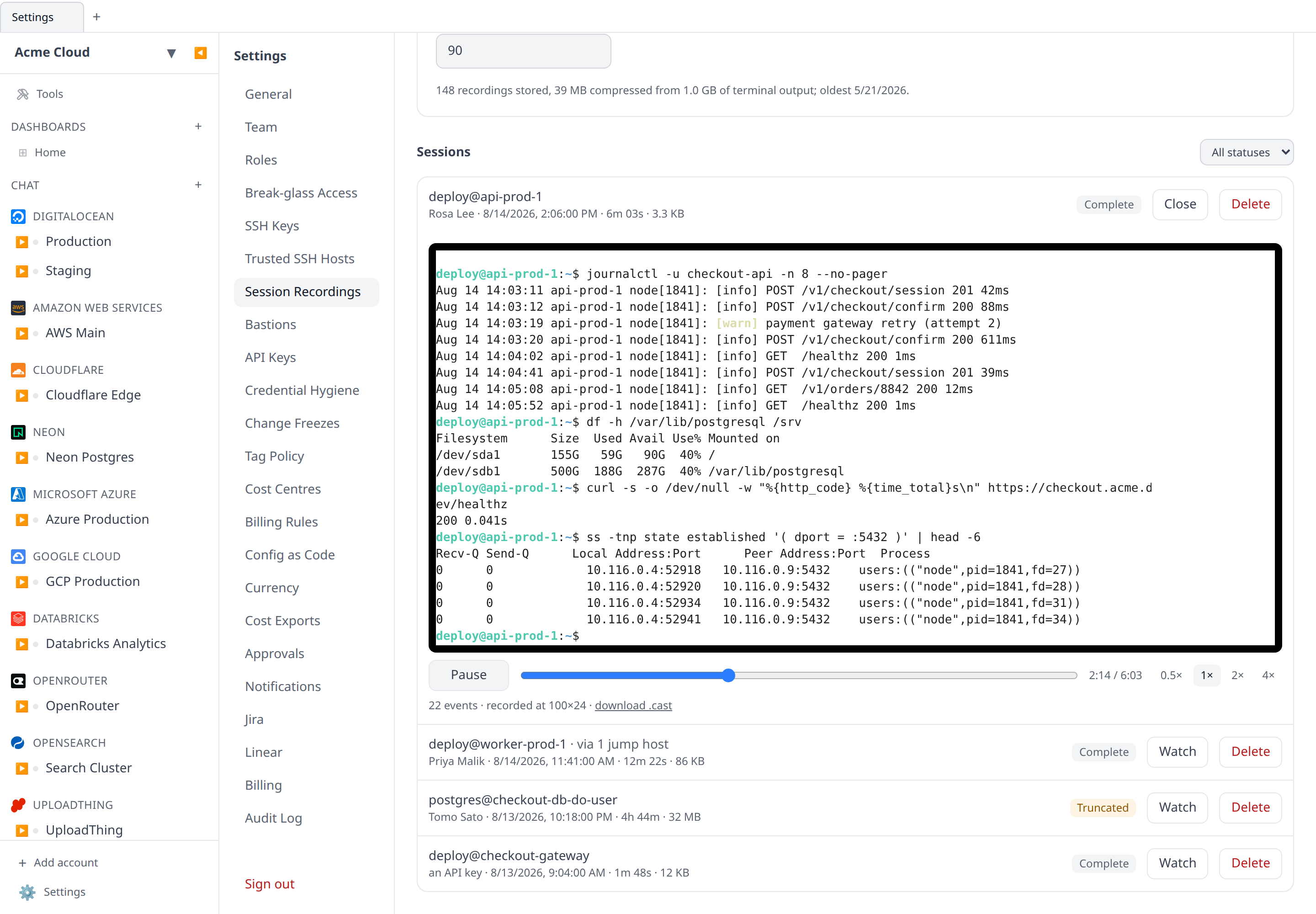
The player has play/pause, a scrubber, and 0.5×/1×/2×/4× speed. Scrubbing is instant no matter how far back you drag: a terminal’s screen at any moment is the product of every byte before it, so seeking replays the output up to that point with the delays removed rather than trying to jump to a keyframe that does not exist.
Sessions are replayed at the geometry they were recorded at. A session recorded in a 200-column window is not reflowed into a narrow panel, because reflowed output is not what the operator saw.
The player is readable by a screen reader: it is named “Session recording playback terminal” and, because a replay takes no input, it stays browsable so you can arrow through the output as text rather than being switched into focus mode. See screen readers on the SSH terminal page for how this works across the rest of the app.
Statuses
- Complete — the session ended and the recording closed cleanly.
- Live — the session is open right now. Recordings are written while the session runs, so you can watch what has been captured so far.
- Truncated — the session hit the per-session capture ceiling (32 MB of terminal output, about ten hours of ordinary interactive work). Someone
cat-ed something enormous. The tape is a genuine partial and says so, rather than silently dropping the middle. - Incomplete — the server handling the session went away before it could close the recording. Everything captured up to that point is intact.
Downloading a cast
Recordings are asciicast v2 documents — asciinema’s own format, not ours. Every recording has a download .cast link, and the same bytes play in asciinema play, in the reference web player, and in whatever tooling an auditor already runs. A recording you can only open inside the product that made it is worth very little to the person it exists for.
From the CLI:
infrawrench recordings
infrawrench recordings get <id> | asciinema play -
infrawrench recordings get <id> --file incident-4417.cast
infrawrench recordings --json gives the list plus the org’s policy and storage usage, for a report or a scheduled export.
Who can see them
Recordings have their own permission family, separate from SSH keys and from the audit log:
session-recordings:read— list, watch and download recordings.session-recordings:write— change the recording policy and delete recordings.
Neither is in the Member system role. Recording exists to watch operators, so handing every operator the ability to watch defeats it. Owners and admins hold both by default, and a custom role can grant read without write — the usual shape for a compliance or security reviewer who should be able to watch a tape but not change the policy or destroy evidence.
Watching a recording is itself audit-logged, along with policy changes and deletions. That is unusual — most reads are not logged — and deliberate: the only thing worse than an unwatched terminal is a recording of one that somebody watched without a trace. Look for session_recording.view, session_recording.delete and session_recording.settings.update in the audit log.
Telling your team
Recording people’s terminals without telling them is, in most places, both a bad idea and a legal problem. Infrawrench gives you the control; the notice is yours to give. If you enable keystroke capture, say so explicitly — that is the setting that can pick up a password.