Work in progressThese docs are still being written and are currently mostly AI-generated. Some details may be inaccurate or incomplete.
SQL editor
Run queries against Postgres, MySQL, Turso, Databricks, ClickHouse, and more.
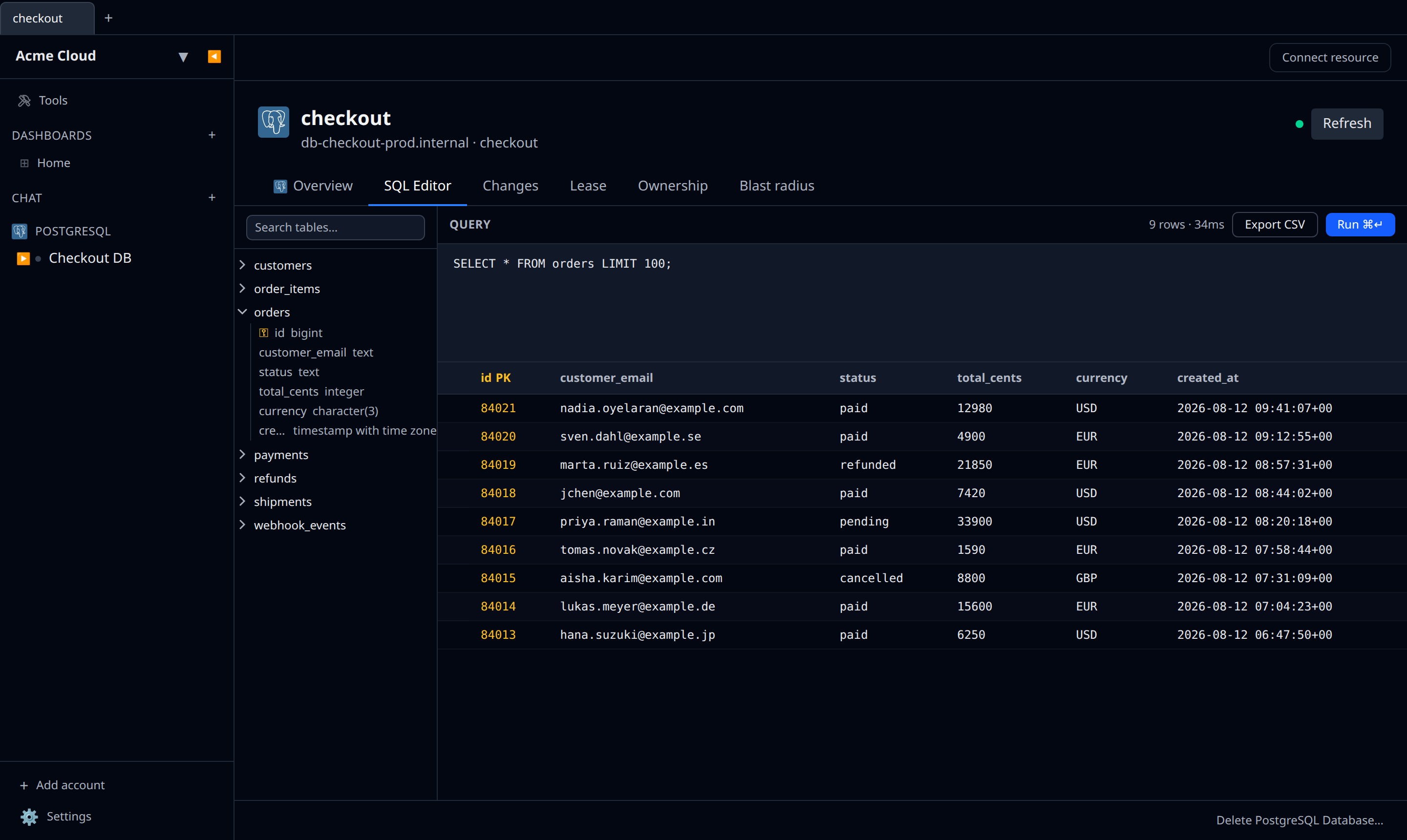
Infrawrench ships an in-app SQL console so you do not need to juggle psql, mysql, and vendor consoles for quick lookups.
Where to open it
- Per-database account — click the SQL button on a Postgres, MySQL, Turso, ClickHouse, or Databricks account.
- Per-resource — many managed databases (RDS instances, PlanetScale branches, Neon branches, Cloud SQL, Turso databases) have their own SQL editor on the detail page so you do not have to add a separate account.
Features
- Schema browser down the left-hand side, from live introspection. Filter it with the Search tables… box, expand a table to see its columns and types, and click a table name to drop
SELECT * FROM <table> LIMIT 100;into the buffer and run it. Primary-key columns are marked with a ⚿. - Result grid with primary-key columns badged PK and nulls shown as
NULL. - Inline row editing — where the query selects from a single table and brings back all of its primary-key columns, the pencil on a row turns the non-key cells into inputs and writes an
UPDATEback. - Export CSV — downloads the current result set.
- Estimate — on engines that support a dry run (BigQuery, Databricks), prices the query before you run it; the toolbar then shows the bytes and cost, or “cache hit · free”.
- Run ⌘↵ runs the whole buffer. Tab inserts two spaces rather than moving focus.
The editor itself is a plain text area — there is no autocomplete, and no query history is kept between visits.
Per-driver notes
- Postgres — full SQL, introspection from
information_schema. - MySQL / PlanetScale — PlanetScale uses Vitess, so cross-shard joins can fail; infrawrench surfaces the raw error.
- Turso — libsql dialect. Edge-replicated, so some writes lag on reads until replication catches up.
- Databricks — runs against a SQL warehouse; results are fetched via REST, not a long-lived connection.
- ClickHouse — HTTP interface. Large result sets stream into the grid.
- MongoDB — not SQL; uses a separate collection browser instead (see the MongoDB plugin).
Writing vs reading
There is no read-only mode by default. If you want a query to dry-run, prepend your statement with EXPLAIN (Postgres, MySQL, ClickHouse) or whatever your engine supports.