Azure
Manage VMs, AKS, App Service, SQL Database, CosmosDB, and storage.
What you can manage
- Compute — Virtual Machines, App Service, Function Apps, App Service Plans.
- Kubernetes — AKS clusters (links to the Kubernetes plugin).
- Databases — SQL Database, CosmosDB.
- Storage — Storage accounts (Blob, File, Queue, Table).
- Networking — VNets, Subnets, NSGs, Load Balancers, Public IPs.
- Security — Key Vault (keys, secrets, certificates).
Credentials
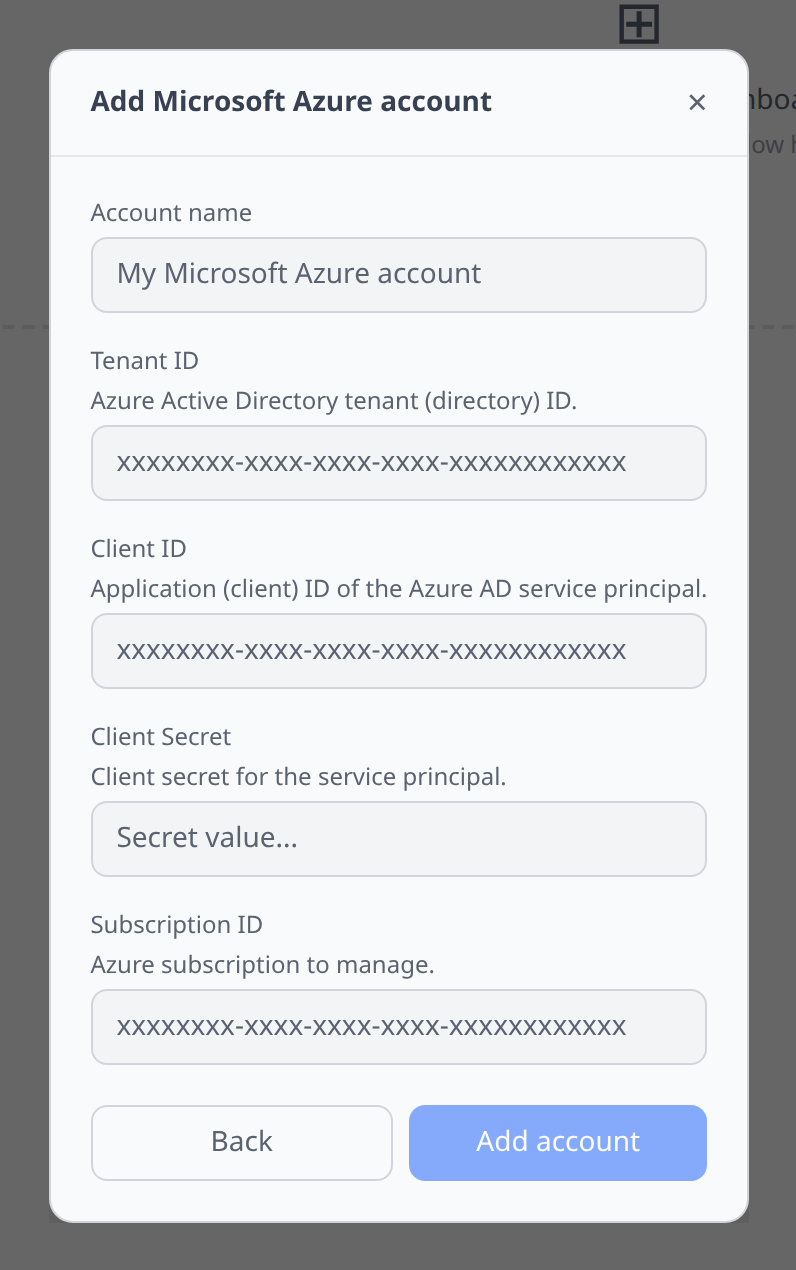
Create a service principal (Azure Portal → Microsoft Entra ID → App registrations → New registration → Certificates & secrets → New client secret). Grant it the roles it needs on the subscription. Paste:
- Tenant ID
- Client ID
- Client secret
- Subscription ID
Notable flows
- Create resources in-app — 25 resource types can be provisioned from the create form: resource groups, VMs (the form auto-creates the VNet, NIC, public IP, and an NSG if you don’t pick an existing one), managed disks, VNets (with a default subnet), NSGs, public IPs, load balancers, AKS clusters, storage accounts, SQL Database (on a new or existing server), Cosmos DB, PostgreSQL and MySQL flexible servers, Redis Cache, App Service, Function Apps, container instances, container registries, Key Vaults, Service Bus and Event Hub namespaces, Log Analytics workspaces, managed identities, DNS zones, and Entra ID app registrations (which also mint the matching service principal).
- SSH terminal on Linux VMs.
- SQL editor on Azure SQL Database.
- File browser on Blob Storage.
- Secret export to K8s for SQL Database and Storage accounts.
- Read-only manifest view on every resource.
- Send test messages to queues or topics inside a Service Bus namespace, and events into hubs inside an Event Hub namespace, from a Send tab on the detail page — see Send test messages. The service principal needs the Azure Service Bus Data Sender or Azure Event Hubs Data Sender role on the namespace.
App Service Plans
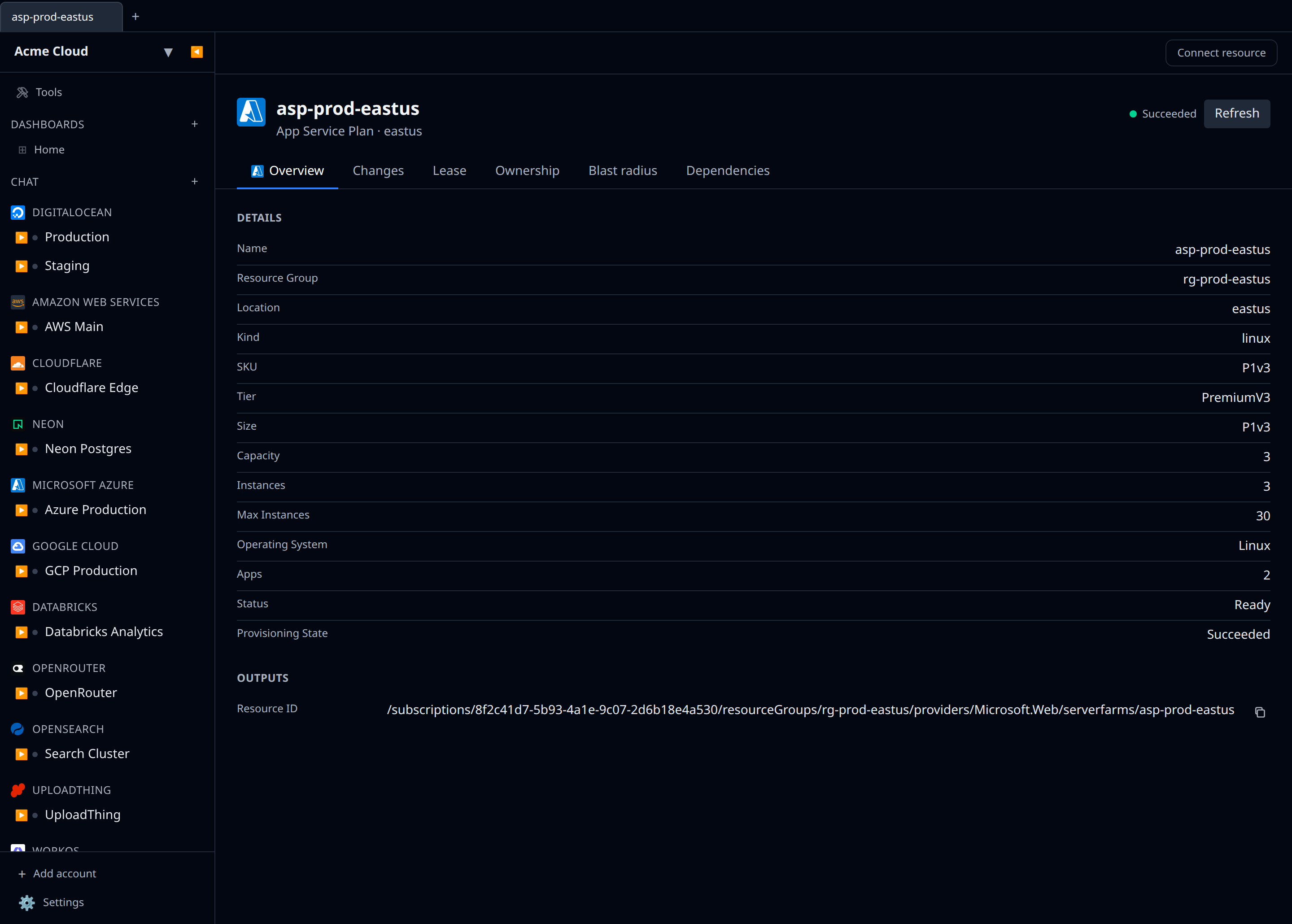
App Service Plans are listed read-only — Infrawrench does not create them. Each plan shows its SKU, tier and size, the instance count it is scaled to, whether its workers are Linux or Windows, and how many apps are assigned to it. Plans are the billing unit for App Service and Functions, so a dedicated plan with zero apps assigned is flagged by the orphan finder. Free and Functions consumption tiers bill per execution rather than per instance, so they are never flagged.
Web apps and function apps link to the plan they run on in the dependency graph, so opening a plan shows everything it hosts.
A Metrics tab reports the plan-wide CPU and memory percentage, disk and HTTP queue length, and data in/out — these are the numbers to scale on, since an individual app’s metrics don’t show plan-level saturation.
Tips & limits
- One account ties to one subscription. For multi-subscription tenants, add one infrawrench account per subscription.
- Key Vault access requires the principal to have an access policy or RBAC role on the vault — the subscription role is not enough.
Cost graphs
Azure subscriptions feed cost graphs & budgets via the Cost Management Query API, collected daily with service and region breakdowns (13 months of history).
- The service principal needs the Cost Management Reader role on the subscription — plain Reader is not enough.
Charge types
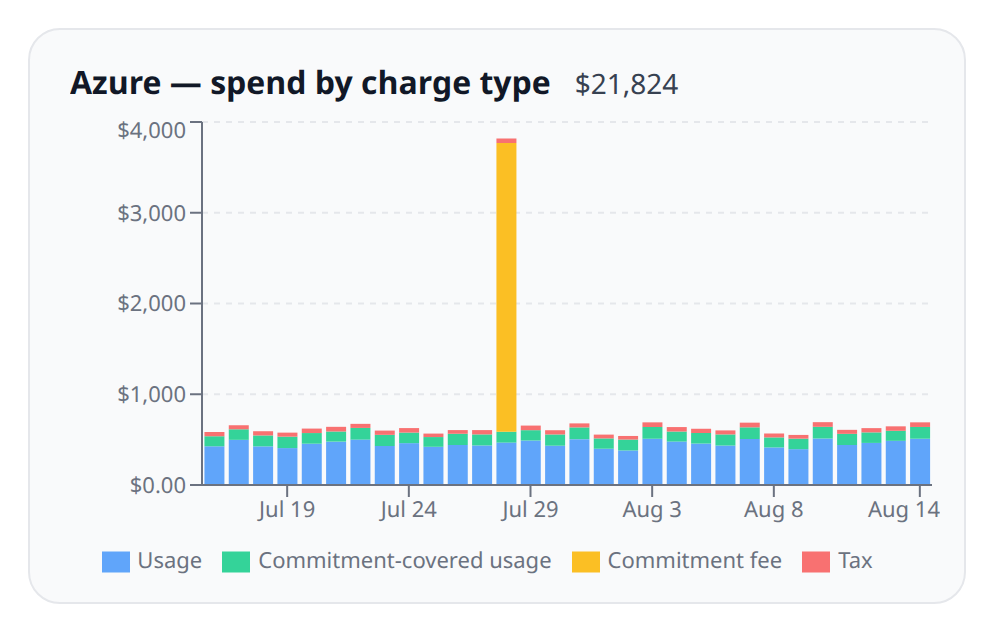
Cost rows are split by charge type, so a month with a reservation purchase in it doesn’t read as a month of runaway consumption. Azure’s charge types map onto the breakdown you see in cost graphs like this:
| Azure charge type | Shown as |
|---|---|
| Usage, billed on demand | Usage |
| Usage, covered by a reservation or savings plan | Commitment-covered usage |
| Purchase, when a reservation or savings plan backs it | Commitment fee |
| Purchase, otherwise (Marketplace, support) | Other |
| UnusedReservation, UnusedSavingsPlan | Commitment fee |
| Refund | Refund |
| Credit | Credit |
| Tax | Tax |
| RoundingAdjustment | Adjustment |
Things worth knowing about the numbers:
- Non-usage rows have no service and no region. Azure’s query API allows only two groupings per query, so the charge-type pass spends both on the charge type and the commitment. Nothing is lost by it: Azure reports purchases with “No service name” and “No resource location” regardless.
- Which charge types you actually see depends on your agreement. Reservation and savings-plan purchases and refunds are billing-account records, so a subscription rarely carries them; pay-as-you-go subscriptions never do. Enterprise Agreement accounts don’t get refund rows at all.
- If your subscription doesn’t support the breakdown, collection still works. Azure only exposes the benefit column on Enterprise Agreement and Microsoft Customer Agreement accounts. When it refuses the query, Infrawrench falls back to the previous single-query collection and every row is recorded as usage.
- Amortized amounts are collected too, where Azure serves them. See below.
Amortized cost, and how coverage is measured
Azure serves cost data as two datasets. Actual cost is the bank statement: a reservation purchase lands whole on the day it was charged, and usage the reservation covers costs zero, because you paid for it when you bought the reservation. Amortized cost spreads the purchase across the term it buys, so the covered hours are priced at what they are actually worth.
Infrawrench queries both, with the same grouping, and the gap between them for a given service and region is exactly what your commitments delivered there. That cell is then recorded as two rows: on-demand consumption, and commitment-covered consumption worth nothing in cash and its amortized value on the amortized cost basis.
This is what makes the Commitments coverage figure work for Azure. It needs no Enterprise Agreement, because it never asks which reservation covered an hour — only whether one did.
Two things follow from it:
-
A reservation purchase is worth zero on the amortized basis, deliberately. Its money has been redistributed to the covered hours and to the unused ones below, and counting it again on its purchase day would show the purchase at full price alongside every amortized slice of it.
-
Unused commitment hours are collected too. Azure reports what a reservation or savings plan wasted as
UnusedReservationandUnusedSavingsPlan, and only in the amortized dataset. Infrawrench collects them as commitment fees worth nothing in cash and their real value on the amortized basis, attributed to the reservation or savings plan that went unused. So an amortized grand total now includes the money a commitment wasted — and no cash total moves, because these rows have no cash side at all.They are deliberately not counted as covered usage: coverage and utilization measure what a commitment delivered, and idle hours are the opposite of that. An underused reservation therefore shows up as spend without lifting either figure, which is exactly the shape that says “this commitment is too big”.
If your subscription doesn’t serve amortized data, nothing breaks. Cost Analysis “doesn’t support viewing amortized reservation costs for a pay-as-you-go subscription”, and Microsoft Online Services Agreement accounts have no commitment purchases at all. Where the pass is refused, each cell is recorded as one undifferentiated usage row with no amortized figure, and the amortized view falls back to cash for it.
Upgrading from an earlier version
Nothing is required of you. Days collected by an older version were stored with every row typed as usage, and re-collection replaces them: a usage row keeps exactly the identity it always had. Where it cannot — a service and region whose spend was only a purchase, tax, or refund, so nothing new lands on the old row’s identity — every collection compares what it is about to write against what is already stored for the same days and supersedes anything left over. Stale rows are cleared by the next collection that touches their day.
Earlier builds documented a manual ALTER TABLE cost_daily DELETE here. It is no longer needed and should not be run.
Commitments
Azure accounts feed the Commitments section with reservations, listed daily from the tenant-level Microsoft.Capacity/reservations API.
- The service principal needs Reader on the reservations (or the Reservations Reader role at tenant scope) — reservation access is granted separately from subscription roles.
- Azure’s list API reports no purchase price, so reservation rows show “price not reported” rather than a dollar figure — the price lives on the reservation order’s billing records, not here.
- Azure is the only provider that reports its own utilization (1, 7 and 30-day figures). Those are shown labelled as provider-reported, alongside — never blended with — the utilization Infrawrench derives from your cost rows.
- Coverage is measured on amortized figures, because on the cash figures Azure reports, usage covered by a reservation costs nothing and every account would read 0% however well covered it is. See Amortized cost, and how coverage is measured above. Subscriptions that do not serve amortized data contribute no covered spend, and are named as excluded rather than counted as 0%.
- Per-reservation utilization needs an Enterprise Agreement or Microsoft Customer Agreement, because the benefit column that names the specific reservation only exists there. Coverage does not — it only asks whether an hour was covered. The provider-reported utilization figures above are always available.