Commitments
Reserved instances, savings plans and committed-use discounts — what you hold, how much of your bill it covers, whether it's being used, and what to buy next.
Reserved instances, savings plans and committed-use discounts are the largest single lever on a big cloud bill — and the least visible thing on a spend graph. The purchase is one spike, the discount is a slightly lower slope, and “is that three-year reservation actually paying for itself” is a question no daily total answers.
The Commitments section on the Costs panel makes the holdings first-class: every reservation, savings plan and committed-use discount your connected accounts hold, collected daily from the provider’s own management APIs.
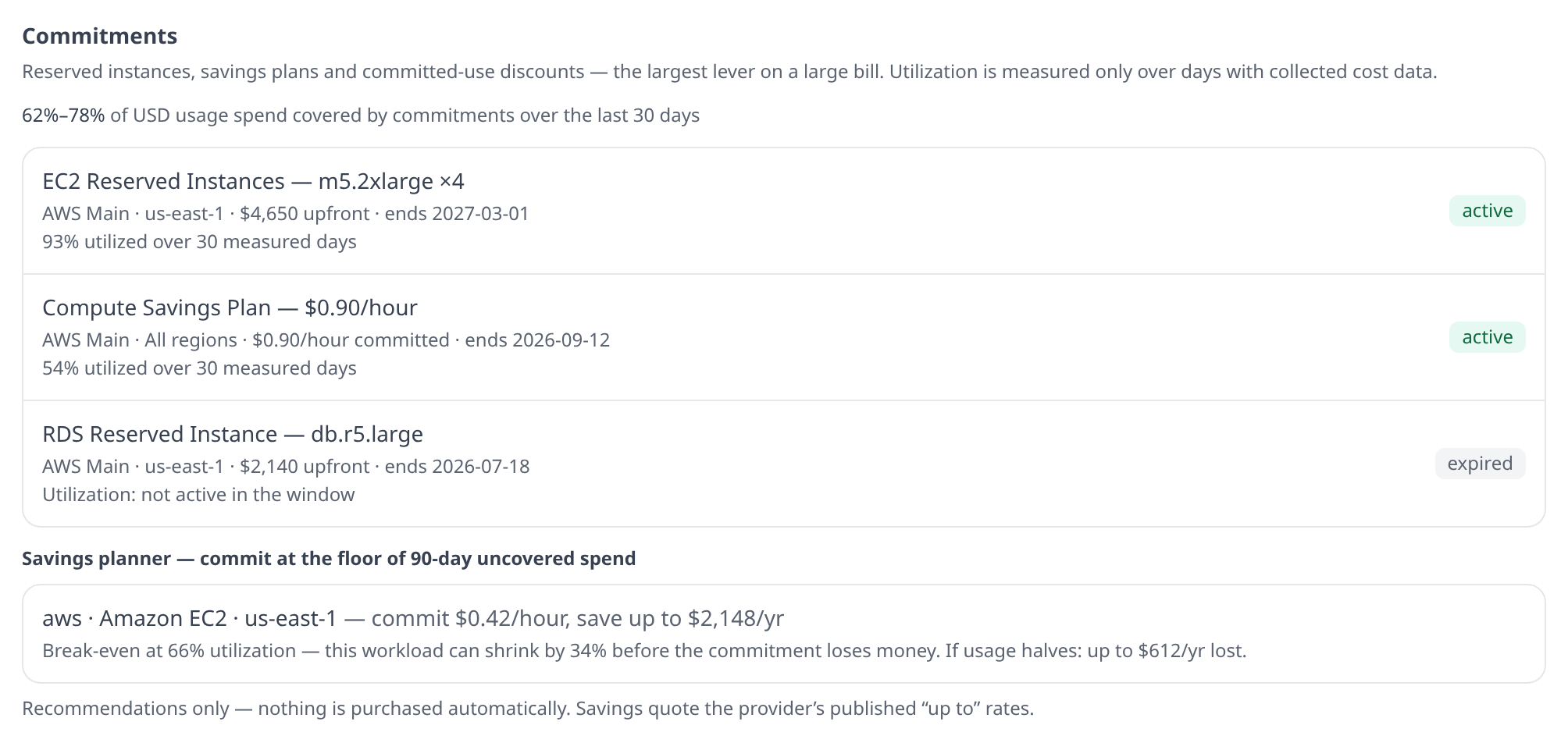
What’s collected
| Provider | What appears | Source |
|---|---|---|
| AWS | EC2 Reserved Instances, RDS Reserved Instances, Savings Plans | DescribeReservedInstances, DescribeReservedDBInstances, DescribeSavingsPlans |
| GCP | Committed-use discounts | compute.regionCommitments |
| Azure | Reservations | the tenant-level Microsoft.Capacity/reservations list |
Expired and queued commitments are collected too — expired records are what close out the history, and a queued purchase is a fact worth seeing before it starts billing.
A few provider quirks are deliberately preserved rather than papered over:
- Azure reports no purchase price on its list API, and GCP reports no money at all (a committed-use discount is denominated in vCPUs and GB, not dollars). Those rows say “price not reported” — never $0, because “free” and “not reported” are different facts and only one of them belongs in a finance review.
- A missing region means “applies across regions” — an AWS Compute Savings Plan genuinely follows your compute wherever it runs, and the UI says “All regions” rather than leaving a blank.
- Azure reservations carry Azure’s own utilization figures (1/7/30-day). They’re shown as provider-reported and never blended with the utilization Infrawrench derives — the two are computed against different meters.
Coverage — a range, on purpose
Coverage answers “how much of our usage spend is covered by a commitment”.
It is computed on amortized money, on both sides of the ratio, and that is not a preference. Providers price commitment-covered hours at zero cash — you paid for them when you bought the commitment — so a coverage percentage built from cash figures reads 0% for every organization that has ever committed to anything, however well covered it is. A ratio that is structurally zero is worse than no ratio, because 0% looks like an answer.
A row counts as covered when the provider says a commitment covered it, whether or not it says which one. Most providers can only say the first: AWS’s cost API can filter by a savings plan or reservation id but cannot group by one, and Azure’s benefit column exists only on Enterprise Agreement and Microsoft Customer Agreement accounts. Coverage therefore never depends on per-commitment attribution — only utilization does, and it says “not measurable” rather than 0% where the id is missing.
There is no single honest denominator for the question, so it’s reported as a range:
- the low end counts every uncovered usage dollar — an over-count, because egress, per-request charges and the like can never be committed against no matter what you buy;
- the high end counts only uncovered usage in service/region cells where a commitment demonstrably landed during the window — provider evidence of committability, not a hand-maintained list of committable services that goes stale.
Accounts whose provider can’t distinguish usage from credits, fees and taxes are excluded and named rather than silently dragging the ratio down. If every account is excluded, coverage reads “unavailable” — not 0%.
Utilization — measured only where there’s data
For money-denominated commitments (a savings plan’s hourly commitment), utilization is delivered spend ÷ committed spend — but only over days where cost data was actually collected. A day the collection didn’t run is reported as a missing day, never counted as an idle commitment: counting it would make a fully-used plan look half-used and send someone off to cancel a healthy commitment.
Values above 100% are shown as-is — spending past the commitment is real, and it’s the signal that says “commit more”.
Unit-denominated commitments (GCP’s vCPU/memory commitments) show “not measurable from spend” rather than a percentage. Cost rows can’t say how many of the committed vCPUs ran, and in a table, “unknown” and “0%” look identical — one of those gets a purchase order cancelled that shouldn’t be.
The savings planner
The planner looks for steady, uncovered, material workloads over the trailing 90 days (minimum 60) and recommends committing at the 10th-percentile floor of daily uncovered spend — the level the workload almost never dips below, not its average.
A workload must pass four gates, and the first failed gate is shown as the reason: it must be present (spend on at least 90% of days), not in decline, have a tight floor (p10 within reach of its median), and be material (at least $1,000/year of commitment).
Every recommendation carries its own risk arithmetic, and it’s exact rather than estimated: at a discount d, the break-even utilization is 1 − d — equivalently, the workload can shrink by the discount rate before the commitment loses money. Rows also quote the worst-case annual loss if the workload halves.
Quoted savings use the providers’ published rates, which are “up to” figures — so the planner says “up to $X/yr” (AWS up to 66%, GCP up to 55%) or a range (Azure publishes 36–72%), never a bare number.
Nothing is ever purchased automatically. The planner produces a briefing; the purchase happens in your provider’s console, by a human who has read the caveats.
Being told, rather than looking
Two of these facts raise alerts of their own — see Commitment & unit-cost alerts:
- Commitment expiry warns at 60, 30 and 7 days before a term ends (and once about one that already lapsed unnoticed), stating what the covered usage will cost once it reverts to on-demand. A commitment with a successor already queued is skipped — nothing lapses.
- Idle commitments alert when utilization stays under 70% across a whole 30-day window,
reporting the wasted money rather than only the percentage. A commitment whose utilization
reads
—on the table above — a unit-denominated CUD, or an account whose provider reports no attribution — never alerts: unknown is not zero.
Everywhere else
- CLI —
infrawrench commitmentsprints the holdings table, coverage range and planner recommendations;--jsonis built for a weekly cron that checks for commitments expiring inside your renewal horizon or utilization sagging. - Mobile — a read-only Commitments section on the Costs tab.
- API / MCP —
GET /api/org/{orgId}/commitments(permissioncosts:read), and theget_commitmentstool for AI assistants.
Required permissions
- AWS —
ec2:DescribeReservedInstances,rds:DescribeReservedDBInstances,savingsplans:DescribeSavingsPlans. - GCP —
compute.commitments.list(included inroles/compute.viewer). - Azure — the service principal needs Reader on the reservations (or the Reservations Reader role at tenant scope).
A collection failure shows up on the section itself with the provider’s error, and collection backs off exponentially — a missing permission won’t hammer the API.