Right-sizing (Oversized resources)
Find machines whose two-week p95 CPU (and memory, where measured) sits well under their size, get the smallest size that still leaves headroom, and apply the resize in one click.
The orphan finder answers “what is wasted entirely”. Right-sizing answers the quieter half of the same question: “what is running real work on a machine twice the size it needs”. Infrawrench computes the 95th-percentile CPU and memory utilisation over the last 14 days of the metrics it already stores, and when a machine sits well under its size, matches it against the provider’s own size catalog — the same sizes the create form offers, with live prices — and recommends the cheapest smaller size that still leaves comfortable headroom.
No new metric collection and no guesswork tables: the percentiles come from the metrics Infrawrench already records for resources pinned to a dashboard, and the candidate sizes and prices come from each provider’s live catalog.
Where to find it
Open Costs in the sidebar and scroll to Oversized, just below Potential savings. Each row shows the machine, its current and recommended size, the p95 CPU and memory figures backing the call, and the estimated monthly saving.
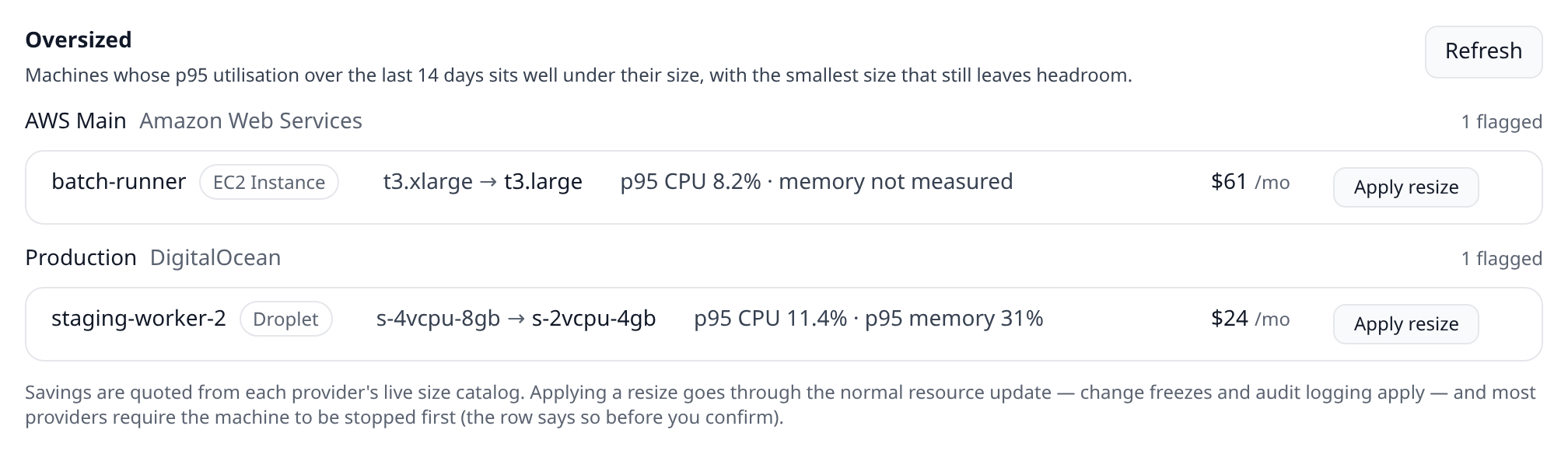
The same list is on the mobile app’s Costs tab (read-only — apply from web or desktop), in the infrawrench oversized CLI subcommand (--json for scripts), and as the list_oversized_resources MCP tool.
When a machine is flagged
A machine is flagged when, over the trailing 14 days:
- its p95 CPU utilisation is under 20%, and
- where the provider reports a memory metric, its p95 memory utilisation is under 40%, and
- there are at least three days of stored metrics to back the numbers.
The recommended size is the cheapest catalog size on which the observed p95 still fits under ~70% of capacity — the recommendation keeps headroom rather than sizing you to your busiest moment. Sizes the provider would reject are never suggested: a different CPU architecture or family, a size unavailable in the machine’s region, or one whose included disk is smaller than the disk the machine already has.
Not every provider measures memory. Where none exists (Hetzner, EC2, Compute Engine without an agent), the row says memory not measured, the recommendation is CPU-driven, and it will never suggest cutting RAM below half the current size — the confirm dialog repeats the caveat so you can check the workload’s memory yourself before applying.
Which providers are covered
Right-sizing is declared by each provider plugin, never hard-coded. It ships for:
- Hetzner Cloud — Servers (per-location EUR prices from the server-type catalog; CPU only — the API exposes no memory metric)
- DigitalOcean — Droplets (USD prices from the sizes catalog; memory measured where the DO Metrics Agent runs on the Droplet)
- AWS — EC2 instances (live per-region on-demand prices from the AWS Price List API; needs the
pricing:GetProductspermission) - Azure — Virtual machines (keyless Retail Prices API; memory from the platform’s Available Memory Bytes metric)
- Google Cloud — Compute Engine VM instances (Cloud Billing catalog prices)
Applying a resize
Apply resize shows a confirm dialog quoting exactly what will change — both sizes with their vCPU/RAM, the projected utilisation on the new size, the saving, and the provider’s own constraint, because there almost always is one:
- Hetzner, EC2 and Compute Engine only resize a stopped machine — stop it first (or let a sleep schedule window do it), apply, then start it again.
- DigitalOcean powers the Droplet off for the resize automatically and boots it afterwards.
- Azure resizes a running VM but restarts it during the change.
Applying goes through the same update path as the resource’s Edit form, so it plays by the same rules as every other change: an active change freeze blocks it with the freeze’s own message, and every applied resize lands in the audit log. Disk is never touched — where the provider distinguishes, Infrawrench always requests the CPU/RAM-only resize, which is the reversible one.
Why a machine you expected isn’t listed
- No stored metrics. Percentiles come from the metrics warehouse, which records resources pinned to a dashboard. Pin the machine and give it a few days.
- Less than ~3 days of data. Thin coverage produces no recommendation rather than a shaky one.
- It’s stopped. A stopped machine’s utilisation describes nothing; the right tool for one that stays stopped is a sleep schedule or deletion.
- No cheaper size fits. The catalog has no smaller same-family size in that region that clears the headroom rule — the good outcome.
- It’s already the smallest size of its family.
Filing a recommendation as an issue
A resize is often somebody else’s change to make, or one that needs scheduling. With Jira or Linear connected, each row in the Oversized section has a file link that opens an issue prefilled with the resource, its current and recommended size, the p95 CPU and memory behind the recommendation, and the estimated monthly saving. Filed rows show their issue key from then on.