Access review
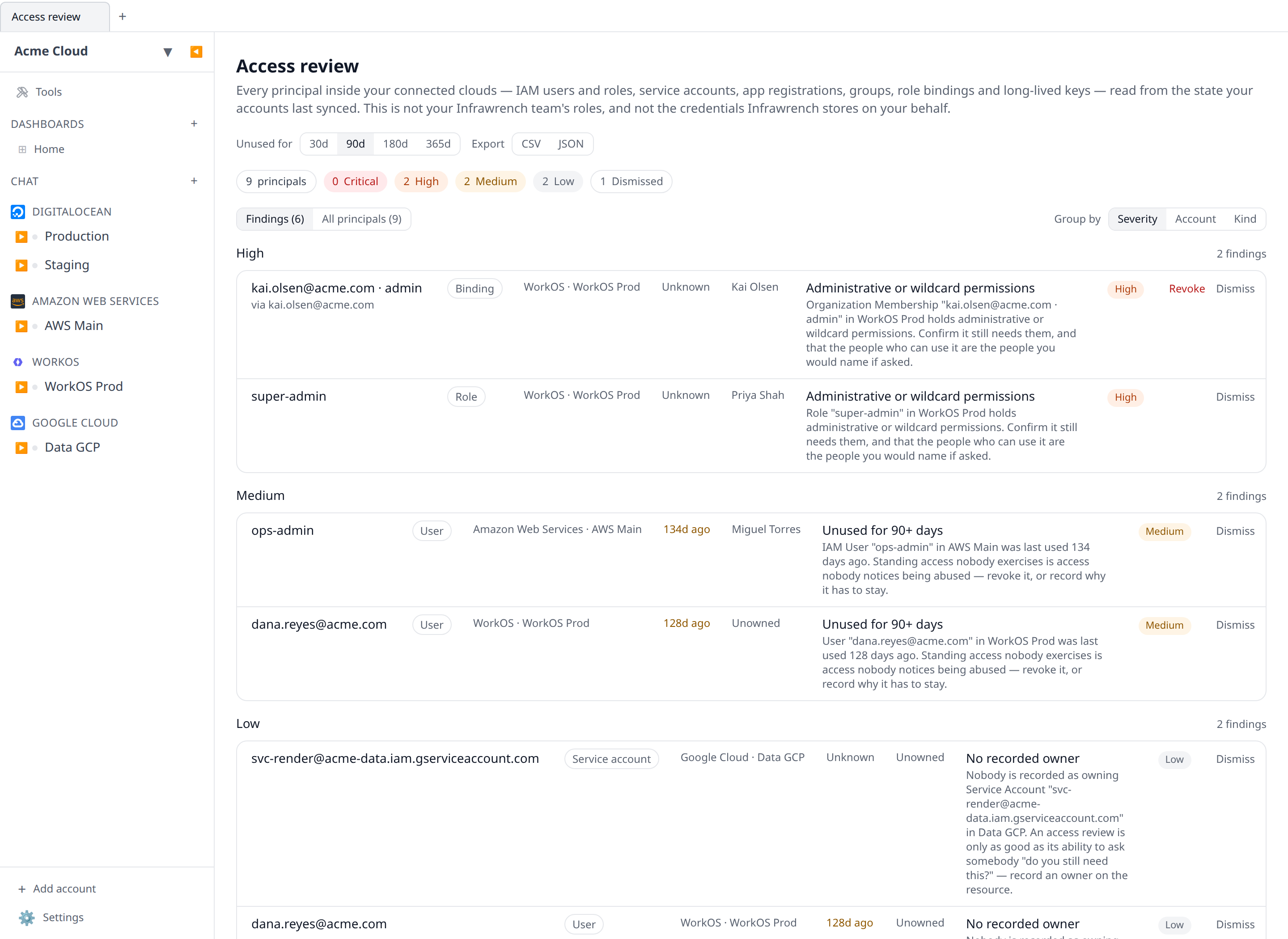
One list of every principal inside your connected clouds — IAM users and roles, service accounts, app registrations, groups, bindings and long-lived keys — with stale, over-privileged, unrotated and unowned access flagged, and a CSV you can hand an auditor.
Somebody left in March. Their IAM user is still there, so is the service account they made for a spike that never shipped, and so is the API key a cron has been quietly using ever since. None of that shows up anywhere until an auditor asks, and then it takes a week of clicking through five provider consoles to answer.
The access review is that answer, standing: every principal your connected accounts have synced, in one list, with the ones worth a conversation flagged.
What counts as a principal
Anything that can hold standing access inside your clouds:
- Users — AWS IAM users, WorkOS and directory users, provider organization members, database users.
- Groups — directory groups that grant through membership.
- Roles — AWS IAM roles, WorkOS environment roles, Postgres roles on a Neon branch.
- Service accounts — GCP service accounts, Azure app registrations and managed identities.
- Keys — long-lived API keys, tokens and database passwords.
- Bindings — the grant itself, like a WorkOS organization membership carrying a role.
Three adjacent things are deliberately not on this page, because confusing them is how a review ends up reassuring you about the wrong thing:
| This page | Not this page |
|---|---|
| Principals inside your cloud accounts | Your Infrawrench team’s roles — see Roles and permissions |
| Access that exists in AWS, GCP, Azure, WorkOS… | The credentials Infrawrench itself stores for you — see Credential hygiene |
| Who can get in | What is exposed — see Posture checks |
What it flags
Five rules, each raised only when there is evidence for it:
- Unused beyond the window — the principal has a known last-use date older than the window you pick (30, 90, 180 or 365 days; 90 by default).
- Administrative or wildcard permissions — the principal holds a role or scope its plugin marks as privileged. A stale admin is escalated a severity level, because that combination is the one that actually gets exploited.
- Past its rotation budget — the credential is older than the rotation budget its plugin declares. This is the same judgement the expiry radar makes, read from there rather than computed twice, so the two screens can never disagree.
- No recorded owner — nobody is named on the resource. A review is only as good as its ability to ask someone “do you still need this?”, so record an owner (see Resource ownership).
- No multi-factor authentication — a user identity signing in without a second factor. Only raised on types whose provider actually reports enrolment.
“Unknown” is an answer, and it is never “stale”
Most providers will not tell you when a principal was last used without a second API call per principal, and the review makes no extra provider calls at all — everything is read from fields your accounts already sync.
So when there is no last-use date, the row says Unknown, and it can never become a stale finding. An IAM role has no last-use date here, because AWS’s ListRoles does not return one; a GCP service account has no timestamps at all. Those principals are still listed, still counted, and still checked for the rules that do have evidence.
The footer of the page says how many principals are in that position, so “we found nothing” and “we could not look” never read the same.
Reviewing
Two views on the same data:
- Findings — only the principals something was raised against, grouped by severity, account or kind.
- All principals — the full inventory with last use, age, admin flag and owner. This is the one you sign off; the findings are what you act on.
Change the staleness window at the top and both recompute immediately.
Accepting a finding
Some access is meant to look like this. A break-glass role really is admin; a shared key really is rotated out of band by a pipeline. Dismiss the finding with a note and it leaves the list and stops feeding the alerts.
It is suppressed, not deleted: the rule keeps being evaluated, the finding reappears under Dismissed with your note and your name for as long as it still matches, and it is included and labelled in the export. Restoring it puts it back. Dismissing needs the resources:write permission — members can read the review but cannot silence it.

Revoking
Where a provider offers a revocation Infrawrench can invoke — a WorkOS membership’s Deactivate, an Anthropic key’s Deactivate key — the row gets a Revoke button. It runs the provider’s own action through the same path as every other resource action, so it obeys change freezes and lands in the audit log.
Rows without that button are not an oversight: their provider either offers no revocation over its API, or only offers a rotation (a new secret for the same principal), which is a different thing and is not offered under a button labelled Revoke.
Exporting the evidence
CSV or JSON, one row per finding, from the buttons at the top of the page. Dismissed findings are included and labelled with the note and the person who accepted them — the question an evidence pack answers is what you found and what you decided, and an export that dropped the accepted risks would answer only half of it.
The CSV quotes every cell and neutralises leading =, +, - and @ so a principal name that came out of your cloud cannot execute as a spreadsheet formula. Exports are recorded in the audit log.
Alerts and the digest
Critical and high findings ride the posture alert — the same daily message, the same Slack/Teams/push channels, and the same switch under Settings → Alerts. Two separate alerts about one security review would mean two messages a day about the same list.
The weekly digest carries an “Access review” line with the open finding count.
Coverage
The review covers a principal type when the provider’s plugin declares one and its lister already stores the fields the rules read. That is why some providers contribute rich rows (last use, age, admin flag) and others contribute an inventory entry and an owner question.
Deliberately not covered today, because nothing syncs the underlying fields: Kubernetes RBAC objects (the Kubernetes plugin lists workloads, not roles and bindings), AWS access keys and GCP service-account keys (they are credential formats on their parent, not listed resources), Azure app-registration client secrets, and MFA enrolment anywhere. Each of those would need a new provider call per principal, which this feature does not make.
Where to find it
Access review in the sidebar, on web and on the desktop app. It is cloud-only: two of its rules read your organization’s ownership records and the shared dismissal store, and a local-only review that answered “unowned” for everything would be describing the app rather than your clouds.