Orphan & idle resource finder
Flag likely-wasted resources — unattached volumes, unassigned IPs — across your connected accounts, with the monthly cost where billing data exists.
The orphan finder scans the resources Infrawrench has already synced from your connected accounts and flags the ones that are probably costing money for nothing: volumes attached to no server, reserved or elastic IPs assigned to nothing, static IPs sitting unused. Each flagged resource comes with a plain-English reason from the provider plugin that knows what the fields mean.
No extra provider API calls are made — the finder runs entirely over data your accounts already list, so opening the page is instant and free.
Where to find it
Open Costs in the sidebar and scroll to Potential savings, below the month-to-date chart and your budgets — what you’re spending and what of it is wasted read together on one page.
Flagged resources are grouped by account, each row showing the resource, its type, and the reason it was flagged. Where Infrawrench collects cost data for the account, rows are annotated with the resource’s spend over the last 30 days.
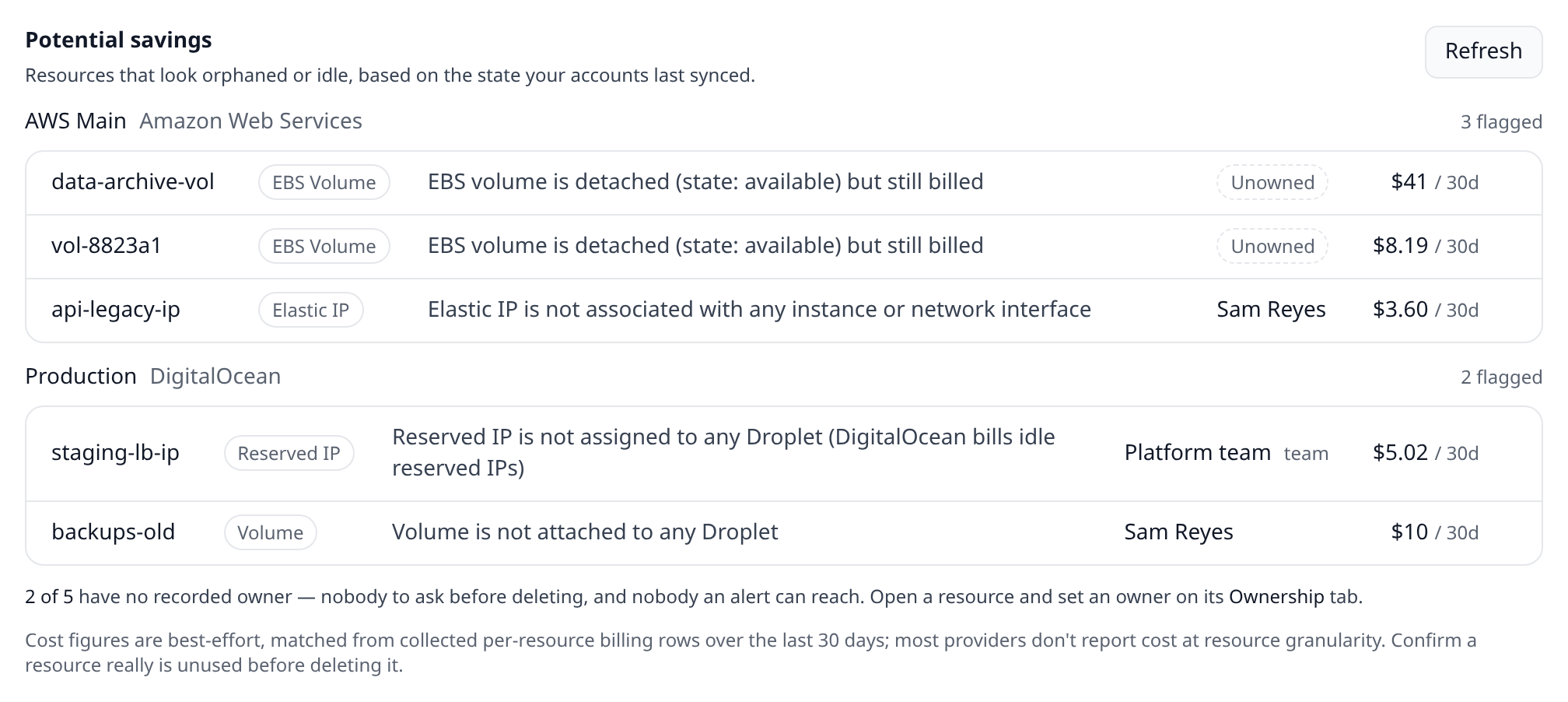
Each resource name is a button — activate it to jump to that resource’s detail page, where you can confirm it really is unused and delete it in place. It is an ordinary tab stop, so you can reach every flagged resource from the keyboard.
The mobile app has the same section at the bottom of its Costs tab, grouped by account the same way, and tapping a row opens that resource. It reads your organization’s synced resources, so it needs you signed in — there is no local mode on a phone.
Cloud mode and local mode
The heuristics are declarative — they read fields the provider already reported — so the same scan runs wherever your resources are stored. What differs is the store and whether cost data exists to annotate with:
| Where you are | What is scanned | Cost column |
|---|---|---|
| Web app, mobile app, or desktop signed in to an organization | Your organization’s synced resources | Trailing 30-day spend where the provider reports per-resource cost |
Desktop signed out (local mode), infrawrench orphans --local | The resources stored in this machine’s local workspace | None — see below |
Local mode needs no account credentials and makes no network calls at all: it reads the workspace database on disk and applies the same plugin rules. It works offline.
Its coverage is narrower, though, and worth understanding: the local workspace stores the resources you created or pinned in the desktop app, not everything your providers hold — the sidebar lists those live from the provider each time. So a local scan classifies what is on disk. Signing in to an organization is what gives the finder a complete, continuously synced inventory to work over.
What gets flagged
A resource is flagged when the provider plugin’s heuristic matches the resource’s current synced state. The first release ships heuristics for:
| Provider | Flagged when |
|---|---|
| DigitalOcean | Volumes attached to no Droplet; Reserved IPs assigned to no Droplet (free while assigned, $5/month while idle) |
| Hetzner | Volumes attached to no server; Floating IPs not assigned; Primary IPs unassigned that won’t auto-delete |
| AWS | EBS volumes in available state (detached but still billed); Elastic IPs with no association |
| Google Cloud | Persistent disks attached to no instance; static external IPs in RESERVED (unused) state — internal IPs are free |
| Azure | App Service Plans with no web app or function app assigned — Free and consumption tiers are not flagged |
Heuristics are declared by each plugin, so coverage grows as plugins do — a provider that knows another “this is idle” signal can add it without any host changes.
Freshness. The finder reads the last synced state of each resource. If you detached a volume a minute ago, it appears after the next account sync — open the account page or wait for the background poller.
Who owns each flagged resource
A list of waste nobody can be attributed to is a list nobody acts on. Every flagged resource carries its owner, and the ones with nobody attached say Unowned rather than leaving the cell blank:
| Resource | Reason | Owner |
|---|---|---|
backups-old | Volume is not attached to any server | Sam Reyes |
staging-lb-ip | Floating IP is not assigned | Platform team (team) |
vol-8823a1 | Volume is not attached to any server | Unowned |
Under the list is the number that drives the work: “12 of 34 have no recorded owner — nobody to ask before deleting, and nobody an alert can reach.” Set an owner on a resource’s Ownership tab and it comes off that count.
A free-text owner (“Platform team”) is marked as such, because the distinction that matters is whether an alert can actually be routed — only a real org member can be sent anything.
Local mode drops the owner column, for the same reason it drops cost: ownership is a cloud
record, so a local scan knows of no owners. That is not the same claim as “nobody owns these”, and
labelling every row Unowned would say the wrong thing.
Cost annotations
When an account has cost collection enabled and the provider reports per-resource cost rows, each flagged resource shows its spend over the trailing 30 days — a concrete number for what deleting it saves. Resources without matching cost rows simply show no figure; the flag itself does not depend on billing data.
Local mode has no cost column at all. Spend is collected and stored by Infrawrench Cloud, and a local workspace never talks to it, so there is nothing to match against. Rather than print a misleading $0.00 next to every row, the desktop section and the CLI table drop the column and say so underneath. The flags themselves are unaffected — they never depended on billing data.
From the CLI
The desktop CLI exposes the same finder:
infrawrench orphans                 # your cloud organization, with cost
infrawrench orphans --local         # this machine's workspace, no cost column
infrawrench orphans --json          # stable JSON for scripting
infrawrench orphans --org <org-id>  # pick an organization explicitly
--json includes unownedCount alongside totalCount, and an owner object on each flagged
resource (null when nobody has claimed it) — enough to script “open a ticket for every unowned
orphan”. It also reports which mode produced the output: local scans carry "costBasis": "unavailable" and "costWindowDays": 0, so a script can tell “nothing was spent on this” apart from “spend is unknown here”.
<insert [Terminal showing infrawrench orphans text output: account headings with flagged resource rows, reasons, and a cost column] here>
Beyond orphans: oversized machines
Waste is not always a resource doing nothing — sometimes it is a machine doing real work on twice the hardware it needs. The Oversized section directly below Potential savings covers that half: right-sizing recommendations computed from two weeks of stored p95 CPU/memory utilisation, each with the provider’s cheapest smaller size that still leaves headroom and a one-click resize.
Filing a flagged resource as an issue
Deleting something is a decision, and often not yours alone to make. With Jira or Linear connected, each flagged row carries a file link that opens an issue prefilled with the resource, its type, account and provider id, the trailing spend, and the plugin’s reason for flagging it. Filed rows show their issue key instead of the link.