Kubernetes
Browse, edit, and run workloads against any kubeconfig-reachable cluster.
The Kubernetes plugin is the one other plugins pipe their secrets into — see Secret export to Kubernetes.
What you can manage
Namespaced resources (create / view / edit / delete):
- Pods
- Deployments
- StatefulSets
- DaemonSets
- Services
- Ingress
- ConfigMaps
- Secrets
- Jobs
- CronJobs
Cluster-scoped:
- Namespaces
- Nodes (read-only — capacity, allocatable, instance type, zone and region)
Credentials
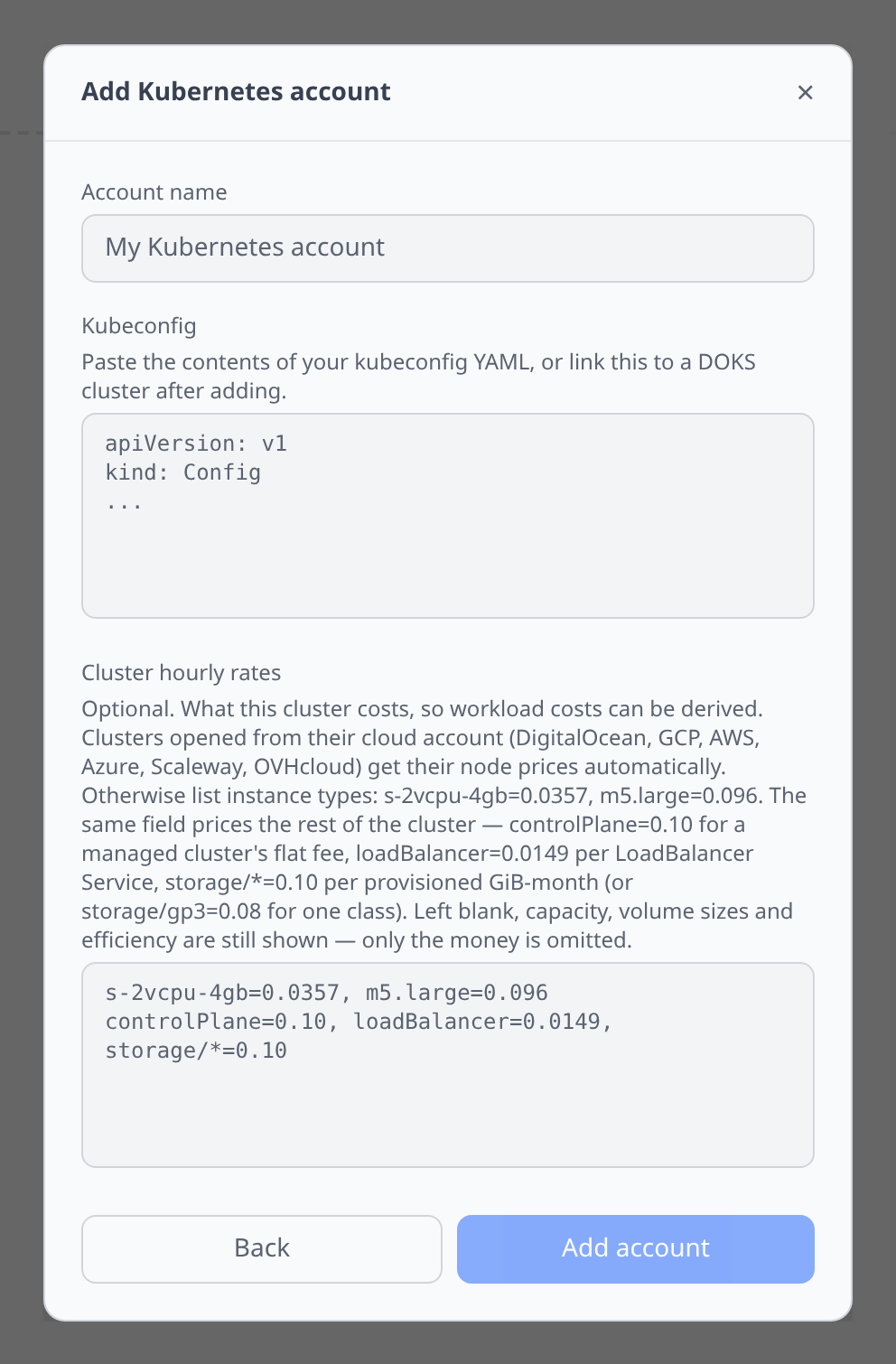
The form has two fields and both are plain text areas. Paste your cluster’s kubeconfig YAML into Kubeconfig.
There is one optional second field, Cluster hourly rates, used only for cost allocation — see Cost allocation below. Leave it blank unless you are connecting a cluster that has no cloud account behind it in Infrawrench, or you want to price the parts of the cluster that are not node compute.
For a cluster you already have in Infrawrench — EKS, AKS, GKE, DOKS, OVH Managed Kubernetes, Scaleway Kapsule — don’t add an account here at all. Open the cluster resource and use its Kubernetes tab: the kubeconfig (and, where the provider reports them, the node prices) flow through from the cluster’s own outputs as an output reference. There is no picker in this credential form.
Cost allocation
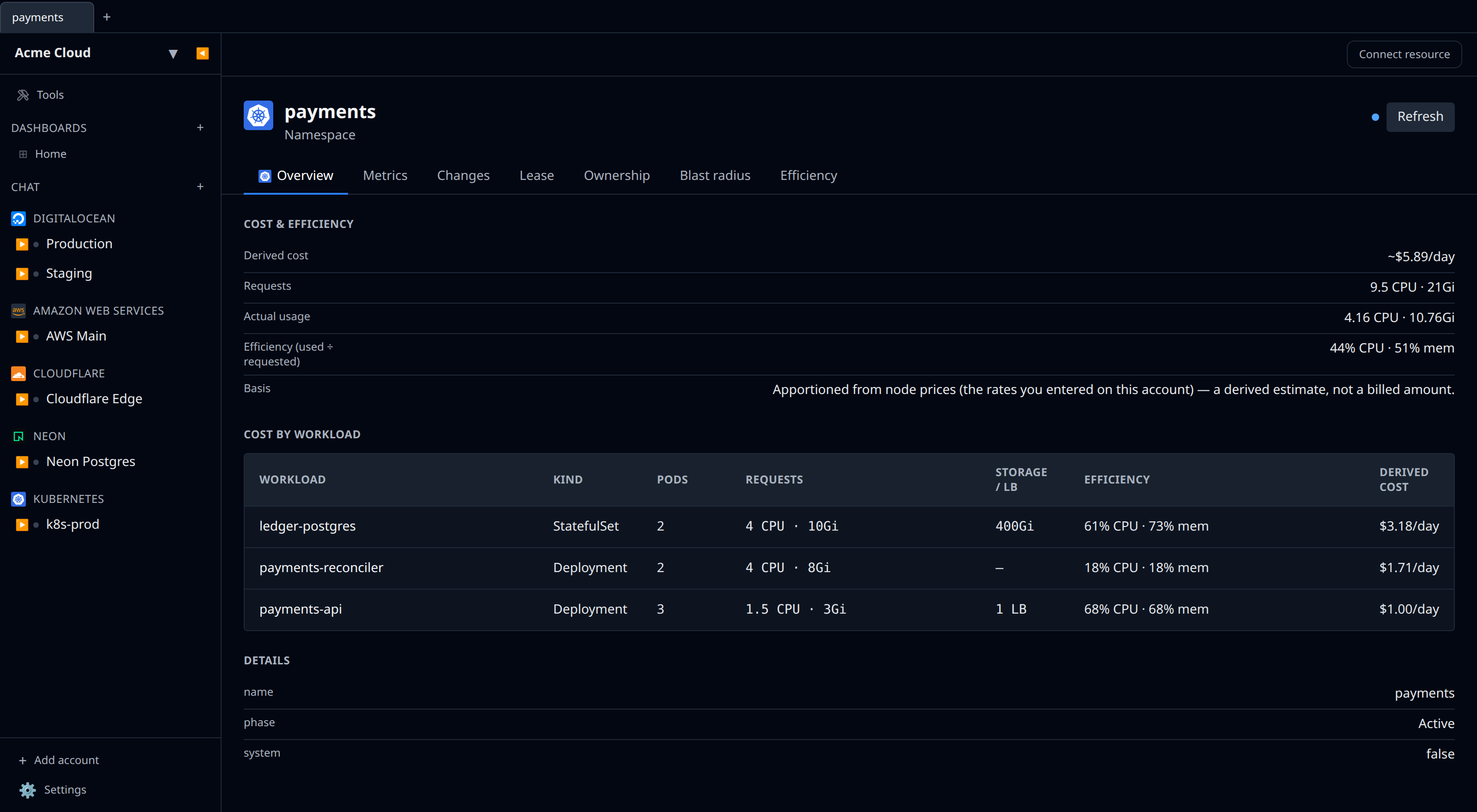
A cluster has no billing API — the money is charged to the cloud account that owns the nodes. So per-namespace and per-workload cost is derived: node capacity times each pod’s share of it, plus the volumes and load balancers each workload owns.
The full explanation is on its own page: Kubernetes cost allocation. The short version:
- Node prices come from the parent cloud plugin when you open the cluster from its cloud account. DigitalOcean supplies the real node-pool price; AWS and Azure supply on-demand list prices; GCP, Scaleway and OVHcloud do not supply one yet. Otherwise fill in the Cluster hourly rates field (
s-2vcpu-4gb=0.0357, m5.large=0.096). - Everything else the cluster costs is priced from the same field, with reserved keys:
controlPlane=0.10for the flat managed-cluster fee,loadBalancer=0.0149per provisionedLoadBalancerService, andstorage/*=0.10(orstorage/gp3=0.08) per provisioned GiB-month. No cloud plugin supplies these automatically yet. - With no price at all, no number is invented. You get capacity, volume sizes, load-balancer counts, requests and efficiency, and the pane explains what to do about it.
- metrics-server is optional. With it, a pod is charged the greater of its request and its actual usage, and you get efficiency figures. Without it, allocation falls back to requests alone and efficiency reads unknown — never 0%. A missing metrics-server never breaks the pane.
- PersistentVolumeClaims are charged to the workload that mounts them, or to the namespace when several do. A bound claim nothing mounts — the classic leftover from a scaled-down StatefulSet — gets its own waste bucket rather than a tenant’s bill, and a claim that never bound is reported but never priced.
LoadBalancerServices are charged to the workload behind their selector, or to the namespace when the selector is ambiguous. One that has not been provisioned yet is counted, not charged.- Idle capacity, the control-plane fee, system-reserved capacity and unattached volumes each get their own bucket, never spread across namespaces — a cluster that is mostly idle is oversized, and burying that in per-team numbers hides it.
- Egress is not allocated. The cluster API exposes no per-workload byte counters, so no apportionment is invented.
kube-systemand the other control-plane namespaces are included, even though the workload listings hide them. Their pods hold real capacity on the same nodes.
These are apportioned estimates, not billed amounts. Do not add a Kubernetes account’s spend to its parent cloud account’s spend.
Efficiency report
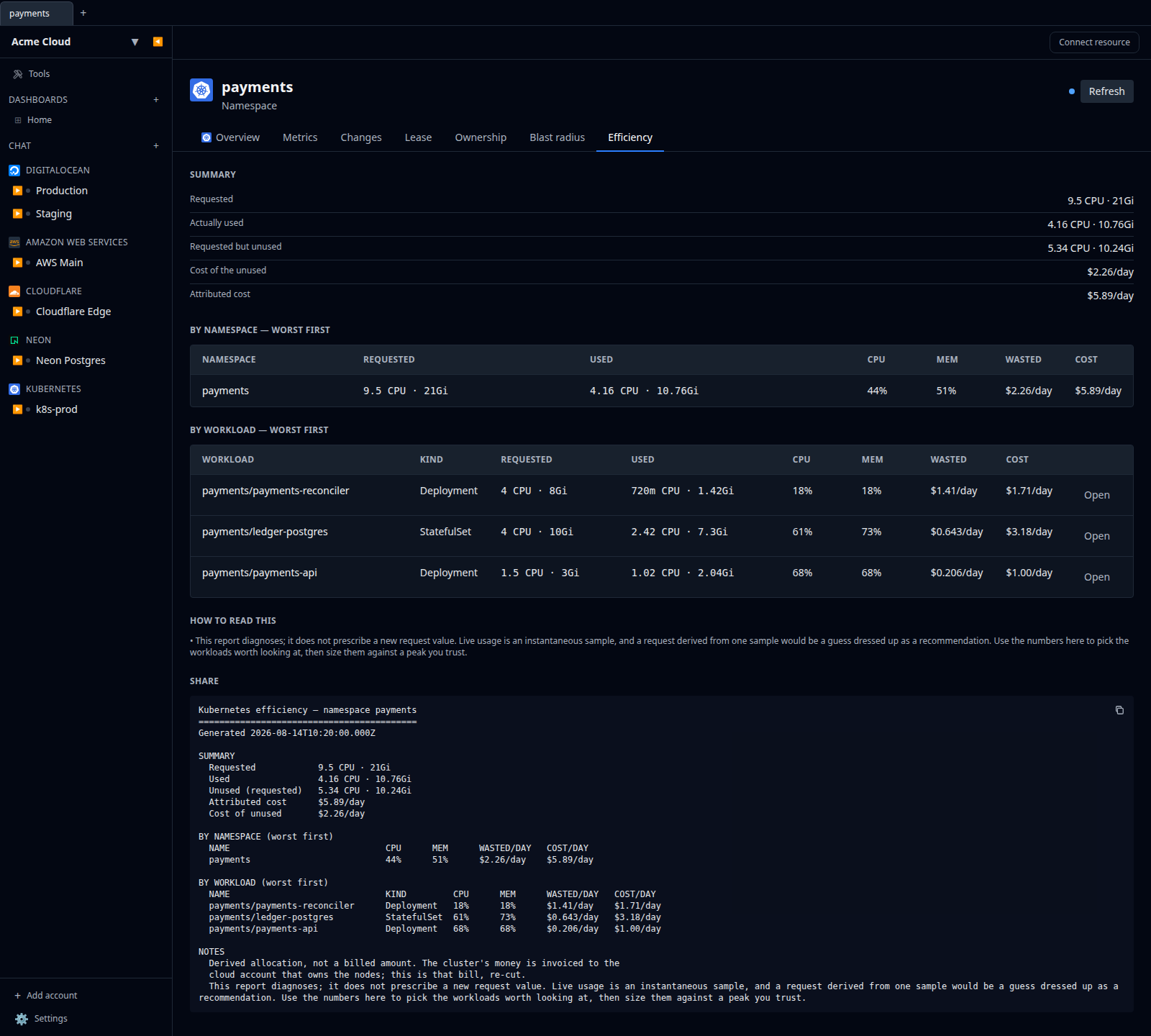
Clusters and namespaces have an Efficiency tab: requested vs used CPU and memory per namespace and per workload, the money the unused portion costs, worst offenders first, with a copyable plain-text rendering to paste into a ticket.
Workloads nothing measured read unknown rather than 0% and sort last. The report diagnoses rather than prescribing a request value — see Right-sizing for why a Kubernetes recommendation is not folded into the VM Oversized list.
Notable flows
- Manifest editor — every resource type is editable as raw YAML in Monaco, applied with Apply ⌘S. See Manifest editor.
- Ephemeral scratch pods — click Launch scratch pod on any namespace to get a throwaway debugging pod with a terminal, auto-deleted after 15 minutes (configurable up to 24 hours).
- Terminal into any pod (
kubectl execequivalent). Pick a container if there is more than one. - Log tail on pods with follow and grep.
- Secret import from other plugins (drag a cloud resource onto a cluster).
- Service picker on create — when creating an Ingress (Backend Service) or a StatefulSet (Headless Service Name), pick an existing Service from a searchable dropdown instead of typing its name. The list is scoped to the namespace selected in the same form.
- Cost and efficiency in the pane — namespaces are ordered by cost, and every pod, deployment, statefulset and daemonset pill carries its derived daily cost and efficiency. Badly over-requested workloads are flagged amber, and the pane’s banner calls out unattached volumes, never-bound claims and any component it could not price.
Tips & limits
- Cluster connections use the kubeconfig’s context. If the kubeconfig has multiple contexts, pick one at add-time.
- Exec and port-forward in the web app proxy through our server. Long-running sessions are fine; heavily streaming ones (continuous log tail over days) may reconnect.
- RBAC applies — if the kubeconfig has limited permissions, some resource types will be hidden and some actions will fail. Cost allocation needs
liston nodes and pods cluster-wide; without it the workload listing still renders, just without cost. Storage and load-balancer allocation additionally needlistonpersistentvolumeclaimsandservices, and each degrades on its own: a kubeconfig that may list pods but not PVCs still gets the complete compute allocation, with storage reported as unavailable rather than as zero. - Egress is not allocated, and is not estimated. The Kubernetes API has no per-workload byte counters —
metrics.k8s.iocarries CPU and memory only — so a per-namespace network figure would have to be invented. It needs a flow-log source outside the cluster API. - Volume utilisation is not measured. Storage is priced on provisioned size, which is what is billed; how full a disk actually is lives on the kubelet’s Prometheus endpoint, not in the Kubernetes API.
- PersistentVolumeClaims and load balancers are cost objects, not browsable resources. They appear on the cluster’s cost tables and its Storage & load balancers tab, not as sidebar entries with their own detail pages.
- There is no cost history to backfill — the Kubernetes API describes the present. Each daily collection appends one snapshot, so the series starts the day you connect the account.