Environment diff
Two accounts of the same provider compared side by side — resource types present in one and not the other, count deltas, and the settings on which corresponding resources disagree.
Staging works. Production doesn’t. Somewhere between the two there is a database on a smaller plan, a queue nobody created, a flag that was flipped in one place and not the other — and finding it means opening two browser tabs of the same provider console and comparing them by eye.
Environment diff does that comparison for you. Point it at two accounts of the same provider and it answers three questions at once:
- What exists in one and not the other. Resource types present in staging and missing from production, and vice versa.
- How the counts differ. Three droplets here, five there, per resource type.
- Where corresponding resources disagree. The instance class, the engine version, the replica count, the feature flag — field by field, with both values side by side.
Like the orphan finder, the expiry radar and posture checks, it costs nothing to have on. The comparison runs over state your accounts already sync — no extra provider API calls, nothing against your rate limits — and reads the same stored records the change timeline diffs against their own past. It is the same comparison, pointed at a different pair of snapshots, which is why it needs no knowledge of any particular provider and covers every plugin automatically.
How resources are paired
Two accounts don’t share resource ids, so the diff pairs resources by resource type plus name, with environment words removed. api-staging lines up with api-prod; acme-blue-worker lines up with acme-green-worker.
The words it strips are a fixed vocabulary — prod, production, prd, live, stg, stage, staging, dev, test, qa, uat, sandbox, preview, preprod, demo, canary, beta, alpha, local — plus every word in the two account names. That last part is what makes it work without configuration: if your accounts are called “Acme Blue” and “Acme Green”, acme, blue and green are stripped too, and you never have to teach it a naming convention.
Where several resources of one type normalize to the same name, they pair up to the overlap in a stable order and the leftovers are reported as present on one side only.
What it hides, and why
Every resource in production has a different id, a different IP address and a different creation time from its staging twin. Listing those would bury the one field that actually diverged, so by default the diff filters out:
- fields whose name ends in an identifier, link or network-address word —
vpcId,arn,endpoint,publicIpAddress,selfLink,fqdn - values that are timestamps on both sides —
createdAt,launchTime - values that are each side’s own provider id
Everything else is shown. An instance class, an engine version, a replica count, a boolean flag — the filter never guesses that a configuration difference is “probably fine”. The count of what it hid is always displayed, and Show ids, addresses & timestamps (or --all on the command line) turns the filter off entirely.
Using it
Open Env diff in the sidebar, pick a baseline account and a comparison account, and read the result. The second dropdown only offers accounts of the same provider as the first — a Droplet has no counterpart in an AWS account, so comparing across providers would produce nothing but noise.
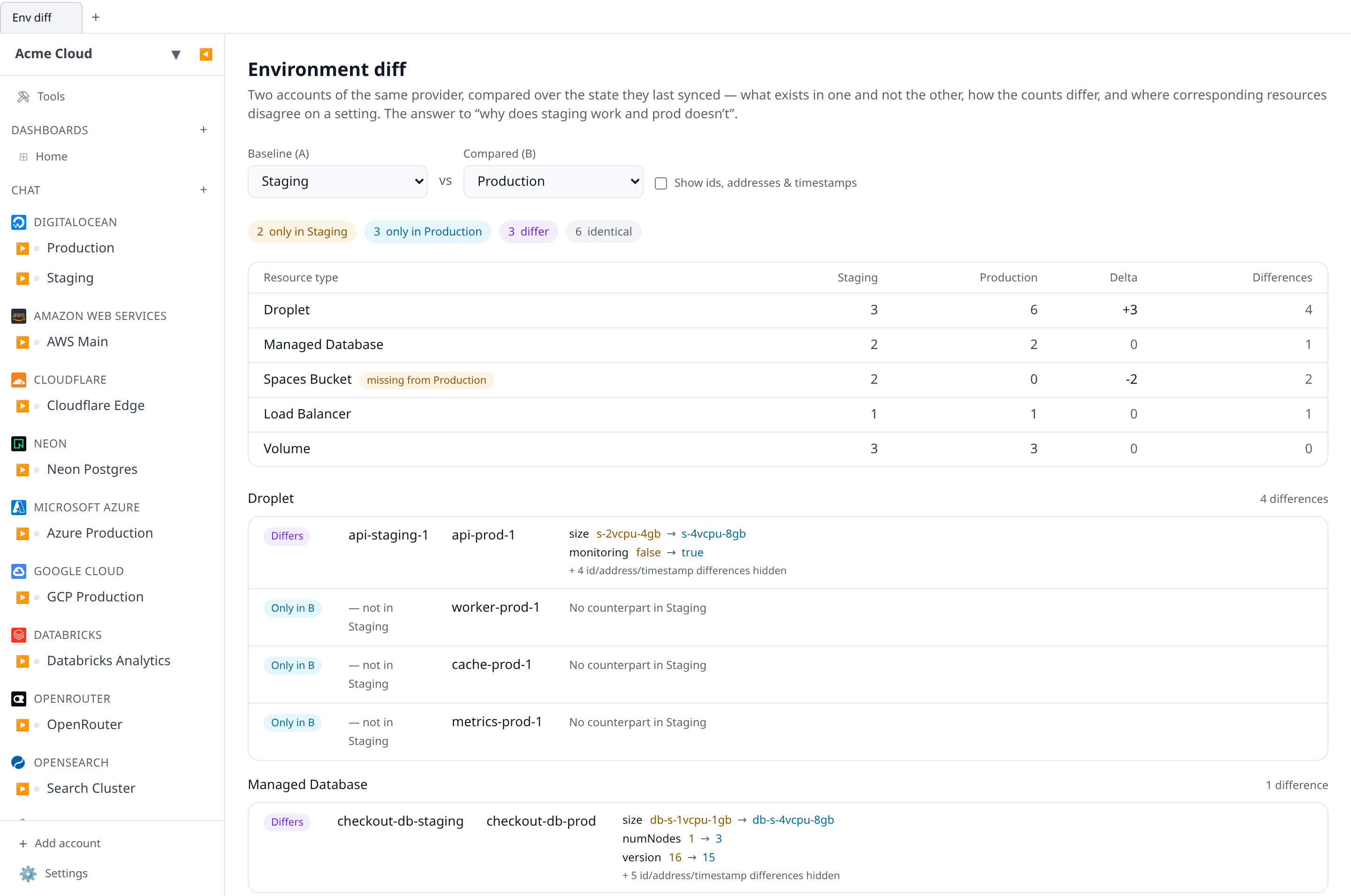
The pair you chose is recorded in the URL, so a comparison can be bookmarked or pasted into a chat. Resource names link through to the resource, which is usually the next thing you want.
From the command line
The CLI prints the same comparison:
# by name, id, or unique name prefix
infrawrench diff -a staging -b prod

# positionally, which reads better for the common case
infrawrench diff staging prod

# one resource type, ids and timestamps included, machine-readable
infrawrench diff staging prod --type managed_database --all --json
--local compares two accounts in the desktop app’s own workspace instead of an organization’s. Because a local workspace keeps no synced copy of your infrastructure, that mode enumerates both accounts through the provider live — slower, and it needs the accounts’ credentials, but it works signed out. A resource type whose listing fails is excluded from the comparison and reported, rather than being counted as missing: “we couldn’t ask” and “prod doesn’t have one” are opposite answers.
From an agent
The MCP server exposes the comparison as diff_environments, taking the two accounts by id or by exact name. It is the tool to reach for when someone asks an agent why one environment behaves differently from another — the agent gets the type deltas and field divergences in one call instead of listing both accounts and comparing them itself.
Permissions and freshness
Reading a diff needs resources:read — the same permission as the account pages it reads. Nothing is written, and no provider is contacted.
Results are as fresh as the last sync. If you have just changed something, sync the account first (or wait for the poller) and re-run the comparison.