Posture checks
Plugin-declared security checks over already-synced resources — public buckets, world-open firewall rules, unencrypted disks, stale credentials — ranked by severity, with alerts on the worst of it.
The bucket that quietly allows public access, the firewall rule someone opened to 0.0.0.0/0 “just for a minute”, the volume that was never encrypted, the console password nobody has used since spring — each is one console page deep in a different provider. Posture checks fold them into one list: every security finding across every connected account, ranked by severity, with alerts when something critical shows up.
Like the orphan finder and the expiry radar, it costs nothing to have on. Findings are computed entirely from fields your accounts already sync — no extra provider API calls, nothing against your rate limits. Each plugin ships declarative rules over the fields its listers store, so the checks cover every provider that declares them and grow automatically as plugins do.
What it checks
Rules fall into a handful of categories, each finding carrying the plugin’s own explanation of why it matters:
- Public exposure — a Redshift cluster reachable from outside its VPC, an EC2 instance with SSH open to the world, a GCP firewall rule allowing ingress from
0.0.0.0/0, a Cloud SQL instance with a public IP, a GCS bucket without public-access prevention, an OpenSearch domain with no VPC attachment, a Hetzner server with no firewall attached, a paused Cloudflare zone exposing its origin. - Encryption — unencrypted EBS volumes, RDS/Neptune/DocumentDB cluster storage, EFS file systems, Redshift clusters and Azure managed disks; an Azure storage account allowing plain-HTTP transfer; an Azure Redis cache with its non-TLS port enabled.
- Credential age — an IAM user whose console password hasn’t been used in over 90 days.
- Data protection — a CloudTrail trail without log-file validation, an Azure key vault without purge protection, a DigitalOcean Droplet with backups disabled.
One check is not a per-resource rule: dangling DNS (dns-dangling-target) flags a DNS record still pointing at a provider name nothing in your workspace claims — the subdomain-takeover case. It has to look across the whole workspace rather than at one field bag, so it is computed by the Domains surface and folded into these findings, where it alerts through the same channel as everything else.
Every finding lands in a severity bucket: critical, high, medium or low. Critical and high findings are the alertable ones; medium and low are hygiene work that stays on the screen.
The Posture screen
Web, desktop and mobile all get a Posture screen: severity totals up top, then the findings grouped by severity, category or account, each row naming the resource, the check that matched, and the plugin’s reason. The resource name is a button — activate it (mouse or keyboard) to open the resource itself and fix it.
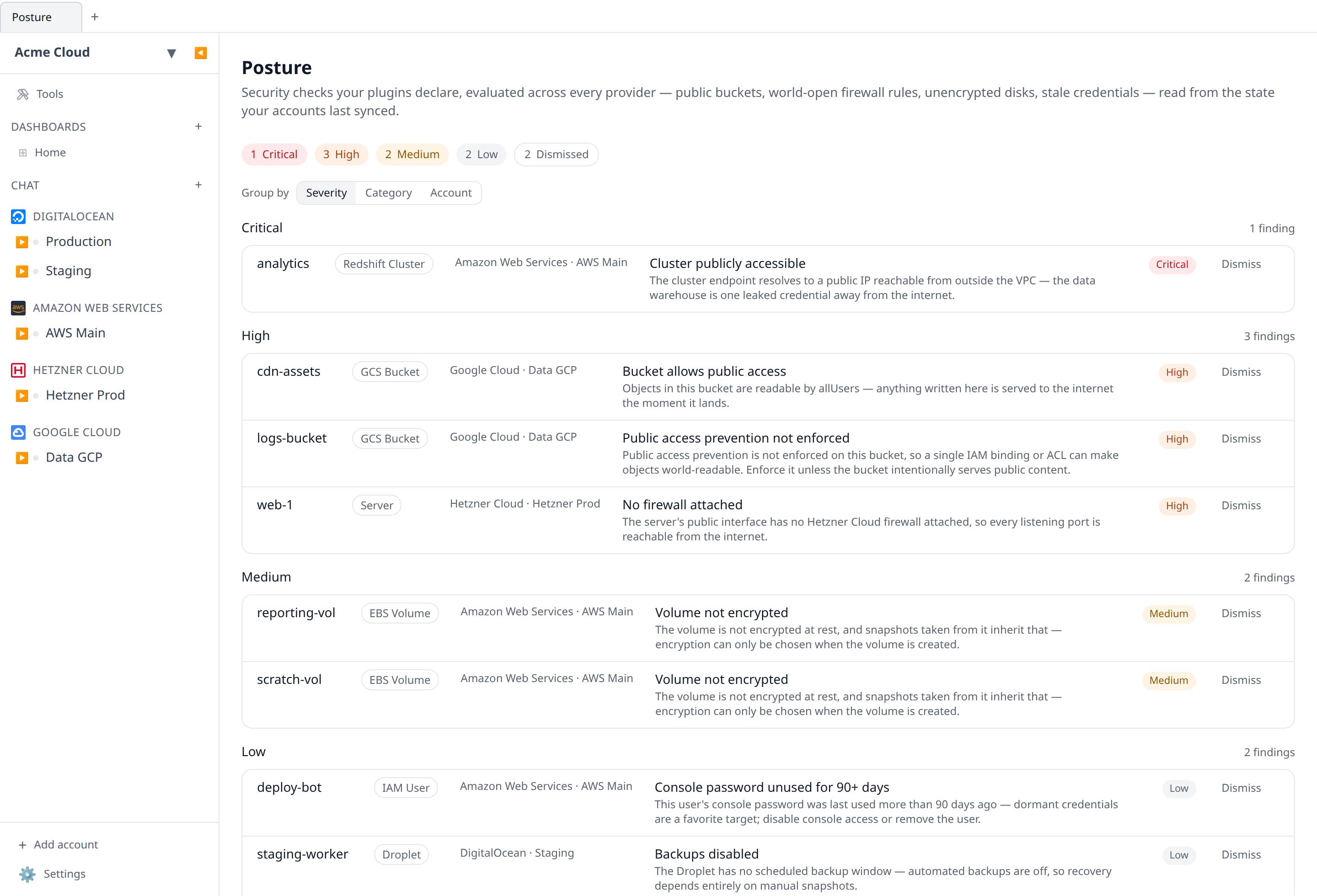
On desktop the screen works in both modes: signed into Infrawrench Cloud it shows the organization-wide findings; in local-only mode it computes the same findings from the workspace on your machine.
Dismissing a finding
Some findings are true and deliberate. The bucket really is a public static site; the key really is rotated by a process Infrawrench can’t see. Hit Dismiss on the row, optionally say why, and the finding leaves the list and stops feeding the alerts.
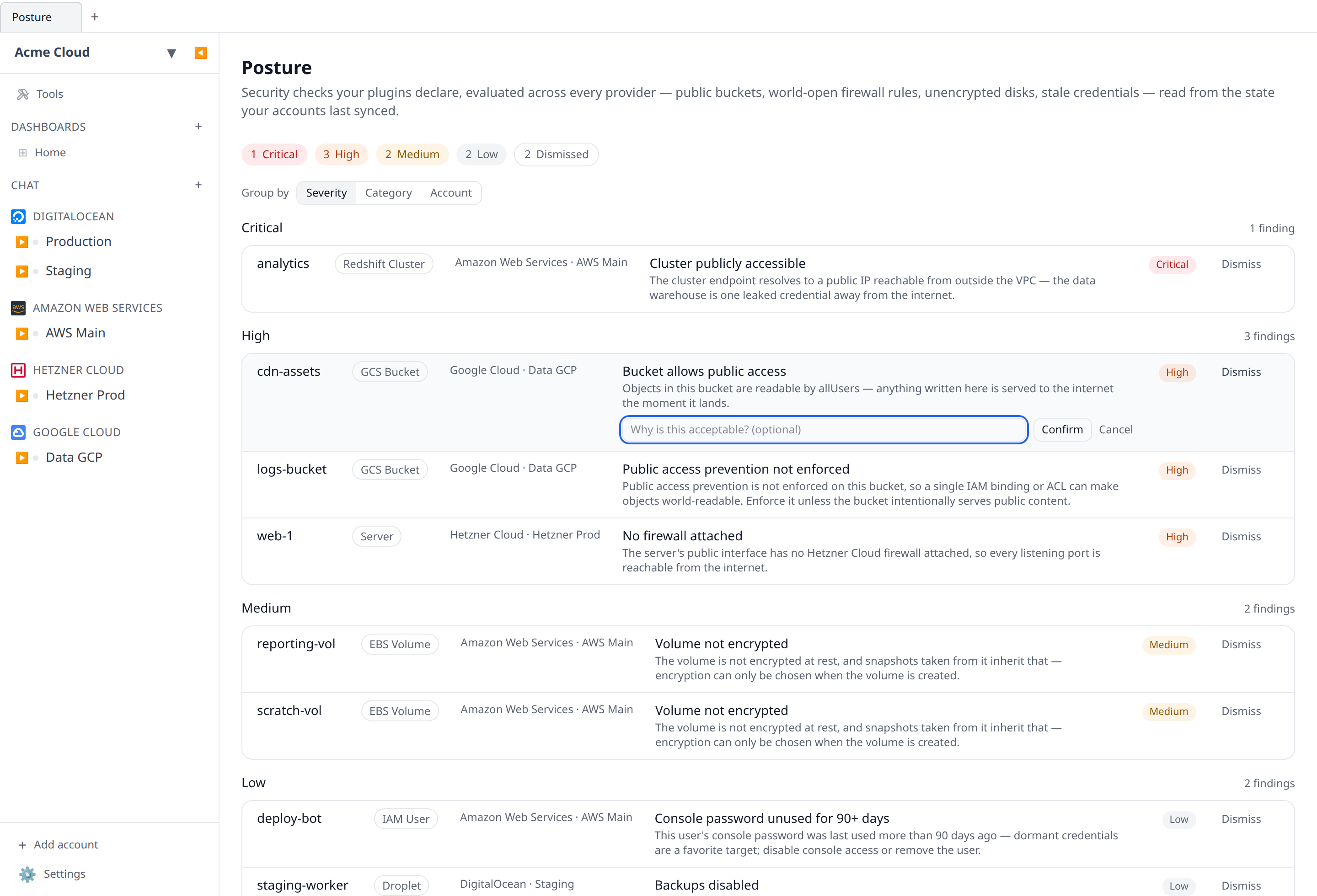
It is a suppression, not a delete, and everything about it is deliberately visible:
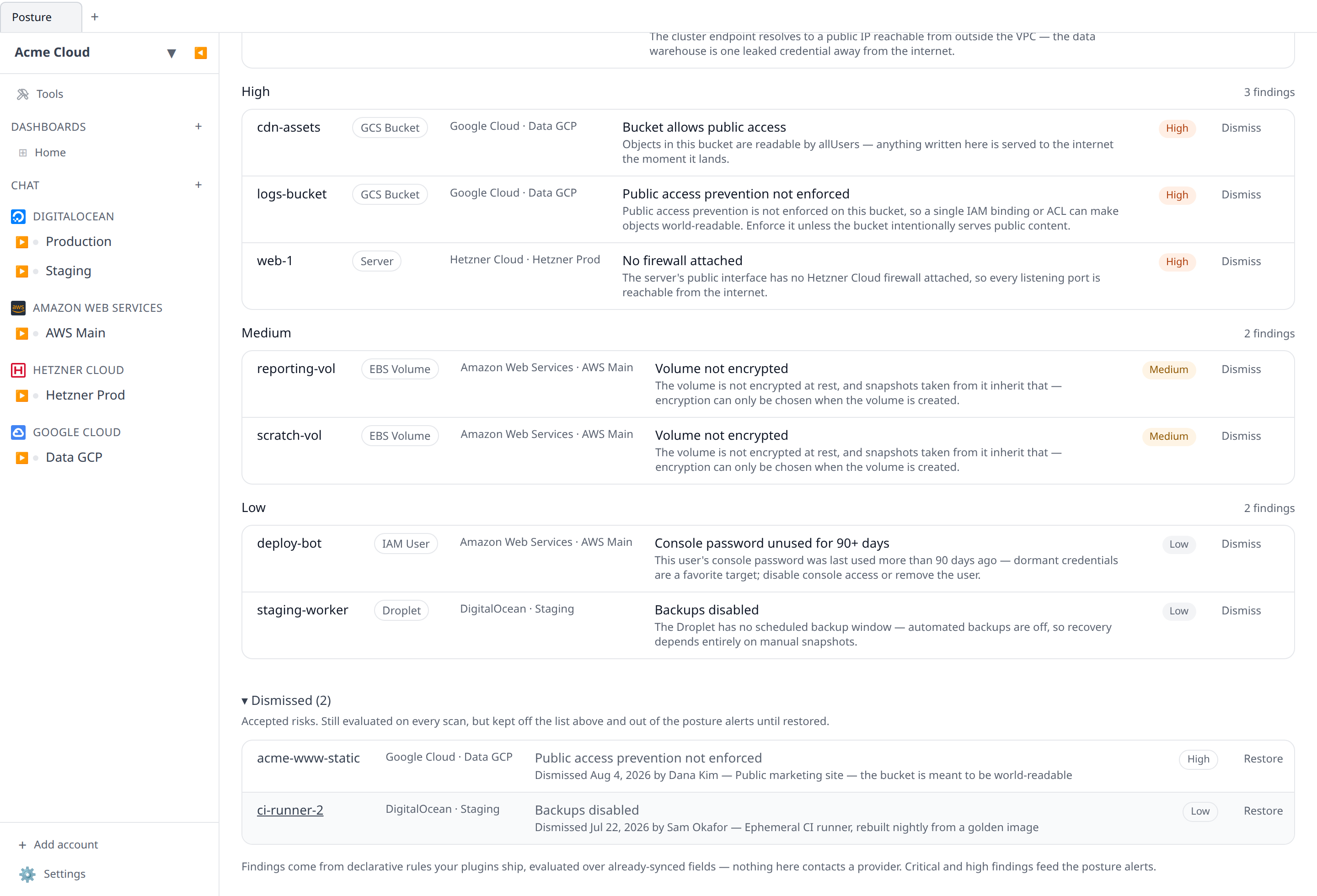
- The rule keeps being evaluated on every scan. Dismissed findings that still match are listed under Dismissed (N) at the bottom of the screen, with who accepted them, when, and the note they left. Restore puts one back.
- A dismissal that stops matching — because you fixed the resource, or deleted it — simply disappears from that list. It leaves no claim about a risk that no longer exists.
- The severity chips gain a Dismissed count, so “clean” is never mistaken for “quiet because somebody silenced it”.
- Dismissing and restoring are both written to the audit log (
posture.finding.dismissed/posture.finding.restored).
Dismissing needs the resources:write permission — owners and admins by default. Members can read the Posture screen but not silence it, and the buttons simply aren’t shown to them.
A dismissal is keyed to the resource and the rule, so it is narrow by construction: accepting “bucket is public” on one bucket says nothing about any other bucket, and the same bucket’s other findings are untouched. There is no way to dismiss a rule everywhere at once — that would be a policy decision, and the honest place for it is the plugin’s rule set.
On desktop, cloud mode records the dismissal for the whole organization; local-only mode keeps it in the workspace on your machine. On mobile you can dismiss and restore, but without a note — that particular sentence is better typed on a keyboard.
Alerts on the worst of it
The cloud poller sweeps every organization’s findings and, when critical or high findings exist, sends one summary alert — counts per severity plus the worst findings — over the same transports as every other alert: Slack channels, Microsoft Teams webhooks, and mobile push. The Posture trigger is on by default and can be toggled per channel and per user in Settings → Notifications (and on the mobile notifications screen). Alerts are rate-limited to one per organization per day; medium and low findings never page anyone.
Posture alerts can be switched off entirely per organization via the posture settings (PUT /posture/settings), without hiding the screen itself.
The weekly digest gains a “Posture” line whenever critical or high findings are open, so even with alerts muted the exposure count reaches you once a week.
The CLI
infrawrench posture prints the same findings, worst first, with --json for scripts and --local for the desktop workspace on your machine:
$ infrawrench posture
Acme Corp · 6 findings  1 critical · 2 high · 3 medium

severity   resource        type               account    finding
critical   analytics       Redshift Cluster   Prod AWS   Cluster publicly accessible
high       web-1           Server             Hetzner    No firewall attached
high       logs-bucket     GCS Bucket         Data GCP   Public access prevention not enforced
medium     scratch-vol     EBS Volume         Prod AWS   Volume not encrypted
Accepted risks are listed under the table rather than hidden, and can be accepted or put back from the terminal too:
$ infrawrench posture dismiss cdn-assets gcs-bucket-public --reason "public static site"
Dismissed cdn-assets · gcs-bucket-public
Accepted for Acme Corp. It leaves the posture list and the daily alerts until `posture restore`.

$ infrawrench posture restore cdn-assets gcs-bucket-public
Both ids come from infrawrench posture --json (resourceId and ruleId on each finding). --local dismisses in the desktop workspace instead; that path needs the desktop app closed, since the two share one database.
MCP
The list_posture_findings tool exposes the findings to AI agents, filterable by severity and category — so an agent asked “is anything exposed?” can answer with your actual posture, and an agent about to open a port knows what is already open. It always reports how many findings are dismissed, and returns the dismissals themselves (with author, date and note) when asked for them.
dismiss_posture_finding and restore_posture_finding let an agent accept and un-accept a risk you have told it is deliberate. Both need resources:write and both are audited.
Caveats
- The checks only see what listers sync. A field a provider never reports can’t be checked — notably, S3 bucket public-access blocks, AWS security-group CIDRs, RDS instance public accessibility and IAM access-key ages aren’t part of synced state today, so those specific checks don’t exist yet. Rules are only ever written over fields that genuinely sync, so a finding is never a guess.
- Findings reflect the last sync. A rule you just fixed clears on the next sync pass, not instantly.
- The dangling-DNS check deliberately stays quiet where it can’t be sure — it only evaluates a provider namespace when you have that provider connected and at least one claimant resource has synced. Domains explains the guard and lists what was skipped.
- Rules are plugin-declared, not user-editable: each plugin ships the checks its synced fields can honestly answer, with a stable rule id and a written reason. What is up to you is which findings you accept — see Dismissing a finding.
- A dismissal has no expiry. It holds until someone restores it, so it is worth reading the Dismissed list occasionally — it is the list of things you decided to live with.
Filing a finding as an issue
Posture findings are work for somebody. With Jira or Linear connected, each finding row has a file link that opens an issue prefilled with the resource, the account, the rule id, the severity and category, and the plugin’s written explanation. Once filed, the row shows its issue key, which keeps two people from opening the same ticket off the same list.