Expiry radar
One cross-provider countdown of everything with a clock on it — TLS certificates, domain registrations, API tokens, database passwords, secret rotation age — with alerts before anything runs out.
Certificates expire, domains lapse, tokens run out, and the secret nobody rotated keeps quietly aging — each on its own clock, in its own provider console. The expiry radar folds all of them into one countdown: everything in your organization with a deadline, sorted soonest first, with alerts before anything actually runs out.
It costs nothing to have on. The radar is computed entirely from fields your accounts already sync — a certificate’s notAfter, a domain’s registration expiry, a token’s expiration date. No extra provider API calls are ever made, and nothing counts against your rate limits. Each plugin simply declares which of its synced fields carry a deadline, so the radar covers every provider that has one and grows automatically as plugins do.
What it tracks
Two flavors of clock:
- Absolute expiries — the field is the deadline: ACM, Cloudflare, Google Cloud and Fly.io TLS certificates; Vercel domain registrations; API keys and credentials with expiration dates (Anthropic, OpenRouter, xAI, Fireworks, Mistral, Deepgram, Neon, PlanetScale database passwords); pending invites; backups and snapshots with retention deadlines; BigQuery tables with an expiration set.
- Age budgets — the field is a creation or rotation date, and the deadline is derived: an AWS Secrets Manager secret that hasn’t been rotated in 90 days shows as overdue, an OpenAI project API key older than 180 days shows as due for rotation.
Every item lands in a severity bucket: expired, critical (within 7 days), warning (within 30 days), and upcoming (within your organization’s lead time, 60 days by default). Items further out than the lead time are still listed — the radar is the full countdown, not just the alarms.
The Expiring screen
Web, desktop and mobile all get an Expiring screen: severity totals up top, then the feed grouped by kind (TLS certificates, domains, API tokens, secret versions, …), by account, or by severity, each row naming the resource, what exactly expires, and how long is left. The resource name is a button — activate it (mouse or keyboard) to open the resource itself and renew, rotate or delete it.
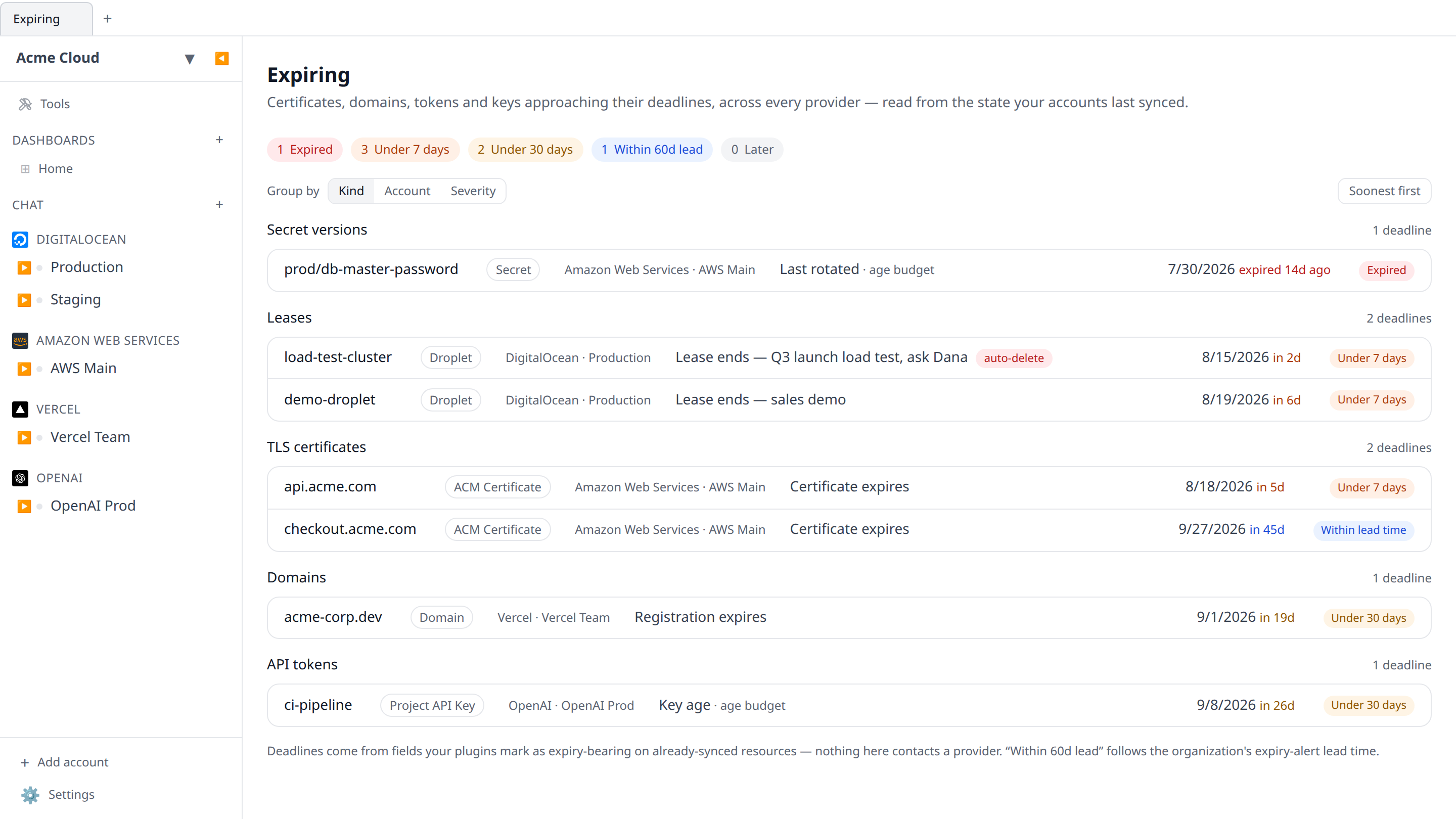
On desktop the screen works in both modes: signed into Infrawrench Cloud it shows the organization-wide feed; in local-only mode it computes the same countdown from the workspace on your machine.
Alerts before it bites
The cloud poller sweeps every organization’s feed and, when items sit inside your lead time, sends one summary alert — counts per severity plus the soonest deadlines — over the same transports as every other alert: Slack channels, Microsoft Teams webhooks, and mobile push. The Expiry alerts trigger is on by default and can be toggled per channel and per user in Settings → Notifications (and on the mobile notifications screen). Alerts are rate-limited to one per organization per day, so a certificate three weeks out reminds you daily, not every fifteen seconds.
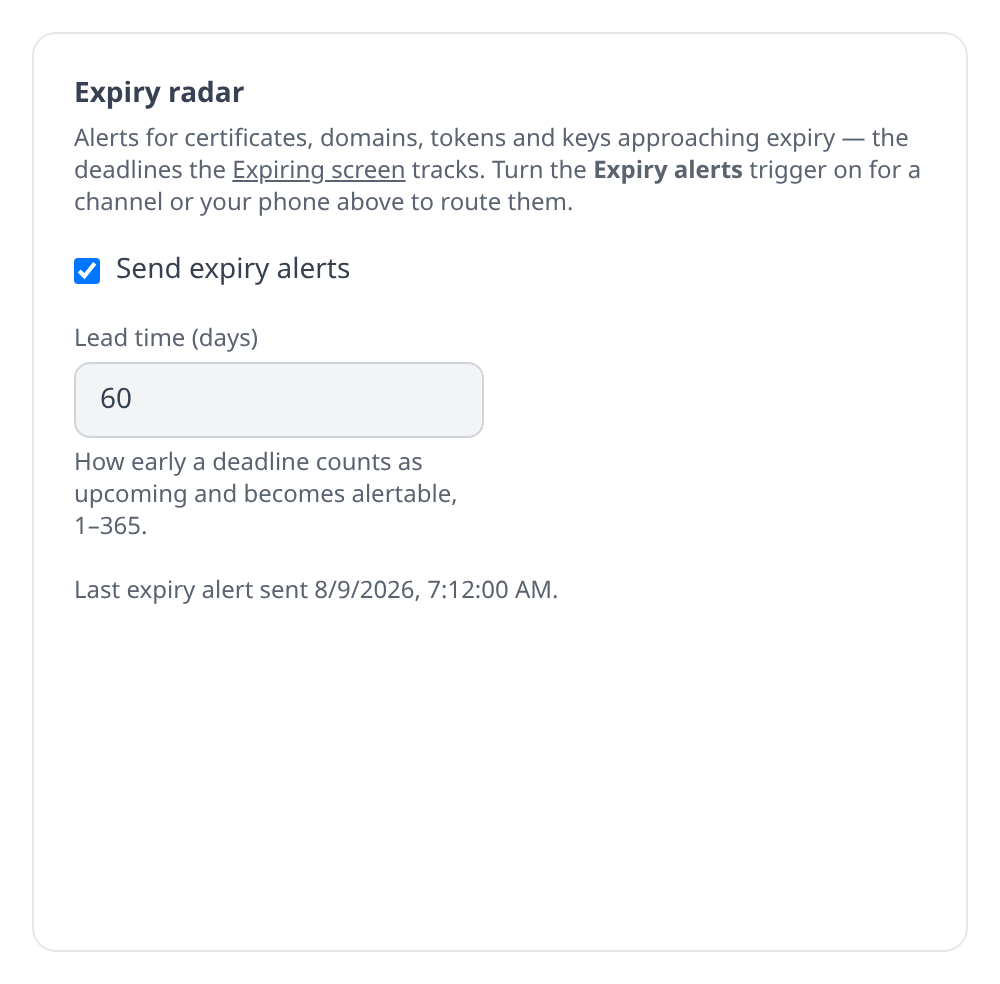
The lead time is the knob: it decides both where the “upcoming” bucket ends on the screen and how early the poller starts alerting. Set it per organization in the same settings card — 30 days if you only want near-term noise, 90 if your renewals need procurement lead time.
The weekly digest gains an “Expiring soon” line whenever deadlines sit within your lead time, so even with alerts muted the countdown reaches you once a week.
The CLI
infrawrench expiring prints the same feed, soonest first, with --json for scripts and --local for the desktop workspace on your machine:
$ infrawrench expiring
Acme Corp · 14 deadlines · 1 expired · 2 within 7d

resource            type              account   deadline              due          remaining
api.acme.com        ACM Certificate   Prod AWS  Certificate expires   2026-08-04   in 3d
acme-corp.dev       Domain            Vercel    Registration expires  2026-08-20   in 19d
prod-db-password    Password          Planet    Password expires      2026-09-02   in 32d
MCP
The list_expiring tool exposes the feed to AI agents, filterable by severity and kind — so an agent asked “is anything about to break?” can answer with your actual deadlines, and an agent automating renewals knows what to renew first.
Caveats
- The radar only sees what listers sync. A provider that never reports a credential’s expiry can’t appear — notably, Azure app registration client-secret expiries and AWS IAM access-key ages aren’t part of synced state today, so they aren’t tracked yet.
- Age budgets are conventions, not provider facts: the 90-day secret-rotation window is a default, and an “expired” age item means “older than the budget”, not “stopped working”.
- Unparseable or absent dates are skipped, never alarmed on — a BigQuery table whose expiration is “NEVER” simply stays off the radar.
See also: Orphan finder, Slack alerts, Teams alerts, Mobile push notifications, Weekly digest, CLI, MCP.