API keys
Issue tokens for programmatic access to your infrawrench organization.
Paid plan only. Available on the web app and, when signed in to a cloud organization, in the desktop app’s Settings tab.
API keys let scripts and CI jobs list resources, create them, and read outputs programmatically. They act on behalf of the user who issued them, subject to that user’s role.
Issue a key
- Settings → API keys → New key.
- Give it a name (e.g.
ci-deploy). - Tick the scopes it needs — the filter box matches the permission string, so
costs:finds the two cost scopes. - Click Create.
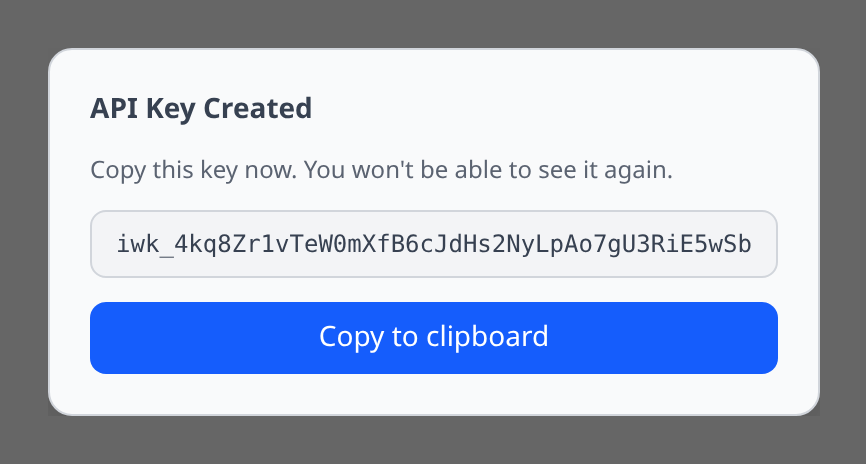
The token is shown once. Copy it now; you cannot see it again.
Using a key
Send it as a bearer token:
Authorization: Bearer iwk_...curl https://app.infrawrench.com/api/org/$ORG_ID/accounts \
-H "Authorization: Bearer $INFRAWRENCH_API_KEY"A key works against every endpoint under /api/org/<orgId>/ — accounts, resources, costs, dashboards, workflows, deployments, schedules, the audit log, org config — subject to the scope rules below and to the five exceptions in what a key cannot reach. See the API reference for the full list.
Keys are pinned to one organization
A key belongs to the organization it was created in. Presenting it against a different <orgId> is a 403, not an empty result — there is no such thing as a cross-org key. If you automate against several organizations, mint a key in each.
What a key cannot reach
Some endpoints are acts a person performs, where “held the permission” is not the whole control. They answer 403 to any key, including one scoped * held by an Owner:
- Minting and revoking API keys. A key that could mint keys could mint a longer-lived one, and revoking the first would not end the access. Listing keys is closed too.
- Billing. Plan changes, payment methods and the customer portal.
- Push devices and notification preferences. These describe someone’s phone.
- Changing team membership — invites, role assignment, custom roles, removals. Reading the team is allowed.
- Requesting, approving, denying or revoking break-glass access. Reading the queue is allowed.
Your own account settings (password, two-factor, email address, active sessions), creating and deleting organizations, and the platform-admin surface are not org-scoped and have never accepted a key. They require a browser sign-in — and the account-security ones require a recent one.
Revoke
Settings → API keys → (key) → Revoke. The key stops working immediately. In-flight requests finish; new requests get 401.
Rotate
There is no built-in rotate. Issue a new key, update your scripts, then revoke the old one.
Scopes
API keys carry an explicit list of permission strings (scopes). The same vocabulary used for roles is used for API keys, so resources:read on a key gates the same endpoints as resources:read on a role.
When you create a key you pick its scopes. The dialog lists every permission the server recognises, grouped into infrastructure, cost and billing, dashboards and alerting, automation and deployment, access and credentials, integrations, and organization settings; the filter box matches the permission string as well as the label, so pasting costs: from a doc page narrows the list to the two cost scopes. Pick the narrowest set that gets the job done — a CI deploy key might only need accounts:read + resources:read, a Terraform provider key managing cost allocation needs costs:read + costs:write, and a sync agent for the desktop app needs resources:read + resources:write.
Nine permissions are deliberately missing from the picker: apikeys:read, apikeys:write, billing:read, billing:write, team:invite, team:role:write, team:remove, access:request and access:approve. Each of them gates only routes in what a key cannot reach, so a key carrying one would be answered 403 regardless — offering the checkbox would look like the difference between working and not working when it isn’t. Everything else in the catalog is selectable.
A sync-scoped key cannot read provider credentials. The sync endpoints report only whether an account has credentials stored; fetching one is a separate, audit-logged call that requires secrets:read.
Wildcard scopes are honored: resources:*:read, resources:postgres:*, or just * for full access. The exact catalogue is documented in the API reference under each operation’s x-required-permission extension. The OpenAPI spec also exposes a Permission enum listing every recognised string.
The chat:read and chat:write scopes gate the AI chat API: list/inspect conversations vs. send messages and approve destructive tool calls. Calls authed by a chat:write key still meter tokens to the org and respect the org-level monthly spend cap.
The costs:write and pages:write scopes gate the push endpoints: reporting your own cost rows, and raising an on-call page from a server. Neither is in a system role, so a key carrying one must be held by an Admin or Owner, or by a member whose custom role grants it — the intersection rule below still applies.
chat:write lets a key hold a conversation — it does not widen what that conversation can do. Every tool the assistant runs is checked against the key’s own scopes, so a chat-only key can talk about your infrastructure but cannot read a secret or delete a resource unless you also granted secrets:read or resources:delete.
Older keys created with the deprecated sync:read / sync:write scopes are renamed automatically the next time they authenticate; the picker no longer offers them, because a key minted with them stores a scope that silently becomes resources:read / resources:write on first use. Tick those two directly instead. The workflow permission split was handled differently, once: workflows were gated on dashboards:read / dashboards:write until they got their own workflows:read, workflows:write and workflows:approve scopes, so every key that was still active at that upgrade had the matching workflow scopes added to it there and then — they are listed on the key like any other scope, and nothing is added at authentication time. Revoked keys were left alone. Every key created since carries exactly the scopes you chose, so grant the workflow scopes a key actually needs — workflows:read to list and inspect, workflows:write to edit and run, workflows:approve to decide an approval step. Use workflows:* only for a key that should hold the whole family.
Keys are bounded by their owner
A key’s effective permissions are its scopes intersected with the current role of the user who created it, evaluated on every request. Two consequences worth planning around:
- Demoting a teammate immediately narrows every key they issued. A key scoped
*held by someone moved from Admin to Member can now only do what a Member can. - Removing someone from the organization revokes the keys they created there. Any key whose owner is no longer a member stops authenticating, even if it was never explicitly revoked.
For automation that must survive staff changes, create the key under an account that stays in the org — not a personal one belonging to someone who may leave.
Audit
Every state-changing call is attributed to the key in the audit log, not just to the person who issued it — the entry shows the key’s name and prefix as a chip in the actor column, with the owner underneath. That is the difference between “Alice deleted the database” and “the ci-deploy key Alice issued deleted the database”, which is the question you actually need answered when a token leaks.
Click that chip, or pick the key from the audit log’s key dropdown, to see everything one credential did; over the API it is ?apiKeyId=<id> on GET /api/org/<orgId>/audit-logs. Filtering by user is not a substitute: a person and every key they ever minted share one user id.
Finding keys nobody uses
Keys outlive the integrations that needed them. The credential hygiene report lists the ones that have never authenticated, the ones that have gone quiet, the ones holding the * scope, and the ones carrying write scopes they never exercise — derived from last_used_at and the audit log, with nothing to enable.