Break-glass access
Time-boxed permission elevation. Ask for the permissions you need, for the minutes you need them, with a reason; someone else approves; the elevation lapses on its own.
The right steady-state role for most people is narrower than the widest thing they will ever have to do. The usual answer to that — “just make them an admin” — is how an organization ends up with ten admins and no record of why any of them got there.
Break-glass access is the other answer. A member asks for specific permissions, for a specific number of minutes, with a reason. Someone else approves. The elevation lapses on its own.
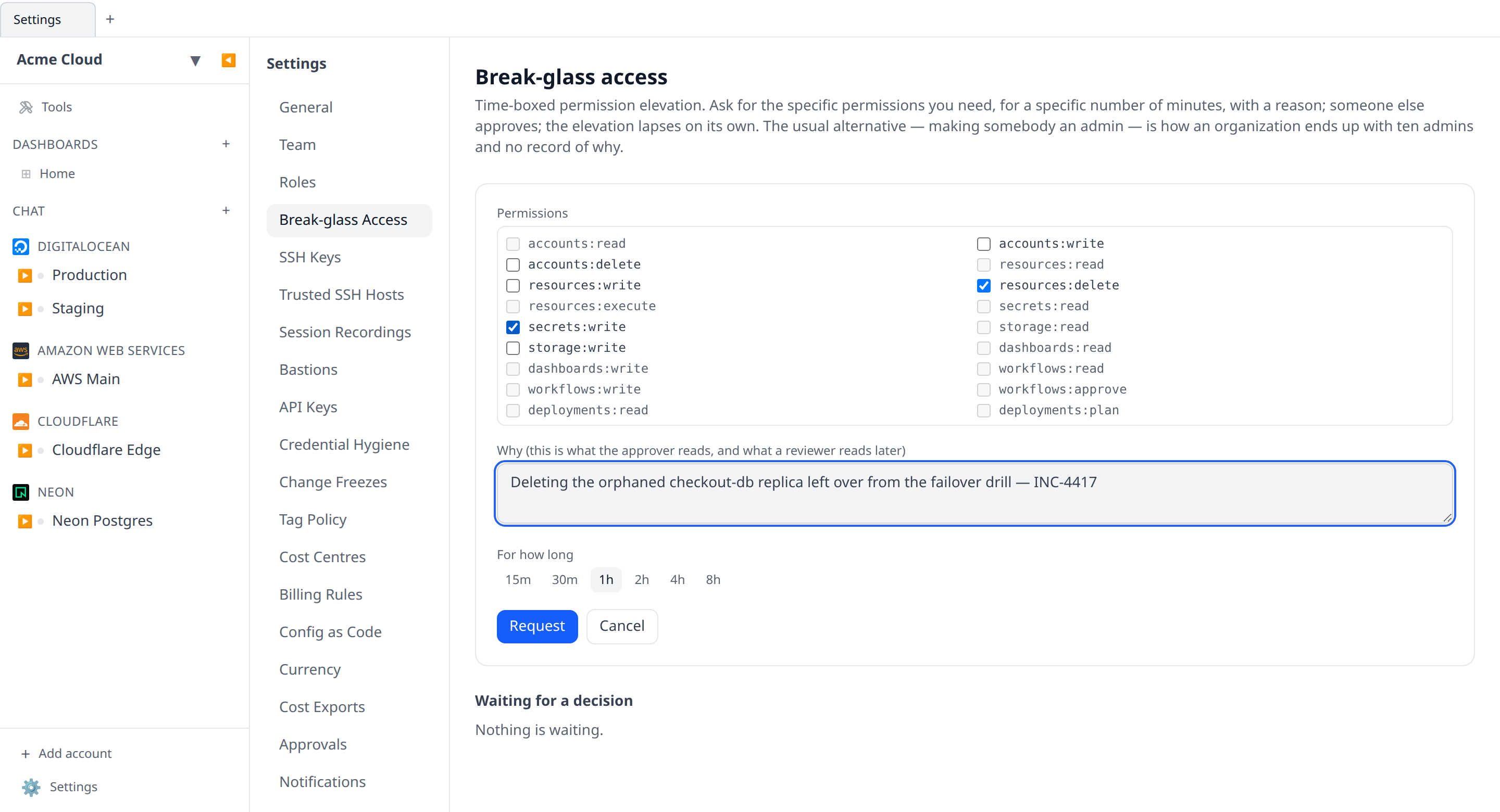
Asking
Settings → Break-glass Access → Request access. Three fields:
- Permissions — picked from the same catalog the role editor uses, so the list can never drift from what the server accepts. Permissions your role already grants are shown greyed out: asking for them changes nothing, and a request made entirely of them is refused with an explanation rather than silently doing nothing.
- Why — at least a sentence. This is what the approver reads now and what a reviewer reads in six months; an unexplained elevation is not auditable, so the server requires one.
- For how long — 15 minutes up to a maximum of 8 hours.
Why 8 hours and not a day? Break-glass is for the incident in front of you. A window that outlives the shift that opened it is a role change wearing a costume — and if someone needs it for longer, the org should be having the conversation about their role rather than quietly avoiding it.
The request goes out to everyone the organization has notifications configured for: mobile push, Slack (with Approve/Deny buttons in the message), and Microsoft Teams, under the same Pages opt-in that carries workflow approvals. If nobody decides within an hour, the request expires — which counts as a refusal.
You can withdraw your own pending request at any time. That is recorded as a withdrawal, not a denial: “they decided they didn’t need it” and “nobody would approve this” read very differently in a review, and collapsing them loses the difference.
Deciding
Anyone with access:approve sees the queue and can approve or deny, from the settings page or straight from the Slack message.
Two rules are enforced on the server and cannot be worked around:
- You cannot decide your own request. That is the entire point of the approval — a self-approvable elevation is just a slower way of having the permission.
- You cannot grant a permission you do not hold yourself. A grant can never mint authority nobody in the room had. Denying a request aimed higher than you is allowed, so an over-ambitious request never gets stranded.
If two people press Approve at the same moment, exactly one decision lands and the other is told the request was already decided.
While the elevation is live
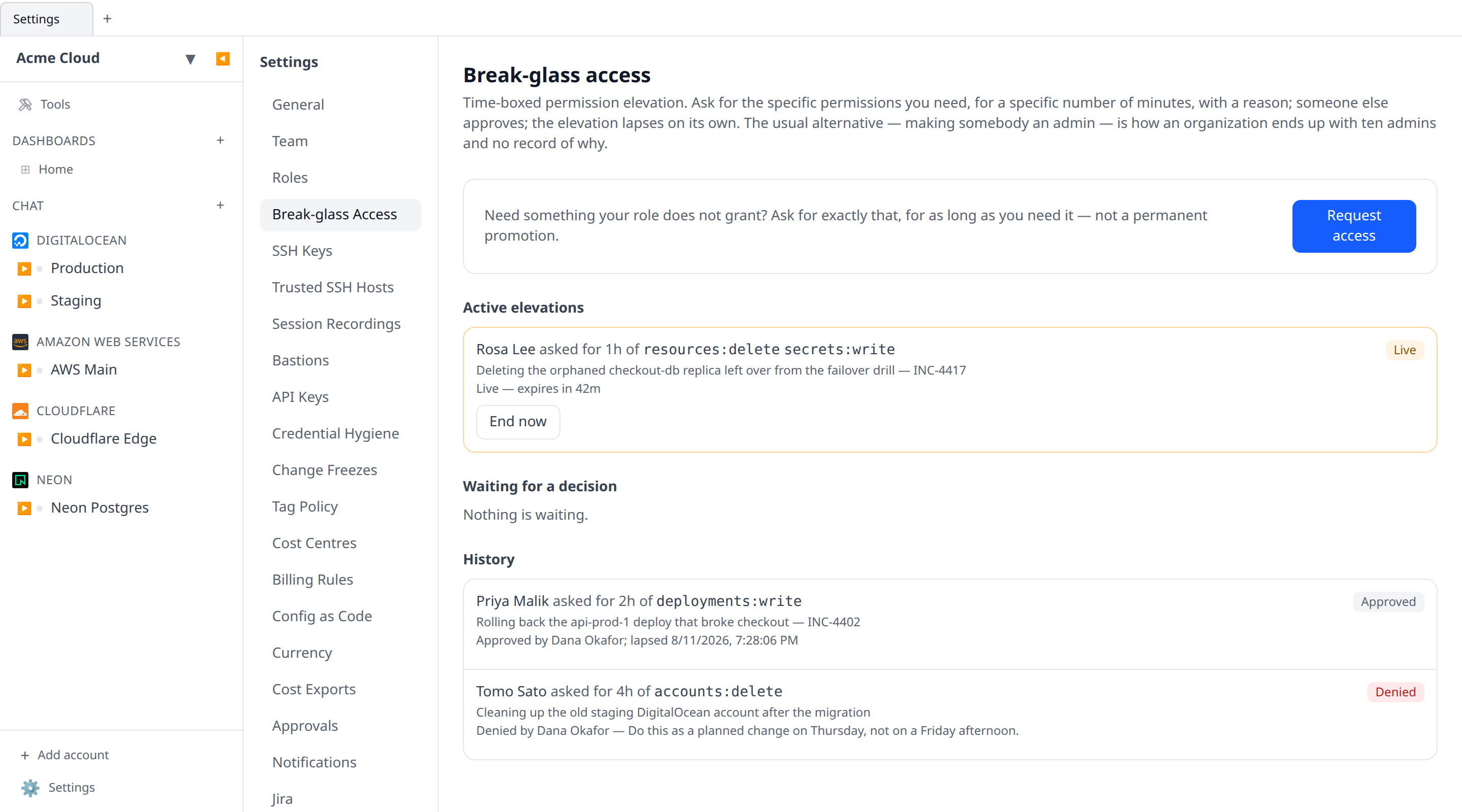
An approved request shows in Active elevations with a countdown. The holder has the requested permissions everywhere at once — the web and desktop apps, the HTTP API under their session, SSH and other terminal sessions, AI chat and MCP tools. There is no separate “elevated mode” to enter; the permissions are simply theirs for the window.
The window is evaluated, not swept. There is no job that goes around expiring grants, because a job that fell behind would be a job that extended everyone’s access. A grant applies while now is inside its window and not a moment longer.
End now revokes a live elevation immediately. Anyone with access:approve can do it — and so can the holder, because giving back access you no longer need should never require finding an approver.
API keys never inherit an elevation
A break-glass grant is authority handed to a person, for a bounded window, on a stated reason. An API key that person minted last quarter is none of those things, so keys resolve against their owner’s role alone and never pick up a live grant. The same applies to custom graphs, which run unattended on their author’s behalf long after the author wrote them.
Permissions
| Permission | What it allows | In the Member role |
|---|---|---|
access:read | See the queue, live elevations and history | Yes |
access:request | Raise and withdraw your own requests | Yes |
access:approve | Approve, deny, and revoke anyone’s elevation | No |
access:approve is deliberately not implied by team:role:write. Granting someone a role is a considered change with a paper trail; approving an elevation happens in the middle of an incident. An organization should be able to say who may do the second without also saying who may do the first.
The audit trail
Every step is in the audit log: access_request.create, .approve, .deny, .withdraw and .revoke, each carrying the permissions, the duration, the reason and the decider. Denials and withdrawals are logged as carefully as approvals — a break-glass regime whose history is only “who got in” is missing the half a reviewer actually asks about.
From the CLI
infrawrench access            # every request, with live elevations first
infrawrench access active     # only what is in force right now
infrawrench access --json
Read-only by design: raising a request needs a reason someone will read and a picker that cannot drift from the catalog, and deciding one is a judgement call that should involve looking at what is being asked for. What the CLI is good at is the question you actually type at 3am — who is elevated right now.