Scheduled cost exports
Ship your raw cost rows to a warehouse or object store on a schedule, as CSV or NDJSON, with the restatement handling a finance system needs.
Cost graphs and the API answer questions inside Infrawrench. A cost export is for the other case: you want the rows themselves, on a schedule, landing somewhere your warehouse or your finance system already reads from.
An export is a saved query, a schedule, and a destination. On its cadence, Infrawrench streams your cost_daily rows out of storage and writes one object per period — one file per day, week, or month — to an S3-compatible bucket or an HTTPS endpoint.
Cloud only. Exports run on Infrawrench Cloud’s background pollers, against the cloud cost store. The desktop app can create and run them while signed into a cloud org, but local-only mode has no cost history to export.
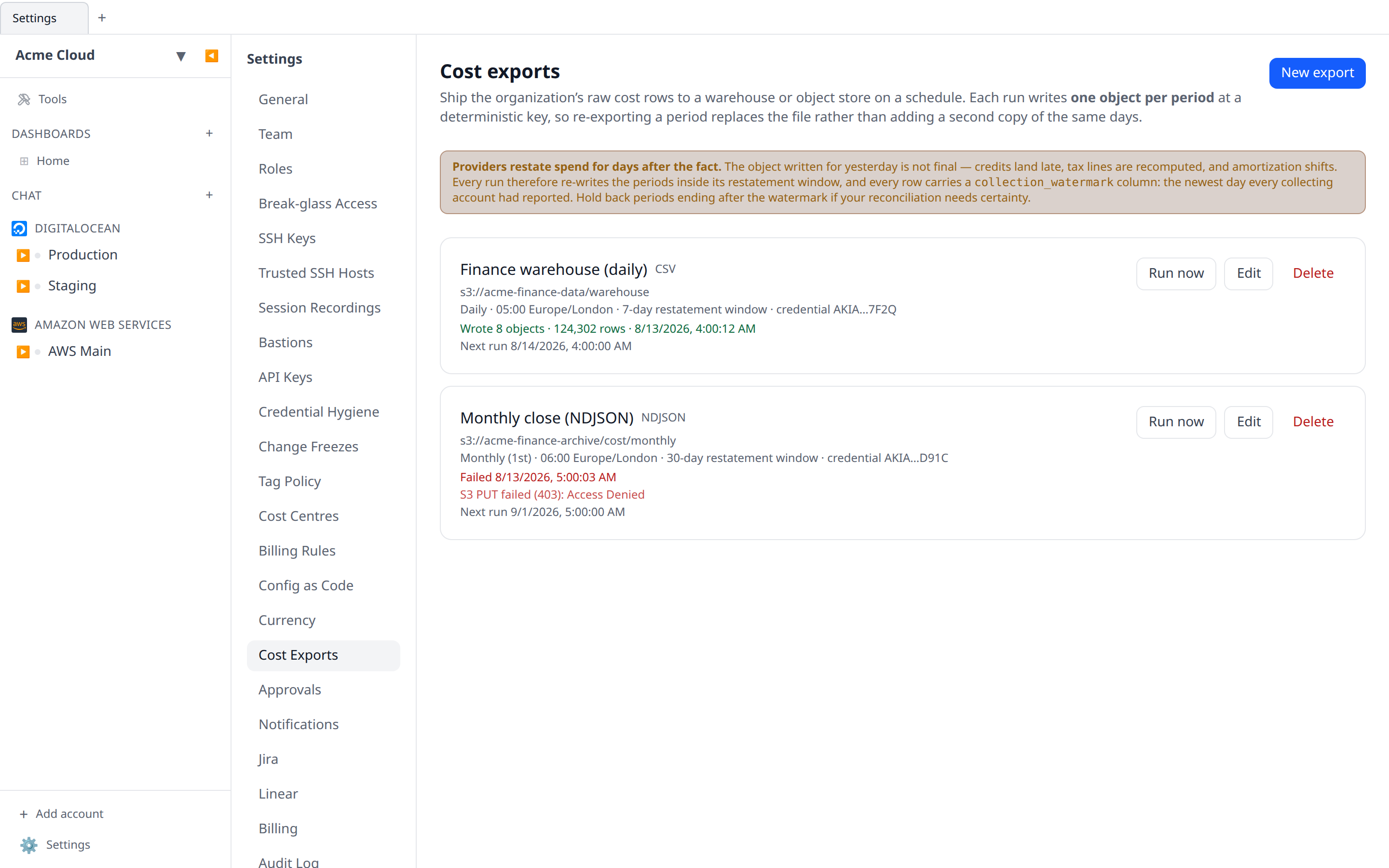
Read this first: providers restate spend
This is the part that decides whether a warehouse built on these files reconciles or quietly drifts.
Cloud spend is not final on the day it happens. Credits land late. Tax lines are recomputed. Amortization schedules shift when a commitment is bought mid-month. An export of “last month” run on the 1st is a snapshot of what the provider believed on the 1st, and it will not match the invoice.
Infrawrench handles this two ways, and you get both:
1. A trailing restatement window. Every run re-exports every period that overlaps the last N days — 7 by default. Each of those periods is rebuilt in full and written to the key it already occupies, so the destination ends up with a better copy of the same file, never a second copy of the same days. A monthly export with a 7-day window run on 3 August therefore rewrites all of July, not just its last week.
2. A collection watermark on every row. Each row carries two extra columns:
| Column | Meaning |
|---|---|
exported_at | When this copy of the object was produced. |
collection_watermark | The newest day for which every cost-collecting account in your org had reported when the run started. |
If your reconciliation needs certainty, hold back any period whose last day is after collection_watermark — those days are still arriving. If you just want the freshest numbers, ignore the column.
The window alone is not enough: a provider that restates on day nine beats a seven-day window, and nothing would tell you. The watermark alone is not enough either: knowing a number is stale does not replace it. Together they are what make the files reconcilable.
You can set the window from 0 to 90 days. 0 disables re-exporting entirely — correct only if you are certain your providers never revise, which for most is not true.
Create an export
Go to Settings → Cost Exports and click New export.
Name, format, and schedule
- Format —
CSV(with a header row) orNDJSON(one JSON object per line, the shape BigQuery, Snowflake and DuckDB all load directly). - Cadence —
daily,weekly(Monday-start ISO weeks), ormonthly. This is also the period definition: it decides how many days go into each object. - Hour and timezone — when the run fires, in your own zone. The timezone also decides what “yesterday” means, which is what a period boundary is measured against.
Runs export through yesterday, never today. The current day’s spend does not exist at any provider yet, and an object that is empty in the morning and full in the evening is worse than no object at all.
Columns
Pick which identity columns survive into the output: provider, account, service, region, resource, charge type, commitment. Leaving one out aggregates over it — a provider + service export is a small fraction of the size of a per-resource one, and for most finance systems it is the right grain.
Tag keys are added separately, as their own tag_<key> columns.
Every object also carries day, currency, amount, usage_amount and usage_unit, plus the two provenance columns above. usage_unit is blank whenever the grouped rows disagree on a unit — summing hours and gigabytes and labelling the result “hours” would be a lie the file could not warn you about.
Filters use the same cost filters the graphs and budgets do, so “filtered to account X” means one thing everywhere.
If you restrict an export to particular charge types
An export can be narrowed to specific charge types. One thing to know when you do: consumption is two charge types, not one. Usage is what a provider billed on demand, and Commitment-covered usage is consumption a reservation or savings plan paid for. Selecting only Usage excludes everything your commitments covered, which on a heavily committed estate is most of the compute bill.
Exports created before commitment-covered usage existed had Usage meaning “all consumption”, so they were updated in place to select both — nothing that was already in your warehouse stopped arriving. From here on the two are separate choices and are taken literally.
Destination: S3-compatible object storage
One setting covers AWS S3, Cloudflare R2, DigitalOcean Spaces, Scaleway Object Storage, Backblaze B2 and MinIO — they differ only in endpoint and region, and all of them speak SigV4.
| Field | What to put in it |
|---|---|
| Bucket | The bucket name. |
| Key prefix | Everything the export writes lives under it. Leave blank for the bucket root. |
| Region | eu-central-1, nyc3, fr-par… Cloudflare R2 wants auto. |
| Endpoint | Blank for AWS S3. Otherwise the provider’s S3 API origin, e.g. https://<account>.r2.cloudflarestorage.com or https://fra1.digitaloceanspaces.com. |
| Path-style addressing | Needed by MinIO and most self-hosted gateways. AWS, R2 and Spaces do not want it. |
| Access key id / secret | A key pair with permission to write under the prefix, and nothing else. |
Destination: HTTPS endpoint
The object is sent as the request body of a POST (or PUT) to a URL you supply, with:
Content-Type: text/csv; charset=utf-8orapplication/x-ndjsonX-Infrawrench-Object-Key— the key the object would have hadX-Infrawrench-Period-Start,-Period-From,-Period-To,-Exported-At,-Collection-Watermark- a
keyquery parameter carrying the same key, for endpoints that route on the URL
The URL must be https. It is treated as a credential in its own right — a pre-signed URL carries its own signature — so it is encrypted at rest and never shown again.
Where the objects land
The key is deterministic:
{prefix}/cost-export/{exportId}/{cadence}/{periodStart}.{csv|ndjson}For example:
warehouse/cost-export/6f1c…/daily/2026-08-07.csv
warehouse/cost-export/6f1c…/monthly/2026-07-01.ndjson
periodStart is the period’s first day as YYYY-MM-DD for every cadence, so keys sort lexicographically and nobody has to know ISO week numbering to find last week’s file.
Determinism is the whole mechanism: re-exporting a restated period writes the same key, so it replaces the previous copy. You will never end up with two files that both claim to be July.
Periods still in progress are written too, ending at yesterday. Their key does not change, so tomorrow’s run replaces yesterday’s object with a longer version of the same file.
Credentials
Destination credentials are encrypted at rest with the same mechanism as every other secret in Infrawrench, bound to the export row so a ciphertext cannot be moved to another org’s export.
No endpoint ever returns them. The API and the UI show a redacted marker (AKIA…7F2Q) and nothing else. When you edit an export, the credential fields start blank, and leaving them blank keeps the stored credential.
When an export fails
A nightly export that stopped working three weeks ago is worse than never having had one, so failures are recorded and shown rather than retried in silence — the same way cost collection failures surface on the Costs panel.
Each export shows the outcome of its last run: how many objects and rows it wrote, or the destination’s own error message. Common ones:
S3 PUT failed (403): Access Denied— the key pair cannot write under that prefix.S3 CreateMultipartUpload failed (404)— the bucket does not exist in that region, or the endpoint is wrong.No destination credentials are stored— the credential could not be decrypted; re-enter it.
A failed run reschedules on the normal cadence rather than backing off. The cadence is already at least a day, the failure is already visible, and an extra backoff only delays recovery once somebody has fixed the credential.
Run now forces a run immediately, against exactly the code path the scheduler uses, and shows what it wrote — which is how you check a destination before trusting it overnight.
From the CLI
infrawrench exports                    # every export, with the last run's status and error
infrawrench exports run "Finance warehouse"
infrawrench exports --json
exports run exits non-zero when the run fails, so a CI step can depend on it. Running is behind an explicit verb rather than a bare positional, because unlike infrawrench reports <name> this one writes to somebody’s bucket.
<insert [Terminal showing infrawrench exports with a table of three exports, one row red with “failed” and its full error printed below the table] here>
Permissions
- Seeing exports needs
costs:read, like every other cost surface. - Creating, editing, deleting and running one needs
org:settings:write— notcosts:write.
That step up is deliberate. costs:write lets someone name a report or define a cost centre: it moves numbers around inside Infrawrench. Creating an export is standing authorisation to ship the organization’s entire billing history, on a schedule, to a destination the creator chose, with a credential only they supplied. That is a data-egress decision, and it belongs with the people who already decide how the org handles its data.
Every mutation is written to the audit log as cost_export.create, .update, .delete or .run, recording the destination and schedule — never the credential.
Limits
- 25 exports per organization.
- Restatement window: 0–90 days.
- A run writes every period overlapping its window, so a daily export with a 90-day window writes 91 objects per run.
See also
- Cost graphs & budgets — where the data being exported comes from.
- Cost reports — the same cost data as a named, reusable graph rather than raw rows.
- Pushing your own cost rows — getting spend into Infrawrench from somewhere it has no plugin for.