Billing rules
Markups, discounts, fixed charges and reallocations applied to collected spend at report time — with the collected figure always shown beside the adjusted one.
Collected spend is what the provider charged you. What your organization reports internally is often something else. A platform team adds a markup to recover shared overhead. A discount is negotiated outside the provider’s own pricing. A credit is spread across teams. A shared Kubernetes cluster is charged back to the products that run on it.
A billing rule is where you write that down, so the answer lives in Infrawrench instead of in a spreadsheet somebody exports to once a month.
Raw and adjusted are two different numbers, and both stay visible
This is the distinction the whole feature is built around, and everything else follows from it.
| What it is | Where it comes from | |
|---|---|---|
| Collected spend | What the provider billed. Reconciles against the invoice, line for line. | Collected daily from the billing API. |
| Adjusted spend | What your organization charges itself. Markups, discounts, reallocations applied. | Computed from your rules, at read time. |
Two rules make that split trustworthy:
Rules are applied when a report is run, never written into your cost data. Infrawrench does not restate a single stored row. Collected spend stays exactly what the provider reported — it is the audit trail, and once it is overwritten there is no way back. Editing a rule, disabling it, or deleting it changes what the next report computes and changes nothing that was ever recorded. Backfilling is never necessary, because there is nothing to backfill.
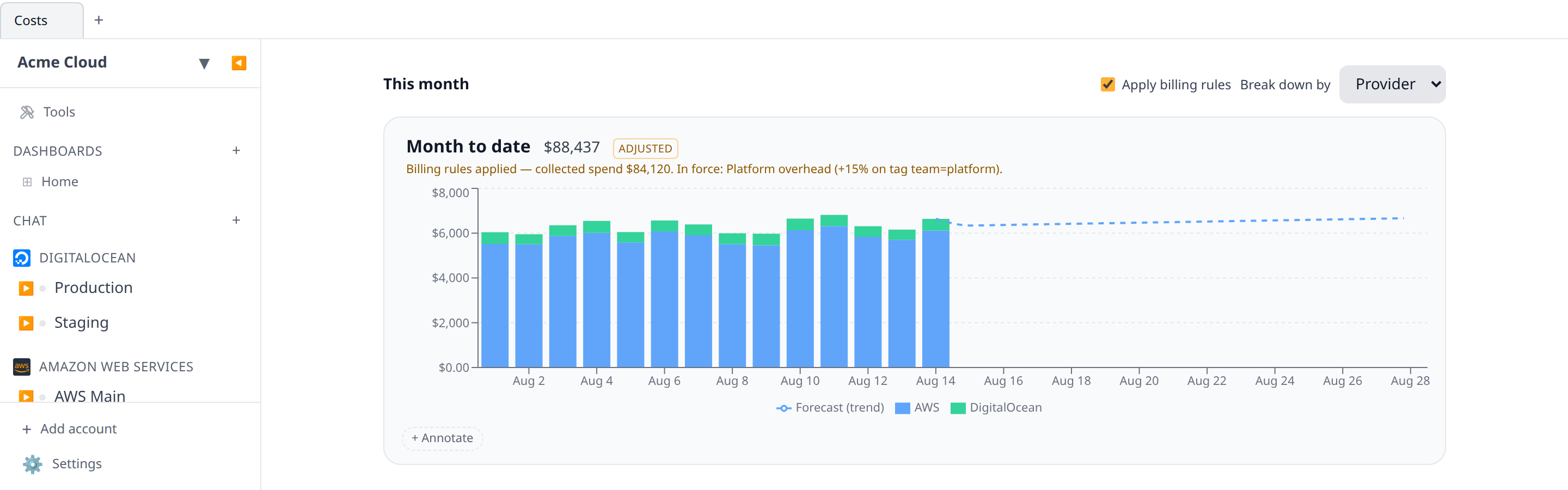
An adjusted figure is never shown without the collected one. Every adjusted answer carries the collected total beside it and names the rules that moved it. A chart that shows adjusted spend wears an Adjusted badge next to its total and a caption underneath giving the collected figure and each rule in force. A report that silently showed marked-up spend would be a report nobody could reconcile against a bill, which is the failure this design exists to prevent.
What a rule is
A rule matches spend and adjusts it.
Matching uses the same vocabulary allocation rules already use — tag key and value, account, provider, service — plus charge type, so a markup that recovers overhead can apply to usage without also marking up credits, refunds and reservation purchases. Every field you set must match; a rule with no fields set matches all spend.
There are three kinds of adjustment.
Markup or discount
A signed percentage. +15 marks matched spend up by 15%; -10 discounts it by 10%. This is the one for recovering shared overhead, for a negotiated rate the provider’s own pricing does not reflect, and for an internal cost-of-capital loading.
Fixed amount
A flat amount per day or per month — “the platform team charges $5,000 a month”. Nothing in your cost data produced it, so it is not multiplied by anything and cannot be reallocated by anything. Over a range shorter than a whole period it is pro-rated: a $3,000/month charge shown across ten days of a thirty-day September contributes $1,000. Showing it in full on a ten-day chart would reconcile against nothing, and showing it as zero would make it silently disappear.
Reallocation
Moves matched spend from where it landed onto a different cost centre or account. This is how shared infrastructure gets charged back: “everything on the shared EKS cluster is billed to the Data cost centre”. A reallocation never changes how much money there is — only whose it is.
Ordering: the three kinds compose differently
Several rules can match one cost row, so the order is defined and total: ascending priority, then creation time, then id. Within that one order the kinds behave differently, and the difference is deliberate.
- Every matching markup or discount applies. Two 10% markups give 21%, not 20%. Markups genuinely compose — an overhead recovery and a cost-of-capital loading are two separate charges — and collapsing them into one would quietly under-recover. Because multiplication commutes, priority never changes the arithmetic here; it only fixes the order the rules are listed in.
- Reallocation is first-match-wins. The first reallocation rule whose match holds moves the row, and no later one fires. A row moves at most once, which is exactly what makes total spend conserved: the total after reallocation always equals the total before.
- Fixed amounts are not functions of any row. They are pro-rated over the period and reported as their own figure.
Markups and reallocations are order-independent with respect to each other, because one changes the amount and the other changes the label.
Where the rules live
Settings → Billing Rules. Anyone with costs:read can see them — a rule is part of the explanation for a number, and hiding it from the people who read the number would make every adjusted figure unauditable. Changing them needs org:settings:write, not costs:write.
That is deliberate. costs:write is the “name a report, define a cost centre, save a filter” permission: acts that add another view of your spend. A billing rule is not another view — a markup changes every internal figure your organization reports, including an opted-in budget’s thresholds and the chargeback statements finance sends to other departments. It is the same class of act as stating an exchange rate or creating a cost export, and it sits behind the same permission. Every create, edit and delete is audit-logged.
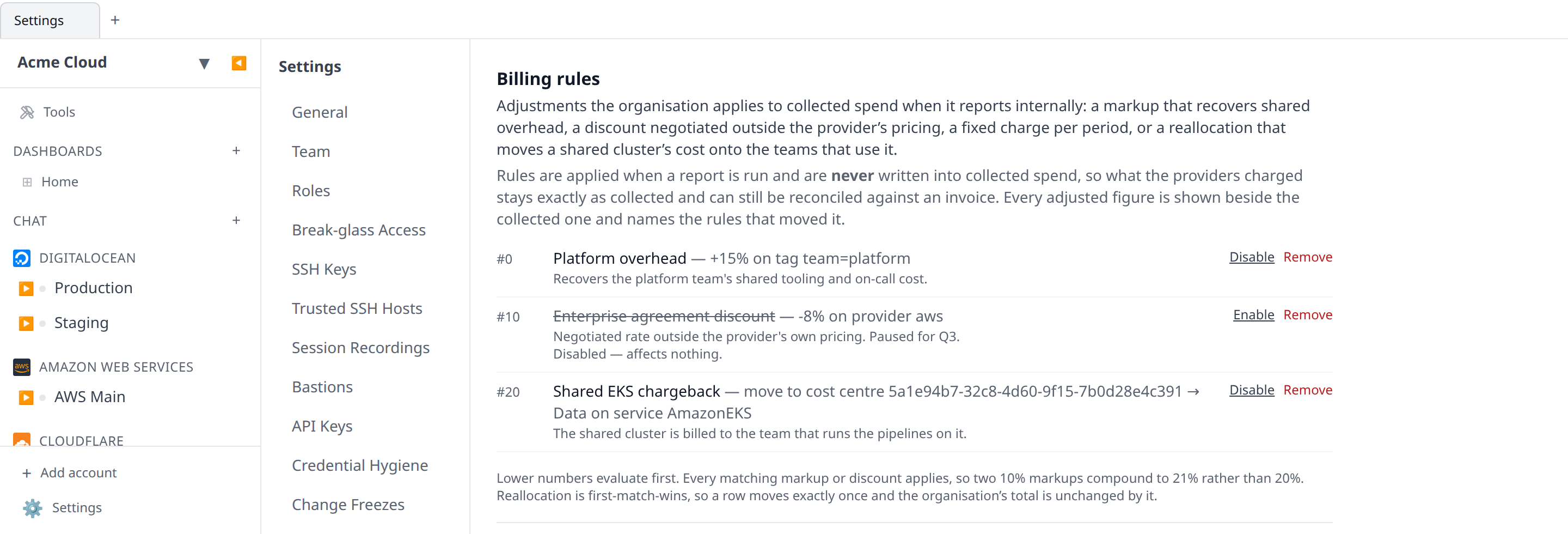
Rules are kept when you switch them off rather than deleted. A markup paused for one quarter and switched back on for the next is the normal life of these objects, and deleting it would lose the wording finance agreed to.
Seeing adjusted numbers
Nothing shows adjusted spend unless it is asked to. The Costs panel grows an Apply billing rules checkbox above the month-to-date chart — and only for an organization that actually has a rule in force, since otherwise it would be a switch between two identical figures. Tick it and the chart redraws with the badge and the caption described above.
The same applies to any cost graph on a dashboard or in a saved cost report: the graph editor’s adjusted option makes that card draw adjusted spend, and the card labels itself. A card someone screenshots into a finance review carries both figures.
What this changes elsewhere, and what it deliberately doesn’t
Every interaction below is a decision, not an omission. The rule behind all of them: anything that pages a human measures collected spend unless it is explicitly opted in.
Budgets — opt in per budget
A budget measures collected spend by default, and does so for every budget that existed before billing rules and every budget nobody deliberately opts in. If a markup silently raised measured spend, adding one row in Settings would move every on-call rota in the organization at once, and every resulting page would be for money nobody actually spent.
A budget can opt in (useAdjustedSpend), and then it measures the internal figure. Unlike a scenario model — which only ever touches the forecast — opting in here affects actual thresholds too, and must: an opted-in budget is measuring the internal number, and month-to-date internal spend is as marked up as the forecast is. Judging one on collected spend and the other on adjusted spend would be a budget measuring two different things.
An alert fired by an opted-in budget says so in its body and names the collected figure, because that message is often the only place the number is ever read.
Showback — opt in per request, and the one place fixed charges land
Showback is where an adjustment is genuinely a chargeback, so it is the one report where a fixed-amount rule is fully attributed: the pro-rated amount is added to the cost centre the rule names, which is exactly the “platform team charges $5,000/month to Engineering” line. A fixed rule that names an account, or names nothing, lands in Unallocated rather than being invented onto a centre that never agreed to it.
Adjustments are still off by default here — a chargeback statement that silently showed marked-up numbers is one the receiving team could not reconcile.
Cost exports — always raw
Cost exports ship your collected rows and are never adjusted. An export is the audit artifact and usually the input to a warehouse that joins it against invoices; adjusting it would put a number in your data lake that does not exist on any bill. Reproduce the adjustment downstream from the rules if you need it there.
Unit costs, anomalies, change alerts, the weekly digest — always raw
Unit costs divide collected spend by a business metric. A unit-economics number that jumped because somebody wrote a markup would be a metric measuring policy rather than efficiency.
Cost anomaly alerts and cost change alerts watch collected spend, always. Both page people, and neither should be able to fire because a rule changed. The weekly digest reports collected spend for the same reason.
Commitments — never adjusted
Commitment coverage and utilization are ratios of provider-reported amortized amounts. A markup would multiply both sides of the ratio and change nothing; a reallocation would scramble which account a covered hour belonged to. Coverage is a fact about the provider’s billing, not about your internal accounting, so billing rules do not reach it.
One thing to know about totals
On a cost graph, the total stays the sum of the series drawn — that identity is what every client relies on. Fixed-amount charges have no series behind them, so they are reported separately (adjustment.fixedTotals) and the caption says the internal figure is the total plus that amount. On a showback report they are attributed to a centre, as described above, so a centre’s total already includes them.
From the terminal
infrawrench billing-rules
infrawrench billing-rules "Platform overhead"
infrawrench billing-rules --json
The list prints in evaluation order with a one-line summary of what each rule does to which spend, and the same two reminders the docs give: that nothing was written into collected spend, and that markups compound while reallocation fires once. It is read-only — writing a markup is a considered act with a form and an audit entry behind it.
See the CLI reference.
From the model
The MCP server and AI chat expose list_billing_rules, and query_costs / query_showback both take adjusted. The tools are instructed to quote collected spend unless you ask for the internal figure, and to state both when they report an adjusted one.
list_billing_rules is the tool to reach for when a total does not match an invoice — the rules are the reason, and each row says what it does to which spend.
API
GET /billing-rules— the rules in evaluation order (costs:read)POST /billing-rules,PUT /billing-rules/{id},DELETE /billing-rules/{id}(org:settings:write)POST /costs/querywithadjusted: true, andGET /costs/showback?adjusted=true
See the OpenAPI reference.