DigitalOcean
Manage Droplets, Kubernetes, managed databases, Spaces, and DNS.
The most approachable cloud plugin — a single API token is all you need.
What you can manage
- Droplets — list, create (image + size + region + SSH key pickers), delete. Full lifecycle actions from the detail page: power on / off / cycle, reboot, shutdown, snapshot (auto-named or named), rename, resize, rebuild from image, reset root password, enable IPv6, enable/disable/restore backups and change backup policy.
- Block-storage volumes — list, create, delete, attach/detach (drag a volume onto a droplet to attach), resize, snapshot.
- Snapshots — sidebar group listing every droplet and volume snapshot, deletable from the detail page. Restore back into a droplet via the droplet’s Actions → Restore from Backup.
- Custom images — your account-owned images (uploaded ISOs, snapshots promoted to images, backups). Distribution and marketplace images are still selectable from the droplet create form.
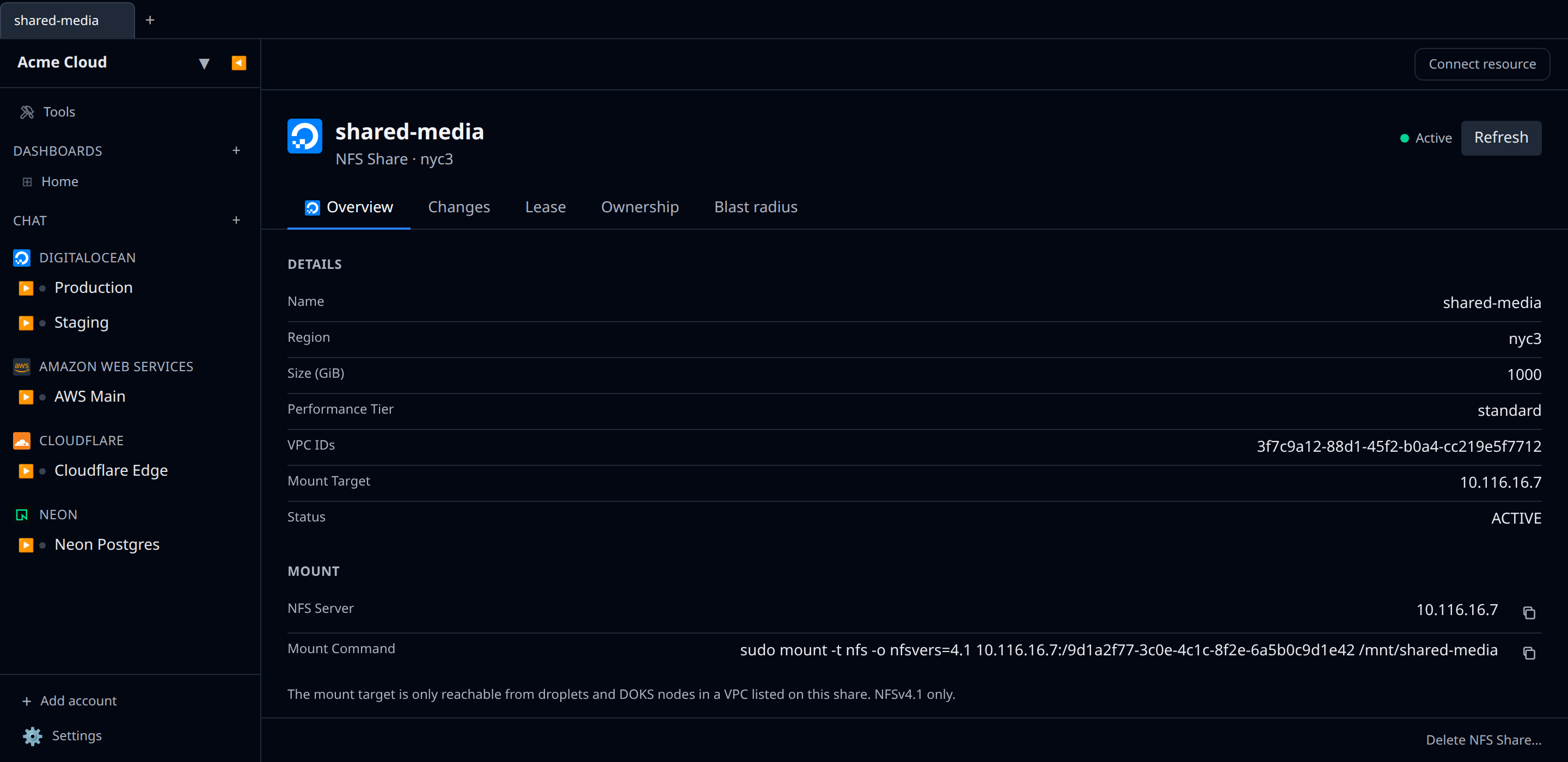
- Network File Storage (NFS) — create POSIX-compliant NFSv4.1 shares (standard or high-performance tier), pinned to a VPC, mountable across multiple Droplets and DOKS nodes. The share detail page surfaces the mount target and a ready-to-paste
mount -t nfscommand. - Reserved IPs — list, create, assign / reassign / unassign, and delete the static addresses you can move between Droplets (DigitalOcean’s old “floating IPs”). Each address shows its region, the Droplet holding it, its project, and whether DigitalOcean has a pending action on it. Unassigned addresses are flagged by the orphan finder — see below.
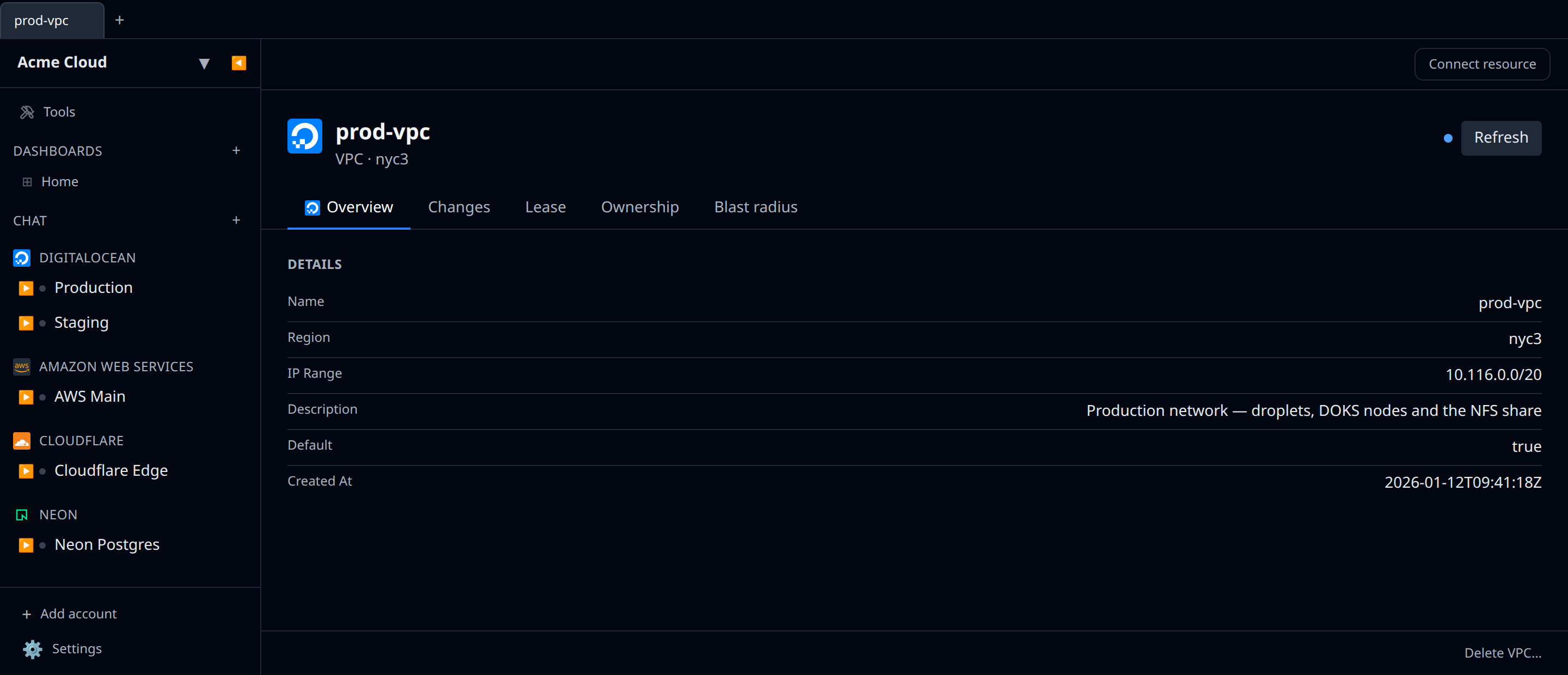
- VPCs — list, create (name + region, with an optional CIDR range and description) and delete the private networks your Droplets, DOKS nodes, NFS shares and Dedicated Inference endpoints sit in. Each VPC shows its region, IP range, description and whether it’s the region’s default. A region’s default VPC — and any VPC that still has members — can’t be deleted; DigitalOcean rejects those with a 403.
- Kubernetes (DOKS) — clusters, with kubeconfig output for the Kubernetes plugin.
- Managed databases — Postgres, MySQL, Valkey (Redis-compatible caching), MongoDB, Kafka, OpenSearch, and Weaviate (private preview). Connection strings are outputs you can reference from the matching client plugins. DigitalOcean retired Managed Redis on 30 June 2025, so the create form provisions Valkey clusters; pre-migration Redis clusters still appear and connect through the same Redis plugin.
- Agent Platform — list, create, and delete Gradient AI agents. The agent’s deployment URL is surfaced as an output you can reference from other resources.
- Knowledge Bases — list, create, edit, and delete RAG knowledge bases; manage their data sources (Spaces buckets, web crawls), trigger and cancel indexing jobs, and watch indexing history. The
kbaas.do-ai.run/v1/{uuid}/retrievehybrid retrieval endpoint is exposed as an output. - Inference Router — list, create, and delete model routers (the “right model per call” auto-routing layer that balances cost and latency across multiple foundation models).
- Dedicated Inference — list, create, and delete dedicated GPU-backed model deployments. Public and private VPC endpoints are exposed as outputs.
- Batch Inference jobs — list and cancel async batch jobs running against OpenAI or Anthropic provider APIs.
- Model API Keys — list and delete the keys used to authenticate against
inference.do-ai.run(serverless inference + OpenAI-compatible SDK access). Creating new keys is done in DigitalOcean’s Model Studio (DO retired the create API), so Infrawrench surfaces the existing keys for review/cleanup rather than creating them. - Spaces — S3-compatible object storage, with the file browser.
- DNS — domains and records.
- Projects — list, create, edit (name / description / purpose / environment) and delete. Use the Edit Project… button at the bottom of the project detail page to rename or repurpose without leaving Infrawrench.
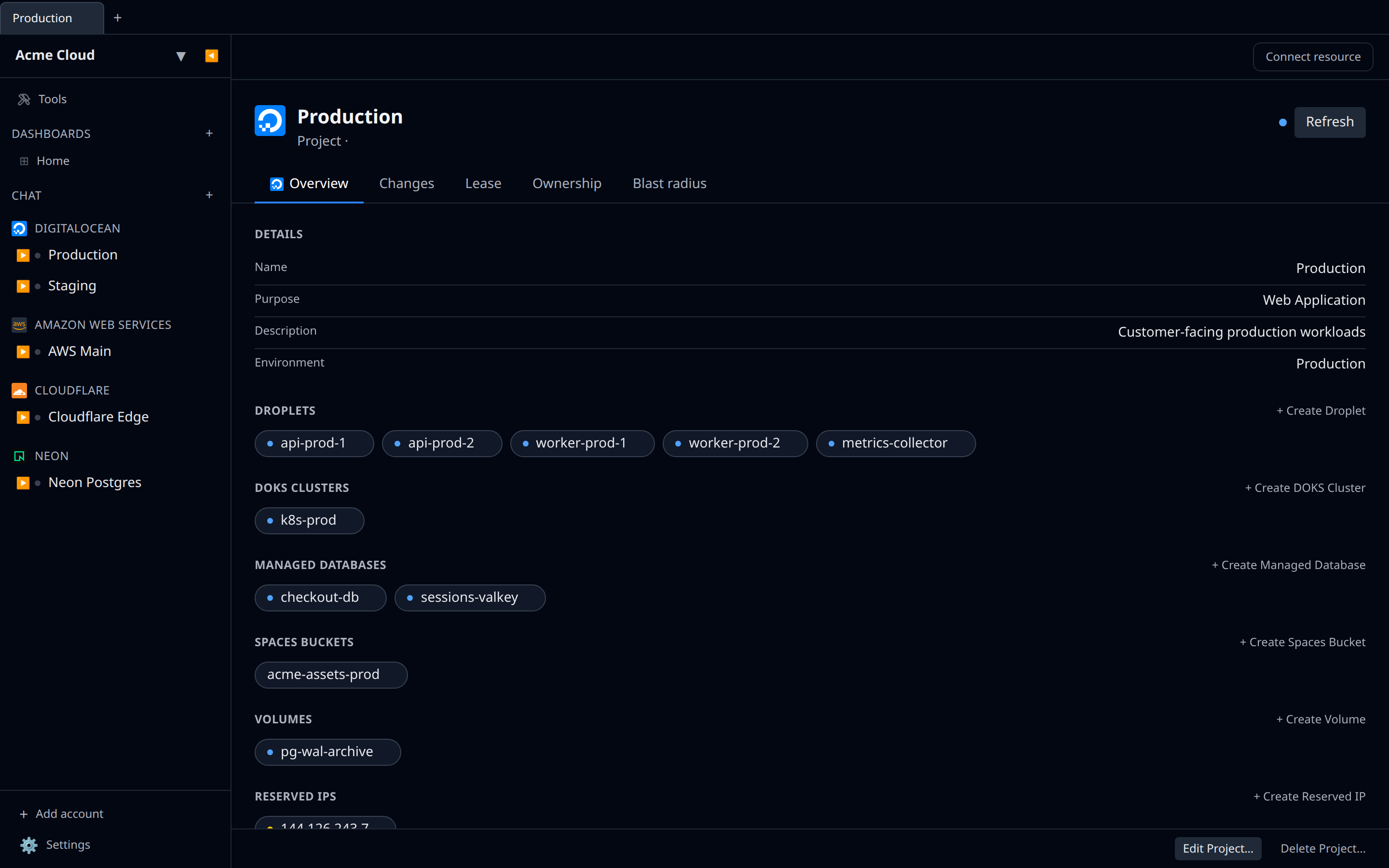
Droplet detail page
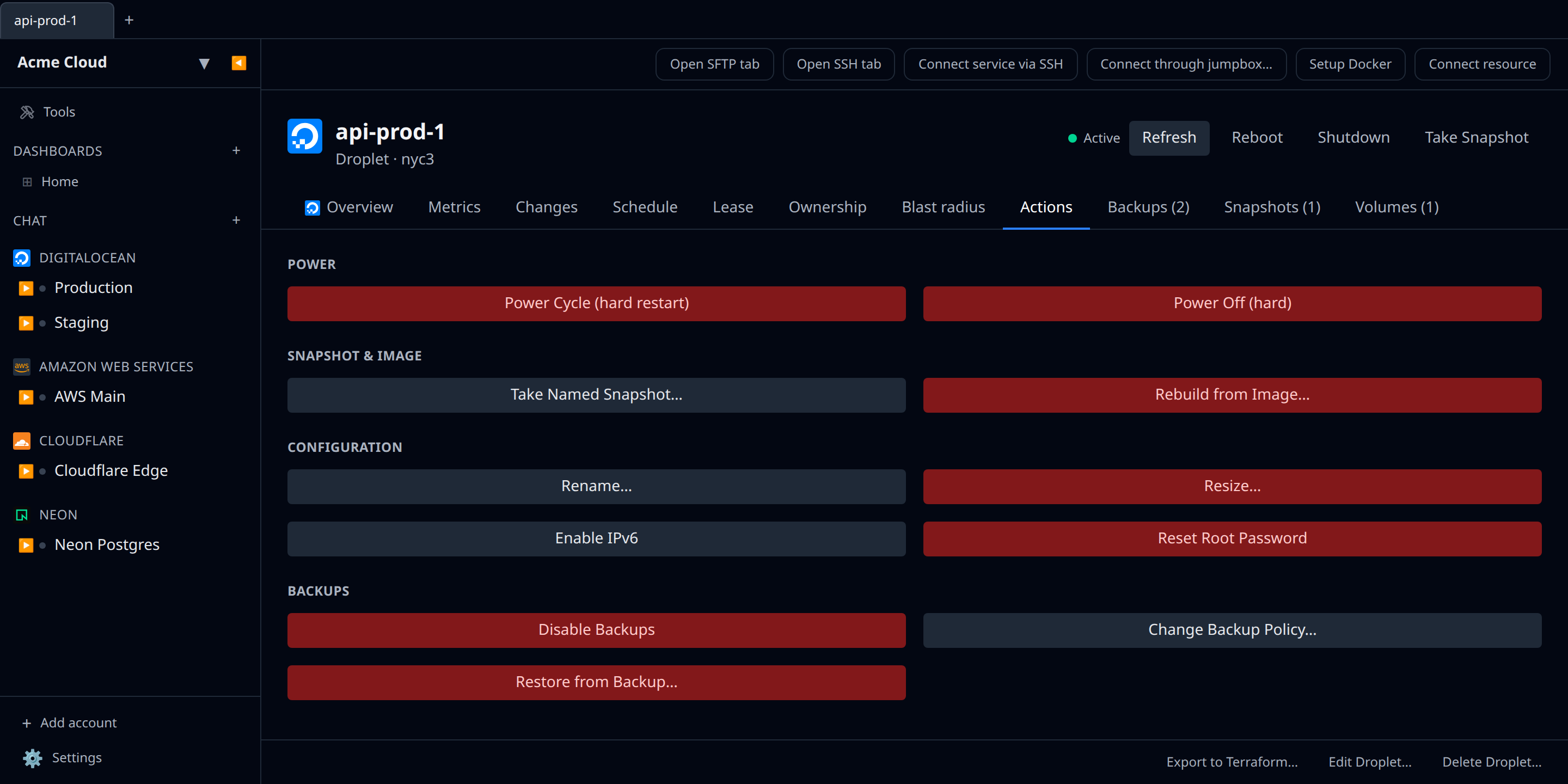
The droplet detail page adds:
- A header action bar with state-aware Power On / Reboot / Shutdown buttons and a one-click “Take Snapshot” (auto-named with the droplet name + ISO timestamp).
- An Actions tab with everything else — Power Cycle, hard Power Off, named Snapshot, Rename, Resize (with a CPU/RAM-only vs disk-included toggle), Rebuild, Enable IPv6, Reset Root Password, Enable/Disable Backups, Change Backup Policy (daily vs weekly + hour + weekday), Restore from Backup. Destructive actions show a confirmation prompt.
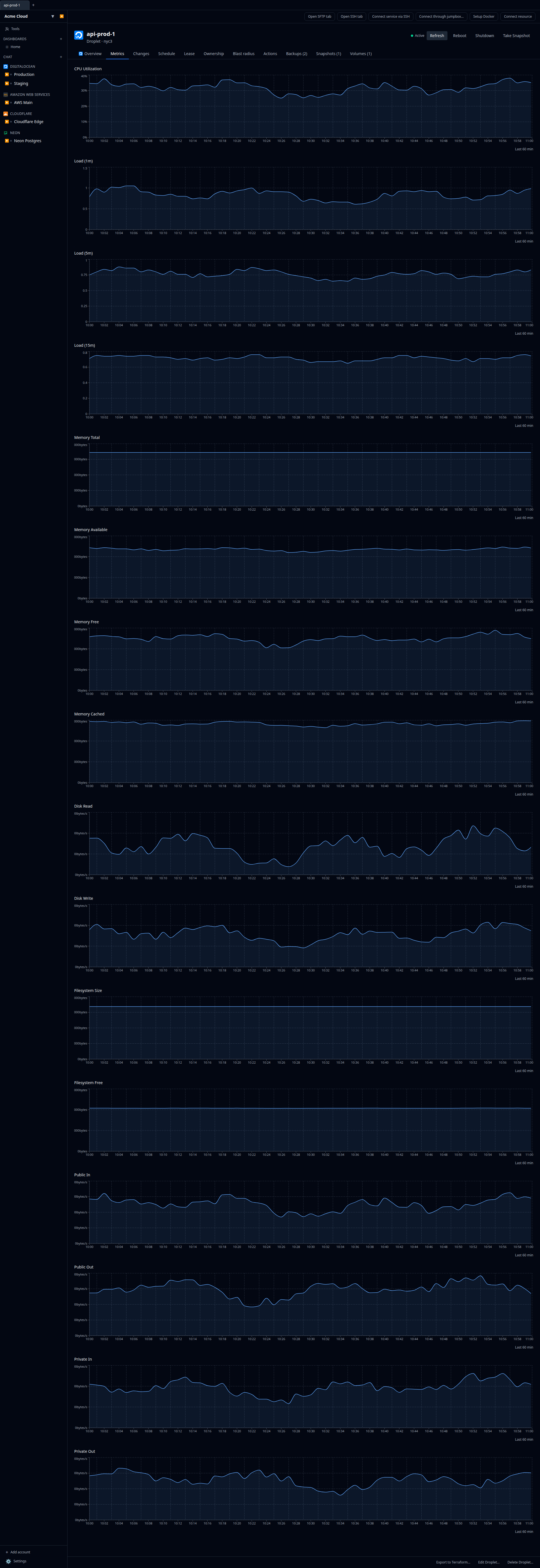
- A Metrics tab charting every metric the DO Monitoring API exposes for droplets: CPU, load (1/5/15 min), memory (total / available / free / cached), disk read/write, filesystem size/free, and bandwidth on both public and private interfaces in both directions. Memory/disk/load/filesystem series only render when the DO Metrics Agent is installed on the droplet.
- Backups / Snapshots / Volumes tabs listing IDs DO has recorded for this droplet, with quick links into the matching detail page where applicable.
Managed databases
Cluster create, list, and delete is straightforward — pick engine, region, node size, node count. Two things to know once the cluster is live:
Users (and where the password comes from)
DigitalOcean reveals a database user’s credential exactly once, at creation — the /users list always shows empty passwords, and doadmin / do-readonly never expose theirs.
- Postgres / MySQL — the password comes back inline on the cluster, so the peer-pane tab (SQL editor) just works. Nothing to do.
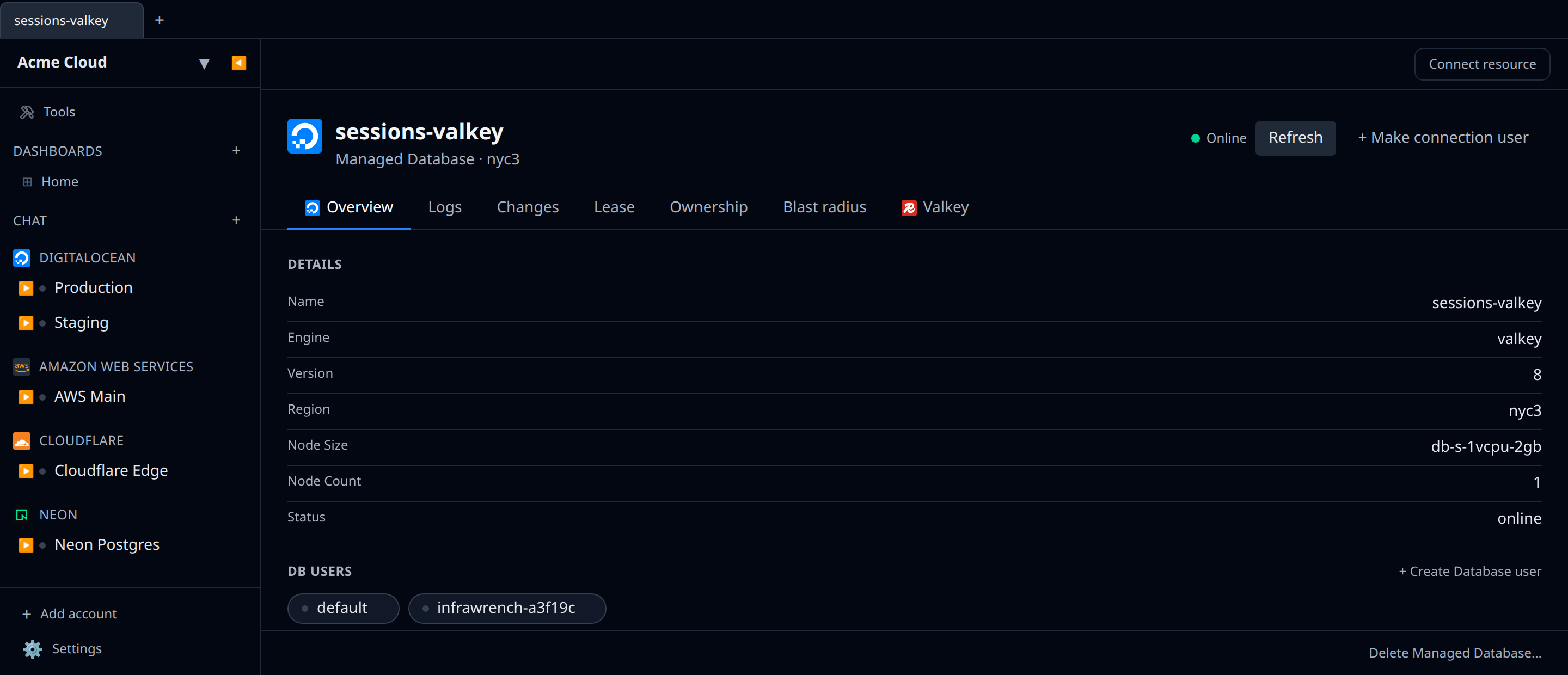
- MongoDB / Valkey / OpenSearch / Kafka — DO doesn’t hand back the built-in user’s password, so the peer-pane tab needs a user you mint. Click + Make connection user in the cluster’s header: Infrawrench creates the user, captures the credential DO returns once (a password, or for Kafka the mTLS cert/key), and stores it encrypted in your local secret store. The cluster’s
connectionStringis then built from that user and the tab starts working. No more “DO returned no password” dead-ends. Kafka users also carry an ACL, so the form adds Topic and Permission fields — they default toadminon every topic (*) so the user works immediately, but you can narrow them (e.g.produceconsumeonevents-*) before creating. Kafka connections use SASL/SCRAM-SHA-256 over TLS (the port DigitalOcean exposes via the API); this needs the user’s password, which DO only returns when your API token has thedatabase:view_credentialsscope — note it is not included in “Full Access” by default, so regenerate the token with that scope ticked if Kafka reports a missing password.
You can also mint users from the DB Users section on the detail page; the “Make connection user” button is just the one-click version wired to capture + store the credential.
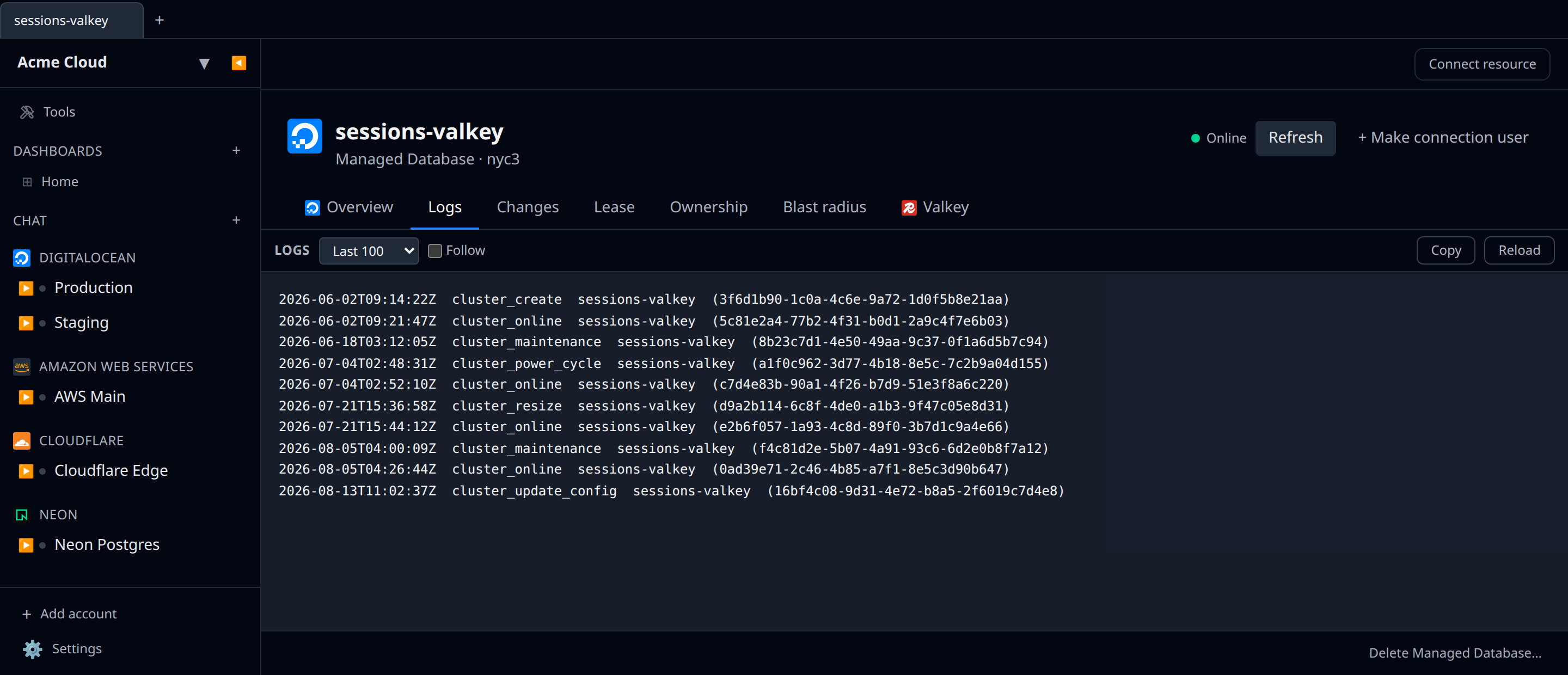
Logs tab
DO doesn’t expose process-level logs over the API. The Logs tab surfaces the cluster’s event stream (/v2/databases/{id}/events) — creates, scale events, maintenance, power cycles. Useful as a “what’s been happening to this cluster” feed, not a query log.
NFS shares
Create a share from any project’s NFS sidebar group:
- Pick a region that supports NFS (the create call returns 422 in unsupported regions).
- Size — minimum 50 GiB, maximum 16,000 GiB.
- Performance tier — Standard ($0.15 / GiB-mo) or High Performance ($0.30 / GiB-mo, GPU-tuned).
- VPC — the share is reachable only from droplets/DOKS nodes in this VPC. Add more VPCs after creation in the DO console.
After creation, the share’s detail page renders the mount target and a copy-paste sudo mount -t nfs -o nfsvers=4.1 … command sized for the share.
Reserved IPs
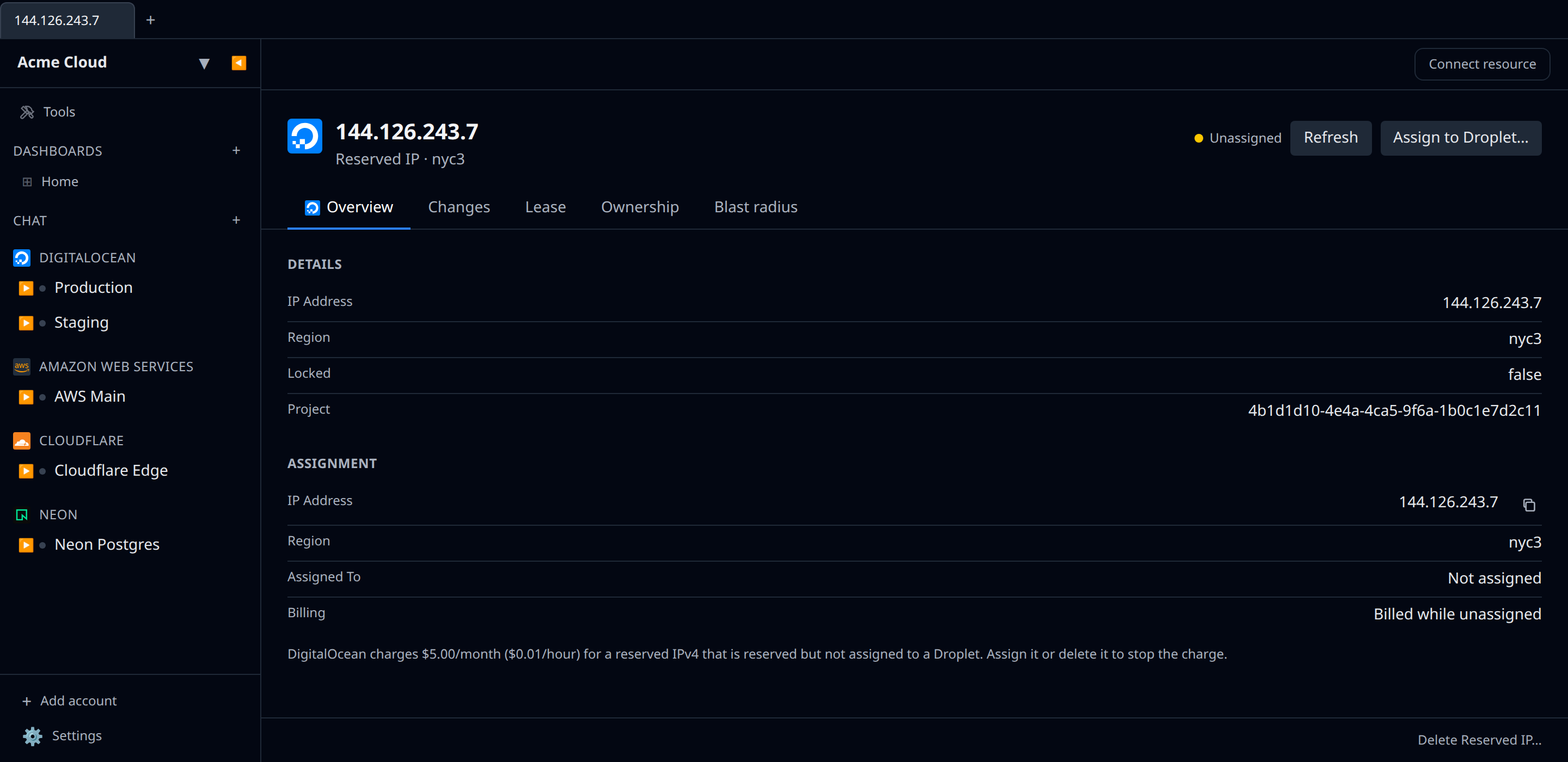
A reserved IP is a static address you can move between Droplets without changing DNS. DigitalOcean renamed these from “floating IPs”; the API and the console both call them reserved IPs now.
The pricing is the thing worth knowing: an assigned reserved IP is free, and an unassigned one costs $5.00/month ($0.01/hour). That makes a forgotten address the most common silent line item on a DO invoice, which is why Infrawrench flags it (see below).
Creating one asks a single question — what is it for?
- A Droplet — pick from a Droplet picker. The address is reserved in that Droplet’s region and assigned immediately, so it never enters the billed state.
- A region — pick a region (and optionally a project). The address is reserved but unassigned, and billing starts.
From the detail page you can Assign (or Reassign) it to another Droplet, Unassign it, or delete it. The Droplet picker only lists Droplets in the address’s own region, because DigitalOcean rejects a cross-region assignment outright. You can also drag a reserved IP onto a Droplet in the sidebar to assign it — same region rule applies, and Infrawrench explains the mismatch rather than passing DigitalOcean’s error through.
While DigitalOcean has an action in flight the address reports as locked: the assign and unassign buttons are hidden until it settles, since the API would reject them anyway.
Deleting a reserved IP releases the address back to DigitalOcean’s pool — you will not get the same one back. Delete is only accepted once the address is unassigned.
VPCs
Every DigitalOcean account gets one default VPC per region, and everything you create lands in one whether you chose it or not. The VPCs sidebar group lists them all with their region, IP range, description and default flag; the uuid is the resource’s external id, so it is the same value a Droplet, NFS share or Dedicated Inference endpoint records for its network.
Because of that, the dependency graph draws a Droplet, an NFS share (one edge per VPC it’s exported to) and a Dedicated Inference deployment straight onto the VPC they sit in — no wiring needed.
Creating one takes a name and a region; leave IP Range blank and DigitalOcean assigns a free /20 that won’t collide with your other networks, or set your own between /28 and /16 from the RFC1918 space. Deleting is only possible once the VPC is empty and is not the region’s default.
Gradient AI Platform & Inference Engine
DigitalOcean’s AI surface area covers two adjacent products that share the same control plane:
- Gradient AI Platform (formerly the GenAI Platform) — agents, knowledge bases, and the inference router. Managed via
/v2/gen-ai/…. - Inference Engine — serverless inference (
inference.do-ai.run/v1/…), batch inference jobs, and Dedicated Inference deployments (/v2/dedicated-inferences).
Infrawrench groups them in the sidebar so you can manage agents, knowledge bases, routers, dedicated GPU deployments, batch jobs, and model API keys side by side. None of these resources are project-scoped from the DO API’s perspective, so they all show up as top-level groups under the account.
Agents
The Agent Platform lets you assemble a chat-style endpoint by pairing a foundation model with an instruction (system prompt), zero or more knowledge bases, and optional function/agent routes. The create form asks for:
- Name — must be unique within the team.
- Workspace — every agent belongs to a workspace. New accounts have none; leaving the picker empty auto-creates a
defaultworkspace (matching the DO console’s behaviour), or use + New workspace to pick a name explicitly. - Region — only regions where Gradient AI is deployed appear here (the list is pulled live from
/v2/gen-ai/regions). - Model source — choose between a single foundation model (picked from
/v2/gen-ai/models?usecases=MODEL_USECASE_AGENT— Anthropic, OpenAI, and DO-hosted Meta models all appear) or an Inference Router (picked from your existing routers, or created inline via the + New router button next to the picker — name, optional description, optional fallback models, all without leaving the agent form). The two are mutually exclusive in DO’s API; routing through a router supersedes any single-model selection. - Instruction — long-form system prompt. Optional; defaults to empty.
You can also swap an existing agent’s model for a router (or vice versa) post-creation via Edit Agent on the detail page — the change goes through PUT /v2/gen-ai/agents/{uuid} and takes effect immediately.
Agent detail page
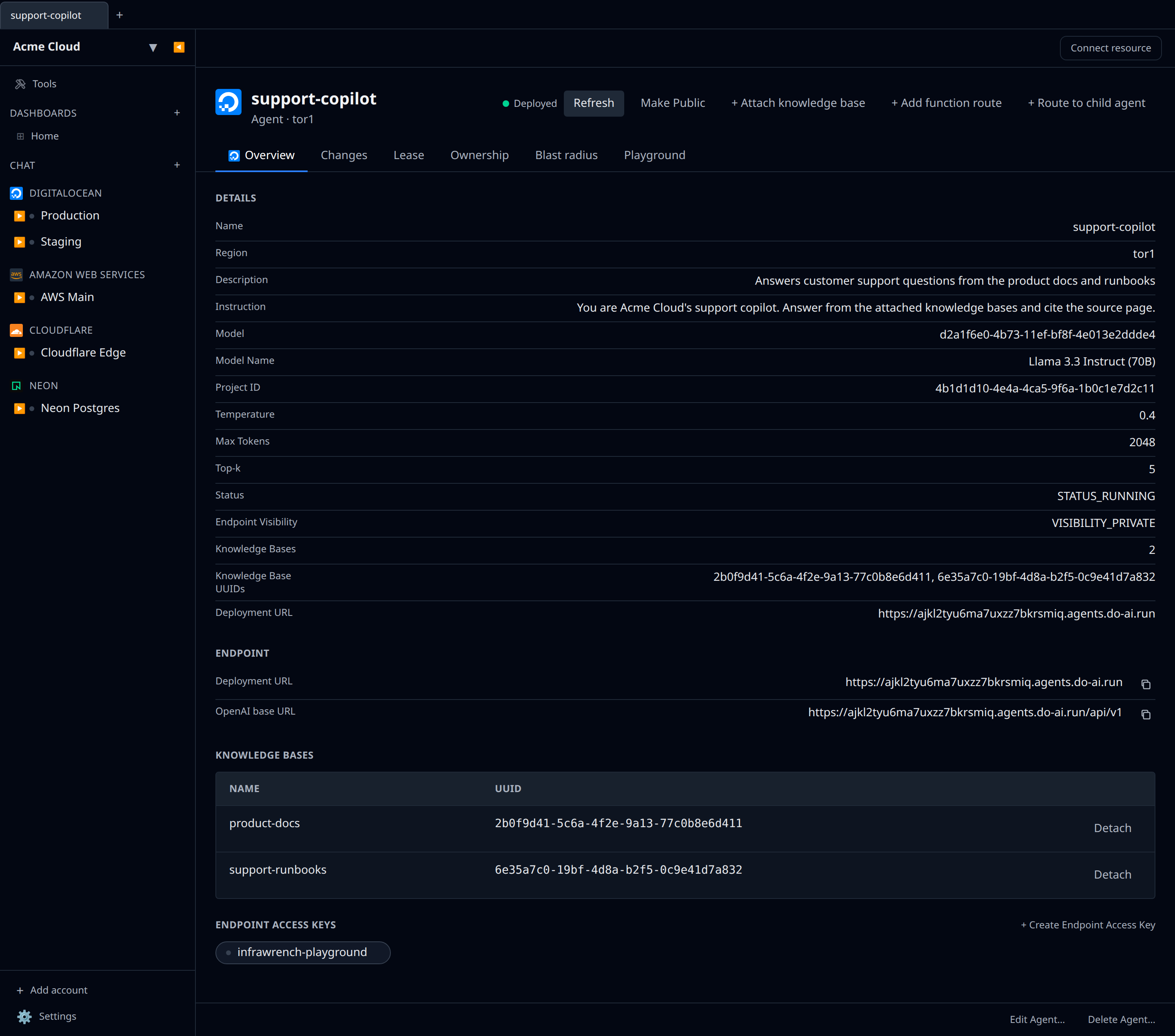
The agent detail page covers everything the DO console’s Overview, Observability, and Resources tabs do, mapped onto Infrawrench’s standard chrome:
- Playground tab — chat directly with the deployed agent. Tokens stream in live (OpenAI-compatible SSE under the hood). The first time anyone opens it on an agent, Infrawrench mints a single
infrawrench-playgroundendpoint access key and stores it encrypted; on the cloud workspace that key is reused org-wide so the team isn’t minting a new token every session (the secret stays server-side and is never exposed to other users). Cmd/Ctrl+Enter sends, Stop cancels mid-stream, New chat resets the history. Per-turn token usage is shown under each assistant reply when the gateway returns it. - Endpoint section — copyable Deployment URL and OpenAI-compatible base URL (
…/api/v1), each with a one-click copy button. A Make Public / Make Private header action flips the agent’s endpoint viaPUT /v2/gen-ai/agents/{uuid}/deployment_visibility; the button label always shows the next action, never the current state. - Embed section — when the endpoint is public, Infrawrench renders DigitalOcean’s chatbot widget
<script>snippet (the same one the DO console offers) as a copyable code block. Paste it into your site’s HTML to embed the chatbot. For private endpoints the section explains that you need to make the endpoint public first. - Endpoint Access Keys — listed inside the agent as the
agent-api-keychild resource. Create from inside the agent’s detail page (the agent UUID is implicit); the secret is returned once on create and persisted encrypted in the local secret store. Delete from the row’s context menu. - Metrics tab — auto-rendered because
supportsMetrics: true. Pulls from/v2/gen-ai/agents/{uuid}/usagewith the host’s selected time range and renders up to six series: per-bucket Input/Output/Total tokens plus aggregate Throughput (tokens/s), Latency, and Time-to-first-token. Agents with no traffic show the host’s standard empty state — no errors. - Knowledge Bases section — lists every attached KB with a Detach button per row. Attach a KB either by dragging it onto the agent in the sidebar or via the + Attach knowledge base header action.
- Function Routes section — lists each function route’s name, FaaS target (
namespace/name), and description, with a Detach button. + Add function route opens a prompt with function name, FaaS name + namespace, optional input/output JSON Schemas. - Agent Routes (child agents) section — routes from this agent to others, with optional
route_nameandif_case. + Route to child agent opens a picker plus the two optional fields. - Settings — the standard Edit Agent button (name, description, instruction, temperature, max_tokens, k, model/router swap) goes through
PUT /v2/gen-ai/agents/{uuid}.
After creation the agent’s deployment URL is exposed as the deploymentUrl output and the agentEndpoint alias — the latter matches the OpenAI-compatible base URL, so you can paste it straight into any OpenAI SDK that takes a baseURL.
Knowledge Bases
Create a knowledge base from the sidebar group. The form takes:
- Name and optional tags.
- Region — same region list as agents.
- Embedding model — picked from
/v2/gen-ai/models?usecases=MODEL_USECASE_KNOWLEDGEBASE.
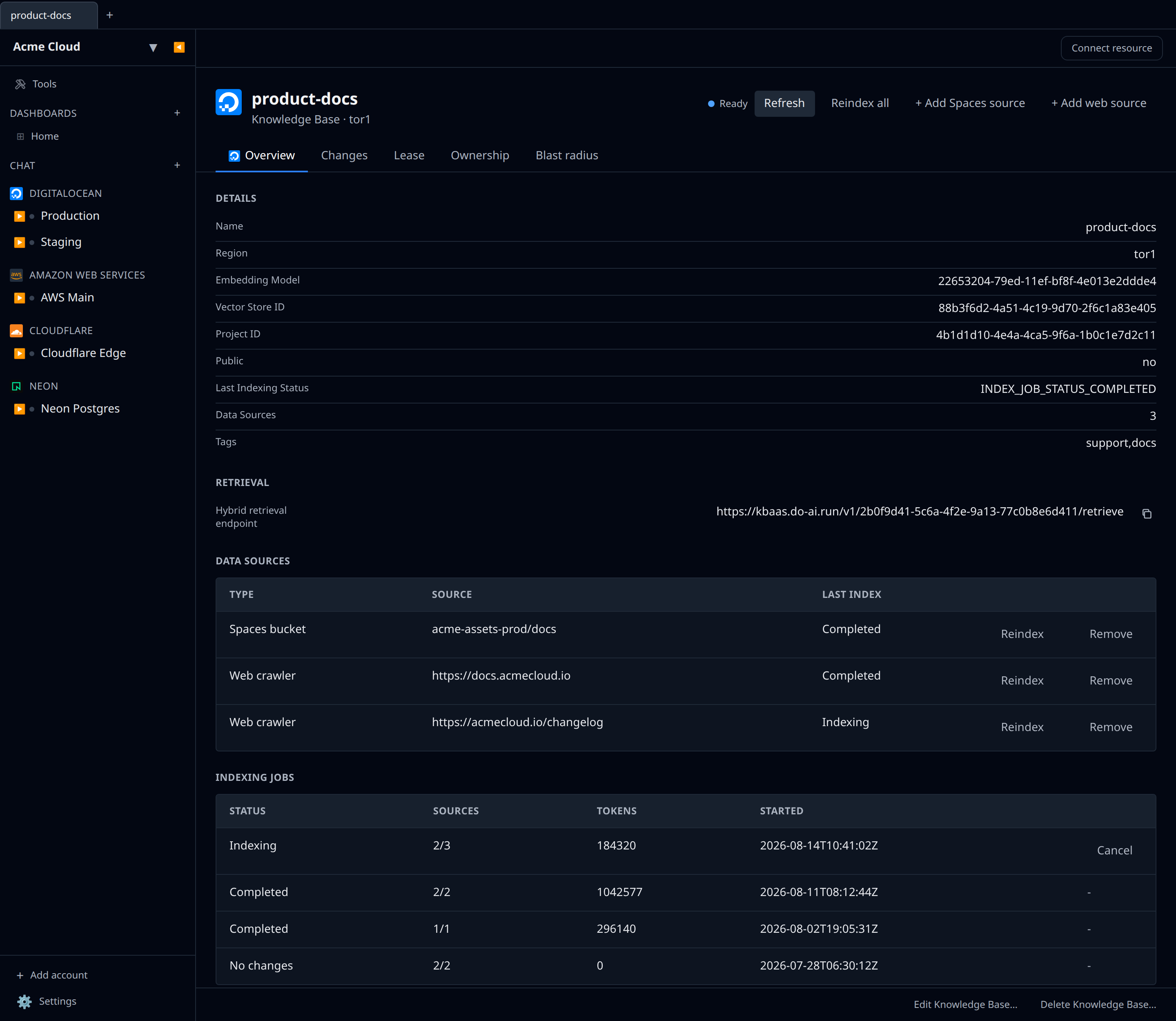
Knowledge bases back onto an OpenSearch vector store (the database_id field exposes the backing cluster UUID). The retrievalEndpoint output is the hybrid retrieval URL — https://kbaas.do-ai.run/v1/{uuid}/retrieve — which supports both semantic and lexical search.
The Name and tags are editable from the detail page (region and embedding model are fixed at creation — changing them would force a recreate). The detail page also manages the knowledge base’s content:
- Data Sources — a table of every source feeding the index, each with its last indexing status and per-row Reindex / Remove actions. Add a source with the header actions:
- + Add Spaces source — index files in a DigitalOcean Spaces bucket. If the account has Spaces API keys configured the bucket is a picker; otherwise enter the bucket name and pick its region. An optional folder/object path scopes indexing to part of the bucket.
- + Add web source — crawl a public website from a seed URL. Pick the crawl scope (Scoped, Path, Domain, Subdomains, or Sitemap) and whether to index media. The crawler indexes up to ~5,500 pages.
- Reindex all — start an indexing job over every data source. Existing embeddings stay queryable while the job runs.
- Indexing Jobs — recent indexing history with status, per-job source progress, token usage, and a Cancel action for jobs still pending or in progress.
Adding a source automatically kicks off indexing, so you usually don’t need Reindex unless the underlying bucket or website content changed.
File uploads and Dropbox / Google Drive OAuth sources still require the DO console — those need presigned-upload and OAuth flows Infrawrench doesn’t model yet.
Inference Router
The router is DO’s “automatic model selection” layer — point your application at a single endpoint and the router picks the cheapest model that can handle each prompt. Create one when:
- Your workload has mixed prompt complexity (some prompts are trivially answerable by smaller models, some need frontier models).
- You want automatic fallback when a model is unavailable.
The create form takes a name, optional description, and a routing preset — DigitalOcean’s presets prefill the router with a recommended set of models and routing policies (routers are always deployed to all regions, so there’s no region picker). Pick “None” to create a bare router and configure it later.
The router detail page shows a Routing Policies table (each task → its candidate models → whether it prefers the cheapest, fastest, or balanced option) and a Fallback Models table for requests that don’t match a policy. You can manage policies right here:
- + Add policy (header) — pick a task, a selection preference (Balanced / Cheapest / Fastest), and the models it may route to (leave the model list empty to use the task’s recommended defaults).
- Edit (per row) — change a policy’s models or preference.
- Remove (per row) — drop a policy so its requests fall through to the fallback models.
Tasks and their router-eligible models come from DigitalOcean’s task presets, so the model choices are always valid.
Dedicated Inference
Dedicated Inference is the always-on, GPU-backed sibling of serverless inference. Move to it when your request volume is steady, latency SLOs are strict, or you need bring-your-own-model. The create form pulls live data from /v2/dedicated-inferences/sizes (regions + GPU sizes + monthly price) and /v2/dedicated-inferences/accelerators (which models each GPU size supports):
- Region — only Gradient AI regions appear.
- GPU Size — the picker shows GPU count and monthly price.
- Model — selectable from the accelerator catalog. Pasting a Hugging Face model ID also works for BYOM.
- Public endpoint — when on, both public and private VPC FQDNs are exposed; otherwise only the private one.
- VPC — optional; defaults to the region’s default VPC.
- Hugging Face token — only needed for gated HF models.
Once provisioning completes, the publicEndpointUrl and privateEndpointUrl outputs are populated.
Batch Inference
Batch jobs let you submit large async workloads against OpenAI or Anthropic provider APIs and get results back within 24 hours at a significantly lower cost than real-time inference. Infrawrench lists every batch job under the account (newest first, 100 per page), with provider, endpoint, status, and request counts. Jobs can be cancelled from the detail page but not edited — JSONL input files and outputs are uploaded/downloaded via the DO console or the inference.do-ai.run/v1/batches/files endpoints directly.
Model API Keys
These are the keys used to authenticate against https://inference.do-ai.run/v1/* (serverless inference, including the OpenAI-compatible SDK shim). DigitalOcean retired the create-key API endpoint — new keys are minted in DigitalOcean’s Model Studio. Infrawrench lists your existing model access keys (name, last-used timestamp) and lets you delete them for cleanup; it no longer offers a create form.
For account-wide API access (/v2/...) keep using the personal access token you added when you set up the plugin.
The detail page is a listing, not a credential: Name, Created By and Last Used, a Refresh action, and delete. There is no secret value to reveal — the key material only ever exists in Model Studio, where it was minted. (The Agent API Keys resource is the one with a shown-once secret; the two are easy to confuse.)
Vector Databases (Weaviate / OpenSearch / PostgreSQL)
DO’s managed vector database offerings are managed through the existing Managed Database group. The engine picker now includes:
- Weaviate (private preview, requires sign-up at digitalocean.com — selecting it in regions that don’t host Weaviate yet will return 422).
- OpenSearch — already supported; pair with the OpenSearch plugin for indices, search, and vector k-NN.
- PostgreSQL with
pgvector— already supported via the Postgres plugin.
The connection string and CA certificate outputs flow the same way as the other managed databases, so the same peer-pane tabs and secret-export templates work.
Credentials
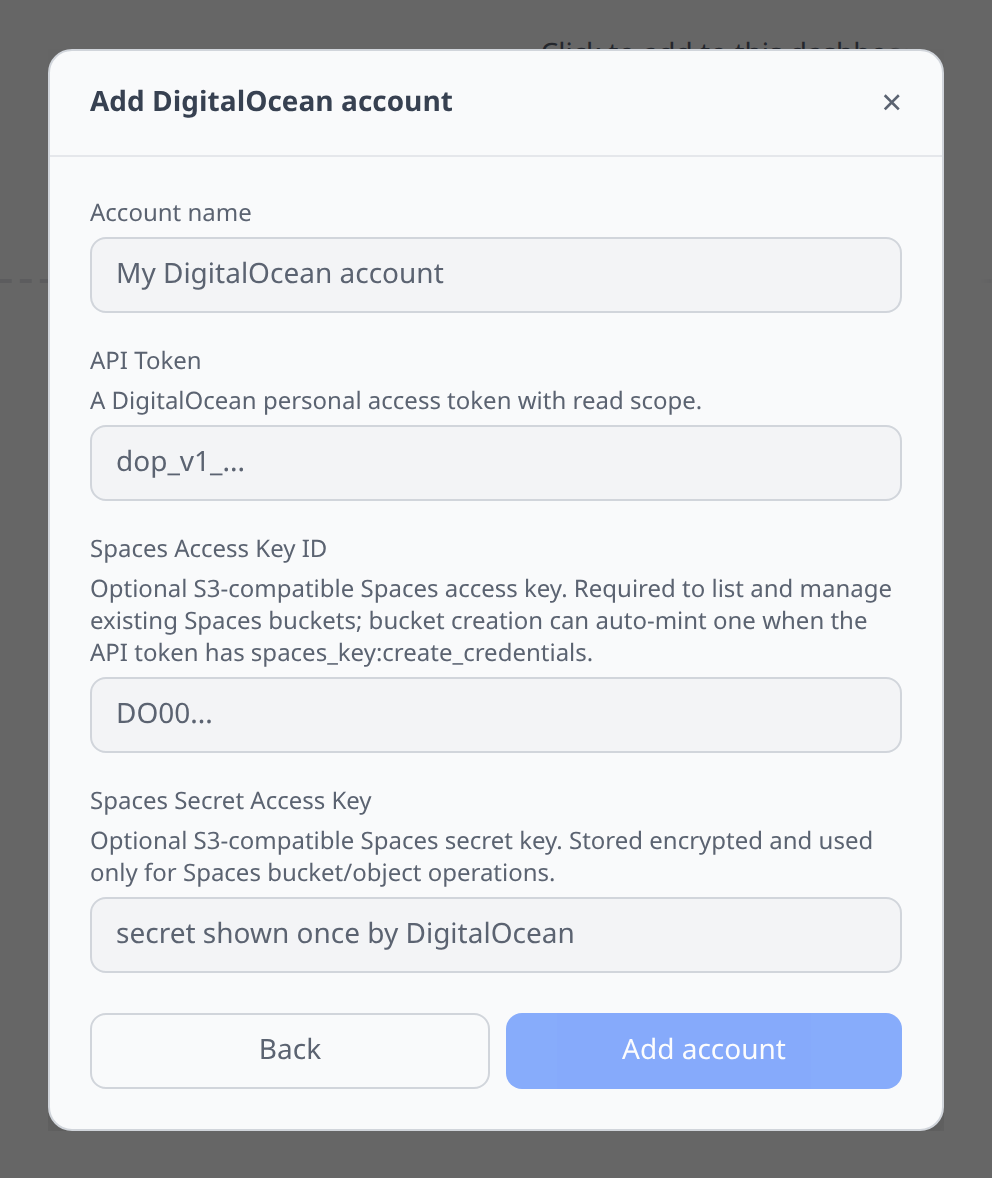
- DigitalOcean → API → Tokens → Generate new token. Read + write scope.
- Paste into the add-account form.
Notable flows
- SSH terminal on Droplets.
- Droplets in Workflows —
droplets.create({...})autocompletes the realregion/size/imagefields with live option values, and thesshPublicKeyfield autocompletes your Infrawrench SSH keys by name (resolved to the public key on create). A created Droplet can be reached withdroplet.waitUntilReachable()thendroplet.ssh("…", { sshKey: "<key name>" })(full result or streamed). - SQL editor on managed Postgres and MySQL (via output reference to the Postgres / MySQL plugins).
- OpenSearch tab on managed OpenSearch clusters — indices, search, snapshots via the OpenSearch plugin. Endpoint and CA cert flow through automatically.
- File browser on Spaces.
- Secret export to K8s for managed databases and Spaces.
Tips & limits
- Droplet creation needs at least one SSH key. Upload via Settings → SSH keys on DigitalOcean (not infrawrench) or use an existing key reference.
- DOKS kubeconfigs rotate periodically. Infrawrench re-fetches on refresh.
Cost graphs
DigitalOcean accounts feed cost graphs & budgets via the Billing Insights API — true daily costs broken down by product and region.
- The API token needs the
billing:readscope (plusaccount:read, which the plugin already uses). - DigitalOcean’s daily figures are nightly invoice estimates and can drift slightly from month-end invoice totals; insights data exists from December 2025 onward.