Commitment & unit-cost alerts
Three alerts derived from facts no spend total contains — a commitment about to lapse, a commitment nobody is using, and cost per unit of a business metric going the wrong way.
Budgets, anomaly detection and change alerts all answer the same shape of question: is this spend total different from that spend total? Three things they therefore cannot see:
- A reservation ends on Tuesday. Nothing has moved yet, and by the time it does the money is already spent at on-demand rates.
- A savings plan is 30% used. Nothing has moved at all — the waste has been there since the day it was bought.
- Spend doubled because volume tripled. Everything moved, and the business got better.
These three alerts read the commitment calendar and the volume the spend bought, so they catch exactly those cases. They arrive on the same routing as everything else, but they are read on a different clock: nobody acts on them within the hour, and all three are written to still make sense when somebody opens the notification three days later.
Which alert fires when
| Alert | Watches | Fires when | Configuration | Cadence |
|---|---|---|---|---|
| Budgets | An absolute monthly total you chose | Spend crosses a threshold of that total | You set the total | Once per threshold, monthly |
| Anomaly detection | A learned trailing baseline | A day’s spend is a statistical outlier, or a source appears anew | None | Per anomalous day |
| Change alerts | A scope you chose, versus its prior period | The move clears your percent and/or amount threshold | You set the scope and threshold | Per cadence period |
| Commitment expiry (this page) | A commitment’s term end date | The term end reaches a horizon — 60, 30 or 7 days out by default | Defaults work | Once per horizon per term |
| Idle commitments (this page) | Utilization of a commitment you already bought | Utilization stays under the threshold across a whole window | Defaults work | Once per commitment per month |
| Unit-cost regressions (this page) | Spend ÷ a business metric | Cost per unit rises past the threshold versus the prior window | Defaults work | Once per metric, then a 14-day cooldown |
The line worth internalising: the first three are all about money, and the last three are about what the money bought. Spend rising while cost-per-customer falls fires a change alert and does not fire a unit-cost regression — and the second one is right.
Commitment expiry
An expiring reservation, savings plan or committed-use discount is the most avoidable surprise on a cloud bill. The usage it was covering reverts to on-demand pricing the hour the term ends, which is a step change nobody sees coming — because until it happens there is no movement in any spend total to notice.
Horizons. By default you are warned at 60, 30 and 7 days. Each fires once per commitment per term. The three exist because they are three different decisions: 60 days is procurement lead time, 30 days is the last point where re-sizing is a considered choice rather than a scramble, and 7 days is “this is happening — renew, or budget for on-demand.”
A commitment fires at the smallest horizon it has reached, never at all of them at once. An account connected 30 days before a term ends gets one alert, not two.
What it costs. Every warning states the commitment’s committed rate as a monthly figure, and — where it can be derived — how much usage the commitment is currently covering, also monthly. The second number is stated as a lower bound (“at least $1,180/month reverts to on-demand”), and deliberately so: no provider’s cost export carries the on-demand list price on a commitment-covered line, so the exact post-expiry figure is not knowable. What is certain is the direction — on-demand is never cheaper than the committed rate — so the amortized value of what the commitment delivers is a floor on what the same usage will cost without it.
A committed-use discount that buys vCPUs rather than dollars states its units instead, and no money. It still warns: a CUD expiring is just as real.
Already expired. A commitment that lapsed without any horizon warning having fired — because the account was connected after the fact, or collection started late — raises one alert at a zero-day horizon. This is on by default, and it is the only way anyone ever hears about that case: every horizon is already in the past, so nothing else can speak. It is bounded to terms that ended within the last 90 days, so connecting an account with years of dead reservations produces one pass of recent news rather than an archive. You can turn it off.
Renewals do not warn the same way. Two signals say a commitment is not really lapsing:
-
A successor is already in the inventory — another commitment on the same account, same kind, region, scope and description, starting when this one ends. That is what a queued AWS reservation purchase looks like. The incumbent is skipped entirely: nothing lapses, and nothing renews at a surprising price.
-
The provider’s own auto-renew flag. A commitment known to renew fires once, at the shortest horizon only, at
infoseverity, and the message says it will renew at the then-current rate rather than that it will lapse — because “we meant to cancel that” is a real conversation and a false “this will revert to on-demand” is not.Note the current limit: Infrawrench’s collected commitment inventory does not yet carry a renewal flag from any provider, so today this path is reached only through successor detection. The moment a collector reports Azure’s
renewor GCP’sautoRenew, these commitments start taking the softer path automatically — nothing about your configuration changes.
Idle commitments
Utilization has been shown on the commitments section since it shipped. This is the alert that tells you about it.
A window, not a day. Utilization is aggregated across the whole window — 30 trailing days by default — rather than sampled per day. That is what makes a weekend not a finding: a weekday-only workload sits around 71% across a full month, comfortably above the 70% default, and never fires. Counting bad days instead would flag it every Monday.
A null utilization never alerts. This is the sharpest edge in the feature and it is worth knowing about, because the “0%” it prevents is exactly the number that gets a healthy purchase cancelled. Utilization is reported as unknown — not as zero — in four situations, and every one of them is skipped rather than judged:
- Unit-denominated commitments. A GCP CUD commits vCPUs. Cost rows cannot say how many of the committed vCPUs ran, so there is no percentage to compare.
- Accounts whose provider reports no commitment attribution. Their rows read as plain uncovered usage, so delivered spend would read $0 for a plan that is working perfectly.
- Windows with no collected cost data, and windows the commitment’s term does not overlap.
- Any window where the obligation works out to zero.
Alongside that, the window has to be mostly real data before anything is judged at all: at least 14 of the 30 days must carry cost rows by default. A collection outage reads as an outage, never as an idle commitment.
Money, not a percentage. Every finding carries the wasted amount — committed obligation minus what was delivered — and the floor that decides whether to speak at all is denominated in money, not in percent. A 4% commitment wasting $3 a month is true and worthless; the default floor is $50. The alert names the commitment, the percentage, the wasted amount, and what to do about it (move matching workloads onto its scope, resize at renewal, or sell it on the provider’s marketplace).
Because idleness is a standing condition rather than an event, it is restated once a calendar month per commitment rather than once a day.
Unit-cost regressions
The other five alerts on this page cannot distinguish “we are spending more” from “we are spending more per customer”. This one can, and it is the one a business actually manages against.
It divides a business metric’s cost scope by the metric’s reported values and compares two adjacent windows. By default: cost per unit up more than 20%, comparing the last 14 complete days against the 14 before them.
Gaps are not zeros, and they are not regressions. A day with no reported metric value is a gap. It contributes to neither side of the ratio — its spend does not enter the numerator either. This is not a nicety: fold in the spend of a day whose volume was never reported and the numerator grows while the denominator does not, so three missed nights of metric ingest would read as a 27% unit-cost regression and page somebody about a pipeline outage wearing a cost regression’s clothes.
The same rule at window scale: a window that is mostly gaps has no unit cost at all. It does not read low, it does not read high — it produces no comparison, and no alert.
Minimum history. A metric needs, at the defaults, 28 days of history with at least 10 reported days in each of the two 14-day windows. Two weeks a side covers two whole weekly cycles, so a weekday-shaped unit cost compares like with like; 10 of 14 means each window is more measurement than gap. A metric somebody updates twice a month has no unit cost to regress and will never fire — which is correct, because the alert would be an artefact of when the two updates happened to land.
Two more guards:
- The current window’s spend must clear a floor ($100 by default). A scope spending less than that in a fortnight cannot move a unit cost readably.
- A rise from a prior unit cost of exactly zero is declined rather than reported as an infinite percentage. It almost always means the prior window’s spend had not landed yet.
Currencies are judged separately and never merged, the same rule the unit-cost chart follows.
Because a regression is a level shift rather than a spike — the elevated fortnight stays elevated until it rolls out of both windows — a metric stays quiet for 14 days after notifying. Every firing is still stored and listed, whether or not it notified.
Managing these alerts
All three live in the Commitment & unit-cost alerts section of the Costs panel, below the anomaly and change-alert sections, on both web and desktop. The list shows what fired, when, what it was about, and the money involved. “Tune alerts” opens the thresholds for all three.
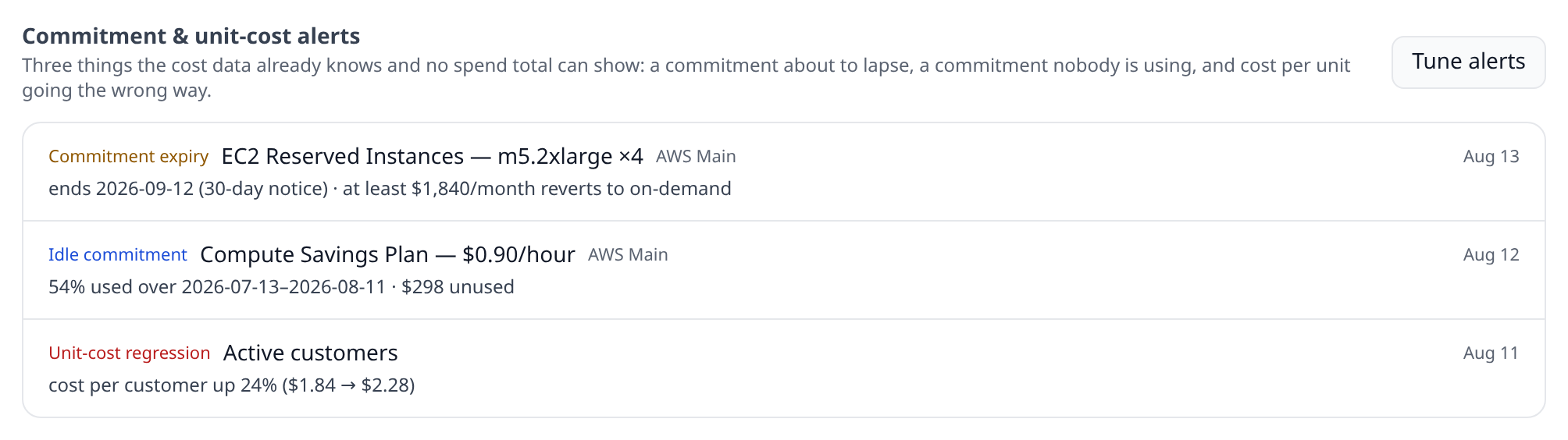
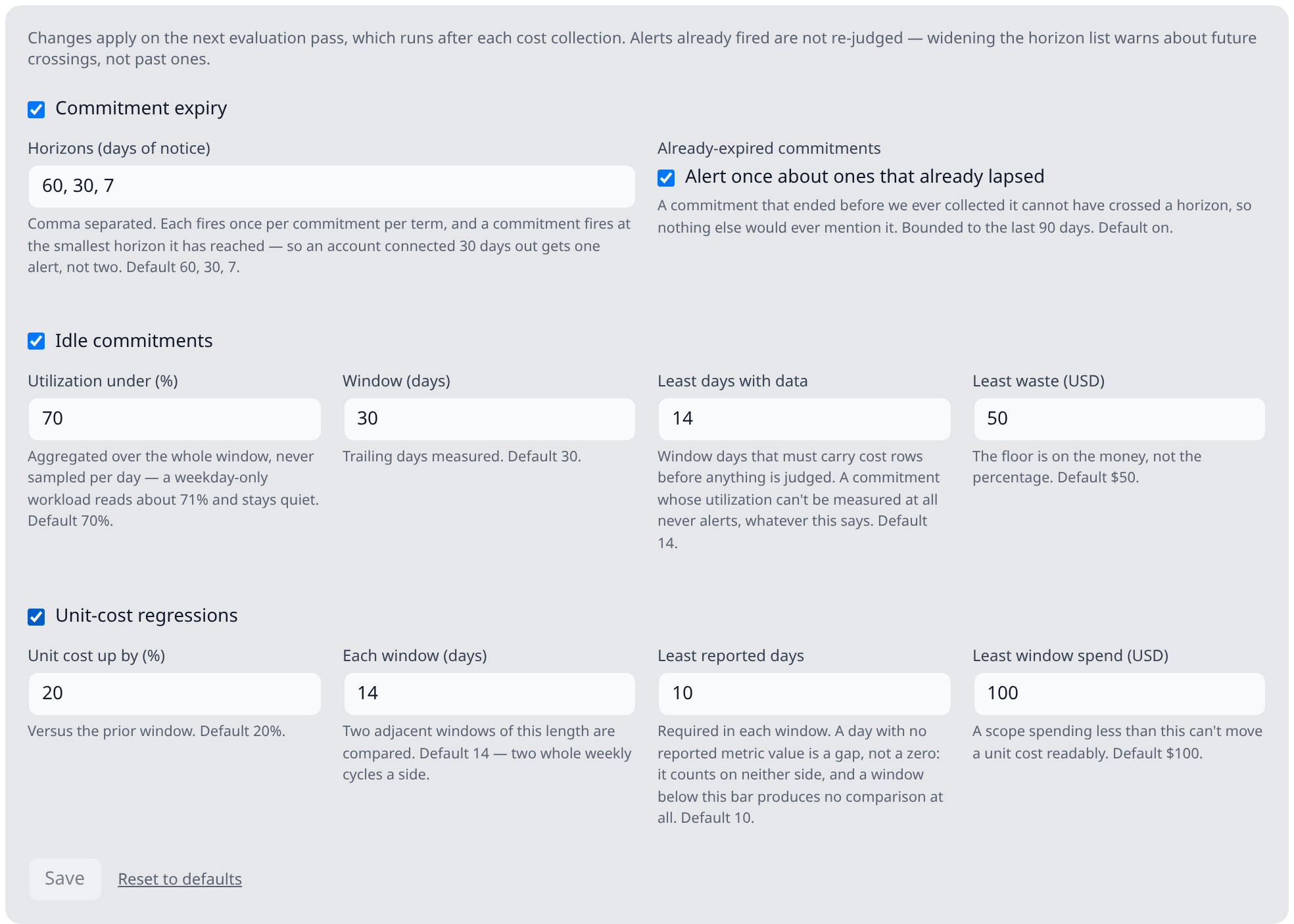
The defaults are chosen to work with no setup: an organization that never opens this panel gets all three detectors at the values described above.
Reading requires the costs:read permission; retuning requires costs:write — the same split
anomaly tuning uses, and for the same reason: this changes what the
organization’s whole cost feed alerts on rather than editing one cost object.
Notifications
The three arrive through alert routing as three trigger kinds — Commitment expiry, Idle commitments and Unit-cost regressions — so routing rules, quiet hours and escalation apply exactly as they do to budgets and anomalies. Nothing is sent to a channel directly.
Rules can match on the money at stake, and each trigger carries the number a person would mean:
- Commitment expiry carries the monthly on-demand exposure, so “commitment expiries over $5,000 → #finance” means the size of the problem, not the size of the invoice ending.
- Idle commitments carry the wasted amount.
- Unit-cost regressions carry the current window’s spend — the size of the scope that regressed. (Not the unit cost itself, which is routinely sub-cent and would make every such rule match nothing.)
Idle commitments default to info severity rather than warning: nothing is breaking, it is
money already spent, and an organization that sleeps through info should keep sleeping through
it. Expiry and unit-cost regressions are warning.
Push notifications deep-link to the Costs tab in the mobile app, where the firings are listed read-only — thresholds are managed from web or desktop.
API
GET /api/org/:orgId/costs/efficiency-alerts— the three detectors’ firings in one feed, newest first, optionally filtered bykind. Requirescosts:read.GET /api/org/:orgId/costs/efficiency-alert-settings— the thresholds. Requirescosts:read.PUT /api/org/:orgId/costs/efficiency-alert-settings— retune them. Requirescosts:write. A whole-object PUT, not a patch.
See the API reference.